| Author |
Message |
sevs
Joined: 19 Sep 2017
Posts: 39
Location: Norway
|
| Posted: Mon Aug 05, 2019 1:07 pm Post subject: Barco 7" geometry and stability problems |
|
|
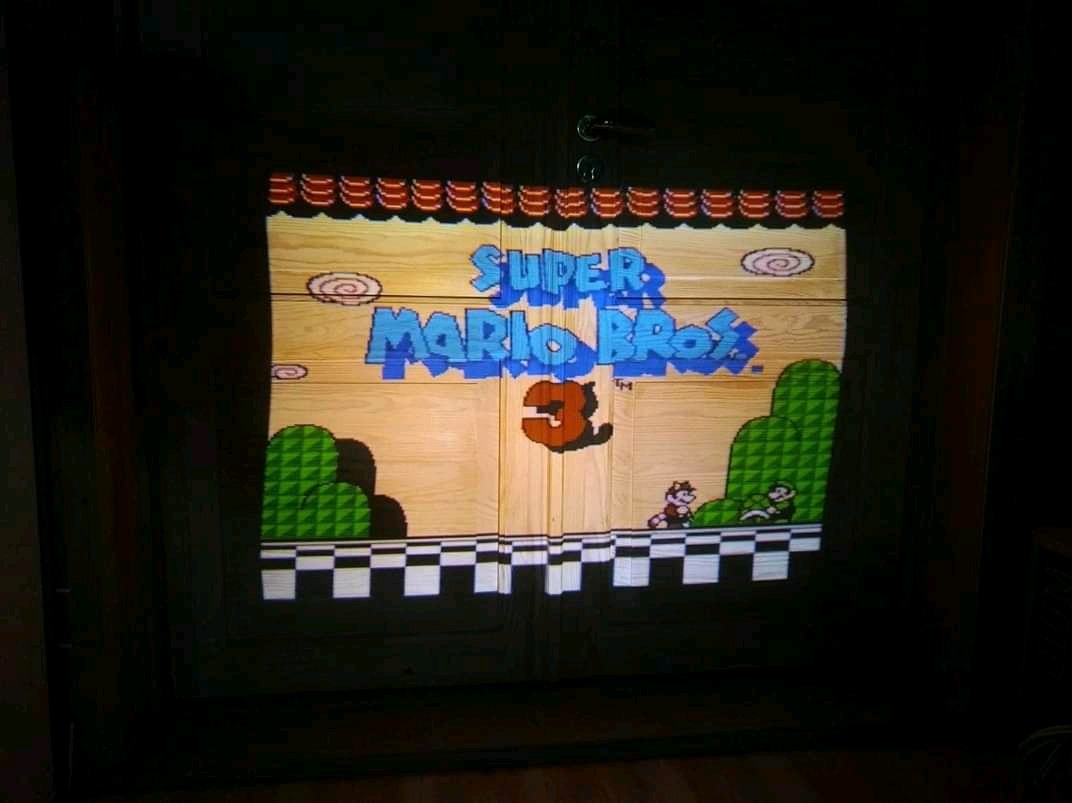
Ok, I'll promise to get more active on this forum. My Barco Data 701s has three problems that I want help with identifying:
1. Geometry. Look at the picture i provided. All input sources are S-shaped (bowed vertically). If i use an Extron RGB 109+ that has a horizontal position knob, and move the picture all the way to the left, the picture looks straight and good but I would need to scale it down to make everything show up otherwise the left side would be cut off.
2. The whole picture is shivering side to side.
3. Blanking intermittently moves in and out of the sides and top/bottom. Sometimes half the picture is gone for a split second.
All of these problems are totally inexistent in the ADJ menu test pattern, even when syncing it on top of the external source.
I could just be using the Extron as a workaround, but I wouldn't be able to use more than a small area of the tube face and the screen would be tiny. I could also just use an external test pattern and (mis)adjust the geometry according to that, but the blanking still uses the internal pattern generator thus the blanking on the sides would be bowed when the picture is adjusted to be straight.
Any idea as to which board(s) need replacement or repair? I have been thinking of doing a recap, which would possible solve the problem, but I'm not entirely sure where to start.
| Description: |
|
| Filesize: |
247.48 KB |
| Viewed: |
3545 Time(s) |
|
_________________
Barco Data 701s - Barco Graphics 808s - Barco Graphics 1200
I love CRT! I don't want to hear your opinion on CRT vs anything else. I use CRT because I want to.
|
|
| Back to top |
|
 |
sevs
Joined: 19 Sep 2017
Posts: 39
Location: Norway
|
| Posted: Mon Aug 05, 2019 1:08 pm Post subject: |
|
|
And yeah, you can see on that picture that the top left, bottom left and top right looks straight but that's due to me having enabled blanking.
Also the projector squeals like a pig when set to high brightness levels and the picture on screen is mostly black with minor white details.
I know some people may want to comment that this projector isn't worth repairing. I do not want to hear any of that, sorry.
_________________
Barco Data 701s - Barco Graphics 808s - Barco Graphics 1200
I love CRT! I don't want to hear your opinion on CRT vs anything else. I use CRT because I want to.
|
|
| Back to top |
|
|
Curt Palme
CRT Tech
Joined: 08 Mar 2006
Posts: 24396
Location: Langley, BC
TV/Projector: All of them!
|
| Posted: Mon Aug 05, 2019 2:39 pm Post subject: |
|
|
|
Disconnect your entire convergence section (2 boards) and see if the problem goes away.
|
|
| Back to top |
|
|
sevs
Joined: 19 Sep 2017
Posts: 39
Location: Norway
|
| Posted: Mon Aug 05, 2019 2:40 pm Post subject: |
|
|
| Curt Palme wrote: | | Disconnect your entire convergence section (2 boards) and see if the problem goes away. |
I'll dust off the projector and try that.
_________________
Barco Data 701s - Barco Graphics 808s - Barco Graphics 1200
I love CRT! I don't want to hear your opinion on CRT vs anything else. I use CRT because I want to.
|
|
| Back to top |
|
|
sevs
Joined: 19 Sep 2017
Posts: 39
Location: Norway
|
| Posted: Mon Aug 05, 2019 3:15 pm Post subject: |
|
|
I did as you said and the problems still remain.
The picture is completely straight, shivers much less but still a little bit, when I set H phase to 0. It is offset too much to the right though, and I remember now that what I used the H position knob on the Extron to move the picture back to the left so I could use the projector. Big con being that I use more component sources than RGB and the extron doesn't work with component. (Or I haven't actually checked but I don't have the necessary adapters at hand right now anyway).
_________________
Barco Data 701s - Barco Graphics 808s - Barco Graphics 1200
I love CRT! I don't want to hear your opinion on CRT vs anything else. I use CRT because I want to.
Last edited by sevs on Mon Aug 05, 2019 5:22 pm; edited 3 times in total
|
|
| Back to top |
|
|
Curt Palme
CRT Tech
Joined: 08 Mar 2006
Posts: 24396
Location: Langley, BC
TV/Projector: All of them!
|
| Posted: Mon Aug 05, 2019 8:39 pm Post subject: |
|
|
|
OK, disconnect the input and use the internal test patterns. Can you align/converge things properly? If so, then the problem is with your input signal, or possibly the RGB input board.
|
|
| Back to top |
|
|
sevs
Joined: 19 Sep 2017
Posts: 39
Location: Norway
|
| Posted: Mon Aug 05, 2019 8:44 pm Post subject: |
|
|
| Curt Palme wrote: | | OK, disconnect the input and use the internal test patterns. Can you align/converge things properly? If so, then the problem is with your input signal, or possibly the RGB input board. |
Convergence works fine and I can make the test patterns look as fine as can be. It happens on all sources i've tried, both using composite video, component and RGB.
Is the RGB card supposed to slide out the back? Which screws do I have to undo?
_________________
Barco Data 701s - Barco Graphics 808s - Barco Graphics 1200
I love CRT! I don't want to hear your opinion on CRT vs anything else. I use CRT because I want to.
|
|
| Back to top |
|
|
sevs
Joined: 19 Sep 2017
Posts: 39
Location: Norway
|
| Posted: Fri Aug 09, 2019 5:32 pm Post subject: |
|
|
Okay, I played around with different sources the other day, then I went to eat dinner and when I came back the whole shivering and geometry issue was gone and I haven't been able to reproduce it ever since.
Maybe the reason why it's temporarily fixed is because I'm only using 0 V size and 30 H size because I'm really limited in space currently, and not using more than a quarter of the raster area. Or maybe because I yanked out the rgb input board and idk, a cracked solder joint fell into place, or maybe a conductive/capacitive speck of dust fell off the board when I pulled out the tray with the boards. Or maybe multiple heating/cooling cycles changed something. I don't know...
Anyway, I'm moving house next week and I'll do a proper setup then and maybe the issues will come back. We'll see...
_________________
Barco Data 701s - Barco Graphics 808s - Barco Graphics 1200
I love CRT! I don't want to hear your opinion on CRT vs anything else. I use CRT because I want to.
|
|
| Back to top |
|
|
|
|





