|
As this forum is rarely used anymore, we've locked it. Feel free to browse and read. Questions? Please reach out to us directly. Cheers! |

|
 |
|
|
| Author |
Message |
mp20748
Joined: 12 Sep 2006
Posts: 5689
Location: Maryland
TV/Projector: 9500LC Ultra / Super 02 and 03 VIM
|
| Posted: Wed Jan 25, 2017 4:06 pm Post subject: |
|
|
A picture of my best Low-Noise Moome card mod.
And a picture of a Certificate of Participation of one the workshops I attended that really taught on noise and interference and how to design for best results.
The original Moome design was very well done, which shows the digital side of things were very well designed. On the analog end, there was room for improvement, and that's exactly what I've done here. My best work so far, considering that I've greatly improved on keeping the projector noise out of the Moome's video stage, to even better isolating the Moomes digital noise from being a problem in the analog section. The measured results are far better than expected for a mixed signal board design. The end results are stunning, especially on the low end of things with near zero hash noise.


|
|
| Back to top |
|
 |
mp20748
Joined: 12 Sep 2006
Posts: 5689
Location: Maryland
TV/Projector: 9500LC Ultra / Super 02 and 03 VIM
|
| Posted: Fri Jan 27, 2017 2:44 pm Post subject: |
|
|
I wanted to get back to this to comment on a few other things, that I really like about the board design (Moome Card) and that much attention was giving to lowering the noise on the board before my attention to it. If you notice, the two 270uf/16v volt aluminum caps are not being used on the buffer supplies (removed). They were not needed after my changes to the board. My approach to lowering the noise resulted more in my ability to trace the noise to it's source, and with circuits like this (mixed A/D) special techniques had to be both learned and developed in order to better isolate the source of the noise. ANd as I may have been mentioned before, I use three different pieces of test gear to help me wit the process. But the noise and interference Workshops/Classics are critical here, because as they say in the Workshops, "Noise and Interference is a technology of its own" and because of the complexities involved in really dealing with it, you would definitely have to spend a lot of time marrying yourself to the art that's involved.
A scope by itself is a powerful piece of gear, but when using it for noise, it's really limited. Because it'll only let you see the signal itself. The noise is harder to see because almost anything in or near the testing point could be the source of a noise (or distortion) shown on the scope screen. Because noise can be ambient (close by) or even riding on the ground. So without a good procedure or special technique, you'll find yourself dealing with it better at the last analog stage. Using high bandwidth chips or transistors makes for a better or sharper image, but will also increase the noise problem. And that is why it's very important especially when using high bandwidth chips to make sure you also address any associated noise.
Now here is the point with the final analog (before buffer) filter stage or network, that it's design is ONLY supposed to address a part of the noise band (notch) or as a low-pass filter (high frequency stripper). These goals depend on the DAC and what they're requiring for a filter network. And when that';s done right, the signal should be good, but here is where the problem becomes more complex, and that is when you have other noises or more noise than what the DAC's filters were needed for. And that is why there is much to do with mixed board designs and making sure you address any and all noise problems on the board. And when dealing with CPU, DACs, or any other digital chip with a clock, the potential for noise problems will exist. And again, the noise I'm talking about here are seen seen as lines and jaggies or any other obvious distortion. Though a keen eye may spot a smaller part of them.
I'll get back to this later, and since this noise is mostly known to be an analog problem. That is not always the case, and I'll prove that later as I've taking my cheap $39.00 Blu Ray with the only connectors on the rear and applied some of what I've learned in the Workshops, to make it perform better. Because with any of the poorly designed digital video devices, if not designed right with noise (and not only interference) as a concern. The image would have problem with this same noise (hash) that I've been running down. The digital video chips and circuits work best, when they are properly designed for best noise performance, and with almost all of them, there are always these particular resistors that they put near the chips.
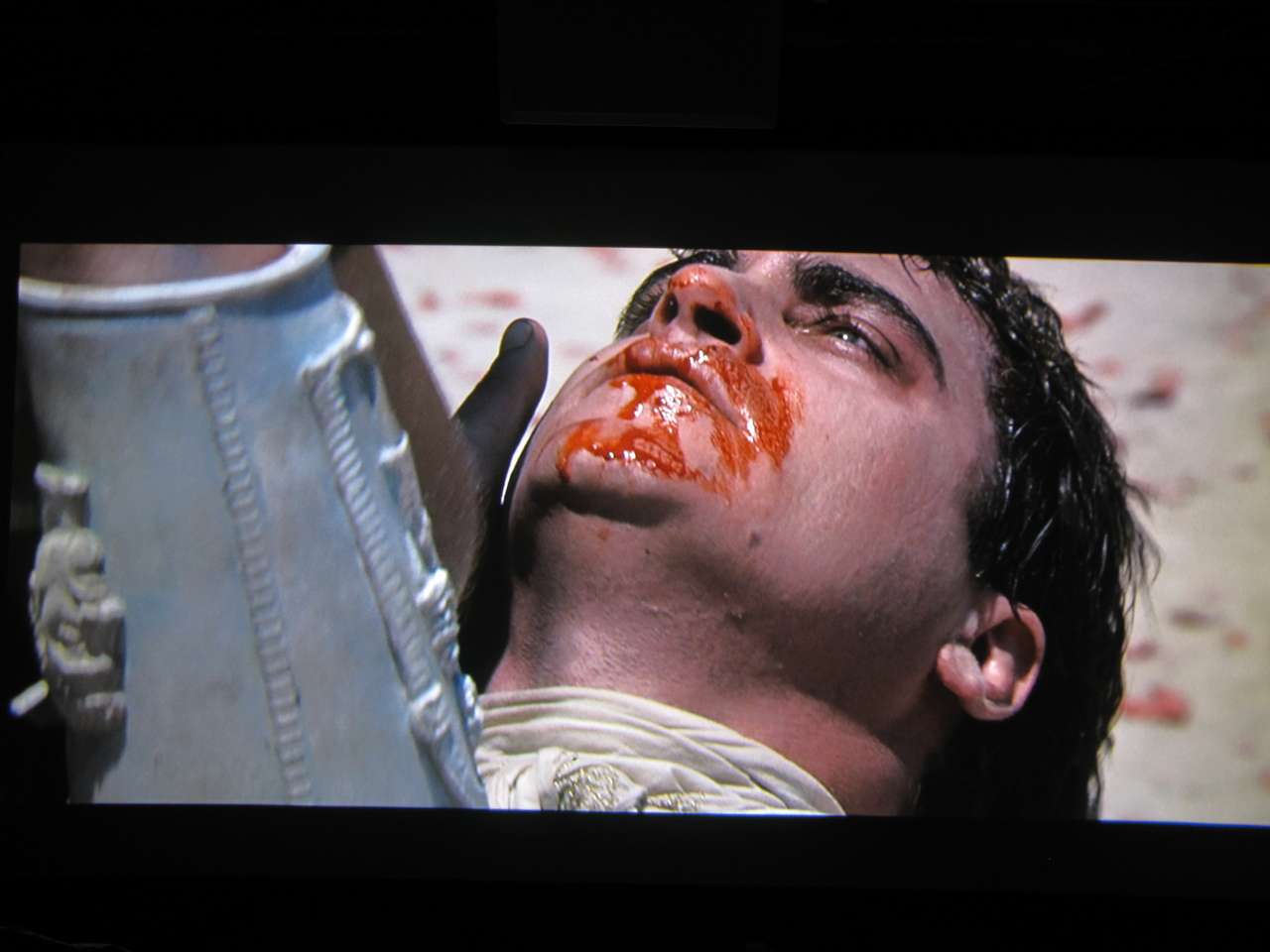
Last week or so I posted some shots on the "shootout" thread, in those shots I used a Moome card that was not fully modified thinking someone would notice the noise in it. One of the shots is below. See if you can tell what the noise is. Look at the other shots that I posted (not on that same batch) as a reference:
|
|
| Back to top |
|
|
mp20748
Joined: 12 Sep 2006
Posts: 5689
Location: Maryland
TV/Projector: 9500LC Ultra / Super 02 and 03 VIM
|
| Posted: Sat Jan 28, 2017 7:22 pm Post subject: |
|
|
| Mr Jaeger wrote: | | Can you explain where the improvements are? |
No, much like I can't explain why I prefer Vanilla Ice cream over Chocolate.
|
|
| Back to top |
|
|
mp20748
Joined: 12 Sep 2006
Posts: 5689
Location: Maryland
TV/Projector: 9500LC Ultra / Super 02 and 03 VIM
|
| Posted: Sat Jan 28, 2017 9:35 pm Post subject: |
|
|
|
Actually the shots show a lot, but being able to or attempting to explain what they show doesn't make sense to me. You may not understand afterwards. And for sure there are differences between the shots, but of course you would have to be familiar with the movie and understand why they are being posted.
|
|
| Back to top |
|
|
Mr Jaeger
Joined: 24 Mar 2015
Posts: 41
|
| Posted: Sat Jan 28, 2017 11:12 pm Post subject: |
|
|
| mp20748 wrote: | | Actually the shots show a lot, but being able to or attempting to explain what they show doesn't make sense to me. You may not understand afterwards. And for sure there are differences between the shots, but of course you would have to be familiar with the movie and understand why they are being posted. |
Jepp 
|
|
| Back to top |
|
|
gregstv
Joined: 27 Aug 2007
Posts: 628
Location: Australia
|
| Posted: Sat Jan 28, 2017 11:26 pm Post subject: |
|
|
|
Give it a go Mike. We are all very interested in your work and knowledge. If any of use lean a small amount from what you explain it's a good thing.
|
|
| Back to top |
|
|
mp20748
Joined: 12 Sep 2006
Posts: 5689
Location: Maryland
TV/Projector: 9500LC Ultra / Super 02 and 03 VIM
|
| Posted: Sun Jan 29, 2017 2:11 pm Post subject: |
|
|
| Mr Jaeger wrote: | What is wrong with your setup MP?
I just had to look at Gladiator and it looked very strange.
Here a Cap of a frame close to yours. Why are you so off?
This file used Full BD |
You have a lot to learn about screenshots and their inability to represent the source, or even what's on the actual screen. So that would make them not a good source for either comparisons or reference.
But of course, none of the above is your real concern...
|
|
| Back to top |
|
|
cmjohnson

Joined: 03 Apr 2006
Posts: 5180
Location: Buried under G90s
|
| Posted: Sun Jan 29, 2017 3:48 pm Post subject: |
|
|
|
One of you has a red push going on, or the other has a blue push to deal with. To start. Why don't you both run a D65 calibration and try again?
|
|
| Back to top |
|
|
cmjohnson
Joined: 03 Apr 2006
Posts: 5180
Location: Buried under G90s
|
| Posted: Sun Jan 29, 2017 4:37 pm Post subject: |
|
|
Mr. Jaeger, please do be careful when saying dumb things like that. I've been rather deeply involved with electronics and projection
CRTs for a VERY long time, and I'm not exactly uneducated abouth these things.
I'm not on Mike's technical level. Or a number of others. But for you to say I don't understand is ABSURD.
I understand just fine. I understand that you're posting irrelevant screen caps and talking about a subject
that you have shown NO evidence you are actually competent in as of yet.
But I can tell you that there's no point in posting a screen capture NOT from a projector in this thread,
when the point of this thread is not even to compare screen captures anyway.
You joined this forum less than two years ago and have managed to rack up an awesome 13 posts to date,
of which 10 of them are from the last 10 days. This is hardly anything to support the idea that you have any level
of technical expertise or knowledge that might make it worth listening to you.
You have no street cred here, in American street talk terminology.
You might be able to improve the membership's opinion of your knowledge if you were to make the effort to post your bona fides.
Until you build a reputation for competence, you won't have a reputation for competence.
Frankly I'm wondering whose troll account you really are. The way you talk (OK, type...) seems....familiar.
|
|
| Back to top |
|
|
Curt Palme
CRT Tech
Joined: 08 Mar 2006
Posts: 24396
Location: Langley, BC
TV/Projector: All of them!
|
| Posted: Sun Jan 29, 2017 4:52 pm Post subject: |
|
|
The ban hammer is about to come down. Seems like some Europeans have nothing better to do than troll. That's why I left the 'yepp' post up. I do know a past forum member that was banned that used that all the time.
I have no problems with querys on people's mods, but trolling and flaming isn't allowed, period.
|
|
| Back to top |
|
|
Mr Jaeger
Joined: 24 Mar 2015
Posts: 41
|
| Posted: Sun Jan 29, 2017 5:06 pm Post subject: |
|
|
|
Not interested in trolling in any way, just to inform and maybe help.
|
|
| Back to top |
|
|
cmjohnson
Joined: 03 Apr 2006
Posts: 5180
Location: Buried under G90s
|
| Posted: Sun Jan 29, 2017 5:14 pm Post subject: |
|
|
Then try to actually do that.
Give some INFORMATION that is HELPFUL.
You can start by telling us what your relevant technical credentials are.
|
|
| Back to top |
|
|
Mr Jaeger
Joined: 24 Mar 2015
Posts: 41
|
| Posted: Sun Jan 29, 2017 5:38 pm Post subject: |
|
|
| cmjohnson wrote: | Then try to actually do that.
Give some INFORMATION that is HELPFUL.
You can start by telling us what your relevant technical credentials are. |
Just tried to let MP understand that it might be good to take a calibration. Also result will look way better shown in his pictures.
Not much technical credentials on CRT any more, but a calibrator and urge for good sound and good picture.
Last edited by Mr Jaeger on Sun Jan 29, 2017 5:53 pm; edited 1 time in total
|
|
| Back to top |
|
|
gjaky

Joined: 05 Jun 2010
Posts: 2802
Location: Budapest, Hungary
|
| Posted: Sun Jan 29, 2017 5:42 pm Post subject: |
|
|
| cmjohnson wrote: | But I can tell you that there's no point in posting a screen capture NOT from a projector in this thread,
when the point of this thread is not even to compare screen captures anyway.
|
Sorry for my ignorance, and with the greatest respect, but what other purpose could a screenshot have other than comparing it to the actual source material?
_________________
projectors in the past : NEC 6-9PG xtra, Electrohome Marquee 6-7500, NEC XG 1351 LC ( with super modified Electrohome VNB neckboard !!!)
current: VDC Marquee 9500LC
The MOD: VNB-DB, VIM-DB
|
|
| Back to top |
|
|
cmjohnson
Joined: 03 Apr 2006
Posts: 5180
Location: Buried under G90s
|
| Posted: Sun Jan 29, 2017 6:07 pm Post subject: |
|
|
I've said before that I consider screenshots to be of limited utility. Consider the amount of compression and loss of data that occurs between the original image and the one on your computer monitor right now.
They aren't totally useless, however. Well made screenshots can show some qualitative differences between images.
|
|
| Back to top |
|
|
racerxnet
Joined: 20 Jun 2007
Posts: 362
Location: Illinois
|
| Posted: Sun Jan 29, 2017 6:53 pm Post subject: |
|
|
| cmjohnson wrote: | I've said before that I consider screenshots to be of limited utility. Consider the amount of compression and loss of data that occurs between the original image and the one on your computer monitor right now.
They aren't totally useless, however. Well made screenshots can show some qualitative differences between images. |
In this case, is the directors intent and Mikes picture a close representation? If not, then the glaring difference is the color reproduction. And, if Mike does not explain what he is looking at/for, then the people viewing the thread have no idea either. Not knocking his work, but color consistency would eliminate some of the cross talk on the matter, and we could try to focus on the background detail.
MAK
|
|
| Back to top |
|
|
cmjohnson
Joined: 03 Apr 2006
Posts: 5180
Location: Buried under G90s
|
| Posted: Sun Jan 29, 2017 7:18 pm Post subject: |
|
|
I agree with that. Consistency of color should be a given. If you are going to post screen shots of ANYTHING that is to be used for purposes of comparison, please be sure you've calibrated your display device first, and don't mess with the settings to make it look subjectively better to you.
I don't post screen shots, right now I have no dog in that fight, but I can tell you that I prefer a slighly more vivid interpretation and enjoy movies that are most colorful and/or make use of color in creative and exciting ways. Examples: Pleasantville. Starts out in black and white, makes color part of the theme of the movie as it develops. And it's gorgeous. And then, Jingle All The Way, colors are full tilt.
|
|
| Back to top |
|
|
mp20748
Joined: 12 Sep 2006
Posts: 5689
Location: Maryland
TV/Projector: 9500LC Ultra / Super 02 and 03 VIM
|
| Posted: Sun Jan 29, 2017 7:55 pm Post subject: |
|
|
| racerxnet wrote: |
In this case, is the directors intent and Mikes picture a close representation? If not, then the glaring difference is the color reproduction. And, if Mike does not explain what he is looking at/for, then the people viewing the thread have no idea either. Not knocking his work, but color consistency would eliminate some of the cross talk on the matter, and we could try to focus on the background detail.
MAK |
I don't know how many times i need to say that this is not a SCREENSHOT thread, and that I've made it clear in this tread as as well as others that I WILL NOT be Calibrating the projector. Not sure why this is always being challenged, or this is not being a conversation in the "SCREENSHOT THREAD"
But we do know for real why it's being brought up here, and as both Curt and CJ pointed out, it's nothing more than Trolling and Flaming. Otherwise it makes no sense to pop up from nowhere and attack what's in a thread, without reading what the thread is all about...
Look I'm a tech. Keep this in mind and maybe it'll help the trollers/flamers from stirring or messing up a thread with really silly statements like this:
| Quote: | | Not interested in trolling in any way, just to inform and maybe help |
Who asked for help, or what you think help was needed. And why bring up calibration questions in a test thread, where I would be a moron to calibrate my projector based on every change that I make, considering the number of changes that are made. To include, one needs to really understand what is going on before rendering insults and attacks on ones work.
If this did have good intent, then a measure of decorum should have preceded the suspected nonsense. But a question was never asked, and that is how the game is usually revealed.
Forget the colors, because the colors were and are never intended or are being a part of this thread since its start. And that is why there ARE NO COMPARISON shots in this thread...nothing to use for caparison or reference, where a proper color condition could be an issue.
So if you really want to be of help, it's really simple. STAY OUT of this thread, because if all you have to contribute is confusion and flaming, then that's not being of help.
And if I get around to quantifying and any discussions on COLORS, then I would welcome your input.
|
|
| Back to top |
|
|
mp20748
Joined: 12 Sep 2006
Posts: 5689
Location: Maryland
TV/Projector: 9500LC Ultra / Super 02 and 03 VIM
|
| Posted: Sun Jan 29, 2017 11:13 pm Post subject: |
|
|
I've been trying a few different Blu-Ray players, but will be getting back to my Pany this evening. And I'll also be getting back to my Moome card version and will re-post some of what I've already posted to bring things into perspective..
|
|
| Back to top |
|
|
mp20748
Joined: 12 Sep 2006
Posts: 5689
Location: Maryland
TV/Projector: 9500LC Ultra / Super 02 and 03 VIM
|
| Posted: Mon Jan 30, 2017 11:11 am Post subject: |
|
|
| gjaky wrote: | | cmjohnson wrote: | But I can tell you that there's no point in posting a screen capture NOT from a projector in this thread,
when the point of this thread is not even to compare screen captures anyway.
|
Sorry for my ignorance, and with the greatest respect, but what other purpose could a screenshot have other than comparing it to the actual source material? |
I forgot to respond to this...
And what would be the reason to compare it to the actual source material (screencap), when it is impossible to duplicate the original using any single chip camera that is NOT really fully capable of first, capturing what's on the screen. and second, after the capture and the image processing done in the camera itself to include the image processing done in hosting (uploading and resized for posting on the forum) the shot itself, even be considered as a viable and reliable source for valid comparison?
Screenshots can never be used as a reference or valid material for proper evaluation or for proper comparison sake. They can only be used as a simulation or replica of what is actually on the screen.
And to answer this further. A proper "screenshot" comparison would involve two separate projectors, using the exact same source, projected on the exact same screen (not only same material) and in the exact same ambient environment.
And this is why comparing screenshots from two different locations, using different camera's or even camera's with different settings, different screens and room environment is just plain stupid. The comparison can never be fair or equal. And for technical qualifications, it would be an exercise of ignorance to believe otherwise.
Oh and before I need to keep reminding that my Green CRT is an LCP. The Red and Blue are LUG's. The Green blooms (as can be seen in my shots) as I've made clear throughout this forum. And unlike with stock neck boards, trying to get these combination of tubes to cooperate with each other is not going to happen on my setup. But that does not mean I'll not be able to show the many others virtues that are other than color balance.
And if you play around with this long enough, you'll also learn how difficult it is for these cameras to maintain that perfect color calibration though the multiple-image-processing-chain from screen capture to screenshot.
|
|
| Back to top |
|
|
|
|
|
|
|
You cannot post new topics in this forum
You cannot reply to topics in this forum
You cannot edit your posts in this forum
You cannot delete your posts in this forum
You cannot vote in polls in this forum
You cannot attach files in this forum
You can download files in this forum
|
Forum powered by phpBB © phpBB Group
|
|




