| Author |
Message |
cmjohnson

Joined: 03 Apr 2006
Posts: 5180
Location: Buried under G90s
|
| Posted: Wed Oct 12, 2016 8:13 pm Post subject: |
|
|
So it's all running, HDMI input card tested OK. It's all over but deciding what to do with it.
Yeah, I do need to put better tubes into it, at least if I choose to sell it.
The green has a few dark spots (super tiny, and actually I've never yet SEEN them in the projected image)
and the red has an out-of-the-image-area shutdown mark but no visible wear. Blue has some pattern wear
that would require tube replacement but it served its purpose for testing the machine.
If I make this available for sale, I'll certainly replace the blue. Red and green replacements probably would
make no real difference to picture quality, but if you're a perfectionist even if you can't see the difference, well,
OK, I could change those tubes out, too.
|
|
| Back to top |
|
 |
cmjohnson
Joined: 03 Apr 2006
Posts: 5180
Location: Buried under G90s
|
| Posted: Wed Oct 26, 2016 2:38 am Post subject: |
|
|
I've picked my "final" replacement tubes out of my inventory. It's getting fresh, brand new (or new condition) LPB tubes for blue and red, and as fine and minty a green LUG as any ever made. So it'll be top notch.
Why LPBs? Because apparently they don't run well in a Marquee and I have some LPBs that need to be used for SOMETHING, and
they are fully compatible with a G90. Many G90s shipped with LPBs. They are reportedly a bit sharper than the LCPs found in a Marquee.
The old tubes in this G90 show a lot of glass darkening outside the final electron gun elements as you go away from the pin base. I think this is indicative of the high drive levels the projector was set to, giving a brighter picture at the expense of tube life.
|
|
| Back to top |
|
|
jbltecnicspro
Joined: 23 Apr 2016
Posts: 512
|
| Posted: Sun Oct 30, 2016 3:17 am Post subject: |
|
|
|
So does this mean you're selling it or keeping it?
|
|
| Back to top |
|
|
cmjohnson
Joined: 03 Apr 2006
Posts: 5180
Location: Buried under G90s
|
| Posted: Sun Oct 30, 2016 3:27 am Post subject: |
|
|
It's likely that I'll be selling it but I'm not in a huge hurry to do so. I fully intend to set it up completely and get to enjoy a few movies on it and really become familiar with its picture qualities even if that means temporarily converting my garage to a home theater.
My real hope is that I'll be able to run it side by side with a LUG equipped 9500LC Ultra for my own private projector shootout.
|
|
| Back to top |
|
|
jbltecnicspro
Joined: 23 Apr 2016
Posts: 512
|
| Posted: Sun Oct 30, 2016 3:42 am Post subject: |
|
|
| cmjohnson wrote: | It's likely that I'll be selling it but I'm not in a huge hurry to do so. I fully intend to set it up completely and get to enjoy a few movies on it and really become familiar with its picture qualities even if that means temporarily converting my garage to a home theater.
My real hope is that I'll be able to run it side by side with a LUG equipped 9500LC Ultra for my own private projector shootout. |
Coolness. I look forward to your results. I also look forward to seeing how you get your gamma adjusted using the projector and whether or not you need the Moome gamma adjustment. G90's are sweet machines.
|
|
| Back to top |
|
|
cmjohnson
Joined: 03 Apr 2006
Posts: 5180
Location: Buried under G90s
|
| Posted: Sun Oct 30, 2016 5:05 am Post subject: |
|
|
|
I'm actually thinking about getting off a few bucks and buying a colorimeter that's a bit more capable than my trusty old Spyder 2, which is functional but hardly cutting edge even for an older budget product.
|
|
| Back to top |
|
|
jbltecnicspro
Joined: 23 Apr 2016
Posts: 512
|
| Posted: Sun Oct 30, 2016 12:33 pm Post subject: |
|
|
| cmjohnson wrote: | | I'm actually thinking about getting off a few bucks and buying a colorimeter that's a bit more capable than my trusty old Spyder 2, which is functional but hardly cutting edge even for an older budget product. |
I know a dude at the FW900 forum at HardForum bought a i1 Display Pro and loves it. He uses it to calibrate his FW900 CRT Monitor. Perhaps you could look into doing that? DTP-94 is an older option, but it was apparently referenced against the SMPTE-C phosphor of the Sony BVM monitors (we like that meter for the Sony GDM monitors because they use the same SMPTE-C phosphor as the BVM monitors  ). ).
|
|
| Back to top |
|
|
garyfritz

Joined: 08 Apr 2006
Posts: 12088
Location: Fort Collins, CO
|
| Posted: Sun Oct 30, 2016 2:40 pm Post subject: |
|
|
|
In case you'd like a colorimeter that's from the same era as the G90... I have a Minolta TV-2150 that needs a home.
|
|
| Back to top |
|
|
cmjohnson
Joined: 03 Apr 2006
Posts: 5180
Location: Buried under G90s
|
| Posted: Sun Oct 30, 2016 2:54 pm Post subject: |
|
|
I don't know much about that unit, but clearly it's a professional grade unit from the 90s.
I'll have to do a little research on its capabilities.
|
|
| Back to top |
|
|
kal
Forum Administrator

Joined: 06 Mar 2006
Posts: 18114
Location: Ottawa, Canada
TV/Projector: JVC DLA-NZ7
|
| Posted: Sun Oct 30, 2016 4:51 pm Post subject: |
|
|
FWIW, colorimeters have filters that degrade over time, so over time they need to be re-measured and offsets created. An old meter will most certainly have drifted quite a bit.
This is one of the reasons why we take the i1 Display Pro meter (what many call the Display 3) and turn it into a Display 3 PRO. Read more here on our order page: http://www.curtpalme.com/ChromaPure_EyeOneDisplay3.shtm
Even when brand new, they're not 100% accurate due to manufacturing variances. Different display types react differently too and create other errors, so we measure on 10+ display technologies to make them very accurate. Our Display 3 PRO units come with a calibration report that is specific to that meter that shows the actual corrections that will be applied to make your specific meter more accurate:
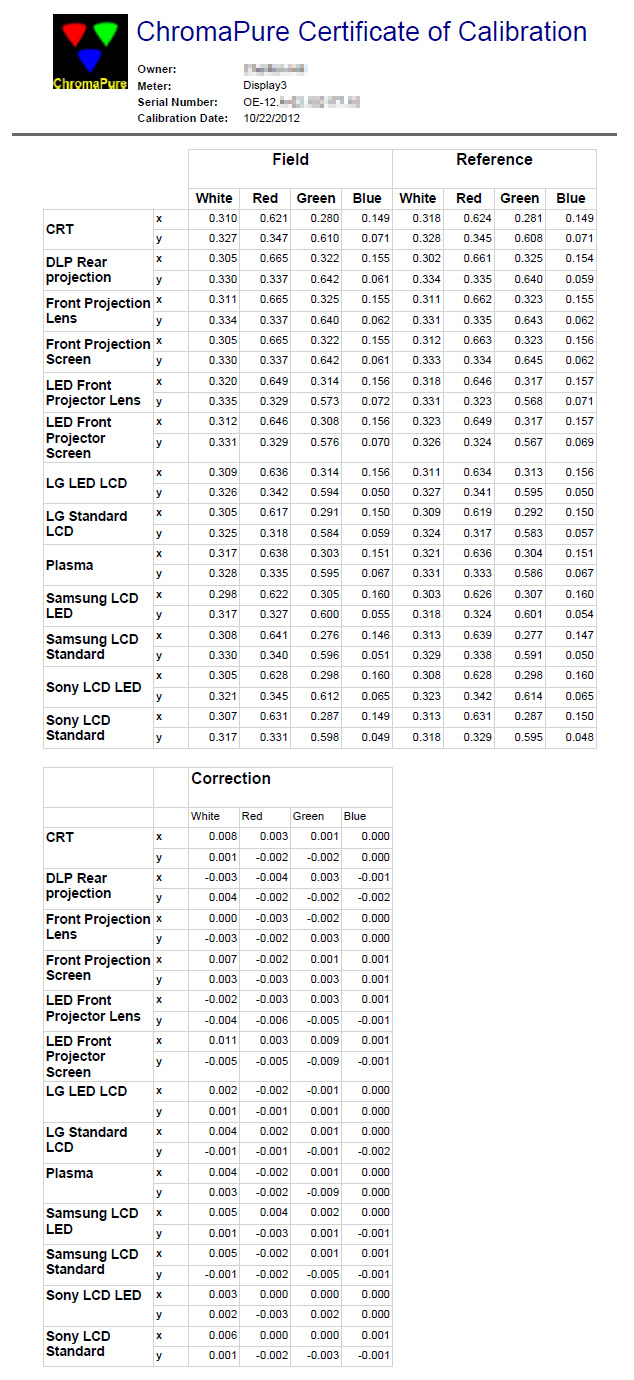
Then (in theory) you should send it back in every year or two to get it recalibrated. Or you can do it yourself using a spectroradiometer like the i1Pro2. More info in our "Which meter is right for me?" FAQ, in the section called "Why buy two meters?". See:
https://www.curtpalme.com/forum_archived/viewtopic.php@t=11436.html
Kal
_________________

Support our site by using our affiliate links. We thank you!
My basement/HT/bar/brewery build 2.0
|
|
| Back to top |
|
|
garyfritz
Joined: 08 Apr 2006
Posts: 12088
Location: Fort Collins, CO
|
| Posted: Sun Oct 30, 2016 9:02 pm Post subject: |
|
|
|
Yeah, hard telling when this 2150 was last calibrated. But I used it to calibrate several CRTs and I was pleased with the results. Then I got a new Spyder II and it matched pretty closely.
|
|
| Back to top |
|
|
kal
Forum Administrator
Joined: 06 Mar 2006
Posts: 18114
Location: Ottawa, Canada
TV/Projector: JVC DLA-NZ7
|
|
| Back to top |
|
|
cmjohnson
Joined: 03 Apr 2006
Posts: 5180
Location: Buried under G90s
|
| Posted: Thu Nov 24, 2016 4:33 pm Post subject: |
|
|
|
I found another G90 for sale near me. And two more a few hours away. I've agreed to buy them all, but I can't buy them all at the same time. I need a good week on ebay to do that.
|
|
| Back to top |
|
|
cmjohnson
Joined: 03 Apr 2006
Posts: 5180
Location: Buried under G90s
|
| Posted: Sun Dec 04, 2016 12:15 am Post subject: |
|
|
G90 no. 2 is now in the house. (Garage, actually.) It's a working unit but the installation it was in was clearly NOT planned out by
a CRT expert. The very nice home theater in the customer's house (which is still in service, but uses a flashlight instead of a real projector) is on the small side and so is the screen size. So the PJ was not set up close enough to fill the CRT faces with raster like you want to do. There's image burn in a too-small area but the image still looks very good within that area.
I'll retube it. I have an adequate supply of tubes in inventory for that.
No.s 3 and 4 are coming soon. Need a few more good ebay sales to make it happen. I do expect to have them before the
end of the year.
|
|
| Back to top |
|
|
cmjohnson
Joined: 03 Apr 2006
Posts: 5180
Location: Buried under G90s
|
| Posted: Mon Dec 05, 2016 5:12 pm Post subject: |
|
|
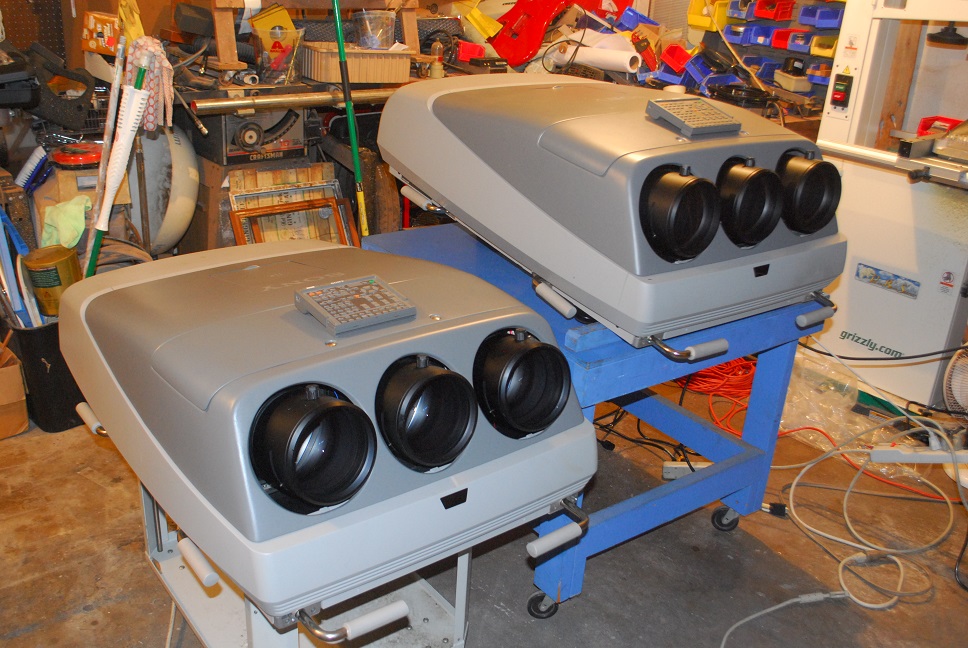
The twins. (Almost. One has the Faroudja option, the other has the HDMI input card. )
| Description: |
|
| Filesize: |
278.61 KB |
| Viewed: |
8750 Time(s) |
|
|
|
| Back to top |
|
|
bachiano
Joined: 13 Mar 2006
Posts: 163
|
| Posted: Mon Dec 05, 2016 8:06 pm Post subject: |
|
|
You Suck
You're Welcome.
Enjoy!
|
|
| Back to top |
|
|
cmjohnson
Joined: 03 Apr 2006
Posts: 5180
Location: Buried under G90s
|
| Posted: Tue Dec 06, 2016 12:59 am Post subject: |
|
|
Something I need to find out....if one has the HDMI input card, can the internal signal still be routed to the secondary set of RGBHV connectors so that the signal can be daisy chained to the second projector?
PJ1 gets signal from HDMI input card.
PJ2 gets signal from PJ1's RGBHV connector set when assigned as outputs.
Workable?
Going to find out. If so, it makes signal distribution for stacking dead simple.
|
|
| Back to top |
|
|
cmjohnson
Joined: 03 Apr 2006
Posts: 5180
Location: Buried under G90s
|
| Posted: Tue Dec 06, 2016 2:14 am Post subject: |
|
|
|
I have two new Dallas chips on order for these two. One shows signs of failing and the other can't be terribly far behind.
|
|
| Back to top |
|
|
cmjohnson
Joined: 03 Apr 2006
Posts: 5180
Location: Buried under G90s
|
| Posted: Wed Dec 07, 2016 4:15 pm Post subject: |
|
|
The first machine is now starting to show a problem. It's getting a red 88 error which occurs only after the unit has been in standby mode for a few minutes.
As determined by board swaps, the problem is not with the YA board or the GA or GB boards.
There is a slight "hot component" smell associated with the error code if it is left in standby long enough.
I'm trying to arrange to borrow a thermal camera so I can try to see where the hot part is without having
to do exploratory surgery.
That the problem is associated with something that is powered up in standby mode does help make the diagnostics easier,
as most of the projector is not powered up at all when in standby mode. I just have to figure out what parts ARE getting power in standby.
|
|
| Back to top |
|
|
cmjohnson
Joined: 03 Apr 2006
Posts: 5180
Location: Buried under G90s
|
| Posted: Sun Dec 11, 2016 4:42 am Post subject: |
|
|
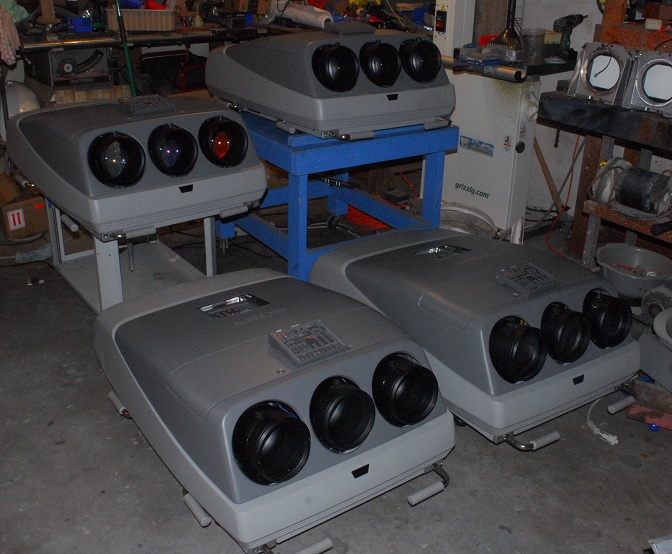
The disease continues to spread...
| Description: |
|
| Filesize: |
123.17 KB |
| Viewed: |
8569 Time(s) |
|
|
|
| Back to top |
|
|
|
|




