| Author |
Message |
cmjohnson

Joined: 03 Apr 2006
Posts: 5180
Location: Buried under G90s
|
| Posted: Wed Oct 05, 2016 6:58 pm Post subject: |
|
|
The blue tube is in, it's connected up, and I'm not out of the woods yet.
Lenses are NOt on the machine. So the lens grounds are not connected. I don't know if that's relevant to anything.
Here's what I get on power-up.
Connect power, master switch on. Red 88 flashes, followed by yellow 88, then display goes blank.
Press power button, I hear a click, green power LED comes on and immediately goes out, and error code 6F shows.
So, I check the manual, and it says with regard to a 6F error, "Install the lenses and connect the cables, dummy! We're Sony
and we're paranoid about you suing us blind over x-ray exposure!"
So I put the lenses on.
Powers right up!
I soon realize it really wants an input. So I hook up my trusty QuantumData 801GX pattern generator, because, you know,
my far better QuantumData 802BT is having trouble reading its own electronic serial number chip so it's out of commission until I get that fixed.
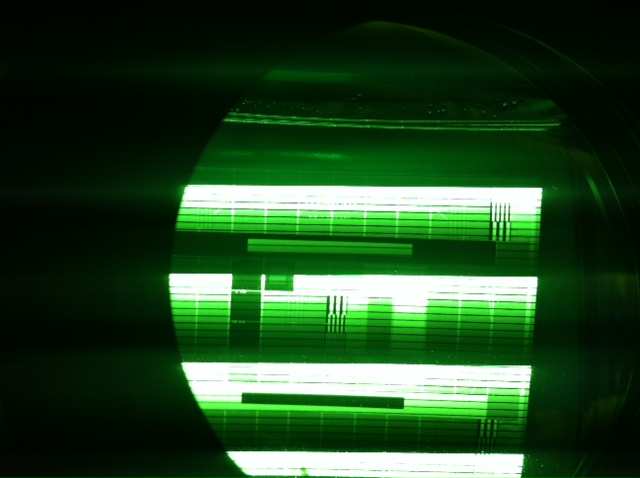
Great, it's working, I'm seeing patterns, but I'm getting an odd and always present (with a signal) set of rolling horizontal bars in the picture. I think it's a sync setting in the PJ but I haven't gotten that far yet.
So I'm off to a brilliant start.
I've attached a photo of the green CRT, note that the regular fading to black bars are a camera artifact.
It's the smaller, regularly spaced black bars that I am asking about. They do move up or down the picture.
They're not present with no external input connected.
I'm using the default RGBHV inputs.
| Description: |
|
| Filesize: |
82.15 KB |
| Viewed: |
10936 Time(s) |
|
|
|
| Back to top |
|
 |
HaydnG90

Joined: 22 May 2006
Posts: 1356
|
| Posted: Wed Oct 05, 2016 7:57 pm Post subject: |
|
|
|
Most likely Sync setting. Freaks a lot of G90 users out.
|
|
| Back to top |
|
|
cmjohnson
Joined: 03 Apr 2006
Posts: 5180
Location: Buried under G90s
|
| Posted: Wed Oct 05, 2016 8:32 pm Post subject: |
|
|
I was running the test generator at too high a sync rate. Dropped it down and everything's just fine.
The unit seems to be healthy at this point.
But for the amount of wear on the green tube, I'm surprised the hours meter indicates so few hours.
Well, I'd heard that G90s run the tubes hard.
3239 hours on the CRT timers. I learned how to get into service mode.
The full featured wireless remote is NOT controlling the projector. Batteries are fresh,
backlight function works, LED flashes when pushing buttons. is there something I need to do to
get the PJ to recognize the wireless remote?
|
|
| Back to top |
|
|
HaydnG90
Joined: 22 May 2006
Posts: 1356
|
| Posted: Wed Oct 05, 2016 8:37 pm Post subject: |
|
|
The original green on my G90 was noticeably burned after less than 700 hours. So yes, they're set up way too hot at the factory.
Not sure why your remote isn't working. Are you sure its the right model number for the G90. The G70 remote looks similar but is not identical. 1000 vs 1001
|
|
| Back to top |
|
|
Curt Palme
CRT Tech
Joined: 08 Mar 2006
Posts: 24396
Location: Langley, BC
TV/Projector: All of them!
|
| Posted: Wed Oct 05, 2016 10:14 pm Post subject: |
|
|
|
The switches on the back need to be set to 0,1. Otherwise the remote won't work.
|
|
| Back to top |
|
|
cmjohnson
Joined: 03 Apr 2006
Posts: 5180
Location: Buried under G90s
|
| Posted: Wed Oct 05, 2016 10:24 pm Post subject: |
|
|
Will check it out. Thanks.
I could kind of use an extra set of G90 CRT mounting frames if anybody has any they want to part with
This is so I can prepare a set of tubes to swap in quickly after pre-installing the new set of tubes.
Please include the four corner screws if you have them.
|
|
| Back to top |
|
|
CIR Engineering

Joined: 25 Aug 2008
Posts: 4269
Location: Chicago USA & Berlin Germany
|
| Posted: Thu Oct 06, 2016 2:29 am Post subject: |
|
|
| Curt Palme wrote: | | The switches on the back need to be set to 0,1. Otherwise the remote won't work. |
Your remote must also be set to 01 as well.
Also, the IR receivers must be enabled in the service menu (front/back/both).
craigr
_________________
JETI 1501-HiRes 2nm Spectroradiometer
JETI 1211 Spectroradiometer
Photo Research PR-650 Spectroradiometer
Klein K10-A Colorimeter
Murideo Fresco SIX-G HDMI 2.x Multimedia Generator
Murideo Fresco SIX-A HDMI 2.x Analyzer
Light Illusion ColourSpace XPT Color Calibration Software
Light Illusion LightSpace XPT Pro Version 10.x Color Calibration Software
OMARDRIS JVC Software Patch to use K10-A and Jeti with JVC OEM AutoCal Software!
Sencore CR7000 CRT Tube Analyzer / Rejuvenater
Authorized Dealer for Lumagen & just about everything worth buying 
www.CIR-Engineering.com - craigr@cir-engineering.com
Phone: 865-405-6892
|
|
| Back to top |
|
|
cmjohnson
Joined: 03 Apr 2006
Posts: 5180
Location: Buried under G90s
|
| Posted: Thu Oct 06, 2016 4:04 am Post subject: |
|
|
|
The PJ setting was 00. Now that it's 01, the remote works fine.
|
|
| Back to top |
|
|
cmjohnson
Joined: 03 Apr 2006
Posts: 5180
Location: Buried under G90s
|
| Posted: Thu Oct 06, 2016 4:27 pm Post subject: |
|
|
G90 shenanigans for me are temporarily suspended while I ride out Hurricane Matthew. I expect things will become rather...interesting...tonight but I really do not expect substantial storm damage. I've been through these before, and one thing
you can count on is that Chicken Little in disguise is the news forecaster for any news agency. They will hype a dust devil into a tornado, a barbecue grill into an uncontrolled wildfire, and a fender bender into a major accident blocking the highway.
Any sustained breeze must therefore be a major storm.
If it's not category 4 and onshore, you just batten down the hatches and wait it out.
I've slept in my own bed in 100 MPH winds, and more, from previous hurricane. No predictions for winds onshore have
gone that high yet.
|
|
| Back to top |
|
|
Spanky Ham

Joined: 22 Mar 2006
Posts: 5643
Location: Comedy Central
|
| Posted: Fri Oct 07, 2016 12:09 am Post subject: |
|
|
| CIR Engineering wrote: | | ElTopo wrote: | Does the G90 still beat the present digitals ?  |
In many respects yes, I still prefer the G90. The UHD digitals beat the G90 at color gamut and resolution assuming we are talking about good digital projectors. But the digitals lose in color fidelity, depth, black level...
It's the same thing, different day.
craigr |
Motion resolution
|
|
| Back to top |
|
|
hal
Joined: 28 Nov 2012
Posts: 100
|
| Posted: Sat Oct 08, 2016 3:37 pm Post subject: |
|
|
Chris, hope you made it thru the storm..
Any updates on the G90..
|
|
| Back to top |
|
|
cmjohnson
Joined: 03 Apr 2006
Posts: 5180
Location: Buried under G90s
|
| Posted: Sat Oct 08, 2016 4:41 pm Post subject: |
|
|
|
Damage here home is minimal. A few banana trees knocked down, two sections of fence damaged, a few branches off a few trees, totally no big deal. Power is out but my generator is keeping the food cold and for internet connection I have a laptop, an iphone, good cell service, and know how to use the wifi personal hotspot. So the A/C is out for now, but the pool is nice!
|
|
| Back to top |
|
|
ElTopo

Joined: 07 Nov 2006
Posts: 1640
|
| Posted: Sat Oct 08, 2016 5:17 pm Post subject: |
|
|
Is it right that you don't need any silicone when changing tubes in a G90 ?
They are just fixed within the aluminium chamber ?
cheers
ElTopo
_________________
Barco Cine 9 the one and only
|
|
| Back to top |
|
|
cmjohnson
Joined: 03 Apr 2006
Posts: 5180
Location: Buried under G90s
|
| Posted: Sat Oct 08, 2016 6:45 pm Post subject: |
|
|
There is some need for silicone, but it's very minimal.
The tube does get siliconed into a frame, and the frame screws to the rest of the LC chamber assembly via four screws and one very good gasket (presumably reusable) is involved.
But the tube is only siliconed into the frame via a single bead of silicone around the edge of the glass face. You don't have to fill the gap between the side of the CRT and the space inside the frame with silicone.
Because there's no depth to the silicone, the tube can be cut out from the frame in just a couple of minutes via a razor blade (several,
actually) inserted into the gap between the CRT and the face of the frame.
|
|
| Back to top |
|
|
Curt Palme
CRT Tech
Joined: 08 Mar 2006
Posts: 24396
Location: Langley, BC
TV/Projector: All of them!
|
| Posted: Sat Oct 08, 2016 6:49 pm Post subject: |
|
|
| ElTopo wrote: | Is it right that you don't need any silicone when changing tubes in a G90 ?
They are just fixed within the aluminium chamber ?
cheers
ElTopo |
That's the G70 you're thinking about.
The G90's tube installation process is the best of all 9" tubes out there. Ampro comes a close second, as it's similar. The worst is Marquee, Barco falls inbetween.
|
|
| Back to top |
|
|
ElTopo
Joined: 07 Nov 2006
Posts: 1640
|
| Posted: Sat Oct 08, 2016 8:13 pm Post subject: |
|
|
Thanky guys.
Very very servicable 
_________________
Barco Cine 9 the one and only
|
|
| Back to top |
|
|
cmjohnson
Joined: 03 Apr 2006
Posts: 5180
Location: Buried under G90s
|
| Posted: Sat Oct 08, 2016 9:04 pm Post subject: |
|
|
Yes, replacing a potted in tube in a Marquee is an adventure.
You have to dig out about four ounces of silicone and depending
on what kind of silicone was used it can be very hard work.
I finally settled on using a moldmaking silicone that is cheap,
extremely dimensionally stable, flows out beautifully, and is easy to remove.
Its color is purplish pink.
|
|
| Back to top |
|
|
cmjohnson
Joined: 03 Apr 2006
Posts: 5180
Location: Buried under G90s
|
| Posted: Mon Oct 10, 2016 4:43 am Post subject: |
|
|
Currently waiting for the silicone to cure on the new green tube. Not yet fully committed to changing out the red tube,
I'll decide later after I attempt to set up the G90 and set greyscale, color temperature, etc.
The blue I'm running is not perfect but it'll do for setup. Pulling another blue tube at this point would require me to remove one
from Marquee LC hardware that I just installed on it within the past few months. Which is a pain. But eventually I'll have to do it,
as it seems likely that I'm going to be putting this G90 up for sale and if I do it'll have perfect tubes in it.
I DO wish that new red LUG I bought hadn't been broken in shipping. I'd have used it, too. As it stands now I'm putting in a new LPB if I replace the red tube at all.
|
|
| Back to top |
|
|
cmjohnson
Joined: 03 Apr 2006
Posts: 5180
Location: Buried under G90s
|
| Posted: Wed Oct 12, 2016 12:49 am Post subject: |
|
|
The G90 is running but I need a bigger screen for testing. My little 4x6 foot Stewart screen is just too small. It's a grey screen anyway (Greyhawk) so clearly that's not optimal for CRT anyway. But I have to give it to the G90, it seems to suffer from no lack
of light output even on a grey screen.
Sony's method of doing picture setups (geometry, convergence, etc) is very different from that of a Marquee, so I've had to get
back into the Sony way of thinking but basic setup has gone very well.
I haven't yet connected it to an external video source but clearly it's a solid running machine and it seems to be quite happy running LUG tubes on blue and green while running an LQF red. I haven't even touched the greyscale calibrations and the white screen is really white. I'm rather good at detecting tinted shades of white, and this looks like fresh snow on a sunny day white.
I gather that the G90 has an automatic adjustment system for bias and gain and if it's responsible for what I'm seeing now, after
swapping out two tubes, then you can count me IMPRESSED.
|
|
| Back to top |
|
|
VideoGrabber
Joined: 09 Apr 2006
Posts: 933
Location: Michigan
|
| Posted: Wed Oct 12, 2016 6:10 am Post subject: |
|
|
| CIR Engineering wrote: | | The UHD digitals beat the G90 at color gamut and resolution assuming we are talking about good digital projectors. |
Expected.
| Quote: | | But the digitals lose in color fidelity, depth, black level... |
Depth and black level are no surprise, nor the motion rez that SpankyHam commented on.
But color fidelity I wouldn't have expected, based on the latest-gen JVC post-cal reports I've seen with dE's under 1.0 across the board. And near perfect gamma tracking. How much better than that can you get? 
_________________
- Tim
|
|
| Back to top |
|
|
|
|




