| Author |
Message |
cmjohnson

Joined: 03 Apr 2006
Posts: 5180
Location: Buried under G90s
|
| Posted: Mon Dec 19, 2016 2:07 am Post subject: |
|
|
Total projectors...about 13, I think. Four G90s, six Marquee Ultras, one G70, the RS45, and an InFocus LP840 LCD data grade projector that I'm thinking of using to project virtual Christmas decorations on my house.
I've had the RS45 only for a couple of days. I paid 1100 for it but that does include a spare lamp.
|
|
| Back to top |
|
 |
cmjohnson
Joined: 03 Apr 2006
Posts: 5180
Location: Buried under G90s
|
| Posted: Mon Dec 19, 2016 4:59 am Post subject: |
|
|
I've spent some time with the RS45 temporarily set up under the Ultra, both being fed the same HDMI signal via a splitter, and I've found some surprising things already.
To summarize it in brief terms, at first the RS45 won in raw sharpness and output. But not much else. Started playing with a bunch of settings, and soon found that I could dramatically improve the picture qualities just by setting brightness and contrast to my own preferences.
With that having been done, the black level is getting really good without losing shadow detail and it's starting to look like it
really can challenge the Ultra in many ways. The image still looks more like film with the Marquee but I attribute that mostly
to the non-fixed-pixel nature of the CRT. At 1080P with anamorphic squeeze the scan lines are touching and there is a very film-like smoothness to the image but yet there is plenty of detail resolution to see as well.
I'm not sure which is the more impressive part: That this digital can be so close to the Marquee's performance, or that
the venerable CRT projector can still fight back and deliver an image that really can't be criticized against far more modern digitals.
The weakness of the Marquee is simply that I'm not able to match the digital for raw sharpness across the whole image area. I can get central focus to be so close to the RS45's sharpness without much of a problem but all the outer focus zones are hit and miss. Some are near zero, others are near 100, others are in the central range, and there's no rhyme or reason to it that I can tell.
Now, if I could get its best sharpness all across the screen in all three tubes, then the whole comparison would become even tougher with regard to picking a winner.
What's most interesting of all is that once I got my bearings, I found that the Marquee could match the brightness of the JVC unit
with the lamp in normal (not high) mode and with the aperture at its typical midrange setting. In fact I found myself dropping the contrast DOWN on the Marquee to try to match up with the JVC. Yet the JVC is not lacking for light output. It's no light cannon but 1300 lumens is quite usable in any average home theater.
Trying to stack the two projectors on the same screen does not work for multiple reasons. One, the Moome HDMI input card on the Marquee processes the image MUCH faster than the JVC does. I'd say that the Moome card gets an image to the screen a good tenth of a second faster, if not more.
There are also some interesting oddities with regard to image geometry. Getting the images to overlap closely would require
a good amount of time spent adjusting nearly every geometry feature and especially linearity, to be followed by an intense convergence adjustment session. With raster sizes matched, nothing else in the two images lines up. I wish my test pattern generators had HDMI outputs so I could see which one has the wonky geometry. I know it's not the Marquee. It's been fully aligned and I know what to align for.
|
|
| Back to top |
|
|
kal
Forum Administrator

Joined: 06 Mar 2006
Posts: 18114
Location: Ottawa, Canada
TV/Projector: JVC DLA-NZ7
|
| Posted: Mon Dec 19, 2016 10:15 pm Post subject: |
|
|
| cmjohnson wrote: | | Started playing with a bunch of settings, and soon found that I could dramatically improve the picture qualities just by setting brightness and contrast to my own preferences. |
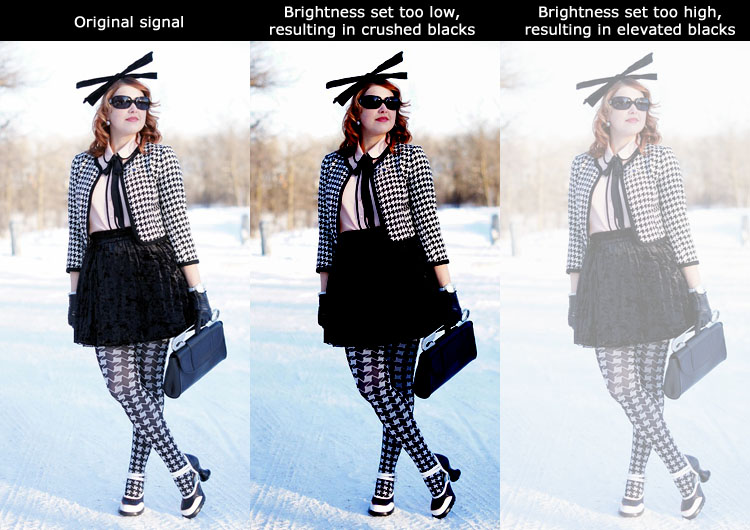
Really? That's very strange as going off the standards will either crush or clip both blacks (brightness) and whites (contrast). There's one one set of "correct" settings unless you want to lose picture information.
On a CRT projector you use brightness to set what's considered the colour "black". Don't do that on a digital: Brightness at the default 0 setting is perfect. Any higher and the picture washes out because you're raising the black level. Any lower and you all you do is crush blacks such at above black becomes black. Going lower cannot make the black level darker (the iris does that).
On a CRT projector you use contrast to set the amount of light output. Don't do that on a digital: Contrast at the default 0 setting is perfect. Any higher and you start to clip whites such that anything lower than 235 (white) becomes the same as white. The light output does not go up as you increase contrast over 0. If you go lower then you do lower the light output. The combination of lamp mode (high or low) and iris should be used to set the amount of light output. Start with low lamp and lower the iris as much as possible while maintaining the amount of light you want on screen (typically 12-14 ft/L).
If you don't run 16-235 but run 0-255 then the brightness and contrast settings will be different of course, but again there's only "one" correct brightness and contrast setting for 0-255 too (it'll be different than the defaults).
The free AVSHD709 test pattern disc has some good stripe patterns at either end to make sure you're not crushing or clipping.
| Quote: | | What's most interesting of all is that once I got my bearings, I found that the Marquee could match the brightness of the JVC unit with the lamp in normal (not high) mode and with the aperture at its typical midrange setting. |
How many foot lamberts are you targeting? Just curious.
Kal
_________________

Support our site by using our affiliate links. We thank you!
My basement/HT/bar/brewery build 2.0
|
|
| Back to top |
|
|
cmjohnson
Joined: 03 Apr 2006
Posts: 5180
Location: Buried under G90s
|
| Posted: Mon Dec 19, 2016 10:58 pm Post subject: |
|
|
Do consider that this projector was last used in conjunction with a Lumagen 2020 and the calibrations were applied thru it.
Since I'm going direct from BDP to projector, it stands to reason that the calibration will be different.
I haven't dragged out a light meter or calibrator yet so I can't tell you what my screen brightness is.
My target is "adequate". I do know that there is no reason to run the JVC's lamp in high power mode. It's bright enough in normal mode with the aperture partially closed.
|
|
| Back to top |
|
|
kal
Forum Administrator
Joined: 06 Mar 2006
Posts: 18114
Location: Ottawa, Canada
TV/Projector: JVC DLA-NZ7
|
| Posted: Mon Dec 19, 2016 11:26 pm Post subject: |
|
|
| cmjohnson wrote: | | Do consider that this projector was last used in conjunction with a Lumagen 2020 and the calibrations were applied thru it. Since I'm going direct from BDP to projector, it stands to reason that the calibration will be different. |
Sorry, what's BDP?
Are you using 16-235 or 0-255, or something completely different? (Not even sure that's possible).
If you had a mismatch between source and display in terms of how brightness/contrast were set previously (ie: 16-235 was being fed into the projector but projector was set for 0-255 - or vice versa) then mostly definitely it would look bad. You could have completely crushed or elevated blacks.
Kal
_________________
Support our site by using our affiliate links. We thank you!
My basement/HT/bar/brewery build 2.0
Last edited by kal on Mon Dec 19, 2016 11:40 pm; edited 1 time in total
|
|
| Back to top |
|
|
cmjohnson
Joined: 03 Apr 2006
Posts: 5180
Location: Buried under G90s
|
| Posted: Mon Dec 19, 2016 11:38 pm Post subject: |
|
|
|
Blu-Ray Disc Player???
|
|
| Back to top |
|
|
kal
Forum Administrator
Joined: 06 Mar 2006
Posts: 18114
Location: Ottawa, Canada
TV/Projector: JVC DLA-NZ7
|
| Posted: Mon Dec 19, 2016 11:42 pm Post subject: |
|
|
Gotcha.
So I don't think it makes a difference to the black and white levels if the Radiance is in the loop. Two level are typically used: 0-255 or the more 'standard' 16-235. That's not really calibration. That's just matching source signal to projector. If they're not matched up correctly in terms of range you'll crush or clip on both ends as the setup is incorrect.
Set your Blu-ray player to "standard" output (not enhanced white or similar) so that it outputs the standard 16-235 signal. Then set the brightness and contrast on your digital projector 0 and 0. Any other setting is incorrect and will clip or crush black and/or white.
Grab a copy of the free AVSHD709 disc and throw up the near black and near white test patterns to make sure you're not clipping or crushing. There's no "calibration" here. It's simply setting the brightness/contrast to 0 and 0 usually.
But then, to confirm that brightness and contrast are correctly on a digital projector you need this sort of test disc so I'm assuming you already did this? There's no other way to do it correctly. You can't "eyeball" it. The best solution is to not touch it at all however: Just set the source to "standard" (16-235) output and keep the digital projector at 0/0 for brightness/contrast. That's the correct setting.
Kal
_________________
Support our site by using our affiliate links. We thank you!
My basement/HT/bar/brewery build 2.0
|
|
| Back to top |
|
|
cmjohnson
Joined: 03 Apr 2006
Posts: 5180
Location: Buried under G90s
|
| Posted: Tue Dec 20, 2016 12:51 am Post subject: |
|
|
|
I always find that I enjoy the picture more when I move away from "calibrated" to get more dynamic range. "Calibrated" looks rather flat and lifeless to me. I like a more contrasty image with slightly intensified colors.
|
|
| Back to top |
|
|
kal
Forum Administrator
Joined: 06 Mar 2006
Posts: 18114
Location: Ottawa, Canada
TV/Projector: JVC DLA-NZ7
|
|
| Back to top |
|
|
cmjohnson
Joined: 03 Apr 2006
Posts: 5180
Location: Buried under G90s
|
| Posted: Tue Dec 20, 2016 2:20 am Post subject: |
|
|
I am aware of that, but I have to learn this PJ for myself by actually experimenting with the settings and seeing what happens when I do.
First things first, I need to mount it on something. It's going on a wall shelf under the Marquee.
|
|
| Back to top |
|
|
kal
Forum Administrator
Joined: 06 Mar 2006
Posts: 18114
Location: Ottawa, Canada
TV/Projector: JVC DLA-NZ7
|
| Posted: Tue Dec 20, 2016 2:49 am Post subject: |
|
|
I'm confused then. You originally wrote that blacks on all digitals are not good:
| cmjohnson wrote: | | Modern digitals do dark grey very well, but true "power failure in a coal mine" black levels is something they don't do very well. |
Then mentioned that the only benefit of the RS45 was sharpness and light output:
| cmjohnson wrote: | | To summarize it in brief terms, at first the RS45 won in raw sharpness and output. But not much else. |
And now you've admitted to not even knowing how to set extremely basic settings like brightness and contrast:
| cmjohnson wrote: | | I am aware of that, but I have to learn this PJ for myself by actually experimenting with the settings and seeing what happens when I do. |
If you don't even know how to set the brightness and contrast correctly on a digital (ie: don't touch them) then you may want to hold off critiquing them. If such basic settings aren't understood, nothing you've written holds any water.
Kal
_________________
Support our site by using our affiliate links. We thank you!
My basement/HT/bar/brewery build 2.0
|
|
| Back to top |
|
|
cmjohnson
Joined: 03 Apr 2006
Posts: 5180
Location: Buried under G90s
|
| Posted: Tue Dec 20, 2016 3:04 am Post subject: |
|
|
|
I have said that this is a new adventure for me. My opinion of the RS45 will NO DOUBT evolve as I learn more about it and how to get the best out of it. I'm sure you can easily understand that. I'm not critiquing it from the perspective of a digital proijection calibration specialist, but from the perspective of a CRT enthusiast with a shiny new toy to play with.
|
|
| Back to top |
|
|
kal
Forum Administrator
Joined: 06 Mar 2006
Posts: 18114
Location: Ottawa, Canada
TV/Projector: JVC DLA-NZ7
|
| Posted: Tue Dec 20, 2016 3:28 am Post subject: |
|
|
You may want to wait until you've figured out some of the basics before starting to post your opinions on comparing your CRT projector to your digital. Had you prefaced your opinions on digitals with the fact that you knew nothing about how to set them up, not even the basics, then people would have likely ignored your opinions as they're frankly meaningless.
Instead, you originally post comments like:
| cmjohnson wrote: | | Ultimately the Marquee draws me into the movie better. I have no plans to take down the Marquee and replace it with the RS45. The primary reason for that is black levels. If there is a digital projector that is so good at the bottom end of the IRE range that it can match or beat a CRT, I can only say that it's not an RS45. |
Which anyone would take to mean that both projectors are set up correctly. Why wouldn't they? Not to mention that if you don't know how to set up the RS45 correctly yet, why would you already draw this conclusion? You took it out of the box, turned it on, and drew your conclusion knowing full well that you had not figured out how to set up the RS45 correctly yet? That doesn't make any sense.
It's only now after some questions are asked you're admitting that you have no idea how to set up the RS45, including in the lower end of the IRE range (the brightness setting that you were critiquing above).
So yes, we all understand *now* that you're learning and that digitals are new to you, but you previous blanket statement comments do not reflect that.
You're talking in circles CM. If you don't understand how something works, don't critique. Better yet, ask questions! I was in the same boat ~4-5 years ago when I switched from CRT to digital. It was a re-learning experience as they most certainly behave differently. I had to re-lean a bunch of stuff. I wrote a bunch of stuff here that's a bit of a 'cheat sheet' for previous CRT owners that may prove useful:
https://www.curtpalme.com/forum_archived/viewtopic.php@t=32973.html
Give it a read. It'll prove helpful and give you hints on how to maximize image quality.
| cmjohnson wrote: | | First things first, I need to mount it on something. It's going on a wall shelf under the Marquee. |
Don't do that. Install the digital as FAR from the screen as you can to maximize contrast ratio (but still keeping the light output you need - the farther back you install the greater the contrast ratio but the lower the lumens). Don't install it at the same throw as the Marquee. You'll kill the contrast ratio. My digital's almost twice as far back as my CRT projector was. The lenses are also better if you try and use the center as much as possible and going farther back means you use less of the lens.
Kal
_________________
Support our site by using our affiliate links. We thank you!
My basement/HT/bar/brewery build 2.0
|
|
| Back to top |
|
|
cmjohnson
Joined: 03 Apr 2006
Posts: 5180
Location: Buried under G90s
|
| Posted: Tue Dec 20, 2016 4:46 am Post subject: |
|
|
|
You are right, and really this never should have even gone in the direction of a review, but I will say that my experiences with the RS45 so far give me every reason to recommend it as an entry level digital projector that has the potential to satisfy even most CRT projection veterans.
|
|
| Back to top |
|
|
jbltecnicspro
Joined: 23 Apr 2016
Posts: 512
|
| Posted: Tue Dec 20, 2016 6:26 pm Post subject: |
|
|
| cmjohnson wrote: | | You are right, and really this never should have even gone in the direction of a review, but I will say that my experiences with the RS45 so far give me every reason to recommend it as an entry level digital projector that has the potential to satisfy even most CRT projection veterans. |
Thank you for your input on this. Very, very promising for a person looking to get a good setup for not too much money. I sent you another private message. Did you get it?
|
|
| Back to top |
|
|
Jeremy112

Joined: 28 Sep 2006
Posts: 2649
Location: Fond du Lac, WI
|
| Posted: Tue Dec 20, 2016 6:39 pm Post subject: |
|
|
I was able to test out a DLA-X700R a few weeks ago when it came in for a light engine cleaning. if neither of you have had a chance to experience one of these in your own setup before, I think you both would be rather impressed with it, as this was the only digital machine I ever saw to date with completely black blacks. I honestly didn't know the projector was running unless I looked back at the machine itself. It is one of the best looking images I've seen projected from a digital, even though its faux 4k.
The eShift makes a huge difference when watching movies. I wouldn't have known it wasn't a true 4K machine by looking at the projected image if I never heard of the model before.
I know its not a "Entry level" machine, but for $3000 usd used, I would have to say its worth every penny!
_________________
When I'm asking for a Model number, that doesn't mean I'm asking for a nude photo with your number on it 
|
|
| Back to top |
|
|
cmjohnson
Joined: 03 Apr 2006
Posts: 5180
Location: Buried under G90s
|
| Posted: Tue Dec 20, 2016 6:53 pm Post subject: |
|
|
I actually have seen a digital projector that does black so well it makes you think it's midnight in a coal mine.
Zeiss Velvet, at a trade show a few weeks ago. Price....if you have to ask....I'm sure it was six figures.
They ran demo material on it which was a simulation of nighttime operations at a small airport up in the mountains. I've never
seen such a realistic rendering of shadow detail and dark objects far off in the distance. Yet when it went to full black, there was absolutely no visual cue remaining as to where the edges of the screen were. It achieved that "I've gone blind" effect.
Advertised contrast ratio: 2.5 million to 1. I believe it.
|
|
| Back to top |
|
|
Jeremy112
Joined: 28 Sep 2006
Posts: 2649
Location: Fond du Lac, WI
|
| Posted: Tue Dec 20, 2016 6:59 pm Post subject: |
|
|
I assume it was a laser projector based off of that high CR? Sounds like a machine I need to see!
_________________
When I'm asking for a Model number, that doesn't mean I'm asking for a nude photo with your number on it
|
|
| Back to top |
|
|
garyfritz

Joined: 08 Apr 2006
Posts: 12088
Location: Fort Collins, CO
|
| Posted: Tue Dec 20, 2016 7:12 pm Post subject: |
|
|
| kal wrote: | | Install the digital as FAR from the screen as you can to maximize contrast ratio (but still keeping the light output you need - the farther back you install the greater the contrast ratio but the lower the lumens). |
How does throw distance affect contrast, or even lumens (or, more likely, ftL)? Ignoring the negligible light loss from "more air in the way," I would think a digital would produce the same ftL on an X" screen regardless of the distance. You have Y lumens coming off the panel, regardless of distance, and the ftL should be the same (for a constant zoomed screen size) regardless of distance -- ftL = lumens / square feet. What am I missing?
|
|
| Back to top |
|
|
cmjohnson
Joined: 03 Apr 2006
Posts: 5180
Location: Buried under G90s
|
| Posted: Tue Dec 20, 2016 7:36 pm Post subject: |
|
|
The larger the displayed image, the greater the light fall-off but only because the projected image is getting bigger.
But distance alone should not have anything to do with it.
It's screen size, not projector to screen distance, that affects luminosity.
If you go to a larger projected image, yes, you will get better black levels but your white levels will fall off as well.
|
|
| Back to top |
|
|
|
|