| Author |
Message |
Luuk neele
Joined: 04 Mar 2015
Posts: 186
Location: Wijk bij duurstede, the Netherlands.
|
| Posted: Wed Mar 18, 2015 8:09 pm Post subject: |
|
|
it's free yes,
but also 775 kilometres away from me  it's in denmark, i am in the netherlands it's in denmark, i am in the netherlands 
|
|
| Back to top |
|
 |
Nashou66

Joined: 12 Jan 2007
Posts: 16171
Location: West Seneca NY
|
|
| Back to top |
|
|
Luuk neele
Joined: 04 Mar 2015
Posts: 186
Location: Wijk bij duurstede, the Netherlands.
|
| Posted: Wed Mar 18, 2015 8:16 pm Post subject: |
|
|
| Nashou66 wrote: | | Luuk neele wrote: |
it's free yes,
but also 775 kilometres away from me it's in denmark, i am in the netherlands |
I drove that far for a Sony G90 and paid money for the PJ, thats nothing!! A nice week end drive and you get parts for your 3600.
Athanasios |
that's true, i probably own one of the few 3600's in my country.
the wife would not be amused though, she's already pissed that this one doesnt work lol.
and because of teh fact that it's so huge
|
|
| Back to top |
|
|
mac
Joined: 07 Nov 2012
Posts: 143
|
| Posted: Wed Mar 18, 2015 8:17 pm Post subject: |
|
|
Ok, good.
So here is what I want you to do. When you start it up I want you to watch for a few things and be prepared to turn off the projector with the main toggle switch if anything is wrong. Do not wait for it to shut down itself. If it is not right, shut it down instantly.
So power it on and:
1)See if all the fans you can see start up.
2) See if all the green leds are lit on the power supply and are of the same brightness. Do not worry about any other leds anywhere else..
3) Watch for smoke anywhere.
4) Listen for constant arcing. Ignore any occasional minor arc sound.
If everything here seems ok then I want you to just put the remote down and let it run for 20 minutes to a half hour. Don't push any buttons, don't make any tests, nothing. Just let it run, even if there is nothing coming out of the tubes.
Let me know how the startup goes and if it is running.
|
|
| Back to top |
|
|
mac
Joined: 07 Nov 2012
Posts: 143
|
| Posted: Wed Mar 18, 2015 8:19 pm Post subject: |
|
|
| Nashou66 wrote: | | Luuk neele wrote: |
it's free yes,
but also 775 kilometres away from me it's in denmark, i am in the netherlands |
I drove that far for a Sony G90 and paid money for the PJ, thats nothing!! A nice week end drive and you get parts for your 3600.
Athanasios |
4200 parts do not work in 3600 series.
|
|
| Back to top |
|
|
Nashou66
Joined: 12 Jan 2007
Posts: 16171
Location: West Seneca NY
|
|
| Back to top |
|
|
mac
Joined: 07 Nov 2012
Posts: 143
|
| Posted: Wed Mar 18, 2015 8:37 pm Post subject: |
|
|
I am pretty sure none. Maybe neck board but even if they did they were an earlier version that had some problems. Even the 4300 to 4600 had some boards that were not interchangeable and these 2 are in the same family.
The 4200 was a family of its own.
|
|
| Back to top |
|
|
Luuk neele
Joined: 04 Mar 2015
Posts: 186
Location: Wijk bij duurstede, the Netherlands.
|
| Posted: Wed Mar 18, 2015 9:04 pm Post subject: |
|
|
| mac wrote: | Ok, good.
So here is what I want you to do. When you start it up I want you to watch for a few things and be prepared to turn off the projector with the main toggle switch if anything is wrong. Do not wait for it to shut down itself. If it is not right, shut it down instantly.
So power it on and:
1)See if all the fans you can see start up.
2) See if all the green leds are lit on the power supply and are of the same brightness. Do not worry about any other leds anywhere else..
3) Watch for smoke anywhere.
4) Listen for constant arcing. Ignore any occasional minor arc sound.
If everything here seems ok then I want you to just put the remote down and let it run for 20 minutes to a half hour. Don't push any buttons, don't make any tests, nothing. Just let it run, even if there is nothing coming out of the tubes.
Let me know how the startup goes and if it is running. |
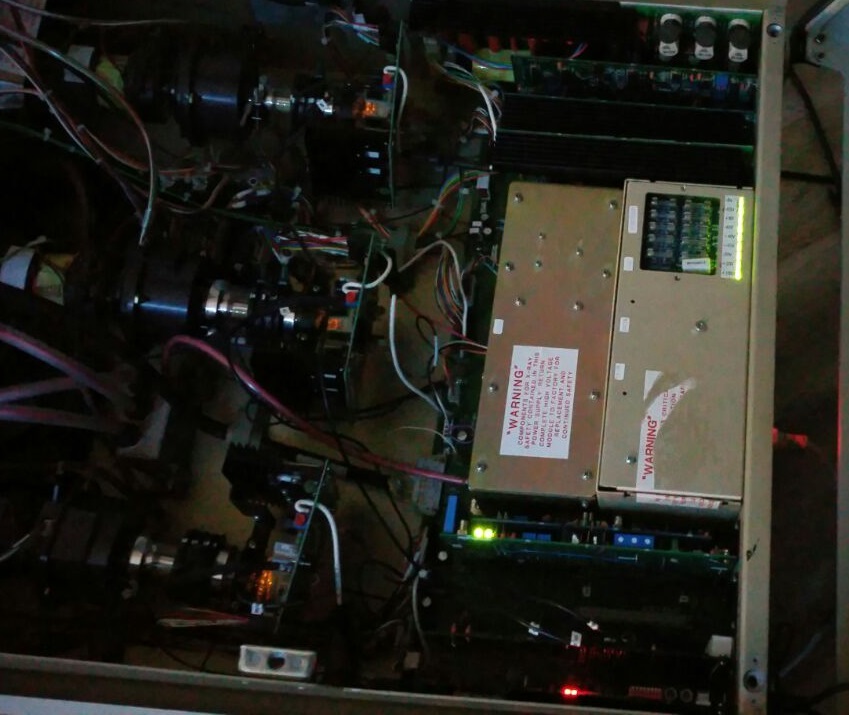
1) All fans work!
2) all green leds on psu on, also the small red one on the back of the psu is on!
3) no smoke, but a cap i soldered onto the rgb card burst, i replaced it checked polarity the cap i put in first had polarity reversed, probably a misprint.
4) no arc sounds, just the occasional sound from the tube
no image though, but thats to be expected, remote shows "no input on channel 1"
lets run for 20 mins.
| Description: |
|
| Filesize: |
136.47 KB |
| Viewed: |
3522 Time(s) |
|
|
|
| Back to top |
|
|
Luuk neele
Joined: 04 Mar 2015
Posts: 186
Location: Wijk bij duurstede, the Netherlands.
|
| Posted: Wed Mar 18, 2015 9:30 pm Post subject: |
|
|
| mac wrote: | Ok, good.
Let me know how the startup goes and if it is running. |
system has been running for about half an hour now, no visible or audible problems.
whats next?
|
|
| Back to top |
|
|
mac
Joined: 07 Nov 2012
Posts: 143
|
| Posted: Wed Mar 18, 2015 9:31 pm Post subject: |
|
|
|
All looks well. I see all 3 heaters on. So after the 20 minute to half hour run, on the remote press "test 1" and see if you get a grid on all 3 tubes.
|
|
| Back to top |
|
|
Luuk neele
Joined: 04 Mar 2015
Posts: 186
Location: Wijk bij duurstede, the Netherlands.
|
| Posted: Wed Mar 18, 2015 9:36 pm Post subject: |
|
|
| mac wrote: | | All looks well. I see all 3 heaters on. So after the 20 minute to half hour run, on the remote press "test 1" and see if you get a grid on all 3 tubes. |
if i press test i see "rgb 1 mode" on remote, if i then press 1 i see "rgb 1 mode channel 1" but no image on tubes
whats wrong?
|
|
| Back to top |
|
|
mac
Joined: 07 Nov 2012
Posts: 143
|
| Posted: Wed Mar 18, 2015 9:40 pm Post subject: |
|
|
|
Try clear first and then the test button.
|
|
| Back to top |
|
|
Luuk neele
Joined: 04 Mar 2015
Posts: 186
Location: Wijk bij duurstede, the Netherlands.
|
| Posted: Wed Mar 18, 2015 9:42 pm Post subject: |
|
|
| mac wrote: | | Try clear first and then the test button. |
nothing happens, i had replaced the battery, that has somethign to do with it?
|
|
| Back to top |
|
|
mac
Joined: 07 Nov 2012
Posts: 143
|
| Posted: Wed Mar 18, 2015 9:45 pm Post subject: |
|
|
Shouldn't.
Try pressing "code" then "30" and see what the lcd reads.
|
|
| Back to top |
|
|
Luuk neele
Joined: 04 Mar 2015
Posts: 186
Location: Wijk bij duurstede, the Netherlands.
|
| Posted: Wed Mar 18, 2015 9:47 pm Post subject: |
|
|
| mac wrote: | Shouldn't.
Try pressing "code" then "30" and see what the lcd reads. |
it shows: channel 3 acc = 0
|
|
| Back to top |
|
|
mac
Joined: 07 Nov 2012
Posts: 143
|
| Posted: Wed Mar 18, 2015 9:50 pm Post subject: |
|
|
Ok, Shut the projector off and switch off main switch.
On the CPU board check each switch location.
Switch:
1)off
2)off
3)off
4)off
5)on
6)off
7)off
8)off
|
|
| Back to top |
|
|
Luuk neele
Joined: 04 Mar 2015
Posts: 186
Location: Wijk bij duurstede, the Netherlands.
|
| Posted: Wed Mar 18, 2015 9:55 pm Post subject: |
|
|
| mac wrote: | Ok, Shut the projector off and switch off main switch.
On the CPU board check each switch location.
Switch:
1)off
2)off
3)off
4)off
5)on
6)off
7)off
8)off |
5 was off it is now on, no image
|
|
| Back to top |
|
|
mac
Joined: 07 Nov 2012
Posts: 143
|
| Posted: Wed Mar 18, 2015 9:57 pm Post subject: |
|
|
|
How about the code 30? Are both round switches on the cpu set to "0"?
|
|
| Back to top |
|
|
Luuk neele
Joined: 04 Mar 2015
Posts: 186
Location: Wijk bij duurstede, the Netherlands.
|
| Posted: Wed Mar 18, 2015 9:59 pm Post subject: |
|
|
code 30 still gives channel 3 acc = 0
the rotational switches are at 0
|
|
| Back to top |
|
|
mac
Joined: 07 Nov 2012
Posts: 143
|
| Posted: Wed Mar 18, 2015 10:04 pm Post subject: |
|
|
Wonderful 
Try this. Have the main power toggle switch on but do not start the projector.
Press "808" then "KEY"
Tell me what the lcd says.
|
|
| Back to top |
|
|
|
|





