|
As this forum is rarely used anymore, we've locked it. Feel free to browse and read. Questions? Please reach out to us directly. Cheers! |

|
 |
|
|
| Author |
Message |
thinker
Joined: 13 Feb 2015
Posts: 13
|
| Posted: Wed Feb 18, 2015 10:36 am Post subject: |
|
|
Here's another test shot after more tweaking, the reds still a little smeared? if you cover the red the image seems clearer, does that mean I need to adjust an electronic control? or is it mechanical like alignment or focus? Thanks

|
|
| Back to top |
|
 |
mc86

Joined: 20 Sep 2008
Posts: 767
Location: pittsburgh, pa
TV/Projector: ECP 4500 (Vidikron box), ECP4500+, wanting 07MS/07MTS, evaluating pc soft-blend
|
| Posted: Sun Feb 22, 2015 2:52 am Post subject: |
|
|
Hi! Looks like you got a nice ECP. My suggestion is that you stop for a hit and read through all the manuals for the ECP 4500 and some of the 4100 as not all of the 4500 documentation is extant anywhere anymore. I found with my similar conditioned 4500 that carefully following their procedures got it good enough for me...but I am an outlier of a data point on here! I am 95% sure I have pdfs of my marked-up manuals and curt's pages in PDF form if you'd like me to send them to you. Just PM me your email.
Matt
|
|
| Back to top |
|
|
thinker
Joined: 13 Feb 2015
Posts: 13
|
| Posted: Wed Mar 11, 2015 8:19 am Post subject: |
|
|
|
did more reading and tweaking but, I realized that the convergence isn't staying, after I adjust it and turn it off it goes back to how it was, I read that the memory chips can go bad, is it possible to get another convergence card, and if it is will it have the same problem?
|
|
| Back to top |
|
|
mc86
Joined: 20 Sep 2008
Posts: 767
Location: pittsburgh, pa
TV/Projector: ECP 4500 (Vidikron box), ECP4500+, wanting 07MS/07MTS, evaluating pc soft-blend
|
| Posted: Wed Mar 11, 2015 9:34 pm Post subject: |
|
|
thinker -- How far out is the convergence upon restart? The ECPs were known for not holding convergence very well (I think even when they were new...but may be mistaken on that). IF you get everything setup correctly after reset (without touching electronic convergence on the remote), it ought to remain so close to good that just a little touch-up with the remote is needed. Expecting it to be perfect, I think, is simply unreasonable. Others on here could chime in, but IIRC, I was told not to expect better. To be concrete, I find that when I start it up and goto into manual convergence, I typically need to move the entire grid up maybe two or three touches of the arrow and to the left one or two touches of the arrow. There will still be a few distortions on the edges, etc., but they don't bother us.
That said, the problem of lost convergence getting lost each time might not be an issue with either the convergence board OR the waveform board. The dallas chip on the CPU board is where all the memory stuff is kept, I think. I used a similar PN dallas chip with a more recent date code and it worked...there have been lots of dallas chip discussions for other projector brands/models that might be helpful. I think all the 123XY-ZZZ+ will work. X can be 0 or 5, I think 5 is just a newer version. ZZZ is speed and others said 100, 120, or 150 might work. CIR says the + reflects a EU lead-free thing and therefore the chip isn't ancient. Also, IIRC, in the lower left of the chips, the first two digits are the year made and the 3rd/4th digits are the week. No idea the next letter...maybe hour..we'd have to study a bazillion to see if only 23 or 24 letters are used.
Incidentally, although I don't externally switch inputs, I do externally switch sources. As such, I sometimes enable ASR (AutoSourcelRecall) and it does pretty well when I do. Normally, however, I switch between sources manually using the remote. These "sources" are internal settings that correspond to which input I am pushing in via the single RGBHV line I use. The main reason for leaving ASR off, truth be told, is that I can't trust my AutoLock on H-Sync when my basement is cold and sometimes even in the summer when my machine hasn't warmed up. I have no idea why that is true, but it sure as hell is!
cheers,
Matt
|
|
| Back to top |
|
|
thinker
Joined: 13 Feb 2015
Posts: 13
|
| Posted: Thu Mar 12, 2015 10:24 pm Post subject: |
|
|
|
it isn't horribly off mostly the edges, it wouldn't be so bad if the remote worked, it lights up and the little light blinks on the remote but, the projector doesn't respond, so I end up running back and forth when I adjust the convergence.
|
|
| Back to top |
|
|
mc86
Joined: 20 Sep 2008
Posts: 767
Location: pittsburgh, pa
TV/Projector: ECP 4500 (Vidikron box), ECP4500+, wanting 07MS/07MTS, evaluating pc soft-blend
|
| Posted: Thu Apr 09, 2015 5:13 am Post subject: |
|
|
IIRC, the remotes can be programmed to have a "number" so that different remotes could control different ECP projectors located in the same room OR one remote could be switch to different PJs. Maybe it is as simple as the sensor's connectors are corroded?
Running back and forth from what -- the screen to the PJ?
Get a a toy pirate telescope and do it from the back of the PJ without moving. As a side bonus, every time you converge, you can say "C ARRRGH T...!"
Matt
|
|
| Back to top |
|
|
Curt Palme
CRT Tech
Joined: 08 Mar 2006
Posts: 24396
Location: Langley, BC
TV/Projector: All of them!
|
| Posted: Thu Apr 09, 2015 1:42 pm Post subject: |
|
|
|
Post a pix of your remote. There are two different types, the smaller, older ECP ones and the larger Marquee-looking ones, which is what the 4500 uses. I MAY have one left over here of the newer style.
|
|
| Back to top |
|
|
mc86
Joined: 20 Sep 2008
Posts: 767
Location: pittsburgh, pa
TV/Projector: ECP 4500 (Vidikron box), ECP4500+, wanting 07MS/07MTS, evaluating pc soft-blend
|
| Posted: Thu Apr 09, 2015 5:09 pm Post subject: |
|
|
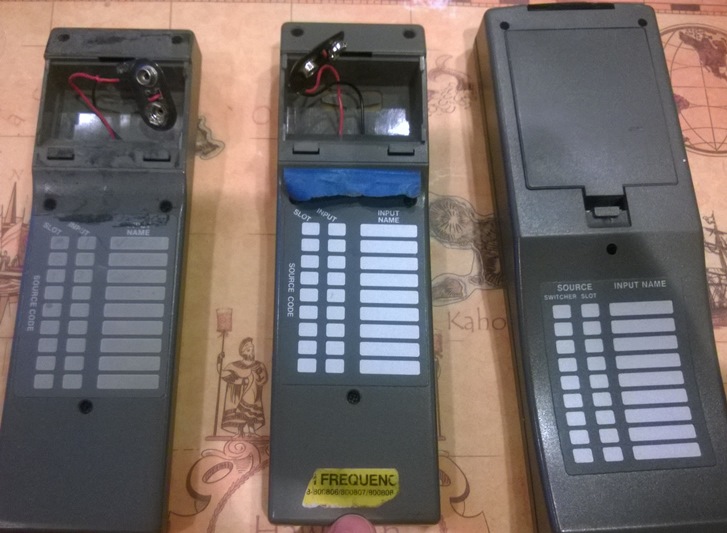
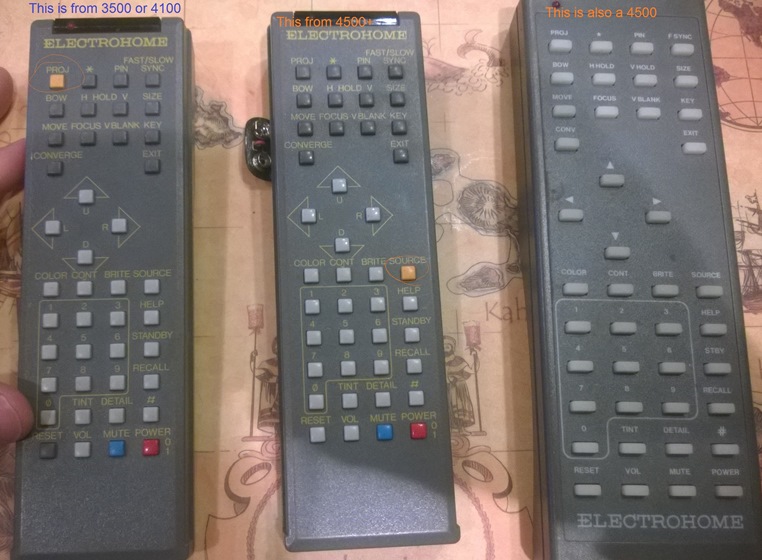
Ehome made the narrow, boxy, grey "ECP style" remotes [hard plastic, many-colored buttons] in a high frequency version that worked on the 4500s, too. The soft-button, more-flat marquee-style remotes also came along for some late model ECP 4500s. Point being, some old style ECP remotes MAY work on the 4500. My 4500 is dated 1997 (IIRC) and uses the old-style remote. However, as Curt notes, one of my 4500 parts-machines had the new-style remote as the mounted-version on the back of the machine. Point being, looks like you can't judge the old-style remote by its cover alone. Maybe a marque-style one will remove any doubt.
Here is a little thread about some of this at this link from early 2000s on AVS below.
All of that said: I have an extra "ECP style" remote that I've never tested. If it works on my 4500 AND IF Curt can't find a remote to sell you for a few bucks first, you are welcome to have my extra. Perhaps the one I have is the low frequency variety...dunno. If so, I'll take them apart to see if an identifying difference can be seen. I dunno about the yellow ribbon/tape stuff mentioned on the AVS thread.
Cheers.
Matt
|
|
| Back to top |
|
|
Curt Palme
CRT Tech
Joined: 08 Mar 2006
Posts: 24396
Location: Langley, BC
TV/Projector: All of them!
|
| Posted: Thu Apr 09, 2015 5:47 pm Post subject: |
|
|
|
Interesting, I've only seen 4500s with the new style remote. Good info, thanks!
|
|
| Back to top |
|
|
Tim in Phoenix

Joined: 21 Oct 2006
Posts: 4409
Location: Phoenix
|
| Posted: Thu Apr 09, 2015 5:53 pm Post subject: |
|
|
Hey
The last of the 3100s and 4100s had the smaller hifreq remotes
|
|
| Back to top |
|
|
mc86
Joined: 20 Sep 2008
Posts: 767
Location: pittsburgh, pa
TV/Projector: ECP 4500 (Vidikron box), ECP4500+, wanting 07MS/07MTS, evaluating pc soft-blend
|
| Posted: Mon Apr 13, 2015 1:40 am Post subject: |
|
|
So I did a quick round-up of some ECP remotes and started playing. First, here are the old and new styles. The yellow tape/ribbon can be seen on the high frequency version of the original style. The sharp-eyed among you will notice the orange button on the original style remote has different location (and others). I can't say if they were that way originally or if someone swapped them around after they left the factory.
Matt
| Description: |
| rear of original and newer "marquee" style |
|
| Filesize: |
128.92 KB |
| Viewed: |
3846 Time(s) |
|
| Description: |
| Front of original and newer "marquee" style |
|
| Filesize: |
146.68 KB |
| Viewed: |
3846 Time(s) |
|
|
|
| Back to top |
|
|
mc86
Joined: 20 Sep 2008
Posts: 767
Location: pittsburgh, pa
TV/Projector: ECP 4500 (Vidikron box), ECP4500+, wanting 07MS/07MTS, evaluating pc soft-blend
|
| Posted: Mon Apr 13, 2015 1:46 am Post subject: |
|
|
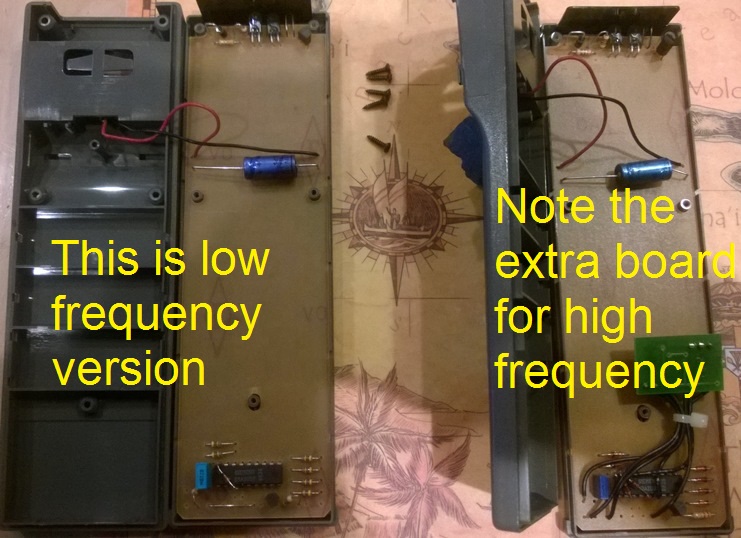
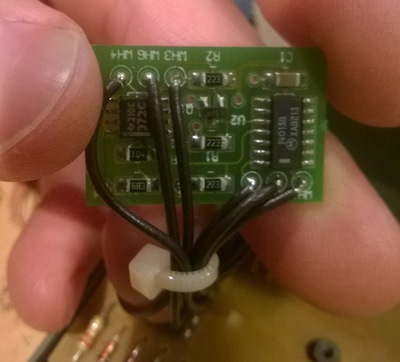
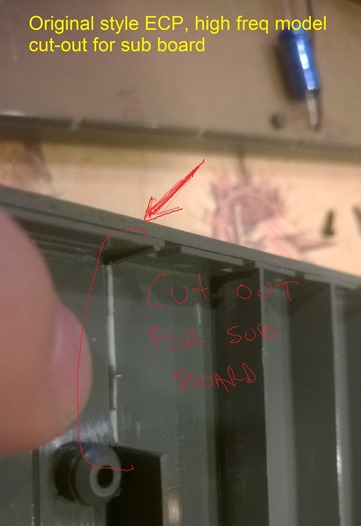
Next, let's look inside the original style remotes at the low and high frequency guts.
You will see an extra board the high frequency units have, a close-up of that board, and a shot showing how they had folks in the factory break off an internal tang to make room for the add-on board.
Matt
| Description: |
| rear of circuit boards for low and high freq |
|
| Filesize: |
165.41 KB |
| Viewed: |
3845 Time(s) |
|
| Description: |
| high frequency add-on board |
|
| Filesize: |
60.47 KB |
| Viewed: |
3845 Time(s) |
|
| Description: |
|
| Filesize: |
62.69 KB |
| Viewed: |
3845 Time(s) |
|
|
|
| Back to top |
|
|
mc86
Joined: 20 Sep 2008
Posts: 767
Location: pittsburgh, pa
TV/Projector: ECP 4500 (Vidikron box), ECP4500+, wanting 07MS/07MTS, evaluating pc soft-blend
|
| Posted: Mon Apr 13, 2015 1:59 am Post subject: |
|
|
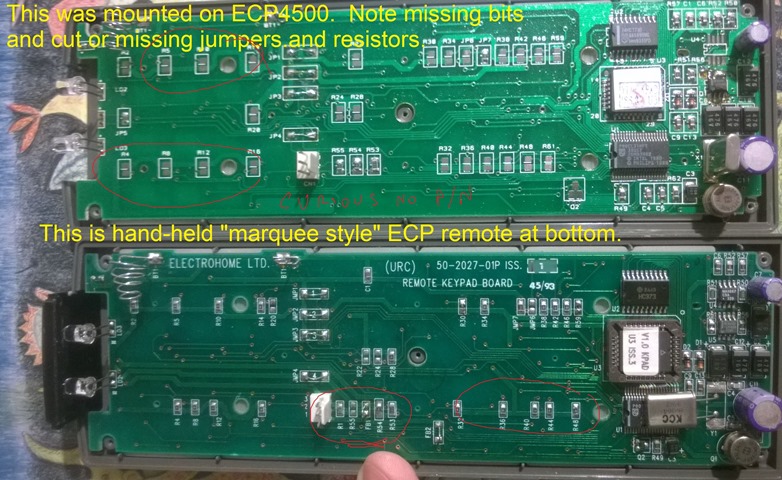
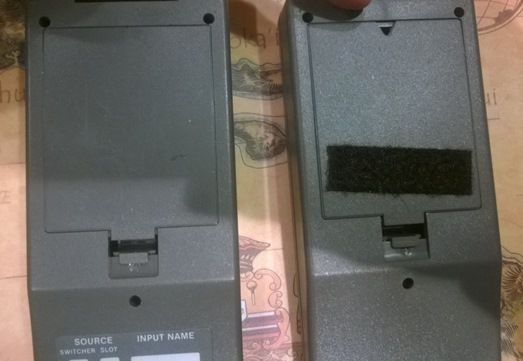
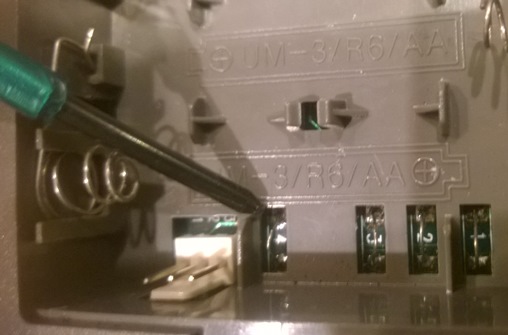
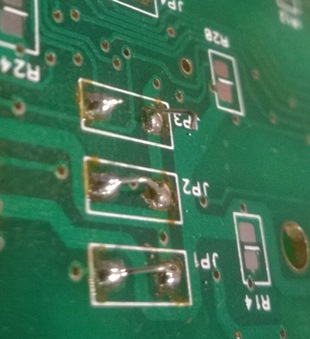
and finally, a little look inside the newer, "marquee" styled ECP remotes. In particular, I took apart the one mounted on the PJ itself and the hand-held version of the same. There are a lot of differences, actually, I was surprised. It could be there were taken off the same machine...or possibly not. I have too many ecp bits to keep them all straight anymore. I comment the pics a little.
Is it worth saving the "marquee" style ECP remotes for those who have actual marquees? I've scrapped some of the mounted ones in the past...
I was excited to see the little crystal oscillator in there as it brought back memories of my grandpa. He had CBs and my dad gave me a hand-held CB-radio walkie-talkie. The thing had a 4 ft long telescoping antenna that was crazy! It could do any channel...but you had to install the freq oscillators you wanted to RX/TX on.
Matt
| Description: |
| Look at the differences in the boards...surprising to me. Different layout, but with some common shared things. I'm guessing the Marquees differ a lot from the ECP version, but use the same printed boards perhaps...? |
|
| Filesize: |
182.97 KB |
| Viewed: |
3839 Time(s) |
|
| Description: |
| From the outsides, the only clue is the little triangle hand-cut at the factory to allow them to run a cable from the mounted-remote to board in the machine... |
|
| Filesize: |
74.09 KB |
| Viewed: |
3839 Time(s) |
|
| Description: |
| Look for these jumpers... |
|
| Filesize: |
63.81 KB |
| Viewed: |
3839 Time(s) |
|
| Description: |
| the mounted ver can be distinguished by the left two jumpers being cut. on the hand-held, they are intact. |
|
| Filesize: |
58.63 KB |
| Viewed: |
3839 Time(s) |
|
|
|
| Back to top |
|
|
|
|
|
|
|
You cannot post new topics in this forum
You cannot reply to topics in this forum
You cannot edit your posts in this forum
You cannot delete your posts in this forum
You cannot vote in polls in this forum
You cannot attach files in this forum
You can download files in this forum
|
Forum powered by phpBB © phpBB Group
|
|




