| Author |
Message |
gregstv
Joined: 27 Aug 2007
Posts: 628
Location: Australia
|
| Posted: Sat May 02, 2015 7:50 am Post subject: |
|
|
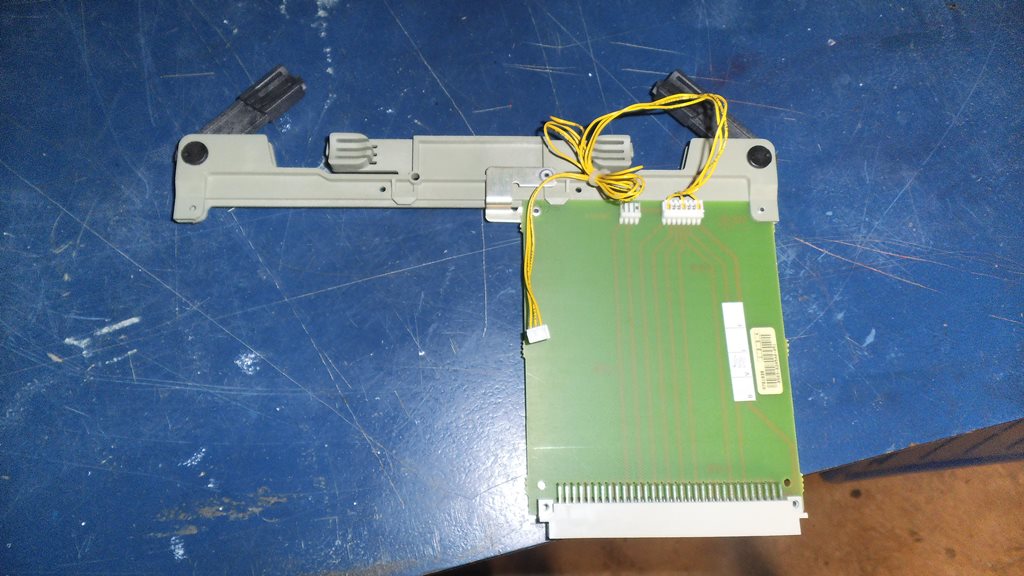
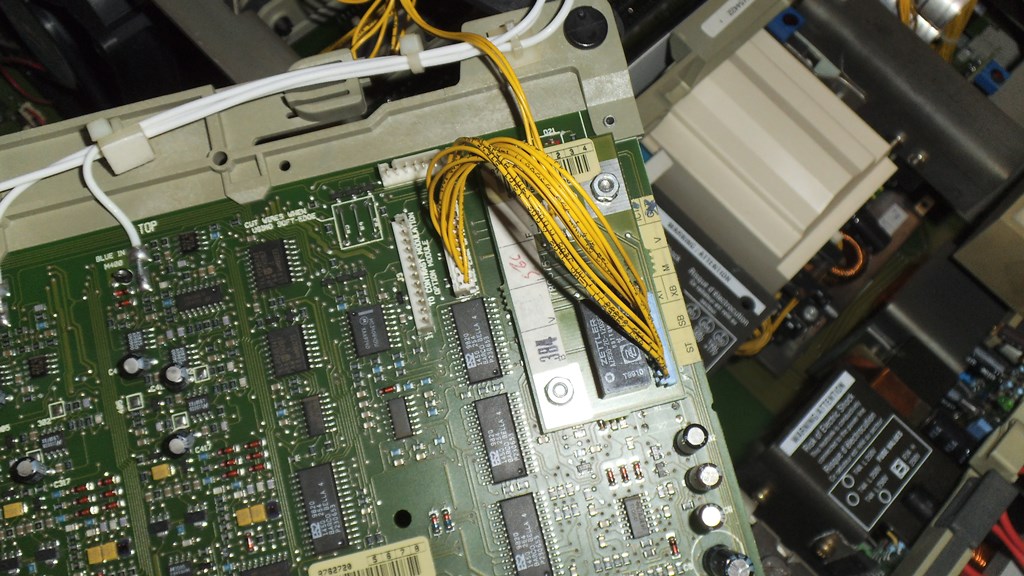
The SEOS has a link board in the port 3 slot. To add a Moome card, can I just remove this board? Do I need to remove the other small board that it is hooked up to? (R762485)
| Description: |
|
| Filesize: |
114.36 KB |
| Viewed: |
6738 Time(s) |
|
| Description: |
|
| Filesize: |
193.02 KB |
| Viewed: |
6738 Time(s) |
|
|
|
| Back to top |
|
 |
Hulio
Joined: 15 Apr 2006
Posts: 494
Location: Belgium
|
| Posted: Sat May 02, 2015 11:17 am Post subject: |
|
|
Hello Greg,
It is recomanded to remove those boards even if you don't need the port 3 slot. They draw power for nothing and degrade the picture quality to some point, for use in single projector configuration.
That small board is part of IBCL-link, so should be removed too. The only thing you have to do is to bridge back the W1 and W2 jumpers on the RGB driver board R762720 ( just under that miniboard ). In order to enable IBCL-link, those wires are cut. So just solder two pieces of wire back and you are good to go.
Good luck and let us know how the PQ is with the Moome card.
|
|
| Back to top |
|
|
gregstv
Joined: 27 Aug 2007
Posts: 628
Location: Australia
|
| Posted: Sun May 03, 2015 12:24 am Post subject: |
|
|
Thanks Hulio, Will do.
I will post some results and screen shots once the Moome card turns up. Moome is waiting on remotes. Hopefully this week.
Thanks again,
Greg
|
|
| Back to top |
|
|
gregstv
Joined: 27 Aug 2007
Posts: 628
Location: Australia
|
| Posted: Sat May 09, 2015 6:54 am Post subject: |
|
|
Hi Guys,
My Moome card turned up yesterday. I have fitted it and the picture came straight up. Very bright and I only had the brightness set to 35. I needed to drop it to 15. I did the G2 adjustment as per the install manual. Adjusted until the leds on the neck boards just went off. When I returned out of the service menu the leds stayed off. Is this normal.
Still need the brightness down at 15. Picture is really sharp and the colours are great. The Moome card is defiantly better than the Moome V3 EXT.
|
|
| Back to top |
|
|
gregstv
Joined: 27 Aug 2007
Posts: 628
Location: Australia
|
| Posted: Sun May 17, 2015 9:03 pm Post subject: |
|
|
Hi Gus,
I mounted the SEOS on the ceiling and now have a few problems.
Fist one is there is a faint line across the centre.I can only see it on some images.
The second problem is that on bright white screen the are wavy lines about an inch thick across the top of the screen. This is worse when picture is full screen. Could this be the quad or the splitter. I have changed all boards with the exception of the G2 and the front try boards.
Thanks,
Greg
|
|
| Back to top |
|
|
CasetheCorvetteman

Joined: 09 Nov 2008
Posts: 6326
Location: Australia
|
| Posted: Mon May 18, 2015 4:38 am Post subject: |
|
|
Could be the quad... Delete all entries and set everything to mid point and set up from scratch.
_________________
Barco Cine 9, ,Sony VPL570ES 4K SXRD, 135" OZ Theatre Majestic 16:9 screen, Denon X6700in preamp mode, 2x 7ch Tonewinner amps, 2x Tonewinner 15" subs, 2x 10" subs, 7.2.6...
RUNCO DTV991 LC ( NEC XG 852 LC ) 100" 4:3 screen, H/K AVR 7.1...
|
|
| Back to top |
|
|
gregstv
Joined: 27 Aug 2007
Posts: 628
Location: Australia
|
| Posted: Mon May 18, 2015 5:24 am Post subject: |
|
|
Thanks Case,
I have deleted all and done a new setup for 1080i@72 Still have the problem. I will try the quad. How do I save different memory blocks? When I try and do one for 60 it over rides the 72.
Greg.
|
|
| Back to top |
|
|
gjaky

Joined: 05 Jun 2010
Posts: 2802
Location: Budapest, Hungary
|
| Posted: Mon May 18, 2015 5:24 am Post subject: |
|
|
As for the faint center line, search for "line of coincidence" it is a commmon issue if the setup is... ahem.. poor. 
_________________
projectors in the past : NEC 6-9PG xtra, Electrohome Marquee 6-7500, NEC XG 1351 LC ( with super modified Electrohome VNB neckboard !!!)
current: VDC Marquee 9500LC
The MOD: VNB-DB, VIM-DB
|
|
| Back to top |
|
|
gregstv
Joined: 27 Aug 2007
Posts: 628
Location: Australia
|
| Posted: Mon May 18, 2015 11:14 am Post subject: |
|
|
Thanks Guys,
I did a full reline and the line has gone. Still have the lines across the top. These are not present for the first 20 minutes.
Greg.
|
|
| Back to top |
|
|
Luuk neele
Joined: 04 Mar 2015
Posts: 186
Location: Wijk bij duurstede, the Netherlands.
|
| Posted: Tue May 19, 2015 8:33 am Post subject: |
|
|
seems like a waveform problem, if this happens on high contrast scenes, you might have a power dip on G2 on line retrace.
got a scope?
|
|
| Back to top |
|
|
CasetheCorvetteman
Joined: 09 Nov 2008
Posts: 6326
Location: Australia
|
| Posted: Tue May 19, 2015 9:28 am Post subject: |
|
|
There is a pot somewhere that moves those AKB lines i think.
_________________
Barco Cine 9, ,Sony VPL570ES 4K SXRD, 135" OZ Theatre Majestic 16:9 screen, Denon X6700in preamp mode, 2x 7ch Tonewinner amps, 2x Tonewinner 15" subs, 2x 10" subs, 7.2.6...
RUNCO DTV991 LC ( NEC XG 852 LC ) 100" 4:3 screen, H/K AVR 7.1...
|
|
| Back to top |
|
|
CasetheCorvetteman
Joined: 09 Nov 2008
Posts: 6326
Location: Australia
|
| Posted: Tue May 19, 2015 9:29 am Post subject: |
|
|
1080p 72Hz is a very big ask for that machine too...
_________________
Barco Cine 9, ,Sony VPL570ES 4K SXRD, 135" OZ Theatre Majestic 16:9 screen, Denon X6700in preamp mode, 2x 7ch Tonewinner amps, 2x Tonewinner 15" subs, 2x 10" subs, 7.2.6...
RUNCO DTV991 LC ( NEC XG 852 LC ) 100" 4:3 screen, H/K AVR 7.1...
|
|
| Back to top |
|
|
gregstv
Joined: 27 Aug 2007
Posts: 628
Location: Australia
|
| Posted: Tue May 19, 2015 12:47 pm Post subject: |
|
|
1080i@72.
The VP50 won't do 96. If I unlock and adjust up to 96 from 72 I get an out of sync picture. I have tried on 3 different projectors and all have the same problem.
|
|
| Back to top |
|
|
gregstv
Joined: 27 Aug 2007
Posts: 628
Location: Australia
|
| Posted: Tue May 19, 2015 8:47 pm Post subject: |
|
|
|
I did the front porch trick to get rid of ringing e rining on the left side. After fitting a new still in the box green tube and the new moome card I can say the picture is stunning. I am still working my way through recapping each board using low esr caps. Still trying to find what is causing the intermittent lines on the top of the picture with a bright picture.
|
|
| Back to top |
|
|
CasetheCorvetteman
Joined: 09 Nov 2008
Posts: 6326
Location: Australia
|
| Posted: Thu May 21, 2015 2:48 am Post subject: |
|
|
The lines are probably AKB, which is normal. Im sure you can move them with a pot somewhere, so first thing you should do is locate that pot if indeed it exsists, and clean it up.
_________________
Barco Cine 9, ,Sony VPL570ES 4K SXRD, 135" OZ Theatre Majestic 16:9 screen, Denon X6700in preamp mode, 2x 7ch Tonewinner amps, 2x Tonewinner 15" subs, 2x 10" subs, 7.2.6...
RUNCO DTV991 LC ( NEC XG 852 LC ) 100" 4:3 screen, H/K AVR 7.1...
|
|
| Back to top |
|
|
gregstv
Joined: 27 Aug 2007
Posts: 628
Location: Australia
|
| Posted: Thu May 21, 2015 3:19 am Post subject: |
|
|
|
These lines are about 1inch thick and there is 2 of them. Would AKB lines be this thick?
|
|
| Back to top |
|
|
CasetheCorvetteman
Joined: 09 Nov 2008
Posts: 6326
Location: Australia
|
| Posted: Thu May 21, 2015 10:38 am Post subject: |
|
|
Not as a rule, you need to post pics...
_________________
Barco Cine 9, ,Sony VPL570ES 4K SXRD, 135" OZ Theatre Majestic 16:9 screen, Denon X6700in preamp mode, 2x 7ch Tonewinner amps, 2x Tonewinner 15" subs, 2x 10" subs, 7.2.6...
RUNCO DTV991 LC ( NEC XG 852 LC ) 100" 4:3 screen, H/K AVR 7.1...
|
|
| Back to top |
|
|
Hulio
Joined: 15 Apr 2006
Posts: 494
Location: Belgium
|
| Posted: Thu May 21, 2015 8:02 pm Post subject: |
|
|
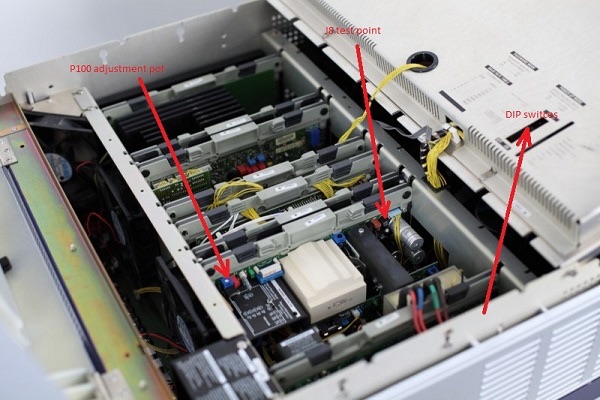
It is worth checking your 17V rail. Other Barco owners, with the same problem you described, got rid of those lines by adjusting P100 pot on SMPS.
Feed the Barco with a internal test pattern at standard frequency (15,6KHz). Put brightness and contrast at 49. With a voltmeter connected at J8 testpoint, adjust P100 pot for a exact reading of 17,2 V.
| Description: |
|
| Filesize: |
86.53 KB |
| Viewed: |
6343 Time(s) |
|
|
|
| Back to top |
|
|
CasetheCorvetteman
Joined: 09 Nov 2008
Posts: 6326
Location: Australia
|
| Posted: Thu May 21, 2015 11:14 pm Post subject: |
|
|
You also need to check it from full black to full white to see if it holds high enough.
_________________
Barco Cine 9, ,Sony VPL570ES 4K SXRD, 135" OZ Theatre Majestic 16:9 screen, Denon X6700in preamp mode, 2x 7ch Tonewinner amps, 2x Tonewinner 15" subs, 2x 10" subs, 7.2.6...
RUNCO DTV991 LC ( NEC XG 852 LC ) 100" 4:3 screen, H/K AVR 7.1...
|
|
| Back to top |
|
|
gregstv
Joined: 27 Aug 2007
Posts: 628
Location: Australia
|
| Posted: Fri May 22, 2015 8:14 am Post subject: |
|
|
Thanks guys. I did check it and it was 17.32. I didn't adjust the contrast and brightness to 49. I will redo this weekend.
Anyone know where I can get a service manual for an 808s with 120mhz neck boards?
Thanks,
Greg
|
|
| Back to top |
|
|
|
|





