|
As this forum is rarely used anymore, we've locked it. Feel free to browse and read. Questions? Please reach out to us directly. Cheers! |

|
 |
|
|
| Author |
Message |
Hulio
Joined: 15 Apr 2006
Posts: 494
Location: Belgium
|
| Posted: Sun Dec 14, 2014 1:30 pm Post subject: |
|
|
Like Keith said, you should be able to move the focus coils a bit backwards to see if focus improves. I know that the heatsink dictates the position of the clamp but if you remove those two srews on the heatsink, you might be able to slide the clamp on the tube neck more backwards. This way you'll create some space for the focus yoke. Just to see if focus improves.
Other than trimpots for red and blue horizontal shift, there are no user adjustment on the focus board, so don't fiddle with anything there. Why don't you try the focus board from the BG 808 to see if the board is faulty ? The one in Cine 8 should be a newer revision ( R7625035 instead of R762503 ) but it should work.
DId you put all adjustments to midpoint in the service menu first ? Also, put the electronic focus to 49 ( where blury ) and play again with the mechanical focus on the lens. Don't forget to tighten the knob for center-screen focus before you do the corner. Sometimes, we forget that and the back barrel of the lens will move along with the front one.
Just don't give up. People on the forum will help you out to narrow the problem.
About the big resistor that came loose on the RGB amp ( R32 ) i can confirm that this is not SMD monted, but manualy. This is normal, just push it back in his place.
If you don't use the iris ( just a gadget anyway ), the best you can do is to remove the iris card from the controller. On each start up, the processor will check for installed options and if they are not there, those options won't even show up in the menu anymore.
Keep us informed.
|
|
| Back to top |
|
 |
km987654

Joined: 25 Jul 2007
Posts: 2874
Location: Australia
TV/Projector: Barco BG809s
|
| Posted: Sun Dec 14, 2014 8:13 pm Post subject: |
|
|
| Hulio wrote: | Like Keith said, you should be able to move the focus coils a bit backwards to see if focus improves. I know that the heatsink dictates the position of the clamp but if you remove those two srews on the heatsink, you might be able to slide the clamp on the tube neck more backwards. This way you'll create some space for the focus yoke. Just to see if focus improves.
Other than trimpots for red and blue horizontal shift, there are no user adjustment on the focus board, so don't fiddle with anything there. Why don't you try the focus board from the BG 808 to see if the board is faulty ? The one in Cine 8 should be a newer revision ( R7625035 instead of R762503 ) but it should work.
DId you put all adjustments to midpoint in the service menu first ? Also, put the electronic focus to 49 ( where blury ) and play again with the mechanical focus on the lens. Don't forget to tighten the knob for center-screen focus before you do the corner. Sometimes, we forget that and the back barrel of the lens will move along with the front one.
Just don't give up. People on the forum will help you out to narrow the problem.
About the big resistor that came loose on the RGB amp ( R32 ) i can confirm that this is not SMD monted, but manualy. This is normal, just push it back in his place.
If you don't use the iris ( just a gadget anyway ), the best you can do is to remove the iris card from the controller. On each start up, the processor will check for installed options and if they are not there, those options won't even show up in the menu anymore.
Keep us informed. |
The two focus boards are interchangeable.
|
|
| Back to top |
|
|
km987654
Joined: 25 Jul 2007
Posts: 2874
Location: Australia
TV/Projector: Barco BG809s
|
| Posted: Sun Dec 14, 2014 8:16 pm Post subject: |
|
|
| dentree wrote: | Could you please give me some detail about how to go about what you have suggested, do not know what is meant by removing the front RGB amp, and the bit about the reversal of which plastic part
Many thanks for you input and interest, actually I am quite overwhelmed by the responses i am getting, sooner or later i am sure this issue will be resolved |
When I am at home I will post a couple of pictures.
|
|
| Back to top |
|
|
CasetheCorvetteman

Joined: 09 Nov 2008
Posts: 6326
Location: Australia
|
| Posted: Sun Dec 14, 2014 9:18 pm Post subject: |
|
|
Dentree, as you may have noticed Keith and i are also Australian, we like to help  Hulio is one of a few Barco guys on here that have a heap of experience, Keith has done some pretty top notch mods to his rigs, so between them youll be up and running again eventually! Hulio is one of a few Barco guys on here that have a heap of experience, Keith has done some pretty top notch mods to his rigs, so between them youll be up and running again eventually!
_________________
Barco Cine 9, ,Sony VPL570ES 4K SXRD, 135" OZ Theatre Majestic 16:9 screen, Denon X6700in preamp mode, 2x 7ch Tonewinner amps, 2x Tonewinner 15" subs, 2x 10" subs, 7.2.6...
RUNCO DTV991 LC ( NEC XG 852 LC ) 100" 4:3 screen, H/K AVR 7.1...
|
|
| Back to top |
|
|
km987654
Joined: 25 Jul 2007
Posts: 2874
Location: Australia
TV/Projector: Barco BG809s
|
| Posted: Sun Dec 14, 2014 9:46 pm Post subject: |
|
|
Here are some pictures.
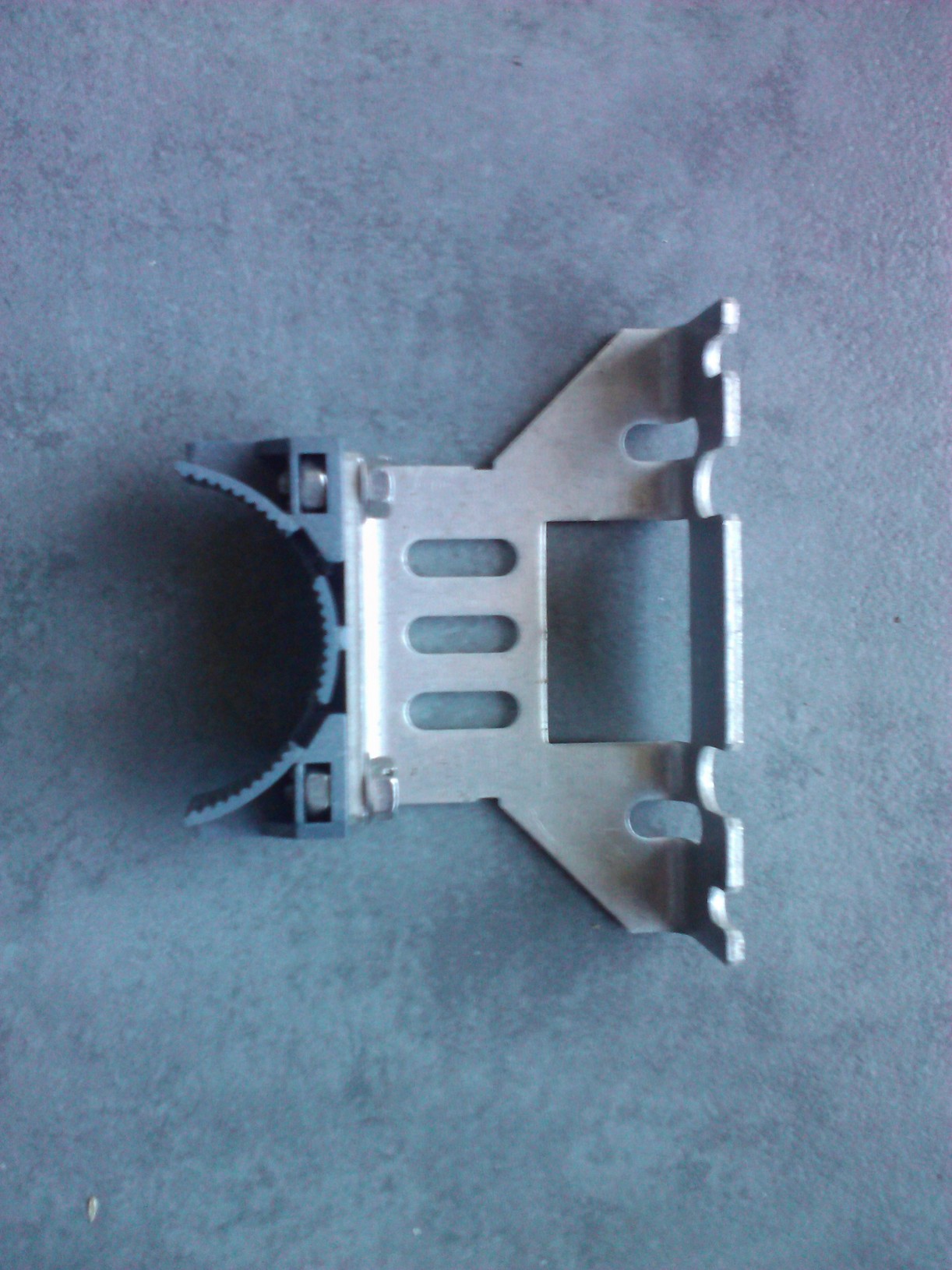
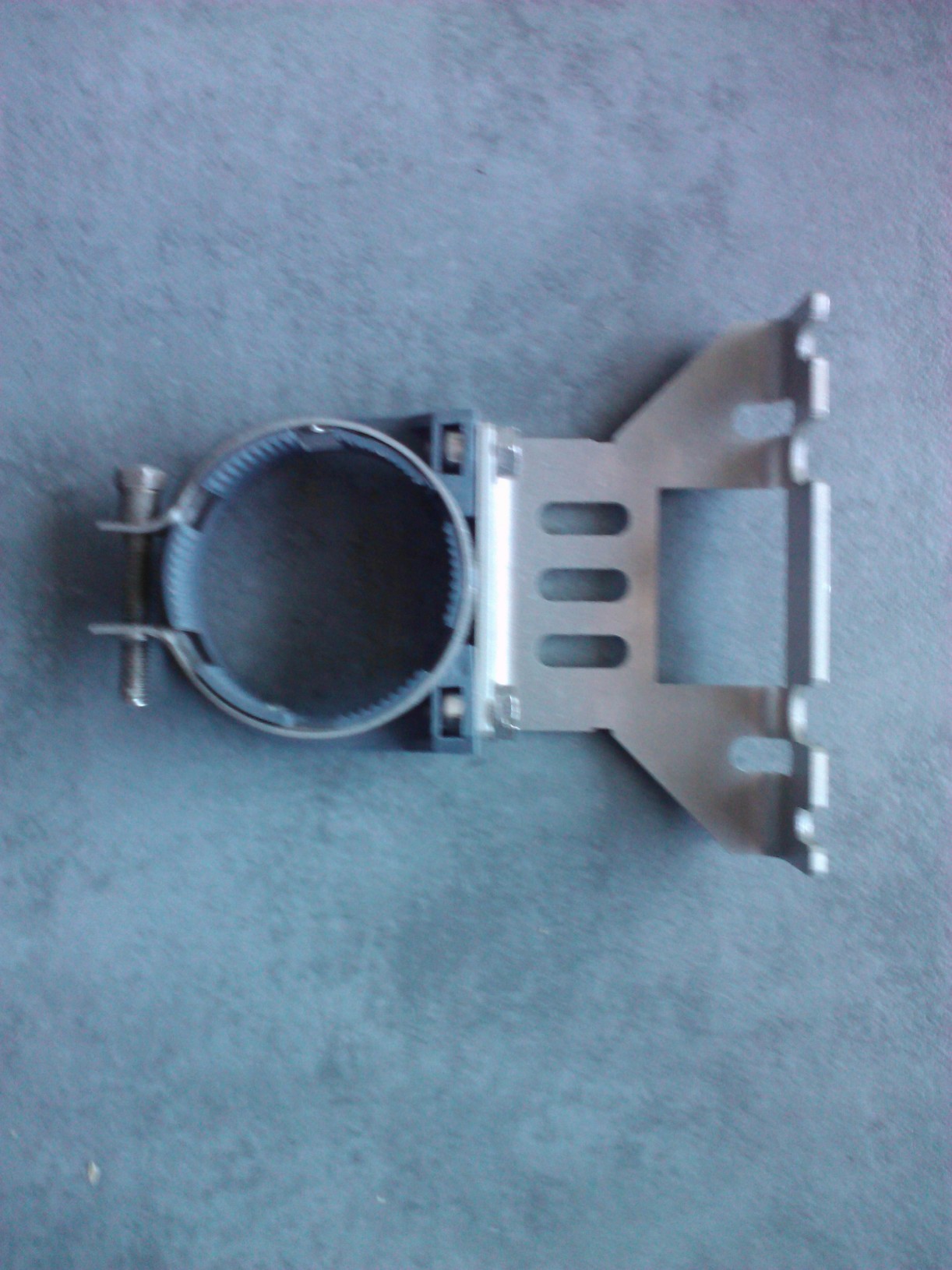
You can see the normal front support that is attached to the RGB AMP by two screws (lower image). To remove the AMP you will need to remove the CPC magnets and the RGB AMP itself. So you can just leave the bracket off to run this test as this will allow a great deal of movement of the focus coils backwards. Be careful of the CPC magnets as you don't want to change the way they are set if these are not set correctly they will also cause a slightly out of focus image.
If you decide you want to leave the focus coils moved further back then the second image shows a modified front bracket. This bracket will sit on the rear of the focus coil. You clamp the focus coil with its clamp and just sit the modified RGB AMP support on top of the rear of the focus coil.
Having said all this Barco designed the focus system to work properly right where it is. So this is only to test if the focus can be improved by moving the focus coil. You have a focus problem caused by either the H-Shift and Focus board or bad tubes in my opinion. I would suggest as before that the problem is in the Focus board and you should change that board.
I would change this board before doing anything else.
| Description: |
| Modified 120mhz front support |
|
| Filesize: |
351.82 KB |
| Viewed: |
5755 Time(s) |
|
| Description: |
| Normal 120mhz front support |
|
| Filesize: |
320.09 KB |
| Viewed: |
5755 Time(s) |
|
|
|
| Back to top |
|
|
Hulio
Joined: 15 Apr 2006
Posts: 494
Location: Belgium
|
| Posted: Sun Dec 14, 2014 9:47 pm Post subject: |
|
|
Case is right. In fact we all learn from each other. That's the meaning of a forum i suppose.
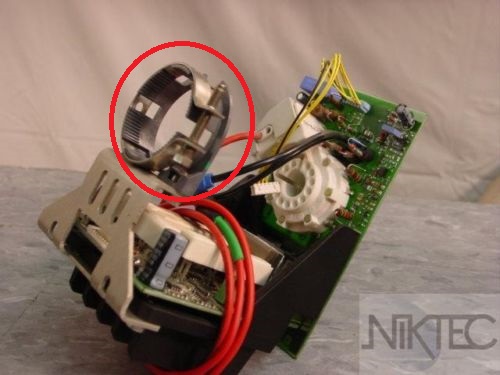
When Keith is saying to reverse the plastic part around the tube, he means to dismount the gear clamp of the RGB amplifier and remount it 180° turned, so that the collar of the clamp will face the astig magnets. Than you have more room for the focus yoke. Look at the picture, i've marked the plastic part with a red circle. Sory Keith, my camera is faster ( no, i lie, is a stolen picture )
| Description: |
|
| Filesize: |
47.33 KB |
| Viewed: |
5753 Time(s) |
|
|
|
| Back to top |
|
|
km987654
Joined: 25 Jul 2007
Posts: 2874
Location: Australia
TV/Projector: Barco BG809s
|
| Posted: Sun Dec 14, 2014 9:53 pm Post subject: |
|
|
| Hulio wrote: | Case is right. In fact we all learn from each other. That's the meaning of a forum i suppose.
When Keith is saying to reverse the plastic part around the tube, he means to dismount the gear clamp of the RGB amplifier and remount it 180° turned, so that the collar of the clamp will face the astig magnets. Than you have more room for the focus yoke. Look at the picture, i've marked the plastic part with a red circle. Sory Keith, my camera is faster ( no, i lie, is a stolen picture ) |
Well done. Yes that's what I meant. I got tired of removing the CPC magnets when I want the RGB AMP off so started using the modified clamp above. I had a fair bit of testing to do when I put the 9" tubes in my 808s chassis and as it turns out the focus coils need to be way back to get the best focus.
|
|
| Back to top |
|
|
dentree
Joined: 01 May 2009
Posts: 247
Location: Melbourne Australia
TV/Projector: BARCO GRAPHICS 808 BARCO GRAPHICS 801
|
| Posted: Mon Dec 15, 2014 3:06 am Post subject: |
|
|
Hi Hulio,
Many thanks for your reply, all I have done so far is to set the focus at 50 as you suggested, I then put in the board you suggested from the BG 808 and the result was exactly the same as the original board, so I assume that we are looking in another direction, I will however take off the neckboard clamps as you suggest, the have a go at moving the focus coils backwards, the thing that bothers me is that as you say BARCO have designed this particular arrangement to suit the machine, so in the absence of any possible movement (by design) then one would have to assume that the focus tuning would be effected by some other means, (this is all your collective thoughts are so valuable in this and other like situations)
Will have a go with the neckboard tonight and report back
Regards
Trevor
|
|
| Back to top |
|
|
CasetheCorvetteman
Joined: 09 Nov 2008
Posts: 6326
Location: Australia
|
| Posted: Mon Dec 15, 2014 6:48 am Post subject: |
|
|
Tubes may indeed be damaged, i didnt really think of that, but id expect youd possibly get some arcing and some distortion, depending on how bad they are.
Look inside the necks, if the ceramics are damaged or the gun parts are not dead aligned, you will never get sharp focus.
Ill find some pics of my badly damaged P16 necks.
_________________
Barco Cine 9, ,Sony VPL570ES 4K SXRD, 135" OZ Theatre Majestic 16:9 screen, Denon X6700in preamp mode, 2x 7ch Tonewinner amps, 2x Tonewinner 15" subs, 2x 10" subs, 7.2.6...
RUNCO DTV991 LC ( NEC XG 852 LC ) 100" 4:3 screen, H/K AVR 7.1...
|
|
| Back to top |
|
|
CasetheCorvetteman
Joined: 09 Nov 2008
Posts: 6326
Location: Australia
|
| Posted: Mon Dec 15, 2014 6:53 am Post subject: |
|
|
Youll see here the gun is shooting into a crooked piece that has fallen down the neck a bit:

And this is the result of that:

The bright blue glow is not normal. This was reasonably servere damage, something less significant could still be noticable and prevent accurate beam focus. Having said that you should try the focus board first, everything points to that for me.
_________________
Barco Cine 9, ,Sony VPL570ES 4K SXRD, 135" OZ Theatre Majestic 16:9 screen, Denon X6700in preamp mode, 2x 7ch Tonewinner amps, 2x Tonewinner 15" subs, 2x 10" subs, 7.2.6...
RUNCO DTV991 LC ( NEC XG 852 LC ) 100" 4:3 screen, H/K AVR 7.1...
|
|
| Back to top |
|
|
dentree
Joined: 01 May 2009
Posts: 247
Location: Melbourne Australia
TV/Projector: BARCO GRAPHICS 808 BARCO GRAPHICS 801
|
| Posted: Mon Dec 15, 2014 8:56 am Post subject: |
|
|
OK, the story so far...........As suggested I changed the focus board for the one in the BG 800, absolutely no difference.
I also did as suggested and turned the neckboard clamp around the other way, which indeed give me about 10mm clearance at the back end of the focus coil, however moving the coil backwards just made the whole situation worse, so have returned everything back to original
...........However during this process I have discovered that the clamp on the astig ring was not fastened and the astig ring was just 'floating' (All quite loose)
So I checked the red and blue (same deal)!
I have since played with all the astig rings as best as I can have set optical focus for best sharpness on 57 (it is not good in anyway) I then ramped the focus down to ZERO unfortunately at ZERO the crosshatch is just off focus, anyway judging it by eye I guessed a setting for minimal flare in both directions, then ramped the focus up to 90 and got the dots as round as I could (never attempted any of these things before) then ramped the focus back to optimum.
I have repeated these steps for the red and the blue, although I now have a reasonable picture on screen the electronic settings I think are somewhat excessive, although the top, bottom, left and right on all 3 guns are at most 10 to 15 either way, the mid point focus settings are as follows:
RED 14
GREEN 9
BLUE 3
Other than that the picture is quite good, but in the course of doing all this and getting pictures on screen I have found another issue, and that is the remote control for the DVD player is also communicating with the projector and at random it will shut the projector off, this happens when pressing the ENTER key on the DVD remote, also If I press PAUSE the picture freezes OK but press PAUSE again to continue and the projector shuts down, If I skip chapters the projector goes looking for another input (input 9 actually) then I get a flash of crosshatch then a blank screen, I then have to select the input on the BARCO remote to get the DVD picture back, I have not found out what happens when ay other keys are pressed (YET!!)
Perhaps after digesting all this, any of you guys might have some brilliant solution, and also your thoughts please on the other things attempted so far including the excessive setting to obtain focus, when I am comfortable with with whatever solutions/advice I have followed, then I might broach the Zone astig..... but I rather think that might be somewhere down the track a bit.
Trevor
|
|
| Back to top |
|
|
dentree
Joined: 01 May 2009
Posts: 247
Location: Melbourne Australia
TV/Projector: BARCO GRAPHICS 808 BARCO GRAPHICS 801
|
| Posted: Mon Dec 15, 2014 9:01 am Post subject: |
|
|
Hi Hulio,
Many thanks for your reply, all I have done so far is to set the focus at 50 as you suggested, I then put in the board you suggested from the BG 808 and the result was exactly the same as the original board, so I assume that we are looking in another direction, I will however take off the neckboard clamps as you suggest, the have a go at moving the focus coils backwards, the thing that bothers me is that as you say BARCO have designed this particular arrangement to suit the machine, so in the absence of any possible movement (by design) then one would have to assume that the focus tuning would be effected by some other means, (this is all your collective thoughts are so valuable in this and other like situations)
Will have a go with the neckboard tonight and report back
Regards
Trevor
|
|
| Back to top |
|
|
km987654
Joined: 25 Jul 2007
Posts: 2874
Location: Australia
TV/Projector: Barco BG809s
|
| Posted: Mon Dec 15, 2014 9:12 am Post subject: |
|
|
| dentree wrote: | OK, the story so far...........As suggested I changed the focus board for the one in the BG 800, absolutely no difference.
I also did as suggested and turned the neckboard clamp around the other way, which indeed give me about 10mm clearance at the back end of the focus coil, however moving the coil backwards just made the whole situation worse, so have returned everything back to original
...........However during this process I have discovered that the clamp on the astig ring was not fastened and the astig ring was just 'floating' (All quite loose)
So I checked the red and blue (same deal)!
I have since played with all the astig rings as best as I can have set optical focus for best sharpness on 57 (it is not good in anyway) I then ramped the focus down to ZERO unfortunately at ZERO the crosshatch is just off focus, anyway judging it by eye I guessed a setting for minimal flare in both directions, then ramped the focus up to 90 and got the dots as round as I could (never attempted any of these things before) then ramped the focus back to optimum.
I have repeated these steps for the red and the blue, although I now have a reasonable picture on screen the electronic settings I think are somewhat excessive, although the top, bottom, left and right on all 3 guns are at most 10 to 15 either way, the mid point focus settings are as follows:
RED 14
GREEN 9
BLUE 3
Other than that the picture is quite good, but in the course of doing all this and getting pictures on screen I have found another issue, and that is the remote control for the DVD player is also communicating with the projector and at random it will shut the projector off, this happens when pressing the ENTER key on the DVD remote, also If I press PAUSE the picture freezes OK but press PAUSE again to continue and the projector shuts down, If I skip chapters the projector goes looking for another input (input 9 actually) then I get a flash of crosshatch then a blank screen, I then have to select the input on the BARCO remote to get the DVD picture back, I have not found out what happens when ay other keys are pressed (YET!!)
Perhaps after digesting all this, any of you guys might have some brilliant solution, and also your thoughts please on the other things attempted so far including the excessive setting to obtain focus, when I am comfortable with with whatever solutions/advice I have followed, then I might broach the Zone astig..... but I rather think that might be somewhere down the track a bit.
Trevor |
Yes as I mentioned incorrectly set CPC will cause an out of focus image. You should re-do the cpc setup for each.
|
|
| Back to top |
|
|
dentree
Joined: 01 May 2009
Posts: 247
Location: Melbourne Australia
TV/Projector: BARCO GRAPHICS 808 BARCO GRAPHICS 801
|
| Posted: Mon Dec 15, 2014 9:32 am Post subject: |
|
|
I have checked the tube 'innards' everything looks fine, all look perfectly aligned and there is no sign of any arcing whatsoever...so that's a relief!!
I also have been trying to find an original remote for the Cine 8, from what I can see in the manual it has a series of 'F' keys to access various things, as age affects the eyesight, it would be brilliant to be able to make adjustments right at the screen, it takes so long and endless miles of walking back and forth to see the effect of any adjustment, I have tried short focus binoculars but I did not find that method very successful, so if anyone out there has this particular remote which could be up for grabs, then I would appreciate the opportunity
|
|
| Back to top |
|
|
km987654
Joined: 25 Jul 2007
Posts: 2874
Location: Australia
TV/Projector: Barco BG809s
|
| Posted: Mon Dec 15, 2014 9:36 am Post subject: |
|
|
| dentree wrote: | I have checked the tube 'innards' everything looks fine, all look perfectly aligned and there is no sign of any arcing whatsoever...so that's a relief!!
I also have been trying to find an original remote for the Cine 8, from what I can see in the manual it has a series of 'F' keys to access various things, as age affects the eyesight, it would be brilliant to be able to make adjustments right at the screen, it takes so long and endless miles of walking back and forth to see the effect of any adjustment, I have tried short focus binoculars but I did not find that method very successful, so if anyone out there has this particular remote which could be up for grabs, then I would appreciate the opportunity |
These guys were playing with Cine remotes they may still have one or two.
https://www.curtpalme.com/forum_archived/viewtopic.php@t=34933.html
|
|
| Back to top |
|
|
CasetheCorvetteman
Joined: 09 Nov 2008
Posts: 6326
Location: Australia
|
| Posted: Mon Dec 15, 2014 10:51 am Post subject: |
|
|
In my experience with the Cine 9 and also with the PG, moving the focus coil backwards will result in a lower number on the digital adjustment, moving it toward the deflection coils should move focus in the direction you require.
You will want to run the blue midpoint around 5-10 above its sharpest point to improve greyscale.
Im not sure if the 17v adjustment procedure is simular for the Cine 8, Hulio or Keith will know, not certain if it has any affect on electronic focus either, but it does a bit on a Cine 9.
Im still not prepared to rule out the quad or splitter here, but i dont know enough about the Cine 8 to be sure.
_________________
Barco Cine 9, ,Sony VPL570ES 4K SXRD, 135" OZ Theatre Majestic 16:9 screen, Denon X6700in preamp mode, 2x 7ch Tonewinner amps, 2x Tonewinner 15" subs, 2x 10" subs, 7.2.6...
RUNCO DTV991 LC ( NEC XG 852 LC ) 100" 4:3 screen, H/K AVR 7.1...
|
|
| Back to top |
|
|
CasetheCorvetteman
Joined: 09 Nov 2008
Posts: 6326
Location: Australia
|
| Posted: Mon Dec 15, 2014 10:56 am Post subject: |
|
|
That is to say Trevor i reckon moving the coils toward the neckboards will make the issue worse, but you will know when you try it.
Might be a good idea to give the focus coil connectors a good clean and see if that helps too, both ends of the cables, and probably also the connector where the focus board slots in.
Does everything else seem to work as it should in relation to electronic convergence and astig controls?
_________________
Barco Cine 9, ,Sony VPL570ES 4K SXRD, 135" OZ Theatre Majestic 16:9 screen, Denon X6700in preamp mode, 2x 7ch Tonewinner amps, 2x Tonewinner 15" subs, 2x 10" subs, 7.2.6...
RUNCO DTV991 LC ( NEC XG 852 LC ) 100" 4:3 screen, H/K AVR 7.1...
|
|
| Back to top |
|
|
Hulio
Joined: 15 Apr 2006
Posts: 494
Location: Belgium
|
| Posted: Mon Dec 15, 2014 11:59 am Post subject: |
|
|
Hello Trevor,
Those midpoint-focus values are way out, indeed. Normaly, they should be somewhere between 40-60 range.
Not a good thing about floating astig rings. The space between deflection yoke, focus yoke and astig rings dictates the spotsize on the CRT face. Do like Case sugested, slide the astig rings for- and backwards and see if you have some focus improvements. A few mm won't be a problem but the magnets will be most efective when they are surrounding the G3 grid of the tube. Somewhere between 2 and 2,5 cm from the neck card will do.
Another thing Case mensioned, is to check the 17,2 voltage on the SMPS. A lot of things depends of it and in fact, it should be the first thing one has to tweak after installing a Barco projector. I you can use and have a voltmeter do the following:
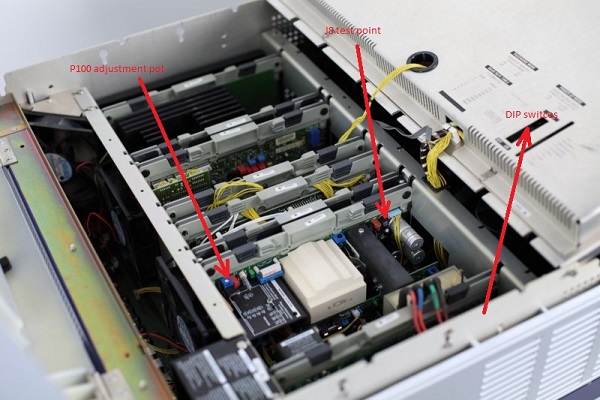
Shut off the projector and plug the mains cord out. Wait for about 10 min or so and push the power button on the back of the PJ on and off again, without the power cord in. On the SMPS board (R763606) you'll see a blue P100 adjustment pot and on the other side of the board, very close to the blue wires-connection, a J8 test point. Grab the testpin with the red crok. of the mutimeter while the black crok. is grabbing the chassis. Now turn your PJ on, choose a 32KHz signal from the internal test paterns and adjust the P100 pot for a reading of 17,2V on testpoint J8. Some Barco users will put that on 17,5 or higher because no one will look at those resolution anymore this days. But that' no so relevant for now, just see if focus improves.
Forgot to mension, try not to use a metal screwdriver for P100 adjustments. Use a ceramic, plastic or make one from wood yourself. I always tend to make one from thos chinees eating sticks. They are perfect.
|
|
| Back to top |
|
|
CasetheCorvetteman
Joined: 09 Nov 2008
Posts: 6326
Location: Australia
|
| Posted: Mon Dec 15, 2014 1:04 pm Post subject: |
|
|
I made the adjustment with a full white screen at 2048x1536 72Hz on my Cine 9, but that obviously wont be practical for a Cine 8, i still found adjusting at 32kHz gave me too low a voltage.
_________________
Barco Cine 9, ,Sony VPL570ES 4K SXRD, 135" OZ Theatre Majestic 16:9 screen, Denon X6700in preamp mode, 2x 7ch Tonewinner amps, 2x Tonewinner 15" subs, 2x 10" subs, 7.2.6...
RUNCO DTV991 LC ( NEC XG 852 LC ) 100" 4:3 screen, H/K AVR 7.1...
|
|
| Back to top |
|
|
Hulio
Joined: 15 Apr 2006
Posts: 494
Location: Belgium
|
| Posted: Mon Dec 15, 2014 7:02 pm Post subject: |
|
|
Yes i know, i remember your post about that. Is whatever will give you enough width and stability on the resolution you watch mostly. And when i say whatever i don't mean 20 volt or so. A too high ( or too low ) voltage and the EHT will generate a HDHT.
In practice, we'll never have a full white screen during movie watching, but could be the best for your CineMax.
No, unfortunately a Cine 8 won't be able to do 2048X1536@72HZ. If that was true, 4K with high end 9 inch machines was almost possible. A cine 8 is in fact nothing else than a late BG808S with colour filtered lenses, less noisy fans, P16 MEC tubes instead of sony 07MFP ( early Cine 8 still used sony tubes ), the proprietary LiMo Pro and a fancy paint job. Still, chassis 56 was Barco's most used and reliable chassis.
Damn, i forgot to add the picture with the adjustment of 17,2V in my pevious post. Here it is.
Trevor, forget the DIP switches from the picture for now, is for when you will have a external RCU.
| Description: |
|
| Filesize: |
94.44 KB |
| Viewed: |
5598 Time(s) |
|
|
|
| Back to top |
|
|
|
|
|
|
|
You cannot post new topics in this forum
You cannot reply to topics in this forum
You cannot edit your posts in this forum
You cannot delete your posts in this forum
You cannot vote in polls in this forum
You cannot attach files in this forum
You can download files in this forum
|
Forum powered by phpBB © phpBB Group
|
|



