| Author |
Message |
Corleone88
Joined: 09 Dec 2006
Posts: 474
Location: France
|
| Posted: Sun Sep 28, 2014 5:50 pm Post subject: |
|
|
| Francisco wrote: | Nice pictures huh  
This is the best card I have had to test so far for Barco. If you use modified video chain like from Eisemann or if you are technical enough to do yourself you'll also get very nice 1:1 mtf
This picture is result of the new Moome Barco-HD board with modified video chain by Greg Eisemann, without added peaking.
 |
What is the meaning of "added peaking"?
|
|
| Back to top |
|
 |
tanwn
Joined: 26 Dec 2006
Posts: 104
|
| Posted: Mon Sep 29, 2014 11:57 am Post subject: |
|
|
|
'Added peaking' means there's a frequency boost at either low, mid or high to enhance sharpness at the expense of some halo.
|
|
| Back to top |
|
|
CasetheCorvetteman

Joined: 09 Nov 2008
Posts: 6326
Location: Australia
|
| Posted: Wed Oct 01, 2014 1:45 am Post subject: |
|
|
| redfox001 wrote: | | I have one question is it possible to ad a factory 817p resolution? I mean 1920x817p@72. I can get it to work on the external Moome but it does not work always. I have to start in 1080p than chose 817p. Perhaps this is just an issue with my Moome? |
I don't have that issue, it could be that your path is not staying connected under certain conditions, there is a jumper inside that will fix that.
_________________
Barco Cine 9, ,Sony VPL570ES 4K SXRD, 135" OZ Theatre Majestic 16:9 screen, Denon X6700in preamp mode, 2x 7ch Tonewinner amps, 2x Tonewinner 15" subs, 2x 10" subs, 7.2.6...
RUNCO DTV991 LC ( NEC XG 852 LC ) 100" 4:3 screen, H/K AVR 7.1...
|
|
| Back to top |
|
|
CasetheCorvetteman
Joined: 09 Nov 2008
Posts: 6326
Location: Australia
|
| Posted: Sat Oct 04, 2014 5:53 pm Post subject: |
|
|
Will the 3D on this work straight from the OPPO 103D?
I have tried to get it to work with the external MOOME with no luck, it states in the manual that a PS3 can be used direct with 3D, so id expect the OPPO should also work.
I dont want to have to buy a radiance just to be able to do 3D straight from the OPPO!!
_________________
Barco Cine 9, ,Sony VPL570ES 4K SXRD, 135" OZ Theatre Majestic 16:9 screen, Denon X6700in preamp mode, 2x 7ch Tonewinner amps, 2x Tonewinner 15" subs, 2x 10" subs, 7.2.6...
RUNCO DTV991 LC ( NEC XG 852 LC ) 100" 4:3 screen, H/K AVR 7.1...
|
|
| Back to top |
|
|
kal
Forum Administrator

Joined: 06 Mar 2006
Posts: 18114
Location: Ottawa, Canada
TV/Projector: JVC DLA-NZ7
|
| Posted: Sun Oct 05, 2014 4:37 am Post subject: |
|
|
Both the EXT-FULLHD and Barco FULLHD card are simply a connection point for the 3D glasses emitter. They do not do any sort of 3D processing.
If you want to watch 3D movies you're going to need either a PC or a Radiance to do the 3D processing for you. Same as Moome's Sony card.
If you only want to play 3D games off the PS3 then the Barco card will do what you need as the PS3 does the gaming 3D processing and the 3D emitter plugs into the Barco card.
I don't know what the Oppo does. Sorry.
Kal
_________________

Support our site by using our affiliate links. We thank you!
My basement/HT/bar/brewery build 2.0
|
|
| Back to top |
|
|
CasetheCorvetteman
Joined: 09 Nov 2008
Posts: 6326
Location: Australia
|
| Posted: Sun Oct 05, 2014 5:00 am Post subject: |
|
|
Why can the PS3 be used to directly connect to the V3 Ext MOOME and run 3D though if nothing else can??? Wouldn't the 3D output be the same from that bluray player as apposed to others???
At the moment I use a PC with Windows 8 and Power DVD 13 ULTRA, and using the RGB output to give me 3D with the NVidia glasses.
_________________
Barco Cine 9, ,Sony VPL570ES 4K SXRD, 135" OZ Theatre Majestic 16:9 screen, Denon X6700in preamp mode, 2x 7ch Tonewinner amps, 2x Tonewinner 15" subs, 2x 10" subs, 7.2.6...
RUNCO DTV991 LC ( NEC XG 852 LC ) 100" 4:3 screen, H/K AVR 7.1...
|
|
| Back to top |
|
|
kal
Forum Administrator
Joined: 06 Mar 2006
Posts: 18114
Location: Ottawa, Canada
TV/Projector: JVC DLA-NZ7
|
|
| Back to top |
|
|
CasetheCorvetteman
Joined: 09 Nov 2008
Posts: 6326
Location: Australia
|
| Posted: Sun Oct 05, 2014 1:09 pm Post subject: |
|
|
Yeah it make me wonder though, if it can do PS3 games in 3D straight in, why not bluray movies??? It also says it can do them straight from the PC to the MOOME, i personally never ever got that to work either.
_________________
Barco Cine 9, ,Sony VPL570ES 4K SXRD, 135" OZ Theatre Majestic 16:9 screen, Denon X6700in preamp mode, 2x 7ch Tonewinner amps, 2x Tonewinner 15" subs, 2x 10" subs, 7.2.6...
RUNCO DTV991 LC ( NEC XG 852 LC ) 100" 4:3 screen, H/K AVR 7.1...
|
|
| Back to top |
|
|
kal
Forum Administrator
Joined: 06 Mar 2006
Posts: 18114
Location: Ottawa, Canada
TV/Projector: JVC DLA-NZ7
|
|
| Back to top |
|
|
CasetheCorvetteman
Joined: 09 Nov 2008
Posts: 6326
Location: Australia
|
| Posted: Mon Oct 06, 2014 12:12 am Post subject: |
|
|
Its still just a video output...
What gets me is why can the HD Fury do it, but the MOOME is apparently the best, yet it CANT do it without an extra processor?
_________________
Barco Cine 9, ,Sony VPL570ES 4K SXRD, 135" OZ Theatre Majestic 16:9 screen, Denon X6700in preamp mode, 2x 7ch Tonewinner amps, 2x Tonewinner 15" subs, 2x 10" subs, 7.2.6...
RUNCO DTV991 LC ( NEC XG 852 LC ) 100" 4:3 screen, H/K AVR 7.1...
|
|
| Back to top |
|
|
redfox001

Joined: 16 Mar 2009
Posts: 2257
Location: The Netherlands
|
| Posted: Mon Oct 06, 2014 8:31 am Post subject: Re: 1080p refresh rate |
|
|
| fearn48 wrote: | Hi all,
In the owners manual, in the "HDMI support mode table" on page 4, it does not show 48Hz under the 1080p entry. Will the card do this?
I currently use an hdfury3, fed from a lumagen XS, to get the single into my Runco DTV-1100. 1080p48 and 817p72 work well with this setup. I just want to make shore it will still work with this card.
Thanks |
I asked the tester to look at this as sometimes I have to shift the image on a Moome box at a certain resolution. But perhaps that is all in my Moome boks only 
_________________
701s->runco933->8500ultra->cinemax->9500mp->919 splitpack + cinemax
|
|
| Back to top |
|
|
CasetheCorvetteman
Joined: 09 Nov 2008
Posts: 6326
Location: Australia
|
| Posted: Mon Oct 06, 2014 11:49 am Post subject: |
|
|
I too have to shift the image at 1920x1080p, i shift it a fair way to the right of the raster or i get a line near the right side, my blankings are about 23 left and 2 on the right.
_________________
Barco Cine 9, ,Sony VPL570ES 4K SXRD, 135" OZ Theatre Majestic 16:9 screen, Denon X6700in preamp mode, 2x 7ch Tonewinner amps, 2x Tonewinner 15" subs, 2x 10" subs, 7.2.6...
RUNCO DTV991 LC ( NEC XG 852 LC ) 100" 4:3 screen, H/K AVR 7.1...
|
|
| Back to top |
|
|
CasetheCorvetteman
Joined: 09 Nov 2008
Posts: 6326
Location: Australia
|
| Posted: Thu Oct 09, 2014 2:13 am Post subject: |
|
|
Who knows anything about this device?
http://www.moomecard.com/moome/products/item/22-ext-3d
_________________
Barco Cine 9, ,Sony VPL570ES 4K SXRD, 135" OZ Theatre Majestic 16:9 screen, Denon X6700in preamp mode, 2x 7ch Tonewinner amps, 2x Tonewinner 15" subs, 2x 10" subs, 7.2.6...
RUNCO DTV991 LC ( NEC XG 852 LC ) 100" 4:3 screen, H/K AVR 7.1...
|
|
| Back to top |
|
|
kal
Forum Administrator
Joined: 06 Mar 2006
Posts: 18114
Location: Ottawa, Canada
TV/Projector: JVC DLA-NZ7
|
|
| Back to top |
|
|
kal
Forum Administrator
Joined: 06 Mar 2006
Posts: 18114
Location: Ottawa, Canada
TV/Projector: JVC DLA-NZ7
|
|
| Back to top |
|
|
twdotnet
Joined: 02 Oct 2008
Posts: 3
Location: Germany
|
| Posted: Tue Dec 02, 2014 10:17 pm Post subject: |
|
|
Got mine today and hooked it up right away. Works like a sharm - only the buzzer was a surprise 
|
|
| Back to top |
|
|
moome
Joined: 01 Jun 2007
Posts: 497
|
| Posted: Wed Dec 03, 2014 3:25 pm Post subject: |
|
|
| twdotnet wrote: | | Got mine today and hooked it up right away. Works like a sharm - only the buzzer was a surprise |
hi, twdotnet, what model of BARCO you use?
can you share some picture of your card list in the chassis ?
thanks
|
|
| Back to top |
|
|
twdotnet
Joined: 02 Oct 2008
Posts: 3
Location: Germany
|
| Posted: Wed Dec 03, 2014 10:29 pm Post subject: |
|
|
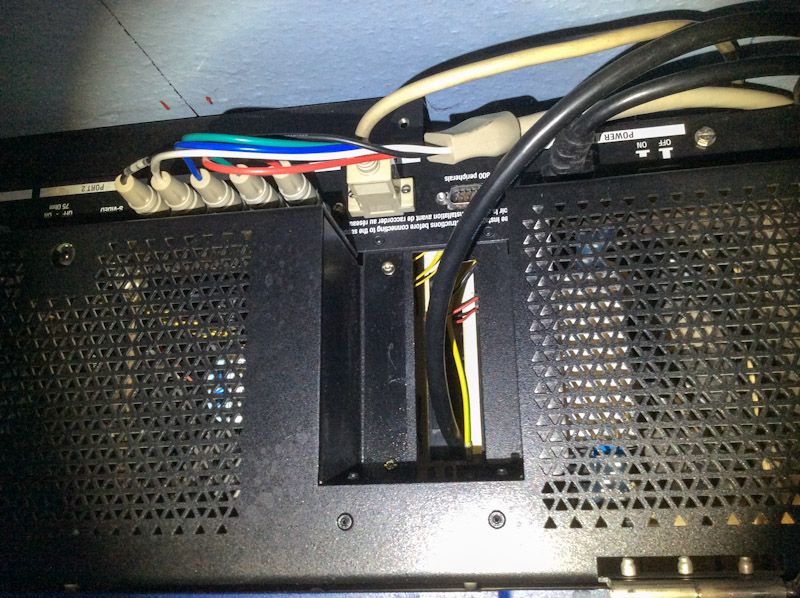
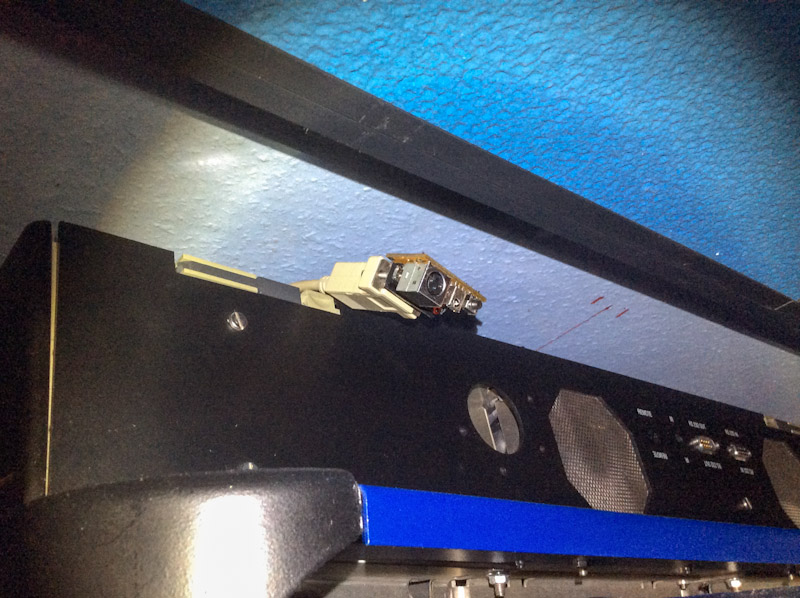
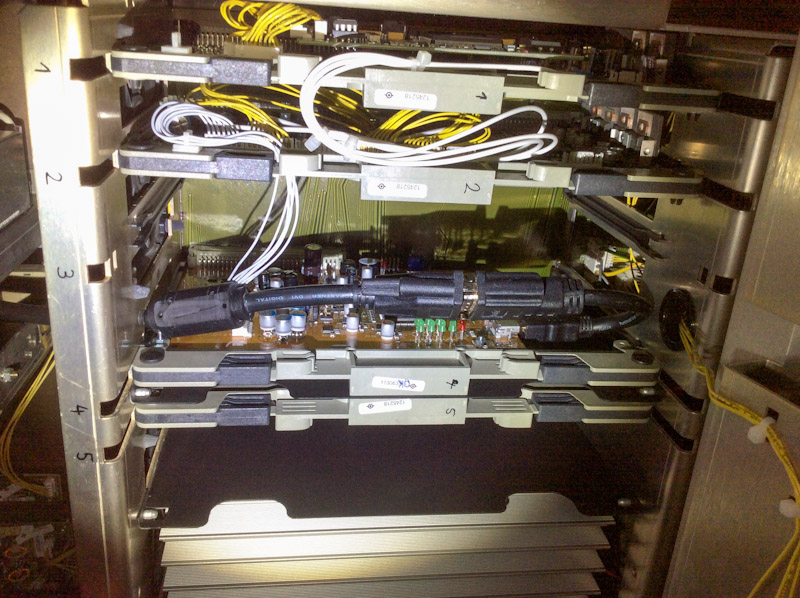
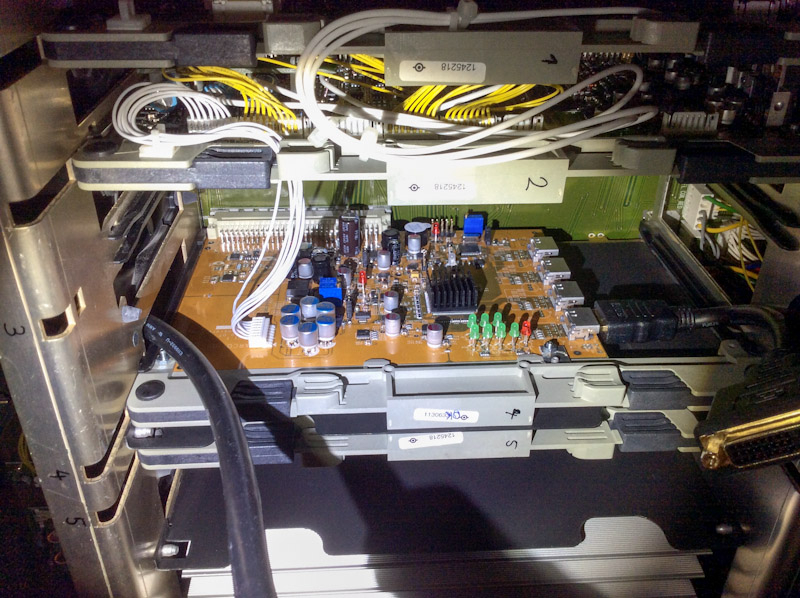
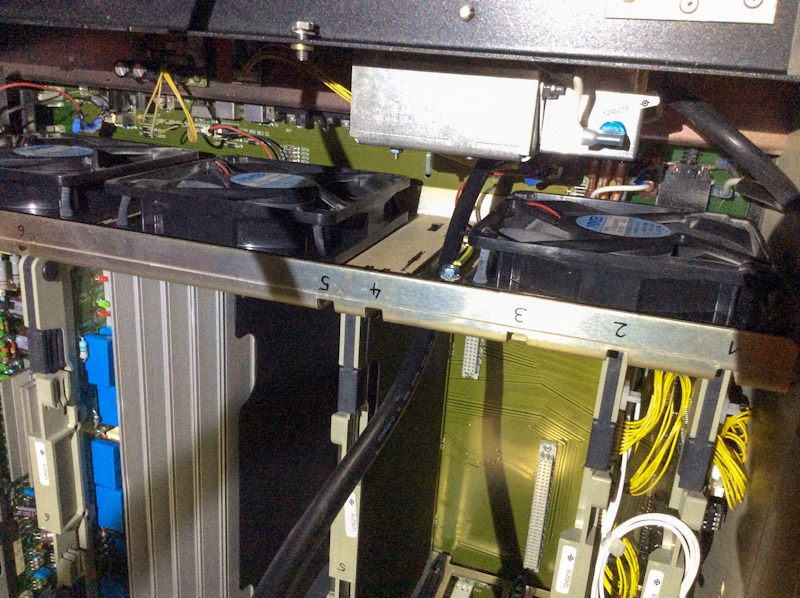
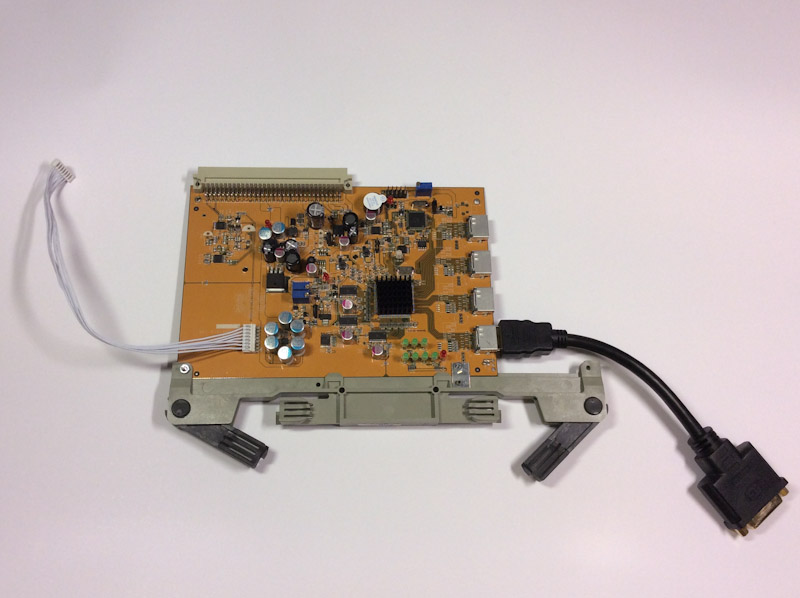
The card is installed in a Barco Reality 909 Chassis. The DVI/HDMI cable is routed through a hole previously covered. The remote board is connected via DB9-Cable and has moved top-front. Here some pictures.
| Description: |
| DVI/HDMI cable passage into chassis |
|
| Filesize: |
230.93 KB |
| Viewed: |
25645 Time(s) |
|
| Description: |
|
| Filesize: |
187.2 KB |
| Viewed: |
25645 Time(s) |
|
| Description: |
|
| Filesize: |
222.36 KB |
| Viewed: |
25645 Time(s) |
|
| Description: |
|
| Filesize: |
229.28 KB |
| Viewed: |
25645 Time(s) |
|
| Description: |
| DVI/HDMI cable passage within chassis |
|
| Filesize: |
239.39 KB |
| Viewed: |
25645 Time(s) |
|
| Description: |
| card with bracket attached |
|
| Filesize: |
108.42 KB |
| Viewed: |
25645 Time(s) |
|
|
|
| Back to top |
|
|
moome
Joined: 01 Jun 2007
Posts: 497
|
| Posted: Thu Dec 04, 2014 1:59 pm Post subject: |
|
|
|
Wow, Great job, hope you enjoy with the card. anything you find not good?
|
|
| Back to top |
|
|
fearn48
Joined: 07 May 2008
Posts: 26
Location: Reading, England
|
| Posted: Sat Dec 06, 2014 8:39 am Post subject: Re: 1080p refresh rate |
|
|
| redfox001 wrote: | | fearn48 wrote: | Hi all,
In the owners manual, in the "HDMI support mode table" on page 4, it does not show 48Hz under the 1080p entry. Will the card do this?
I currently use an hdfury3, fed from a lumagen XS, to get the single into my Runco DTV-1100. 1080p48 and 817p72 work well with this setup. I just want to make shore it will still work with this card.
Thanks |
I asked the tester to look at this as sometimes I have to shift the image on a Moome box at a certain resolution. But perhaps that is all in my Moome boks only |
Thanks for the warning Redfox,
I have some custom porch setting at the moment to prevent the wraparound effect, and to make the picture wide enough I had to increase an adjustment (G2, if memory serves) to well past normal.
I'm expecting to have to do a full alignment after fitting the moome card. I'm hoping I will be able to reduce some of the more Extreem settings I've had to do to get the correct size picture, as I'm really pushing the limits at the moment.
Thanks.
_________________
If only you could see what I've seen with your eyes!
|
|
| Back to top |
|
|
|
|




