|
As this forum is rarely used anymore, we've locked it. Feel free to browse and read. Questions? Please reach out to us directly. Cheers! |

|
 |
|
|
| Author |
Message |
hiddink
Joined: 09 Jan 2014
Posts: 47
|
| Posted: Tue May 13, 2014 6:36 pm Post subject: |
|
|
Hello,
Anyone has a cheap sync inverter for sale (Extron 203 fe), based in Europe, near the NL?
There are several available from Ebay but these are mostly from the States and then, shipping and handling triples the cost...
Please let me know!
Thanks in advance!
-brt
|
|
| Back to top |
|
 |
hiddink
Joined: 09 Jan 2014
Posts: 47
|
| Posted: Tue May 13, 2014 6:41 pm Post subject: |
|
|
| tschaeikaei wrote: |
BTW: Do you have to create a new topic for everything? This is the third thread now, always the same questions. Barco 808 does not run as you want it to.
Why don't you put everything to the "Barco only runs on red tube" thread and ask kal to delete those other two?
Regards, Julian |
You're right, I made a mess of it, sorry for that, I just copied them over and I'll ask Kal to delete the other two...
-brt
|
|
| Back to top |
|
|
hiddink
Joined: 09 Jan 2014
Posts: 47
|
| Posted: Tue May 13, 2014 6:56 pm Post subject: |
|
|
| hiddink wrote: | Hello,
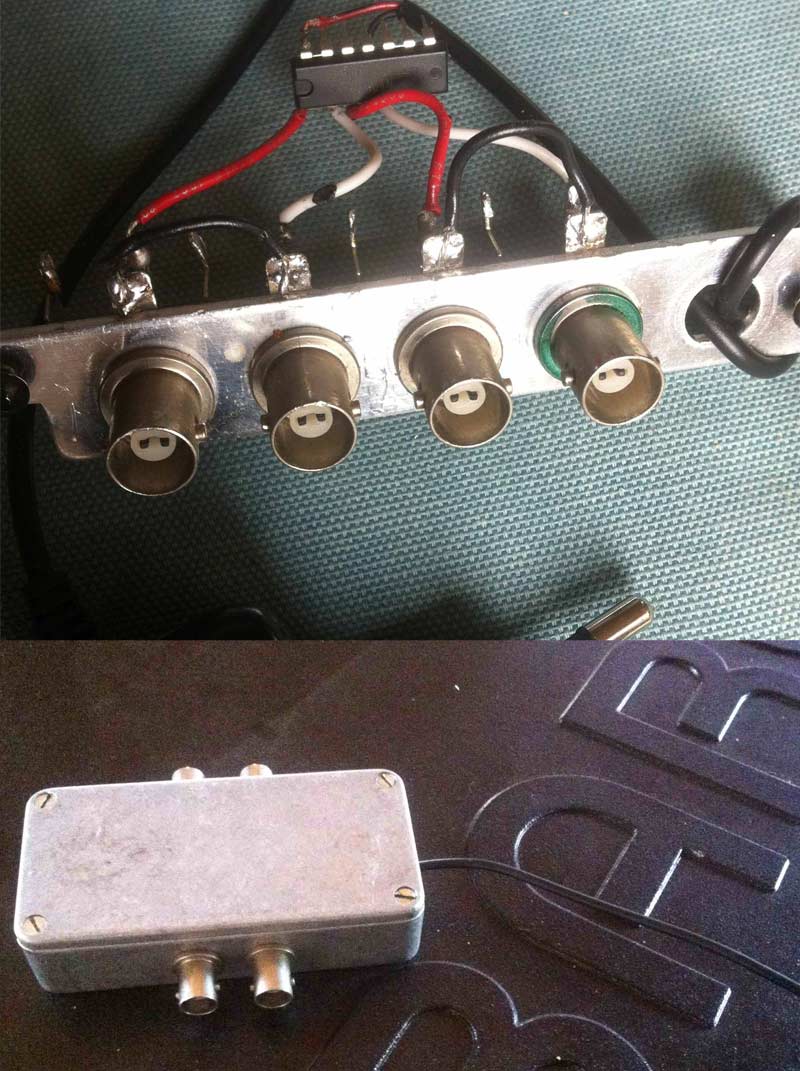
Today I made a sync inverter for barco G 808, based on this part:
http://nl.rs-online.com/web/p/hex-inverters/0307503P/
I got the +5V power from a cell phone, followed the scheme here:
http://www.twobits.com/sync.html
Look at the images for the result (proof of concept)...
Now, when I connect a normal DVD-player to port 5 WITHOUT the inverter, I get a good image from the projector.
However, when I use the DVD-player WITH the inverter, I get "Source not available"...
What could I have overlooked that it does not work? Any ideas?
Thanks in advance,
-brt
| gjaky wrote: | Port 5 accepts only negative sync, right?
So your DVD player have negative sync on output, since the projector works. Now your sync inverter inverts sync so the negative becomes to positive, which is not accepted on port 5 so to me it seems to be working. |
| tschaeikaei wrote: | An inverter inverts the signals polarity. Barcos run on negative Sync polarity. So if your DVD player puts out negative, the inverter will invert it to positive.
And the projector does not run with that. OK?
Regards, Julian |
|
I got your point and you're both right: when I connect my MacBook Pro to the Port5, in case I DON'T use the sync inverter, I do not get an image ("Source not available"), in case I DO use it with my inverter, I get a nice image of my Desktop at 1080p...so that's good news...however, the image disappears for 2 seconds, I get a grey, noised or "snowed" image and after 3 seconds, the Desktop image comes back for several seconds, disappears, and so-forth, and so-forth...
Any idea where this comes from?
Thanks again!
Regards,
-brt
|
|
| Back to top |
|
|
CasetheCorvetteman

Joined: 09 Nov 2008
Posts: 6326
Location: Australia
|
| Posted: Wed May 14, 2014 8:28 am Post subject: |
|
|
| tschaeikaei wrote: | Case, do you use a PC for 1080i on the PG?
I tried 1080i72 yesterday, didn't work that well.
Sometimes i only got half the picture on the screen,
sometimes the whole pic but it was distorted as hell.
Horizontal lines through the whole picture that went over the edges.
I'm not an expert in setting porches, so maybe you can post me your powerstrip-settings?
Thanks, Julian |
Ive never used power strip, nVIDIA has it all included in the driver. I only use the stock timings and only 50 and 60Hz, i was doing nVIDIA 3D at 1366x768 72 or 75Hz.
_________________
Barco Cine 9, ,Sony VPL570ES 4K SXRD, 135" OZ Theatre Majestic 16:9 screen, Denon X6700in preamp mode, 2x 7ch Tonewinner amps, 2x Tonewinner 15" subs, 2x 10" subs, 7.2.6...
RUNCO DTV991 LC ( NEC XG 852 LC ) 100" 4:3 screen, H/K AVR 7.1...
|
|
| Back to top |
|
|
CasetheCorvetteman
Joined: 09 Nov 2008
Posts: 6326
Location: Australia
|
| Posted: Wed May 14, 2014 8:31 am Post subject: |
|
|
| hiddink wrote: | | tschaeikaei wrote: |
BTW: Do you have to create a new topic for everything? This is the third thread now, always the same questions. Barco 808 does not run as you want it to.
Why don't you put everything to the "Barco only runs on red tube" thread and ask kal to delete those other two?
Regards, Julian |
You're right, I made a mess of it, sorry for that, I just copied them over and I'll ask Kal to delete the other two...
-brt |
Create as many new bloody threads as you like!!
There is more important things to worry about than how many threads you create on a forum!!
_________________
Barco Cine 9, ,Sony VPL570ES 4K SXRD, 135" OZ Theatre Majestic 16:9 screen, Denon X6700in preamp mode, 2x 7ch Tonewinner amps, 2x Tonewinner 15" subs, 2x 10" subs, 7.2.6...
RUNCO DTV991 LC ( NEC XG 852 LC ) 100" 4:3 screen, H/K AVR 7.1...
|
|
| Back to top |
|
|
hiddink
Joined: 09 Jan 2014
Posts: 47
|
| Posted: Wed May 14, 2014 12:44 pm Post subject: |
|
|
Hello.
I definitely can confirm that the DIY sync inverter works, used in combination with the HD Fury...
Tonight, I connected a raspberry pi (tiny media server capable of playing 1080p) to it, and without the inverter, I got a "Source not available". When I connected the inverter with it, I got a nice and stable image...
http://www.raspberrypi.org/
http://www.raspbmc.com/
So I am wondering why the inverter did not resolve my issues with the iPad...any ideas?
Thanks and regards,
-brt
|
|
| Back to top |
|
|
CasetheCorvetteman
Joined: 09 Nov 2008
Posts: 6326
Location: Australia
|
| Posted: Thu May 15, 2014 3:21 am Post subject: |
|
|
Yeah mate, timings are incorrect. Someone else will be able to explain it better, but from memory i think it was sync width that is too short.
_________________
Barco Cine 9, ,Sony VPL570ES 4K SXRD, 135" OZ Theatre Majestic 16:9 screen, Denon X6700in preamp mode, 2x 7ch Tonewinner amps, 2x Tonewinner 15" subs, 2x 10" subs, 7.2.6...
RUNCO DTV991 LC ( NEC XG 852 LC ) 100" 4:3 screen, H/K AVR 7.1...
|
|
| Back to top |
|
|
hiddink
Joined: 09 Jan 2014
Posts: 47
|
| Posted: Thu May 15, 2014 6:28 am Post subject: |
|
|
| CasetheCorvetteman wrote: | | Yeah mate, timings are incorrect. Someone else will be able to explain it better, but from memory i think it was sync width that is too short. |
FINALLY, I got a nice picture on the Barco G808 with a Netflix-video from the iPad (with HD Fury on port 5)!!!
After that I had built the sync-inverter, I had tested it with an iPhone, then I got a "Source not available" so I gave up for then, supposing that both iPhone and iPad would act in the same way. Until then, I could only successfully connect a Raspberry Pi with XBMC ...
However, yesterday I tested once again now with my iPad and guess what: I got a very nice picture, I am very happy with this result! I need to do some fine-tuning on the projector but the overall result is very nice...One of the reasons I like connecting my iPad to the Barco is that I can stream the audio directly to my hifi using Airplay on the iPad while the video stream goes into projector.
You mention "incorrect timings" but how can I become aware of the specific timings (h-sync and v-sync) a specific device needs? Just by trial and error? I saw how to configure a custom-preset in the barco (h-sync, v-sync) but how assure that the connected device picks up this specific preset?
Thanks again for all your help...I am very happy so far with the result...last week I ordered a Chromecast http://www.google.nl/intl/en/chrome/devices/chromecast/. Want to test this also in this set-up...
The only thing which remains unclear to me is why the port3 with a thoroughly tested custom-cable (VGA-D-sub 9) does not work. Would be nice to have that working also in order to compare results...
Anyway, thanks again to all of you for your patience!
Regards,
-brt
|
|
| Back to top |
|
|
CasetheCorvetteman
Joined: 09 Nov 2008
Posts: 6326
Location: Australia
|
| Posted: Thu May 15, 2014 7:30 am Post subject: |
|
|
Good that you got it working 
The timings you adjust are at the source, not at the projector. I had issues with one of my bluray players after updating firmware, wouldnt work on the Barco, but fine on the XG, so i never updated the other bluray player. Ive seen the same when i updated nVIDIA drivers too.
_________________
Barco Cine 9, ,Sony VPL570ES 4K SXRD, 135" OZ Theatre Majestic 16:9 screen, Denon X6700in preamp mode, 2x 7ch Tonewinner amps, 2x Tonewinner 15" subs, 2x 10" subs, 7.2.6...
RUNCO DTV991 LC ( NEC XG 852 LC ) 100" 4:3 screen, H/K AVR 7.1...
|
|
| Back to top |
|
|
tschaeikaei
Joined: 08 Apr 2013
Posts: 490
Location: Germany/Saarland
|
| Posted: Fri May 16, 2014 1:19 pm Post subject: |
|
|
So did you get port3 to work?
If timing on the source are not changable, try to switch retrace time on the projector menu.
| Quote: | | so that's good news...however, the image disappears for 2 seconds, I get a grey, noised or "snowed" image and after 3 seconds, the Desktop image comes back for several seconds, disappears, and so-forth, and so-forth...snowed |
I know of a strange behavior my Barco G400 had. It switched itself off from time to time (tubes black) and back on after a few seconds.
This is similar to your problem, but not the same.
In my case it was because the sync level (amplitude/voltage) was too high.
If you have a scope maybe measure H and V-Sync voltages and if it is too much, try a resistor in line.
I do not know if a resistor is a good solution in that case, but other people can tell.
But, don't worry, you cannot kill something by adding a resistor. To me, it was a good help.
Regards, Julian
_________________
Marquee 9500U edgeblend P43 | NEC 9PG
|
|
| Back to top |
|
|
CasetheCorvetteman
Joined: 09 Nov 2008
Posts: 6326
Location: Australia
|
| Posted: Fri May 16, 2014 10:03 pm Post subject: |
|
|
Resistor will be fine yes. Assuming that is what it needs.
_________________
Barco Cine 9, ,Sony VPL570ES 4K SXRD, 135" OZ Theatre Majestic 16:9 screen, Denon X6700in preamp mode, 2x 7ch Tonewinner amps, 2x Tonewinner 15" subs, 2x 10" subs, 7.2.6...
RUNCO DTV991 LC ( NEC XG 852 LC ) 100" 4:3 screen, H/K AVR 7.1...
|
|
| Back to top |
|
|
hiddink
Joined: 09 Jan 2014
Posts: 47
|
| Posted: Mon May 19, 2014 6:34 am Post subject: |
|
|
| tschaeikaei wrote: | So did you get port3 to work?
If timing on the source are not changable, try to switch retrace time on the projector menu.
| Quote: | | so that's good news...however, the image disappears for 2 seconds, I get a grey, noised or "snowed" image and after 3 seconds, the Desktop image comes back for several seconds, disappears, and so-forth, and so-forth...snowed |
I know of a strange behavior my Barco G400 had. It switched itself off from time to time (tubes black) and back on after a few seconds.
This is similar to your problem, but not the same.
In my case it was because the sync level (amplitude/voltage) was too high.
If you have a scope maybe measure H and V-Sync voltages and if it is too much, try a resistor in line.
I do not know if a resistor is a good solution in that case, but other people can tell.
But, don't worry, you cannot kill something by adding a resistor. To me, it was a good help.
Regards, Julian |
Hello Julian,
No, port 3 does not work, I still need to solder the Scart-Dsub-9 cable to check whether there is a problem with the board of port 3.
I made a beautified version of the sync inverter this weekend and with that, port 5 works very well at 1080p (iPad, Raspberry PI, etc)...
The issue with the noisy or snowy image sometimes appears but can be fixed easily by releasing/connecting the HDMI cable to the HD Fury once, the sequence of how I connect projector/inverter/hd fury/device seems to play a role there...Not a big issue though...
What remains is port 3, have to work on that to see why the customized cable does not work...
Thanks again!
-brt
| Description: |
|
| Filesize: |
121.8 KB |
| Viewed: |
6506 Time(s) |
|
|
|
| Back to top |
|
|
|
|
|
|
|
You cannot post new topics in this forum
You cannot reply to topics in this forum
You cannot edit your posts in this forum
You cannot delete your posts in this forum
You cannot vote in polls in this forum
You cannot attach files in this forum
You can download files in this forum
|
Forum powered by phpBB © phpBB Group
|
|




