|
As this forum is rarely used anymore, we've locked it. Feel free to browse and read. Questions? Please reach out to us directly. Cheers! |

|
 |
|
|
| Author |
Message |
ecrabb
Forum Moderator

Joined: 13 Mar 2006
Posts: 15909
Location: Utah
TV/Projector: JVC RS40, Epson 5010
|
| Posted: Tue May 06, 2014 6:22 pm Post subject: |
|
|
| jbmeyer13 wrote: | Zero keystone (lens angle matching the screen angle and lens center height at screen center height) results in light bouncing back into the lens which is not optimal. The manual is vague on the screen tilt (>15 degrees) and/or benefits of implementing such a solution. If I place a 5" shim at the top mounting brackets on my screen that would equate to a 5.8 degree tilt angle. Based on my proposed projector/lens location that would yield a delta of 2.2 degrees (8 degrees - 5.8 degrees=2.2).
I'm thinking that tilting the screen would result with some light being bounced back into the lens and that it would be better to go with my proposed solution in the diagram above. |
Thought about this a little more, Justin… I'm not sure it's worth the work for you. Doing some very rough math and sketches in the computer, moving from your current setup to the proposed setup just doesn't move the needle that much in terms of squaring up the raster. You're going from roughly 18 degrees of offset to about 13 degrees… About a quarter of the way to a zero-keystone setup.
So, rough numbers… I don't know the exact absolute numbers, so I'm guessing. But, the percentages should be in the ballpark. With your current setup, if your raster is maximized at around 6 inches wide, then the keystone reduces the opposite side of the raster to about 5.5 inches. After you build a new platform and move the projector up, I think you'll only gain about 3/16" of an inch more raster.
Here's what I'd do. Throw up the black/white pattern that everybody uses and compare top and bottom. Bandwidth restrictions should restrict top and bottom equally. The horizontally-compressed raster should affect the top of the screen (for your floor-mount install) more than the bottom. If the top is noticeably softer, then it may be worth raising the projector. If they're not appreciably different, then it's probably not worth it.
Tilting your screen down the same amount would have the same effect btw, but unlike raising the projector would also have the added benefit of tilting the screen image toward the viewers.
SC
|
|
| Back to top |
|
 |
jbmeyer13
Joined: 03 Dec 2010
Posts: 1135
|
| Posted: Tue May 06, 2014 6:51 pm Post subject: |
|
|
| ecrabb wrote: | | jbmeyer13 wrote: | Zero keystone (lens angle matching the screen angle and lens center height at screen center height) results in light bouncing back into the lens which is not optimal. The manual is vague on the screen tilt (>15 degrees) and/or benefits of implementing such a solution. If I place a 5" shim at the top mounting brackets on my screen that would equate to a 5.8 degree tilt angle. Based on my proposed projector/lens location that would yield a delta of 2.2 degrees (8 degrees - 5.8 degrees=2.2).
I'm thinking that tilting the screen would result with some light being bounced back into the lens and that it would be better to go with my proposed solution in the diagram above. |
Thought about this a little more, Justin… I'm not sure it's worth the work for you. Doing some very rough math and sketches in the computer, moving from your current setup to the proposed setup just doesn't move the needle that much in terms of squaring up the raster. You're going from roughly 18 degrees of offset to about 13 degrees… About a quarter of the way to a zero-keystone setup.
So, rough numbers… I don't know the exact absolute numbers, so I'm guessing. But, the percentages should be in the ballpark. With your current setup, if your raster is maximized at around 6 inches wide, then the keystone reduces the opposite side of the raster to about 5.5 inches. After you build a new platform and move the projector up, I think you'll only gain about 3/16" of an inch more raster.
Here's what I'd do. Throw up the black/white pattern that everybody uses and compare top and bottom. Bandwidth restrictions should restrict top and bottom equally. The horizontally-compressed raster should affect the top of the screen (for your floor-mount install) more than the bottom. If the top is noticeably softer, then it may be worth raising the projector. If they're not appreciably different, then it's probably not worth it.
Tilting your screen down the same amount would have the same effect btw, but unlike raising the projector would also have the added benefit of tilting the screen image toward the viewers.
SC |
Thanks Steve...All great points! I do have the box built (from previous set up) but moving the PJ is a PITA for a multitude of reasons. Shimming the top of the screen 5" is not entirely easy either since the screen weighs more than 100lbs. I'll probably need special bolts to accommodate such a set up. I'll have to think about that as I'm not an expert on load bearing applications of this nature 
_________________
Projector: Modded 9501LC ULtra- MP VIM, Vold VNB, ETECH LVPS, Silver VIM Cables, HD10F's & a V1 case!
|
|
| Back to top |
|
|
thewolfman
Joined: 28 Mar 2011
Posts: 1311
Location: Sweden
|
| Posted: Tue May 06, 2014 10:02 pm Post subject: |
|
|
I really want to do this myself, raise it to a near perfect 90 degree angle. Seeing that I have a blue tube on the floor right now, that needs replacing, I don't see a reason why I shouldn't be doing this. It will be quite light empty and all I need to do is lift it up 3 links at the ceiling, and if I don't like it I could just lower it down again. A little lensflap and I should know as well if it made any difference with light bouncing back in the lenses. The links makes it off by 1 inch instead 5 and that's as close as I can get it with things that I have.
EDIT: I meant to level the tubes to a near perfect 90 degree angle instead of having top lid in a 90 degree angle as it sits. Actually, I'm sticking with how things are. I think. At least you got some alternative "angles" on how to do things. That's always good. Looking forward to the outcome, btw.
My numbers..
Screen - lens center: 316 cm
Lens center - floor: 108,5 cm
Actual viewing screen surface: 108 cm
Lens center - actual viewing surface hight: 40 cm
Screen center - Floor: 121,5 cm
Should be it I think.
| Description: |
|
| Filesize: |
284.07 KB |
| Viewed: |
2815 Time(s) |
|
Last edited by thewolfman on Wed May 07, 2014 6:49 pm; edited 1 time in total
|
|
| Back to top |
|
|
CasetheCorvetteman

Joined: 09 Nov 2008
Posts: 6326
Location: Australia
|
| Posted: Wed May 07, 2014 12:04 am Post subject: |
|
|
| ecrabb wrote: | | CasetheCorvetteman wrote: | | In my case it works very well for me to have it installed with very little angle due to the ceiling being lower at the projector end, the halos around bright objects do seem to be a little worse though, whether or not this is related i wouldnt know. |
I suppose since the screen is on the focal plane, the screen would put some light back on the phosphor. Think of the projector as also like a camera; the screen is the "scene" and the phosphor becomes the film.
An even better comparison for us old farts that ever did traditional darkroom photography is an enlarger. A zero-keystone projector is working exactly as the enlarger did. The major difference is that the enlarger's primary focal point (the film) was very dark object while the projector's primary focal point is white phosphor. The enlarger also typically had very slow, very sharp lenses; the CRT projector not so much.
The only time I ever saw obvious, horrible halos was with my 12xx, which is air-coupled HD-8's. Literally if there was a bright point-source light like a moon on the screen, there would be a giant halo about 3x the size, at about 10% intensity, seat-of-the-pants numbers, of course. The G70 was much less noticeable; so much so that it almost seemed like my eyes doing it rather than the projector.
I'd guess most of your haloing is probably the CRT's optics itself. ANSI contrast, by far, is the CRT projector's biggest achilles heel. Huge lens, and a large, white imaging surface.
Should be easy to test, though. Use your HTPC and load up an all-black image with a big white dot. First, look at at on the top part of the screen where it should be reflecting back into the lens, then move the big dot to the bottom of the screen where most of the light would be reflective down toward the viewing position and see whether the halo is any different. If it's not significantly different, it's the CRT optical system itself; if it's much worse up high, then it's the light bouncing off the screen and back into the lens and lighting up the phosphor.
Cheers,
SC |
Ive got newer tubes coming in LC housings and some HD-18 lenses, as well as the different brackets that vary between my AC and the LCs, so ill do some testing between the two while im at it.
_________________
Barco Cine 9, ,Sony VPL570ES 4K SXRD, 135" OZ Theatre Majestic 16:9 screen, Denon X6700in preamp mode, 2x 7ch Tonewinner amps, 2x Tonewinner 15" subs, 2x 10" subs, 7.2.6...
RUNCO DTV991 LC ( NEC XG 852 LC ) 100" 4:3 screen, H/K AVR 7.1...
|
|
| Back to top |
|
|
jbmeyer13
Joined: 03 Dec 2010
Posts: 1135
|
| Posted: Thu May 08, 2014 6:02 pm Post subject: |
|
|
| jbmeyer13 wrote: | | ecrabb wrote: | | jbmeyer13 wrote: | Zero keystone (lens angle matching the screen angle and lens center height at screen center height) results in light bouncing back into the lens which is not optimal. The manual is vague on the screen tilt (>15 degrees) and/or benefits of implementing such a solution. If I place a 5" shim at the top mounting brackets on my screen that would equate to a 5.8 degree tilt angle. Based on my proposed projector/lens location that would yield a delta of 2.2 degrees (8 degrees - 5.8 degrees=2.2).
I'm thinking that tilting the screen would result with some light being bounced back into the lens and that it would be better to go with my proposed solution in the diagram above. |
Thought about this a little more, Justin… I'm not sure it's worth the work for you. Doing some very rough math and sketches in the computer, moving from your current setup to the proposed setup just doesn't move the needle that much in terms of squaring up the raster. You're going from roughly 18 degrees of offset to about 13 degrees… About a quarter of the way to a zero-keystone setup.
So, rough numbers… I don't know the exact absolute numbers, so I'm guessing. But, the percentages should be in the ballpark. With your current setup, if your raster is maximized at around 6 inches wide, then the keystone reduces the opposite side of the raster to about 5.5 inches. After you build a new platform and move the projector up, I think you'll only gain about 3/16" of an inch more raster.
Here's what I'd do. Throw up the black/white pattern that everybody uses and compare top and bottom. Bandwidth restrictions should restrict top and bottom equally. The horizontally-compressed raster should affect the top of the screen (for your floor-mount install) more than the bottom. If the top is noticeably softer, then it may be worth raising the projector. If they're not appreciably different, then it's probably not worth it.
Tilting your screen down the same amount would have the same effect btw, but unlike raising the projector would also have the added benefit of tilting the screen image toward the viewers.
SC |
Thanks Steve...All great points! I do have the box built (from previous set up) but moving the PJ is a PITA for a multitude of reasons. Shimming the top of the screen 5" is not entirely easy either since the screen weighs more than 100lbs. I'll probably need special bolts to accommodate such a set up. I'll have to think about that as I'm not an expert on load bearing applications of this nature |
Hey Steve,
When you have a moment, can you do some rough math to see if it matches mine?
New Proposal:
Center of lens: 33.0” from floor (12” platform on top of current set up)
Centerline of the screen: 47.25” from floor (49 x 87 screen size)
Screen tilt: 3” outward at top
-With the screen flat against the wall I’m getting a 7 degree projection angle and if I then shim the top of the screen 3” that should translate to an additional 3.5 degree reduction. This should net to an offset of approx. 3.5 degrees.
What’s the differential between just shimming the screen and both shimming plus raising the PJ another 12”?
The image is by no means soft in the current incarnation but I’m curious as to the possible improvement. My guess is that the best option is to just shim the screen as this should be a little easier to incorporate and if for some reason I don’t like it, much easier to undo.
Thanks,
Justin
_________________
Projector: Modded 9501LC ULtra- MP VIM, Vold VNB, ETECH LVPS, Silver VIM Cables, HD10F's & a V1 case!
|
|
| Back to top |
|
|
416ray4538
Joined: 14 Jul 2009
Posts: 517
Location: near Toronto Ont
|
| Posted: Sat May 10, 2014 3:05 pm Post subject: |
|
|
Link Posted: Mon Jan 06, 2014 7:59 pm Post subject:
416ray4538 wrote:
If not for the pj being in the way,wouldn't the ideal be to have the face of the CRT parallel to the screen then keystone wouldn't be an issue?
I assume that the tilt of the CRTs relative to the case is a practical angle but with the back tilted down on a ceiling mount the faces are closer to parallel ?
no, for zero keystone the PJ is designed to have a 15 degree angle relationship between lenses and screen, or 75 degrees depending on how you look at it.
_________________
When the first clock was invented, how did they know what time to set it to?
No point being pessimistic; it probably would't work anyway.
|
|
| Back to top |
|
|
jbmeyer13
Joined: 03 Dec 2010
Posts: 1135
|
| Posted: Mon May 19, 2014 8:34 pm Post subject: |
|
|
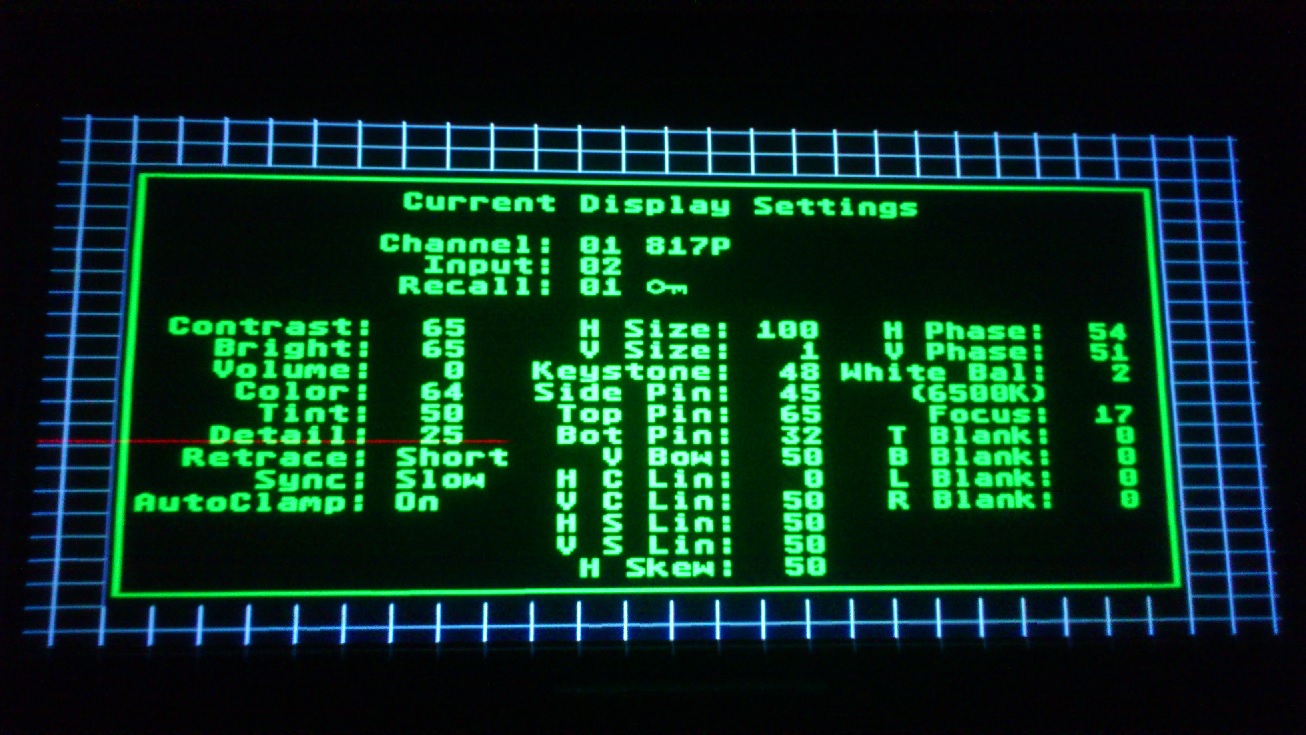
Yesterday I installed an additional platform that raised the projector 12" higher and tilted the top of my screen forward just under 1". This reduces the rise from 27" previously to 15" and when combined with the screen tilt produces an offset of approx. 6.5 degrees. This allowed me to reduce my keystone from 69 to 60 (50 is zero keystone on a Marquee) which may not seem like much but it made a substantial difference in reducing the trapezoidal shape of the raster and use of other compensatory geometry adjustments to create a linear grid.
It would be interesting to see how it would look if I could tilt the screen out another 6 degrees. I'm going to see if I can use a threaded rod coupling to allow for more screen tilt.
_________________
Projector: Modded 9501LC ULtra- MP VIM, Vold VNB, ETECH LVPS, Silver VIM Cables, HD10F's & a V1 case!
|
|
| Back to top |
|
|
Nashou66

Joined: 12 Jan 2007
Posts: 16171
Location: West Seneca NY
|
| Posted: Mon May 19, 2014 9:32 pm Post subject: |
|
|
| jbmeyer13 wrote: | Yesterday I installed an additional platform that raised the projector 12" higher and tilted the top of my screen forward just under 1". This reduces the rise from 27" previously to 15" and when combined with the screen tilt produces an offset of approx. 6.5 degrees. This allowed me to reduce my keystone from 69 to 60 (50 is zero keystone on a Marquee) which may not seem like much but it made a substantial difference in reducing the trapezoidal shape of the raster and use of other compensatory geometry adjustments to create a linear grid.
It would be interesting to see how it would look if I could tilt the screen out another 6 degrees. I'm going to see if I can use a threaded rod coupling to allow for more screen tilt. |
Good Idea.
Nashou
_________________
Don't blame your underwear for your crooked ass~ unknown Greek philosopher
"Republicans believe every day is the Fourth of July, but the Democrats believe every day is April 15." --- President Reagan
One Smart Dog!!!
Marquee High Performance Bellows now shipping!!
Marquee Modifications and Performance Enhancement
Marquee C-element and Bellow removal
|
|
| Back to top |
|
|
|
|
|
|
|
You cannot post new topics in this forum
You cannot reply to topics in this forum
You cannot edit your posts in this forum
You cannot delete your posts in this forum
You cannot vote in polls in this forum
You cannot attach files in this forum
You can download files in this forum
|
Forum powered by phpBB © phpBB Group
|
|




