| Author |
Message |
shelleybear
Joined: 18 Jul 2013
Posts: 70
|
| Posted: Fri Apr 18, 2014 1:13 am Post subject: Green CRT 808s |
|
|
So, I'm almost done, BUT I need to be able to adjust the green CRT on this model projector.
The blue and red guns align to each other, but not to the green.
The Blue DOES align to the green.
The red CRT needs to be raised about about two inches, but I can't find vertical control.
Any help is appreciated.
I found nothing in the manual.
You have all been wonderful.
|
|
| Back to top |
|
 |
km987654

Joined: 25 Jul 2007
Posts: 2874
Location: Australia
TV/Projector: Barco BG809s
|
| Posted: Fri Apr 18, 2014 2:44 am Post subject: Re: Green CRT 808s |
|
|
| shelleybear wrote: | So, I'm almost done, BUT I need to be able to adjust the green CRT on this model projector.
The blue and red guns align to each other, but not to the green.
The Blue DOES align to the green.
The red CRT needs to be raised about about two inches, but I can't find vertical control.
Any help is appreciated.
I found nothing in the manual.
You have all been wonderful. |
Red and Blue have adjustments that are on the vertical board. You will need a small screw driver.
Having said that 2 inches is rather large. Is the red tube properly mounted?
Check this:
http://www.curtpalme.com/Barco808_Layout3.shtm
There is a later model V board than the one pictured but the trimpots are in the same location they just look different.
|
|
| Back to top |
|
|
shelleybear
Joined: 18 Jul 2013
Posts: 70
|
| Posted: Fri Apr 18, 2014 3:39 am Post subject: |
|
|
I know exactly which board you're talking about, AND I have a full set (well, two full sets actually) of plastic screwdrivers just MADE for this kind of work.
That said, is this something I can do with the board IN the slot, or do I need to remove the board and use "hit and miss" to get it right?
|
|
| Back to top |
|
|
km987654
Joined: 25 Jul 2007
Posts: 2874
Location: Australia
TV/Projector: Barco BG809s
|
| Posted: Fri Apr 18, 2014 6:32 am Post subject: |
|
|
| shelleybear wrote: | I know exactly which board you're talking about, AND I have a full set (well, two full sets actually) of plastic screwdrivers just MADE for this kind of work.
That said, is this something I can do with the board IN the slot, or do I need to remove the board and use "hit and miss" to get it right? |
You make the adjustment while the projector is running so be carefull where you put your hands. You have to turn the screws a lot for a little movement.
|
|
| Back to top |
|
|
Curt Palme
CRT Tech
Joined: 08 Mar 2006
Posts: 24396
Location: Langley, BC
TV/Projector: All of them!
|
| Posted: Fri Apr 18, 2014 1:57 pm Post subject: |
|
|
|
They are 10 turn pots...
|
|
| Back to top |
|
|
shelleybear
Joined: 18 Jul 2013
Posts: 70
|
| Posted: Fri Apr 18, 2014 9:39 pm Post subject: |
|
|
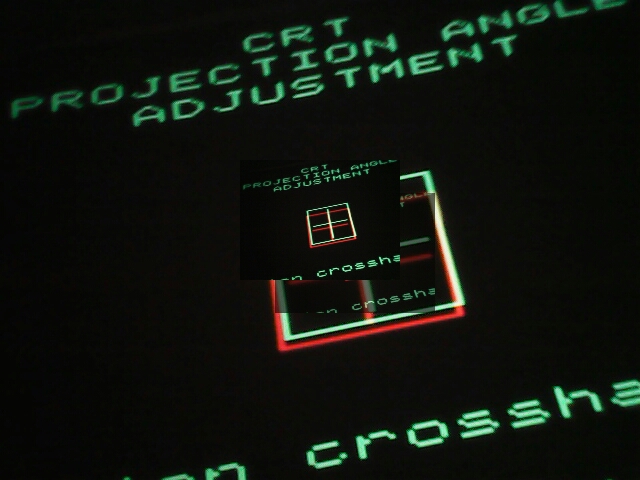
I found the pots for both red and blue.
Niether will align with the green, bot they will align with each other.
Could the problem be with the green lens?
If so, is there any way to raise it.
One last thought.
I assume that all three are supposed to blend into a single image.
Am I wrong?
| Description: |
|
| Filesize: |
168.5 KB |
| Viewed: |
5384 Time(s) |
|
|
|
| Back to top |
|
|
km987654
Joined: 25 Jul 2007
Posts: 2874
Location: Australia
TV/Projector: Barco BG809s
|
| Posted: Fri Apr 18, 2014 10:18 pm Post subject: |
|
|
Are the Rasters centred.
Did you clear all memory blocks to give you a clean slate electronically.
Last edited by km987654 on Sat Apr 19, 2014 12:15 am; edited 1 time in total
|
|
| Back to top |
|
|
shelleybear
Joined: 18 Jul 2013
Posts: 70
|
| Posted: Fri Apr 18, 2014 10:43 pm Post subject: |
|
|
I thought I had cleared the memory blocks.
The manual shows a rectangle in the middle of each crt, but I have no such rectangles on mine.
I noticed some text and a calibrated line but that only appeared on the green CRT and not on the red or blue.
|
|
| Back to top |
|
|
km987654
Joined: 25 Jul 2007
Posts: 2874
Location: Australia
TV/Projector: Barco BG809s
|
| Posted: Fri Apr 18, 2014 11:41 pm Post subject: |
|
|
You need to centre the raster on the tube face. You will find how to do that on this site.
Look at the below point 4 onwards.
http://www.curtpalme.com/Barco_Setup_Quick_Reference_Guide.shtm
Search the CRT forums also.
Before doing any of that just make sure that all the tubes are physically mounted properly, that is they are not able to move up or down which will change the alignment. Its highly unlikely that this is the case but I have seen it on a projector that did not have all the mounting bolts in place.
|
|
| Back to top |
|
|
shelleybear
Joined: 18 Jul 2013
Posts: 70
|
| Posted: Wed Apr 23, 2014 12:34 am Post subject: |
|
|
Well, I wish I had better news.
I was able to locate the controls to adjust the red and green cross-hairs, but while it lengthened the "legs" of the cross-hairs, it did not let me adjust them to be able to overlay the images. so red and blue still do not "merge" with green.
It's funny, I'd love to pay someone to come in and adjust this once and for all, but no one knows how.
|
|
| Back to top |
|
|
Curt Palme
CRT Tech
Joined: 08 Mar 2006
Posts: 24396
Location: Langley, BC
TV/Projector: All of them!
|
| Posted: Wed Apr 23, 2014 12:59 am Post subject: |
|
|
you replaced the green tube, right? Are you sure when you mounted it in the bracket that you didn't miss the tabs that hold the one end of the tube in place? that would cause either the top or the bottom of the tube to be fairly out of focus. How is the focus on the screen from the green tube, esp top and bottom?
There was one set here that I had to do a modification on to the V board to extend the range of the R and B V shift pots due to the same problem. It could be that the magnet within your focus yoke has shifted, causing this problem.
|
|
| Back to top |
|
|
shelleybear
Joined: 18 Jul 2013
Posts: 70
|
| Posted: Wed Apr 23, 2014 1:33 am Post subject: |
|
|
As far as I know the green tube was never replace.
Neither were the red or blue.
All three have very little wear on them.
What I have been trying to describe (and yes, possibly be doing a poor job of)is, imagine the cross -hairs as single images.
Three pictures.
The shift pots extend/distort the red and blue images (stretch or shrink might be a god way t describe them) but they do not simply lift the whole images and let me shift them up and down enough to converge.
I can move the entire cross-hair image sideways by loosening the screws under the the lens for a normal adjustment.
However, as far as I can see, I don't know how to d the same vertically.
Does this help?
|
|
| Back to top |
|
|
shelleybear
Joined: 18 Jul 2013
Posts: 70
|
| Posted: Wed Apr 23, 2014 1:33 am Post subject: |
|
|
As far as I know the green tube was never replace.
Neither were the red or blue.
All three have very little wear on them.
What I have been trying to describe (and yes, possibly be doing a poor job of)is, imagine the cross -hairs as single images.
Three pictures.
The shift pots extend/distort the red and blue images (stretch or shrink might be a god way t describe them) but they do not simply lift the whole images and let me shift them up and down enough to converge.
I can move the entire cross-hair image sideways by loosening the screws under the the lens for a normal adjustment.
However, as far as I can see, I don't know how to d the same vertically.
Does this help?
|
|
| Back to top |
|
|
Curt Palme
CRT Tech
Joined: 08 Mar 2006
Posts: 24396
Location: Langley, BC
TV/Projector: All of them!
|
| Posted: Wed Apr 23, 2014 1:40 am Post subject: |
|
|
Ok, you're adjusting the wrong pots! One pair of pots adjusts the V size of the R and B tubes, the other set of pots that are longer in length with a little brass screw at the top end facing you are the V shift pots. Those are the ones you need to adjust.
Once you've got the center cross overlapped with the V shift pots, then go back into the main convergence test pattern, and adjust the V size controls so that the size of all three images are pretty close to equal top and bottom. That will minimize use of the convergence controls, which is a good thing.
|
|
| Back to top |
|
|
shelleybear
Joined: 18 Jul 2013
Posts: 70
|
| Posted: Wed Apr 23, 2014 1:49 am Post subject: |
|
|
|
Are the V shift pots on the same board?
|
|
| Back to top |
|
|
Curt Palme
CRT Tech
Joined: 08 Mar 2006
Posts: 24396
Location: Langley, BC
TV/Projector: All of them!
|
| Posted: Wed Apr 23, 2014 1:50 am Post subject: |
|
|
|
Yes.
|
|
| Back to top |
|
|
shelleybear
Joined: 18 Jul 2013
Posts: 70
|
| Posted: Wed Apr 23, 2014 2:09 am Post subject: |
|
|
I fear that the layout on the 808s board is different.
The blue and read V -height controls are clearly visible at the front of the board.
But those are the only two that I can see.
Could the V-shift pots be in the back, and, if so can I remove the board from it's slot and make the adjustments while holding it in my hand?
Yes, I am nervous about doing this.
|
|
| Back to top |
|
|
Curt Palme
CRT Tech
Joined: 08 Mar 2006
Posts: 24396
Location: Langley, BC
TV/Projector: All of them!
|
| Posted: Wed Apr 23, 2014 2:52 am Post subject: |
|
|
|
The trimpots should be towards the edge of the board that is closest to the tubes. Round brass screwdriver slots for the adjustments. Yes, different versions of the board have the pots in different locations, but they should be there. Post the 762XXX part number off the board, worst case, and I"ll check tomorrow.
|
|
| Back to top |
|
|
shelleybear
Joined: 18 Jul 2013
Posts: 70
|
| Posted: Wed Apr 23, 2014 4:07 am Post subject: |
|
|
|
All but two of the boards that I can see are 1096339.
|
|
| Back to top |
|
|
Decibel

Joined: 31 May 2007
Posts: 904
Location: Roma - Italia
|
| Posted: Wed Apr 23, 2014 6:01 am Post subject: |
|
|

_________________
Domenico (Barco fan!)
|
|
| Back to top |
|
|
|
|




