| Author |
Message |
stridsvognen
Guest
|
| Posted: Tue Sep 09, 2014 5:14 pm Post subject: |
|
|
| redfox001 wrote: | | There should be to correct for the cables but not sure. MP once said you needed different filters for different resolutions thought that was peaking relating to resolution like in the barco? |
Im not aware of any peaking on any moome cards, i know there is ferrite beads to filter the output, and that they mostly limits the output bandwidth.
If you use a SONY V3 INT card, or the Marquee moome card, no matter how they are filtered, they should have plenty of bandwidth for the 909, and you might bennefit from a bit of roleoff from the filtering so that the Barco video chain dont get stressed.
The EXT cards might have a buffer or different filters so that they wont run into problems with different cables, as i doubt a DAC will be able to run longer cables.
|
|
| Back to top |
|
 |
Francisco

Joined: 05 Apr 2007
Posts: 305
Location: The Netherlands
|
| Posted: Tue Sep 09, 2014 5:19 pm Post subject: |
|
|
| stridsvognen wrote: | Yes i only use the HDfury 4 to tripple the framerate, and yes it do effect the signal. It seems that there is no way to pass a digital video signal true a processor chip without messing with the signal, i just try to find the least messed up solution.
With the current firmware the Radiance is a mess when you evaluate how it pass the croma signal and bit dept.
The Hdfury 4 is the only device i can find capable of outputting 1080P 72hz 178Mhz without effecting the image quality to much. It do limit the bandwidth of the croma channel, but its the best i have found from a processor so far, and it passes a perfect bitdept/ grayramp.
The analog output of the Hdfury4 has limited bandwidth, and will display distortion at 178Mhz. |
Okay does it only mess up the croma a little? Gonna try this solution as well and see how it behaves on the 909 1080p72hz
_________________
Philips vacuum cleaner | Trystar double toaster | Car radio with orange plastic memory arrows | Class A Fridge
|
|
| Back to top |
|
|
stridsvognen
Guest
|
| Posted: Tue Sep 09, 2014 5:44 pm Post subject: |
|
|
| Francisco wrote: | | stridsvognen wrote: | Yes i only use the HDfury 4 to tripple the framerate, and yes it do effect the signal. It seems that there is no way to pass a digital video signal true a processor chip without messing with the signal, i just try to find the least messed up solution.
With the current firmware the Radiance is a mess when you evaluate how it pass the croma signal and bit dept.
The Hdfury 4 is the only device i can find capable of outputting 1080P 72hz 178Mhz without effecting the image quality to much. It do limit the bandwidth of the croma channel, but its the best i have found from a processor so far, and it passes a perfect bitdept/ grayramp.
The analog output of the Hdfury4 has limited bandwidth, and will display distortion at 178Mhz. |
Okay does it only mess up the croma a little? Gonna try this solution as well and see how it behaves on the 909 1080p72hz |
You need to know the hole chain from player to know whats up and down, i cant say how your player messes it up or not, so its kind of hard to know the end result at your place, but as the 909 have a very low bandwidth, i dont think its a good idea to push 1080P 72hz, if you cant resolve the luma resolution, i dont guess its of much importance how the croma signal is resolved in your digital chain.
If you run a OPPO 103D HDMI 2 out 1080P 60hz 4:2:2 8 bit into a SONY V3 moome card you have that part of the video chain as good as it gets, and the rest is left to the analog performance of your Barco.
|
|
| Back to top |
|
|
redfox001

Joined: 16 Mar 2009
Posts: 2257
Location: The Netherlands
|
| Posted: Wed Sep 10, 2014 9:01 am Post subject: |
|
|
| stridsvognen wrote: | | redfox001 wrote: | | There should be to correct for the cables but not sure. MP once said you needed different filters for different resolutions thought that was peaking relating to resolution like in the barco? |
Im not aware of any peaking on any moome cards, i know there is ferrite beads to filter the output, and that they mostly limits the output bandwidth.
If you use a SONY V3 INT card, or the Marquee moome card, no matter how they are filtered, they should have plenty of bandwidth for the 909, and you might bennefit from a bit of roleoff from the filtering so that the Barco video chain dont get stressed.
The EXT cards might have a buffer or different filters so that they wont run into problems with different cables, as i doubt a DAC will be able to run longer cables. |
Aaah ferrite I should have guessed 
But throwing a quick look at a sony internal I think I see three 14 bit video dacs while the external has one 11 bit video dac and also I do see the buffer opamp that is a very fast opamp and that is probable not doing anything wrong with its slewrate. But in the feedback loop of this opamp the filtering, gamma correcting and contrast correcting with the pots is done. I am thinking you and Craigr remove the gamma correction so probable on you boards the whole buffer is removed? Would like to know that.
My guess is further that in the feedback there is also peaking somewhere. But might be that the peaking is done in the vim or in the inputboard of the sony?
I will experiment with the external moome once I have the faster 5 Ghz transistor that I ordered replaced on the standard port 3 input. There is a 1 Ghz transistor there that even the specs say is for middel frequencies. That really blows my mind. But the port 5 is 5 GHz and I just ordered those for 15 cents each. Might blow a few with the Moome before my mind blows 
|
|
| Back to top |
|
|
redfox001
Joined: 16 Mar 2009
Posts: 2257
Location: The Netherlands
|
| Posted: Wed Sep 10, 2014 9:16 am Post subject: |
|
|
|
By the way I will make some pictures of my amateur mods and some friends I will help but I have to warn that I think it is a big risk to start modding a Cine 9 unless you know what you are doing. All the things I think I see are also the things Eisemann mentions and probable more. So apart form Eisemanns hdmi input, that did not pass the test with the hdfury inside as I see it, I would go for letting Eisemann do the mods on a Barco.
|
|
| Back to top |
|
|
redfox001
Joined: 16 Mar 2009
Posts: 2257
Location: The Netherlands
|
| Posted: Fri Sep 12, 2014 4:21 pm Post subject: |
|
|
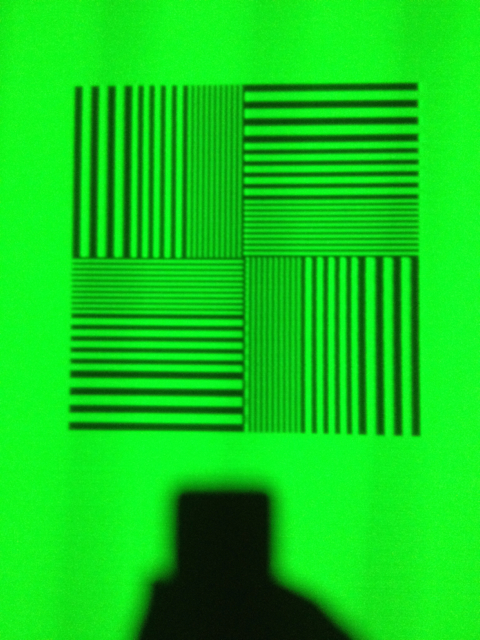
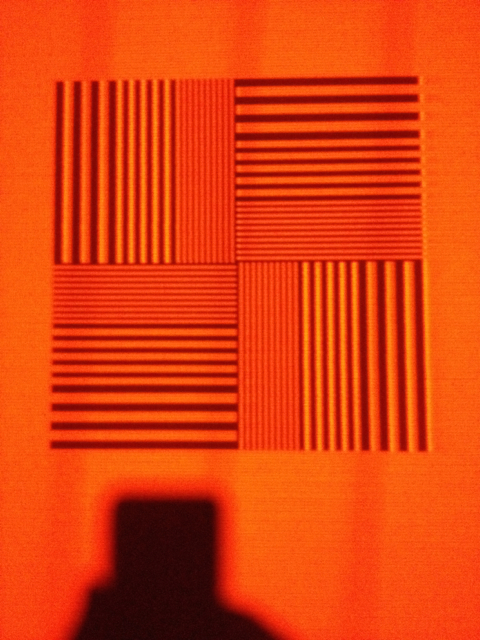
Ok I replaced the port 3 input transistors from 1 GHz to 5 GHz so I could connect my internal hdmi again (that is a modified external moome). A quick look it looks very promising. The resolution at 720p@72 is about the same ad with the vga solution but it looks sharper or clearer or darker black. Don't know but the internal hdmi seems to pass my external vga now. Think it might be less noise.
_________________
701s->runco933->8500ultra->cinemax->9500mp->919 splitpack + cinemax
|
|
| Back to top |
|
|
redfox001
Joined: 16 Mar 2009
Posts: 2257
Location: The Netherlands
|
| Posted: Fri Sep 12, 2014 10:00 pm Post subject: |
|
|
720p@72 is my max resolution for the moment. It looks much better than before like through a window. I see something like the ultra hd effect. To bad that I can't get it at higher resolutions. Green looks less than red and blue.
Btw I gave you guys the wrong link for this testprogram. It is the Nokia monitor test program I use not the Nec.
http://www.softpedia.com/get/Multimedia/Video/Other-VIDEO-Tools/Nokia-Monitor-Test.shtml
| Description: |
|
| Filesize: |
337.99 KB |
| Viewed: |
7482 Time(s) |
|
| Description: |
|
| Filesize: |
374.03 KB |
| Viewed: |
7482 Time(s) |
|
_________________
701s->runco933->8500ultra->cinemax->9500mp->919 splitpack + cinemax
|
|
| Back to top |
|
|
stridsvognen
Guest
|
| Posted: Fri Sep 12, 2014 10:18 pm Post subject: |
|
|
|
looks like you addet peaking now.?
|
|
| Back to top |
|
|
redfox001
Joined: 16 Mar 2009
Posts: 2257
Location: The Netherlands
|
| Posted: Fri Sep 12, 2014 10:51 pm Post subject: |
|
|
| stridsvognen wrote: | | looks like you addet peaking now.? |
No I just changed the input transistors that where only buffering the signals. Did not change anything with peaking but the other pictures where with the vga these are with the moome ext placed internal perhaps there is peaking on the moome?
I see a very nice 1,2 and 3 pixel very even to be honest.
Checked barco peaking. Still ad mid freq where I always have it.
_________________
701s->runco933->8500ultra->cinemax->9500mp->919 splitpack + cinemax
|
|
| Back to top |
|
|
redfox001
Joined: 16 Mar 2009
Posts: 2257
Location: The Netherlands
|
| Posted: Fri Sep 12, 2014 10:57 pm Post subject: |
|
|
You are right with red the vertical 2 pixel lines are a bit to light. Hmm have to think on that. Thanks!
_________________
701s->runco933->8500ultra->cinemax->9500mp->919 splitpack + cinemax
|
|
| Back to top |
|
|
stridsvognen
Guest
|
| Posted: Sat Sep 13, 2014 5:47 am Post subject: |
|
|
I liked the first 720P shot. was that at 60 or 72hz.?
Seems to me it has less streaking, and no peaking to the 1st vertical, and start of the horizontal line.
|
|
| Back to top |
|
|
redfox001
Joined: 16 Mar 2009
Posts: 2257
Location: The Netherlands
|
| Posted: Sat Sep 13, 2014 8:52 am Post subject: |
|
|
That was done at 60Hz and looking at the white testpic there was an overshoot in red in those too because white looked a little red.
I think this buffer doe not filter a higher frequency part away that is peaked in the rest. I have to play with lower peaking settings or perhaps no peaking because it might be that these first pictures where with no peaking.
But what I see from using the internal solution is that there is much less noise or deeper black and no more shadows on the left and no wave effects. Everything is better but this internal solution has a very nice stabilised power section. However when I look at 1080p it gets realy bad with the testpictures. This does confirm that the Moome ext is filtered steep and wrong in my opinion. Now what can I do about it. Perhaps completely changing the feedback on the opamp to a resistor one?
_________________
701s->runco933->8500ultra->cinemax->9500mp->919 splitpack + cinemax
|
|
| Back to top |
|
|
stridsvognen
Guest
|
| Posted: Sat Sep 13, 2014 9:10 am Post subject: |
|
|
| redfox001 wrote: | That was done at 60Hz and looking at the white testpic there was an overshoot in red in those too because white looked a little red.
I think this buffer doe not filter a higher frequency part away that is peaked in the rest. I have to play with lower peaking settings or perhaps no peaking because it might be that these first pictures where with no peaking.
But what I see from using the internal solution is that there is much less noise or deeper black and no more shadows on the left and no wave effects. Everything is better but this internal solution has a very nice stabilised power section. However when I look at 1080p it gets realy bad with the testpictures. This does confirm that the Moome ext is filtered steep and wrong in my opinion. Now what can I do about it. Perhaps completely changing the feedback on the opamp to a resistor one? |
I doubt that any of this has much to do with the moome card.
When you shoot the 1:1 to show bandwidth and improvements, try keep the same resolution and framerate and other settings like peaking.
Thats the only way to see if its better or worse.
And the peaking is also on the green on your new shot. It looks quite distorted.
The 720P 60hz you made is the best 909 1:1 pic i ever seen in here.
On the HD Basic blu ray, there is some native 720P 60 hz material, try run that direct to the moome card from a reference blu ray player, it also have 720P testpatterns.
Then you will see how 1:1 pixel mapping + a bandwidth you can almost resolve looks without scaling.
|
|
| Back to top |
|
|
redfox001
Joined: 16 Mar 2009
Posts: 2257
Location: The Netherlands
|
| Posted: Sat Sep 13, 2014 9:23 am Post subject: |
|
|
You are right about having the same setting to compare pictures. Also I should change only one aspect and than make a picture in the future.
But I made both pictures with the same iphone and you can even see on these pictures that the black looks blacker, the iphone adds noise but it looks much smoother the last pictures. There are also three waves on the last pictures but they where iphone induced, the rolled over the phone screen. In reality it was pure flat.
I think peaking can be a way to artificial introduce some sharpness. Looks nice.
_________________
701s->runco933->8500ultra->cinemax->9500mp->919 splitpack + cinemax
|
|
| Back to top |
|
|
stridsvognen
Guest
|
| Posted: Sat Sep 13, 2014 9:29 am Post subject: |
|
|
i marked the peaking with red, and the streaking with a red arow, that looked much better on the old shot, it looks like you addet more distortion to this picture.
It looks the same as the G90.
|
|
| Back to top |
|
|
redfox001
Joined: 16 Mar 2009
Posts: 2257
Location: The Netherlands
|
| Posted: Sat Sep 13, 2014 9:43 am Post subject: |
|
|
Ok. Don't know the G90. I think you are right about peaking going on in the whole picture but I judge it by comparing the black of the 2 pixel vertical with horizontal. The first pictures are more even in this. The second pictures introduce some artificial contrast.
@Francisco sorry for hijacking your thread. If you want to keep this one on Eisseman we could start a new one if I have something new to mention on resolution of a 909?
_________________
701s->runco933->8500ultra->cinemax->9500mp->919 splitpack + cinemax
|
|
| Back to top |
|
|
AnalogRocks
Forum Moderator

Joined: 08 Mar 2006
Posts: 26706
Location: Toronto, Ontario, Canada
TV/Projector: Sony 1252Q, AMPRO 4000G
|
| Posted: Sat Sep 13, 2014 10:03 am Post subject: |
|
|
If you guys like I can separate out the post and put them in a new thread?
_________________
Tech support for nothing
CRT.
HD done right!
|
|
| Back to top |
|
|
stridsvognen
Guest
|
| Posted: Sat Sep 13, 2014 10:06 am Post subject: |
|
|
| AnalogRocks wrote: | | If you guys like I can separate out the post and put them in a new thread? |
Fine with me. 
Its redfox001 project, so its all up to him.
|
|
| Back to top |
|
|
redfox001
Joined: 16 Mar 2009
Posts: 2257
Location: The Netherlands
|
| Posted: Sat Sep 13, 2014 10:19 am Post subject: |
|
|
Yes fine with me too. In fact I am running Mike Parker modified boards with a little simpel modifying myself. So it is not about Eisemann at all.
_________________
701s->runco933->8500ultra->cinemax->9500mp->919 splitpack + cinemax
|
|
| Back to top |
|
|
CasetheCorvetteman

Joined: 09 Nov 2008
Posts: 6326
Location: Australia
|
| Posted: Sat Sep 13, 2014 11:10 am Post subject: |
|
|
I have some other patterns for you to try when you do:


_________________
Barco Cine 9, ,Sony VPL570ES 4K SXRD, 135" OZ Theatre Majestic 16:9 screen, Denon X6700in preamp mode, 2x 7ch Tonewinner amps, 2x Tonewinner 15" subs, 2x 10" subs, 7.2.6...
RUNCO DTV991 LC ( NEC XG 852 LC ) 100" 4:3 screen, H/K AVR 7.1...
|
|
| Back to top |
|
|
|
|




