|
As this forum is rarely used anymore, we've locked it. Feel free to browse and read. Questions? Please reach out to us directly. Cheers! |

|
 |
|
|
| Author |
Message |
htsycho
Joined: 04 Jan 2007
Posts: 8
|
| Posted: Tue Jan 16, 2007 3:38 am Post subject: Need help on 1270 |
|
|
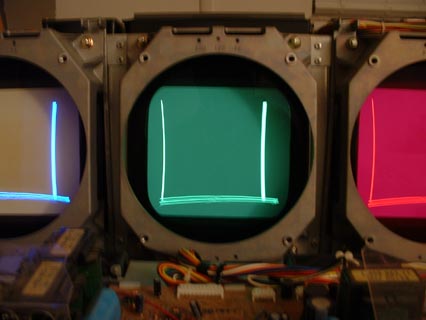
Hi, all. I have a problem setting up 1270 I got recently. I am trying to do mechanical setup and found something wrong with raster after the reset. Please see the picture. (I lowered brightness to show just the lines) I see two vertical lines on the raster. I don't remember seeing this vertical lines on my old 1270 raster. I did disassembled and reassembled this one all the way down to chasis. May be I assembled wrong? Any idea which part I did mess up? Thanks for the advice.
Chris
| Description: |
|
| Filesize: |
18.9 KB |
| Viewed: |
4742 Time(s) |
|
|
|
| Back to top |
|
 |
Curt Palme
CRT Tech
Joined: 08 Mar 2006
Posts: 24396
Location: Langley, BC
TV/Projector: All of them!
|
| Posted: Tue Jan 16, 2007 3:51 am Post subject: |
|
|
|
I have NEVER seen that before! Does it do it with the input signal removed? Can you get rid of it with the blanking controls?
|
|
| Back to top |
|
|
Sonynut

Joined: 08 Aug 2006
Posts: 367
Location: Bradford,PA
|
| Posted: Tue Jan 16, 2007 4:24 am Post subject: |
|
|
Hmm... I have seen similar before. Do you still have the old 1270? Try switching Y boards. I had a 1251 where the Y board was ok, but one of the EEPROM's was bad- I switched them to another known good Y board and had the same result.. Its easier and less risky to just change the whole board.
If you try, let us know what happens. 
|
|
| Back to top |
|
|
htsycho
Joined: 04 Jan 2007
Posts: 8
|
| Posted: Wed Jan 17, 2007 1:49 am Post subject: |
|
|
Hey, Sonynut. Thanks, you were right on  . I just tried Y board from old 1270 and there are no vertical lines anymore. Just horizontal AKB line. Did changing EPROM fixed yours? I see three chips with socket. Which one is the EPROM? . I just tried Y board from old 1270 and there are no vertical lines anymore. Just horizontal AKB line. Did changing EPROM fixed yours? I see three chips with socket. Which one is the EPROM?
Curt, Is there anything I can try with the board to fix this? What is the DIP SW and a Button for? If not, how much will it cost to replace the board? Thanks.
Chris
|
|
| Back to top |
|
|
Curt Palme
CRT Tech
Joined: 08 Mar 2006
Posts: 24396
Location: Langley, BC
TV/Projector: All of them!
|
| Posted: Wed Jan 17, 2007 2:05 am Post subject: |
|
|
Cool, I just learned something..
I've got those boards for $100 incl shipping. Let me know, and I need the 9 digit part number off the board, there were several different versions.
I can't remember what the DIP switch and button is for, a master reset?
|
|
| Back to top |
|
|
Sonynut
Joined: 08 Aug 2006
Posts: 367
Location: Bradford,PA
|
| Posted: Wed Jan 17, 2007 6:33 am Post subject: |
|
|
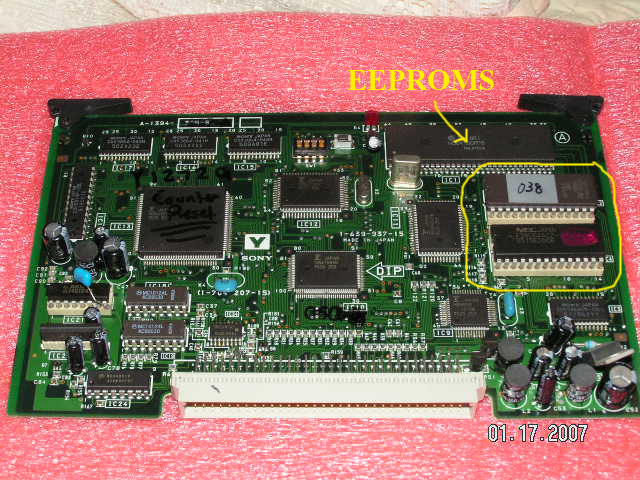
I have attached a pic of a Y-board from a 2nd generation 1272(my spare). The one from a 1270 is of course similar. The two EEPROMs are pointed out. They conatain all of the factory saved data, and the data you store to the various memory blocks. I am not sure which one contains which, sorry.
I had my 1251, with at least defective settings stored in these, and an RVP-401q(among other 12xx projectors). I switched the EEPROMs from the RVP Y-board to the 1251 Y-board, and all was well, exept of course the factory settings being ALL out of whack because of the differences between convergence of an RP set compared to a FP set. It is possible that resetting the factory data on the 1251 EEPROMs would have corrected the problem, but I never tried. I was just experimenting. I also of course lost the hour counter data from the 1251 when I did this, as the RVP, just as the 1270, did not have an hour counter.
The firmware that runs the machine does not seem to be stored in these EEPROMS, as it remained the same when I changed them. Only the factory and user data is stored in them.
The DIP switches control vairious aspects of these EEPROMs. I believe SW1-1 set to ON puts the PJ in constant service man mode. Various combinations of the others allow you to erase all data stored in them(including factory data- beware), and also to reset the factory data.
This could come in handy if you wanted to set the factory data to your setup and preferences(NO input condition), but is a very lengthy and risky prcedure... it HAS ro be done right or you will end up starting all over. There may also be other risks such as deflection burn if things arent done right, but as I have not tried, I am not sure.
I would download the service manuals from the 125x,127x section of this site for the 1270 and 1271. I know for sure the 1271 had the procedure for resetting the factory data in there. Again this is a lengthy and possibly risky procedure, which is why I have never had the time to try- I imagine it could take upwards of 3-6 hours.
You may be able to clear the EEPROMs on the seemingly faulty Y-board, and reset all the data, and save the board. No sense in changing the EEPROMs, since you have a working board. If you do this, I would suggest setting factory data for a perfect mechanical setup, with rasters maxxed(something Sony didnt do). This of course means that all the installation data in the install manual will be off, but then again you could set the data by finding where the projector fills your screen with maxxed rasters and setting up there, as most of us do.
Let me know what you try, and your results if you do. I am interested in how helpful this procedure would be.
Best regards,
Heath L.
| Description: |
|
| Filesize: |
157.12 KB |
| Viewed: |
4680 Time(s) |
|
|
|
| Back to top |
|
|
htsycho
Joined: 04 Jan 2007
Posts: 8
|
| Posted: Fri Jan 19, 2007 5:02 am Post subject: |
|
|
Heath and Curt. I tried EPROM reset following 1271 service manual this evening. I did not go thru whole process. Just initialization part before the factory data restore hoping it resolves the problem. But it looks like it's not working so far  No change. The lines are still there. Also I noticed that AKB line has noise, so I think it may be some other part is damaged beside the EPROM. Interestingly, I did tried S-video signal and , I found that vertical lines disappear but with weird AKB line. Unfortunately, also found that I could not make any adjustments; center, size, lin, key, etc. This one has bad wear (small 4:3) on blue tube so I am not sure I will invest more for this one. I will keep it as part machine for a while. Thanks for your help. No change. The lines are still there. Also I noticed that AKB line has noise, so I think it may be some other part is damaged beside the EPROM. Interestingly, I did tried S-video signal and , I found that vertical lines disappear but with weird AKB line. Unfortunately, also found that I could not make any adjustments; center, size, lin, key, etc. This one has bad wear (small 4:3) on blue tube so I am not sure I will invest more for this one. I will keep it as part machine for a while. Thanks for your help.
Chris
|
|
| Back to top |
|
|
AnalogRocks
Forum Moderator

Joined: 08 Mar 2006
Posts: 26706
Location: Toronto, Ontario, Canada
TV/Projector: Sony 1252Q, AMPRO 4000G
|
| Posted: Fri Jan 19, 2007 7:21 am Post subject: |
|
|
| Curt Palme wrote: | Cool, I just learned something..
|

_________________
Tech support for nothing
CRT.
HD done right!
|
|
| Back to top |
|
|
tony359

Joined: 04 Aug 2006
Posts: 378
|
| Posted: Tue Oct 02, 2007 5:55 pm Post subject: |
|
|
Raising this old thread.
About 127x hard reset. 1271 manual explain how to perform it but there is a mistake somewhere.
First point: put the (1) switch on LOWER position (OFF). Then restore (ON).
Second point: set the (4) switch on LOWER position (OFF) then restore (ON)
Third point: While projector is ON, set (1) and (4) to ON position...??? They already are ON!
More, on second point, they say to turn off the set with remote commander and to remove the Y board. Should I remove the Y board with +5 SUB voltage still operating????
What's wrong?
Ciao
Antonio
|
|
| Back to top |
|
|
|
|
|
|
|
You cannot post new topics in this forum
You cannot reply to topics in this forum
You cannot edit your posts in this forum
You cannot delete your posts in this forum
You cannot vote in polls in this forum
You cannot attach files in this forum
You can download files in this forum
|
Forum powered by phpBB © phpBB Group
|
|




