|
As this forum is rarely used anymore, we've locked it. Feel free to browse and read. Questions? Please reach out to us directly. Cheers! |

|
 |
|
|
| Author |
Message |
thewolfman

Joined: 28 Mar 2011
Posts: 1311
Location: Sweden
|
| Posted: Thu Jan 23, 2014 10:22 pm Post subject: My Completely noise free Marquee ! |
|
|
Hello everybody.
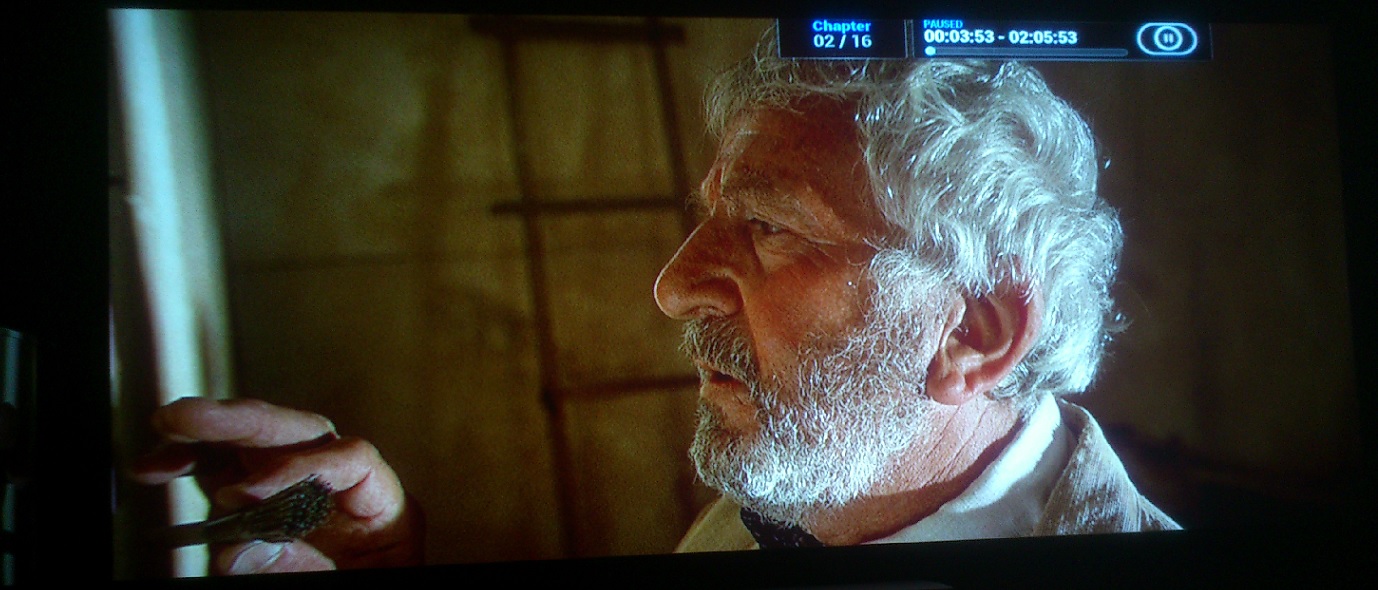
I put the projector back to stock some weeks ago and been doing some work on it whilst waiting for the up graded parts. Ok, last night RGB menu stooped working for me, but got it going again after reinserting the contacts on the vertical focus board. Haven't clean that one ever. Well, today Stigmator adjustment stopped working on blue, but red and green is working though.
One more thing. The noise has been greatly reduced (ghost pattern) because I swapped over to short retrace. I been playing around with different resolutions and Hz back and forth and that taught me some good stuff. With fast retrace I had to try out a lot off different total pixels in CRU.
With literately an 1/2 an inch I made it pass the screen borders to fill the screen at 98 horizontal and vertical @ 1. With some movies I need to go to a full 100 to get rid of the noise at the very end. Unbelievable though, no new holes in the ceiling for this to work.
However, there's a faint vertical line on the right side now (it's always been there) but basically invisible on the screen. With 96Hz that faint line had huge horizontal lines coming out of it that really messed up the image so I'm back at 72Hz again. But sometimes 96Hz looked better than 72 also.. it all boils down to get a custom resolution where phase stay at 50-52 or else I get terrible banding and other distortions. So basically doing that I found out that ghost pattern went away with fast retrace and lowering the HTOT so that the phase is more or less at 50 all the time. It's 51 and 51 now, before I could use a much as 55 in order to fit the image to the screen.
With long, total was 2460.. but in order to fill the screen with short retrace I had no other way but to reduce the numbers and believe it's 2340 now. The drawback with this is that I get a slight haze of ringing back in, but it's so little I hardly think of it. Mostly on a white screen I see it now. The banding is almost gone to, and not like before with a whole section across the image. As of now it's only a small 3 footer on the left side. another method would be using steel bars through the ceiling hooks, that way I could move the pj backwards a little and get rid of the ringing that way with higher numbers than 2340.
| Description: |
|
| Filesize: |
233.17 KB |
| Viewed: |
1733 Time(s) |
|
Last edited by thewolfman on Fri Jan 31, 2014 7:19 pm; edited 4 times in total
|
|
| Back to top |
|
 |
jbmeyer13
Joined: 03 Dec 2010
Posts: 1135
|
| Posted: Thu Jan 23, 2014 11:25 pm Post subject: |
|
|
My HTOT is 2330 and there's no trace of raster ringing so you are very close. Make sure you position the raster so that the right edge is just slightly past the right border of your screen; this will eliminate the ringing. My phase is also 50/50 so it sounds like you are in great shape.
_________________
Projector: Modded 9501LC ULtra- MP VIM, Vold VNB, ETECH LVPS, Silver VIM Cables, HD10F's & a V1 case!
|
|
| Back to top |
|
|
thewolfman
Joined: 28 Mar 2011
Posts: 1311
Location: Sweden
|
| Posted: Thu Jan 23, 2014 11:40 pm Post subject: |
|
|
| jbmeyer13 wrote: | | My HTOT is 2330 and there's no trace of raster ringing so you are very close. Make sure you position the raster so that the right edge is just slightly past the right border of your screen; this will eliminate the ringing. My phase is also 50/50 so it sounds like you are in great shape. |
I will try that. But I am like 1 cm near the edges on both sides, not much spare room at all. But I understand what you are saying and will try that indeed. Thanks for your advice.
EDIT: I did what you said and ringing is gone now. Thanks again.
|
|
| Back to top |
|
|
thewolfman
Joined: 28 Mar 2011
Posts: 1311
Location: Sweden
|
| Posted: Wed Jan 29, 2014 8:11 pm Post subject: |
|
|
|
That's right - the projector is completely noise free now! No ringing. No ghost pattern. No banding. It took me about 4 hours to get rid of the banding with the use of a laser leveller. Before that, I cheated a lot and eye-balled it most of the times, and haven't used it since the first time, which coincidently had no banding either. So probably not a coincident that making the green grid pattern laser straight makes the banding go away. That and phase as close to 50 as you can. At least that's my experience.
|
|
| Back to top |
|
|
|
|
|
|
|
You cannot post new topics in this forum
You cannot reply to topics in this forum
You cannot edit your posts in this forum
You cannot delete your posts in this forum
You cannot vote in polls in this forum
You cannot attach files in this forum
You can download files in this forum
|
Forum powered by phpBB © phpBB Group
|
|



