| Author |
Message |
shelleybear
Joined: 18 Jul 2013
Posts: 70
|
| Posted: Sun Jan 19, 2014 4:03 pm Post subject: So Close and Yet So Far |
|
|
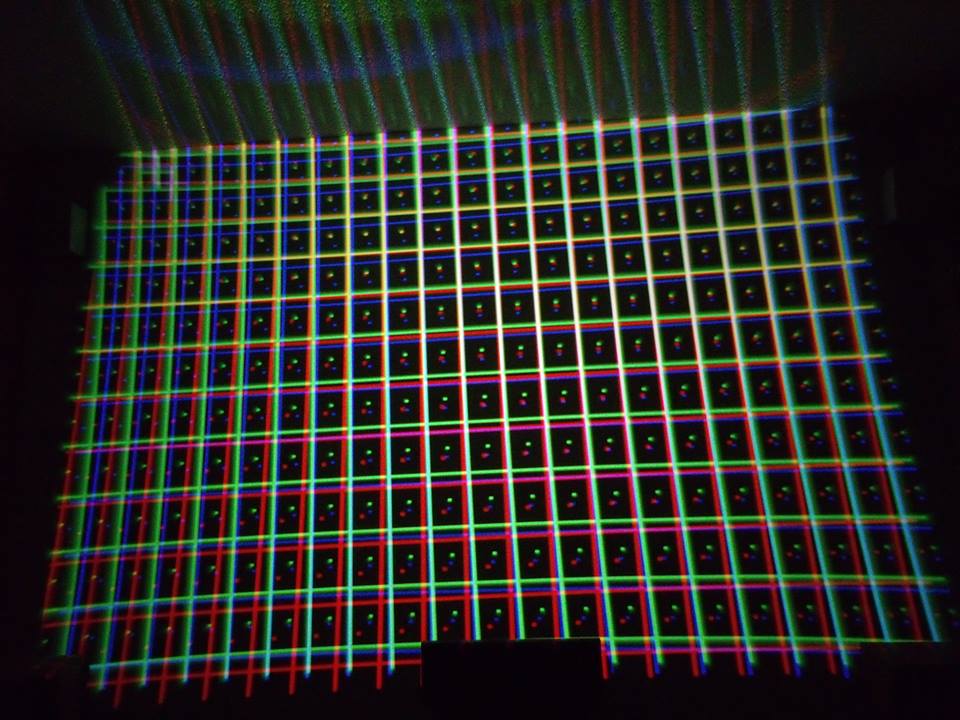
I have a Barco 808s in perfect condition.
The problem is, during the move and mounting the guns were mis-adjusted.
Well, I tried hiring a "pro" to do the last bit, but no one will touch it because of the age (1996).
So, I have come here begging for help.
I'm going to try and mount a copy of a jpg I made and if anyone has any thoughts about how to approach the problem, I'd appreciate some direction (what settings to start with etc...)
| Description: |
|
| Filesize: |
103.2 KB |
| Viewed: |
2480 Time(s) |
|
|
|
| Back to top |
|
 |
Curt Palme
CRT Tech
Joined: 08 Mar 2006
Posts: 24396
Location: Langley, BC
TV/Projector: All of them!
|
| Posted: Sun Jan 19, 2014 4:10 pm Post subject: |
|
|
What exactly is the problem? I see a CRT projector that needs to be set up. The barco manuals are VERY easy to follow and are here:
http://curtpalme.com/Barco808_Downloads.shtm
Download the correct one, and start on page 1. Jumping into the set at random will get you nowhere except for frustrated. 
CRT is completely a do it yourself thing at this point, you can't rely on any tech to support you, save for the people here.
Let us know if you get stuck, but you're in for a 3-4 hour learning curve as you learn what each control does. Then once you get good at it, you can go from this to a decently setup picture within 30 minutes.
|
|
| Back to top |
|
|
AnalogRocks
Forum Moderator

Joined: 08 Mar 2006
Posts: 26706
Location: Toronto, Ontario, Canada
TV/Projector: Sony 1252Q, AMPRO 4000G
|
| Posted: Sun Jan 19, 2014 6:26 pm Post subject: |
|
|
I'll second that. The Barco's have guided onscreen setup. Read the manual first then try following the onscreen guided setup. I've done a few of these and they are well designed and easy to follow once you understand it. AND Curt doesn't exaggerate, once you get the hang of it you can get a watchable picture in 30 minutes.
Your other option is to post your location and see if one of us is near enough to come help you.
_________________
Tech support for nothing
CRT.
HD done right!
|
|
| Back to top |
|
|
Nashou66

Joined: 12 Jan 2007
Posts: 16171
Location: West Seneca NY
|
|
| Back to top |
|
|
digitalayon
Joined: 02 Mar 2009
Posts: 921
|
| Posted: Mon Jan 20, 2014 5:17 pm Post subject: |
|
|
|
Hey look....Curt has manuals on his site!
|
|
| Back to top |
|
|
Mr. Green

Joined: 23 Feb 2007
Posts: 1394
Location: Calgary
TV/Projector: Marquee 9501LC / NEC 9PG+
|
| Posted: Thu Jan 23, 2014 4:39 am Post subject: |
|
|
I wish my setup looked that well after a move. Take a few hours on a weekend and do it right (3 times) and you'll be back to watching movies that night. Looks like you have a really good start there. Trust the 3 times thing. It gets you familiar with the projector and it gets just a little bit better each time you do it.
_________________
You can be young only once but, you can be immature forever.
Current Projector Marquee9501LC with PS3 (BLu-Ray) at 1080P LOVE IT! Screen is an Elunevision 120" 4:3 (2.4 gain - no hotspots). (also own a NEC 9PG+)
|
|
| Back to top |
|
|
|
|





