|
As this forum is rarely used anymore, we've locked it. Feel free to browse and read. Questions? Please reach out to us directly. Cheers! |
|
|
 |
|
|
| Author |
Message |
CasetheCorvetteman

Joined: 09 Nov 2008
Posts: 6326
Location: Australia
|
| Posted: Thu Dec 05, 2013 9:39 am Post subject: |
|
|
No, the pattern im using is one Ecrabb posted up on here a few years ago. That one the verticals were darker no matter what display i put them on. This one seems to be simular layout but the vertical bars and horizontals are the same level.
Yes there is an adjustment for peaking in the menu, 4 settings, off, then low, mid, and high scan frequency. I didnt go in and change it, so i have no idea what it will have been on but id say mid scan frequency. I dont really know what effect it has, ive only adjusted it with a bluray movie playing.
_________________
Barco Cine 9, ,Sony VPL570ES 4K SXRD, 135" OZ Theatre Majestic 16:9 screen, Denon X6700in preamp mode, 2x 7ch Tonewinner amps, 2x Tonewinner 15" subs, 2x 10" subs, 7.2.6...
RUNCO DTV991 LC ( NEC XG 852 LC ) 100" 4:3 screen, H/K AVR 7.1...
|
|
| Back to top |
|
 |
ecrabb
Forum Moderator

Joined: 13 Mar 2006
Posts: 15909
Location: Utah
TV/Projector: JVC RS40, Epson 5010
|
| Posted: Thu Dec 05, 2013 4:40 pm Post subject: |
|
|
| CasetheCorvetteman wrote: | | No, the pattern im using is one Ecrabb posted up on here a few years ago. That one the verticals were darker no matter what display i put them on. This one seems to be simular layout but the vertical bars and horizontals are the same level. |
That's weird, Case… I can confirm both horizontal and vertical bars are 255,255,255 (or 100IRE). Those verticals shouldn't appear dark "no matter the display" unless you were looking at the pattern only on CRT monitors and/or on a digital display, but via analog display connector.
Are you displaying this new pattern from exactly the same source as when you were displaying my pattern, or from a different source?
SC
|
|
| Back to top |
|
|
gjaky

Joined: 05 Jun 2010
Posts: 2802
Location: Budapest, Hungary
|
| Posted: Thu Dec 05, 2013 7:10 pm Post subject: |
|
|
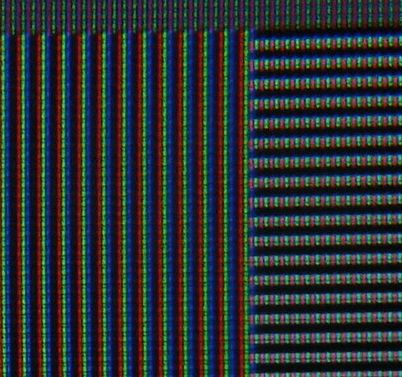
They indeed look differently to me on PC, but I think that is because the vertical lines consist of RGB pixels meaning the left side of the pixel looks redish the right side looks blueish, while on the horizontal lines there aren't such a problem obviously.
_________________
projectors in the past : NEC 6-9PG xtra, Electrohome Marquee 6-7500, NEC XG 1351 LC ( with super modified Electrohome VNB neckboard !!!)
current: VDC Marquee 9500LC
The MOD: VNB-DB, VIM-DB
|
|
| Back to top |
|
|
CasetheCorvetteman
Joined: 09 Nov 2008
Posts: 6326
Location: Australia
|
| Posted: Thu Dec 05, 2013 11:41 pm Post subject: |
|
|
| ecrabb wrote: | | CasetheCorvetteman wrote: | | No, the pattern im using is one Ecrabb posted up on here a few years ago. That one the verticals were darker no matter what display i put them on. This one seems to be simular layout but the vertical bars and horizontals are the same level. |
That's weird, Case… I can confirm both horizontal and vertical bars are 255,255,255 (or 100IRE). Those verticals shouldn't appear dark "no matter the display" unless you were looking at the pattern only on CRT monitors and/or on a digital display, but via analog display connector.
Are you displaying this new pattern from exactly the same source as when you were displaying my pattern, or from a different source?
SC |
No mate other way around  Yours is the one im using now!! The other one was not done that way, and id say someone made a mistake making it. It was the same even on digitals. Yours is the one im using now!! The other one was not done that way, and id say someone made a mistake making it. It was the same even on digitals.
I deleted the other pattern when i found yours again.
_________________
Barco Cine 9, ,Sony VPL570ES 4K SXRD, 135" OZ Theatre Majestic 16:9 screen, Denon X6700in preamp mode, 2x 7ch Tonewinner amps, 2x Tonewinner 15" subs, 2x 10" subs, 7.2.6...
RUNCO DTV991 LC ( NEC XG 852 LC ) 100" 4:3 screen, H/K AVR 7.1...
|
|
| Back to top |
|
|
CasetheCorvetteman
Joined: 09 Nov 2008
Posts: 6326
Location: Australia
|
| Posted: Thu Dec 05, 2013 11:47 pm Post subject: |
|
|
| gjaky wrote: | | They indeed look differently to me on PC, but I think that is because the vertical lines consist of RGB pixels meaning the left side of the pixel looks redish the right side looks blueish, while on the horizontal lines there aren't such a problem obviously. |
Are you refering to my pics Gábor? I didnt spend any great amount of time on the convergence, which was a hair width out since pulling half the projector apart to swap the quad...
Ive now got the contrast down to 70 and the brightness down in the 40s or the image is too bloody bright... Dont know what the cutoffs and gains are at cause i didnt bother with those for this exercise.
_________________
Barco Cine 9, ,Sony VPL570ES 4K SXRD, 135" OZ Theatre Majestic 16:9 screen, Denon X6700in preamp mode, 2x 7ch Tonewinner amps, 2x Tonewinner 15" subs, 2x 10" subs, 7.2.6...
RUNCO DTV991 LC ( NEC XG 852 LC ) 100" 4:3 screen, H/K AVR 7.1...
|
|
| Back to top |
|
|
gjaky
Joined: 05 Jun 2010
Posts: 2802
Location: Budapest, Hungary
|
| Posted: Fri Dec 06, 2013 7:10 am Post subject: |
|
|
| CasetheCorvetteman wrote: | | gjaky wrote: | | They indeed look differently to me on PC, but I think that is because the vertical lines consist of RGB pixels meaning the left side of the pixel looks redish the right side looks blueish, while on the horizontal lines there aren't such a problem obviously. |
Are you refering to my pics Gábor? I didnt spend any great amount of time on the convergence, which was a hair width out since pulling half the projector apart to swap the quad...
Ive now got the contrast down to 70 and the brightness down in the 40s or the image is too bloody bright... Dont know what the cutoffs and gains are at cause i didnt bother with those for this exercise. |
No, I wanted to support your observations. I tried to catch the effect on my LCD screen... this is because the RGB dots are not overlapped on LCD/CRT monitors.
| Description: |
|
| Filesize: |
42.4 KB |
| Viewed: |
1693 Time(s) |
|
_________________
projectors in the past : NEC 6-9PG xtra, Electrohome Marquee 6-7500, NEC XG 1351 LC ( with super modified Electrohome VNB neckboard !!!)
current: VDC Marquee 9500LC
The MOD: VNB-DB, VIM-DB
|
|
| Back to top |
|
|
CasetheCorvetteman
Joined: 09 Nov 2008
Posts: 6326
Location: Australia
|
| Posted: Fri Dec 06, 2013 7:18 am Post subject: |
|
|
Oh gotcha Wasnt certain what you were saying before, cause its quite hard to see the convergence is slightly out in my pics.
_________________
Barco Cine 9, ,Sony VPL570ES 4K SXRD, 135" OZ Theatre Majestic 16:9 screen, Denon X6700in preamp mode, 2x 7ch Tonewinner amps, 2x Tonewinner 15" subs, 2x 10" subs, 7.2.6...
RUNCO DTV991 LC ( NEC XG 852 LC ) 100" 4:3 screen, H/K AVR 7.1...
|
|
| Back to top |
|
|
|
|
|
|
|
You cannot post new topics in this forum
You cannot reply to topics in this forum
You cannot edit your posts in this forum
You cannot delete your posts in this forum
You cannot vote in polls in this forum
You cannot attach files in this forum
You can download files in this forum
|
Forum powered by phpBB © phpBB Group
|
|




