| Author |
Message |
scoutinit
Joined: 02 Dec 2013
Posts: 1
|
| Posted: Mon Dec 02, 2013 7:48 pm Post subject: barco 1200 adjustment/repair |
|
|
|
I recently purchased a Barco 1200. When midpoint it set on adjustment the raster pattern is rolling off the bottom of all 3 crts. The pattern can almost be centered with v shift but maxes out adjustment and pattern at top is scrunched and elongated at bottom. any ideas.
|
|
| Back to top |
|
 |
km987654

Joined: 25 Jul 2007
Posts: 2874
Location: Australia
TV/Projector: Barco BG809s
|
| Posted: Tue Dec 03, 2013 2:48 am Post subject: |
|
|
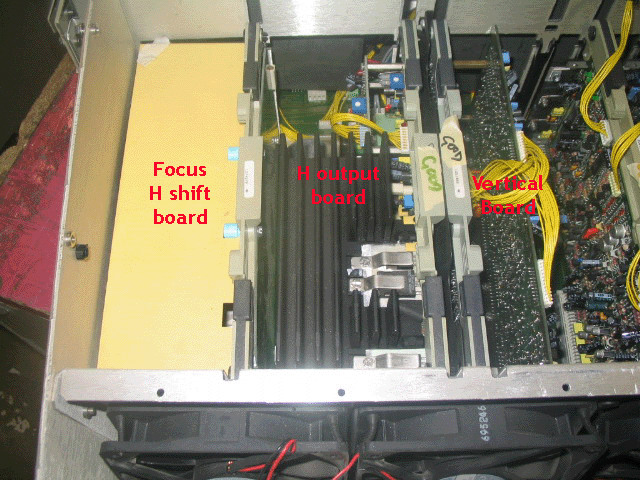
Make sure the crosshairs are centred this means getting the mechanical setup right first. If you cannot centre them with the electronic controls then there are manual controls on the vertical and horizontal boards. After this you can adjust raster height, width and phase from the electronic menu.
There is enough information on this site for you to see what to do.
|
|
| Back to top |
|
|
Ile

Joined: 09 Mar 2006
Posts: 1491
Location: Jyväskylä, Finland
|
| Posted: Tue Dec 03, 2013 8:25 am Post subject: |
|
|
Are you using internal croshatch or actual picture from source?
Internal patterns fill whole raster, so use actual picture to see what it actually looks.
If green vertical raster sift is maxed out, there is usually something wrong. Red/blue have trimpots for that in vertical deflection board.

Some vertical unlinearity is normal due to 10.5 degree projection angle, use vertical linearity controll to fix it.
|
|
| Back to top |
|
|
|
|




