| Author |
Message |
CasetheCorvetteman

Joined: 09 Nov 2008
Posts: 6326
Location: Australia
|
| Posted: Wed Jan 01, 2014 9:53 pm Post subject: |
|
|
Can you move the focus yokes back and forward on the necks?
_________________
Barco Cine 9, ,Sony VPL570ES 4K SXRD, 135" OZ Theatre Majestic 16:9 screen, Denon X6700in preamp mode, 2x 7ch Tonewinner amps, 2x Tonewinner 15" subs, 2x 10" subs, 7.2.6...
RUNCO DTV991 LC ( NEC XG 852 LC ) 100" 4:3 screen, H/K AVR 7.1...
|
|
| Back to top |
|
 |
joepke
Joined: 14 Oct 2008
Posts: 23
Location: the Netherlands
|
| Posted: Wed Jan 01, 2014 10:17 pm Post subject: |
|
|
Yes i already tried that.
If i slide the focus yoke further back/forth the tube neck, then the only difference is that the center is sharp with different focus values. For example: center focus set to 50. Moving focus yoke requires me to set the center focus to 40 to get it sharp again.
Same with the left and right edges.
|
|
| Back to top |
|
|
CasetheCorvetteman
Joined: 09 Nov 2008
Posts: 6326
Location: Australia
|
| Posted: Wed Jan 01, 2014 11:51 pm Post subject: |
|
|
So the edges adjust at the exact same rate when you slide them forward and back?
Does it have any effect at all on the outer edges? Isnt there a menu for zones?
_________________
Barco Cine 9, ,Sony VPL570ES 4K SXRD, 135" OZ Theatre Majestic 16:9 screen, Denon X6700in preamp mode, 2x 7ch Tonewinner amps, 2x Tonewinner 15" subs, 2x 10" subs, 7.2.6...
RUNCO DTV991 LC ( NEC XG 852 LC ) 100" 4:3 screen, H/K AVR 7.1...
|
|
| Back to top |
|
|
joepke
Joined: 14 Oct 2008
Posts: 23
Location: the Netherlands
|
| Posted: Thu Jan 02, 2014 8:43 am Post subject: |
|
|
| Quote: |
So the edges adjust at the exact same rate when you slide them forward and back?
|
Yes.
So in my understanding this means that the optical focus and scheimpflug is correctly set right?
| Quote: |
Does it have any effect at all on the outer edges? Isn't there a menu for zones?
|
If i slide the yoke all the way down away in the direction of the 2/4pole magnets then eventually the sides are sharp.
However, the center isn't any more.
I did a reset of all settings. (focus and astig included) and started from scratch.
I noticed that the walk-through installation setup are better in focus. Not completely though.
So with lower video bandwidth (15khz for example) the tubes are much better focused although still far from perfect.
Everything above PAL/NTSC video bandwidth is getting worse and worse.
What i find strange is that this is on all 3 tubes.
The 1209s is a reversed engineered Seos prodas projector. I bought it from curt.
Could it be that there is some software bug preventing a correct EM overall focus?
cheers.
|
|
| Back to top |
|
|
CasetheCorvetteman
Joined: 09 Nov 2008
Posts: 6326
Location: Australia
|
| Posted: Thu Jan 02, 2014 8:54 am Post subject: |
|
|
Im not familiar with the 1209 at all, my focus was like that from a bad quad, but ive got a pretty controllable system in that i can adjust a number of zones, some of which i couldnt get focused at all before, yet the zone beside it would focus fine.
The fact it does it on all 3 says to me it is something common to all 3 tubes, but at the end of the day im just speculating.
_________________
Barco Cine 9, ,Sony VPL570ES 4K SXRD, 135" OZ Theatre Majestic 16:9 screen, Denon X6700in preamp mode, 2x 7ch Tonewinner amps, 2x Tonewinner 15" subs, 2x 10" subs, 7.2.6...
RUNCO DTV991 LC ( NEC XG 852 LC ) 100" 4:3 screen, H/K AVR 7.1...
|
|
| Back to top |
|
|
Curt Palme
CRT Tech
Joined: 08 Mar 2006
Posts: 24396
Location: Langley, BC
TV/Projector: All of them!
|
| Posted: Thu Jan 02, 2014 2:25 pm Post subject: |
|
|
|
Can you post a pix of the test grid? I'll need to check where the signals are coming from that control the focus board. with any 120X series so far, the problem has always only been the focus board, but it may have a waveform generated on another board that drives the focus board..
|
|
| Back to top |
|
|
joepke
Joined: 14 Oct 2008
Posts: 23
Location: the Netherlands
|
| Posted: Fri Jan 03, 2014 1:44 pm Post subject: |
|
|
Hi Curt,
With the test grid, you mean the internal # pattern?
thanks.
|
|
| Back to top |
|
|
joepke
Joined: 14 Oct 2008
Posts: 23
Location: the Netherlands
|
| Posted: Fri Jan 03, 2014 4:26 pm Post subject: |
|
|
oh and can someone tell me how i can make good pictures of my screen?
I only have a sony cybershot camera (8.1 Mpix)
|
|
| Back to top |
|
|
Curt Palme
CRT Tech
Joined: 08 Mar 2006
Posts: 24396
Location: Langley, BC
TV/Projector: All of them!
|
| Posted: Fri Jan 03, 2014 4:33 pm Post subject: |
|
|
|
Yes, of the test grid so I can see how bad the problem is.
|
|
| Back to top |
|
|
AnalogRocks
Forum Moderator

Joined: 08 Mar 2006
Posts: 26706
Location: Toronto, Ontario, Canada
TV/Projector: Sony 1252Q, AMPRO 4000G
|
| Posted: Fri Jan 03, 2014 4:55 pm Post subject: |
|
|
| joepke wrote: | oh and can someone tell me how i can make good pictures of my screen?
I only have a sony cybershot camera (8.1 Mpix) |
What model number?
_________________
Tech support for nothing
CRT.
HD done right!
|
|
| Back to top |
|
|
joepke
Joined: 14 Oct 2008
Posts: 23
Location: the Netherlands
|
| Posted: Fri Jan 03, 2014 4:58 pm Post subject: |
|
|
|
DSC-W150
|
|
| Back to top |
|
|
AnalogRocks
Forum Moderator
Joined: 08 Mar 2006
Posts: 26706
Location: Toronto, Ontario, Canada
TV/Projector: Sony 1252Q, AMPRO 4000G
|
| Posted: Fri Jan 03, 2014 5:47 pm Post subject: |
|
|
I had a look at your cameras manual. Off hand I would say you could try the following:
Sit the camera on a tripod or firm surface.
Select one of the following modes;
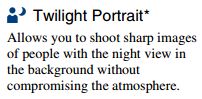
Twilight Portrait that's the one with the little symbol of a person with a moon beside it.
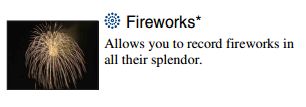
Fireworks setting may work. That's the one on the selection dial that looks like a flower.
Although it's not clear as to how the camera sets the focus in that mode.
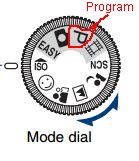
P (program) may also work. That allows the camera to select best shutter and exposure, but may not select a projector friendly setting.
Now here't the important part. Don't shake that camera when you take the picture.
You need to push the shutter (picture taking) button half way to make the camera focus. Then all the way to take the picture.
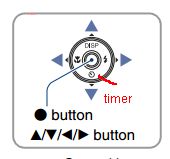
I recommend using the self timer. Activated with the round 4 way button on the back of the camera. That's the symbol that looks like a circle with a dot and lever.
Push the shutter button half way, let the camera lock the focus on your screen. Push it the rest of the way and allow the count don timer to finish taking the the picture. No camera shake this way.
If you have trouble getting the camera to focus, try aiming the center of the camera's screen at the edge of your projection screen. Often times the focus system needs contrast or an edge to lock focus.
Good luck.
Please see the symbols below:
| Description: |
| Twilight Portrait. Meant for capturing the subject and the background in low light. |
|
| Filesize: |
8.04 KB |
| Viewed: |
6705 Time(s) |
|
| Description: |
| Program mode. A good all around picture taking mode. |
|
| Filesize: |
6.92 KB |
| Viewed: |
6705 Time(s) |
|
| Description: |
| Fireworks setting on mode dial. Looks like a flower. |
|
| Filesize: |
5.82 KB |
| Viewed: |
6705 Time(s) |
|
| Description: |
| Timer setting on bottom of dial |
|
| Filesize: |
5.42 KB |
| Viewed: |
6705 Time(s) |
|
_________________
Tech support for nothing
CRT.
HD done right!
|
|
| Back to top |
|
|
joepke
Joined: 14 Oct 2008
Posts: 23
Location: the Netherlands
|
| Posted: Fri Jan 03, 2014 7:11 pm Post subject: |
|
|
wow that's quite an impressive How-To.
I will try it out and let you know.
|
|
| Back to top |
|
|
joepke
Joined: 14 Oct 2008
Posts: 23
Location: the Netherlands
|
|
| Back to top |
|
|
CasetheCorvetteman
Joined: 09 Nov 2008
Posts: 6326
Location: Australia
|
| Posted: Fri Jan 03, 2014 9:27 pm Post subject: |
|
|
| joepke wrote: | Added you find 2 pics.
This one: Image center in focus (although its not as clearly visible as i hoped it would be)
The edges are not sharp as in the next pic.

In this picture, the edges are much sharper.

Let me know if you need more specific pictures. |
Fixed it for you 
_________________
Barco Cine 9, ,Sony VPL570ES 4K SXRD, 135" OZ Theatre Majestic 16:9 screen, Denon X6700in preamp mode, 2x 7ch Tonewinner amps, 2x Tonewinner 15" subs, 2x 10" subs, 7.2.6...
RUNCO DTV991 LC ( NEC XG 852 LC ) 100" 4:3 screen, H/K AVR 7.1...
|
|
| Back to top |
|
|
CasetheCorvetteman
Joined: 09 Nov 2008
Posts: 6326
Location: Australia
|
| Posted: Fri Jan 03, 2014 9:30 pm Post subject: |
|
|
Your horizontal lines seem dimmer, especially near the edges... This thing doesnt have a contrast modulation board in it does it?
_________________
Barco Cine 9, ,Sony VPL570ES 4K SXRD, 135" OZ Theatre Majestic 16:9 screen, Denon X6700in preamp mode, 2x 7ch Tonewinner amps, 2x Tonewinner 15" subs, 2x 10" subs, 7.2.6...
RUNCO DTV991 LC ( NEC XG 852 LC ) 100" 4:3 screen, H/K AVR 7.1...
|
|
| Back to top |
|
|
Curt Palme
CRT Tech
Joined: 08 Mar 2006
Posts: 24396
Location: Langley, BC
TV/Projector: All of them!
|
| Posted: Fri Jan 03, 2014 10:34 pm Post subject: |
|
|
OK, good pictures. I do see the issue, but when the focus board fails, the edges are far more out of focus than yours is. Try this:
Set the middle focus to say 30, then move the focus yoke on the neck of the tubes so that the center focus is the best. By reducing the middle focus below 50, you should now have more range for the edge focus, so that when you're at 70, with the middle focus at 30, it's like the edge focus being at 90 when the middle focus is at 50.
that then gives you more play with the edge focus, and in my experience, the L/R edge focus is usually up between 80-100 for best focusing. I'll bet that will do it.
|
|
| Back to top |
|
|
AnalogRocks
Forum Moderator
Joined: 08 Mar 2006
Posts: 26706
Location: Toronto, Ontario, Canada
TV/Projector: Sony 1252Q, AMPRO 4000G
|
| Posted: Sat Jan 04, 2014 6:59 am Post subject: |
|
|
So which setting worked best on your camera?
_________________
Tech support for nothing
CRT.
HD done right!
|
|
| Back to top |
|
|
joepke
Joined: 14 Oct 2008
Posts: 23
Location: the Netherlands
|
| Posted: Sat Jan 04, 2014 7:06 pm Post subject: |
|
|
| Quote: |
Set the middle focus to say 30, then move the focus yoke on the neck of the tubes so that the center focus is the best. By reducing the middle focus below 50, you should now have more range for the edge focus, so that when you're at 70, with the middle focus at 30, it's like the edge focus being at 90 when the middle focus is at 50.
that then gives you more play with the edge focus, and in my experience, the L/R edge focus is usually up between 80-100 for best focusing. I'll bet that will do it.
|
I tried that several times but no luck.
The issue remains. I have good center focus at 30 and good side focus at 57.
So only the range has changed.
I moved the focus yoke on both the green and red CRT's. Both behave the same.
| Quote: |
Your horizontal lines seem dimmer, especially near the edges... This thing doesnt have a contrast modulation board in it does it?
|
i think its just my "high-Q" camera. Nevertheless, how can i check the existence of a contrast modulation board?
| Quote: |
So which setting worked best on your camera?
|
The first setting.
Twilight Portrait in combination with the Fireworks setting.
Again thanks for your great how-to.
|
|
| Back to top |
|
|
km987654

Joined: 25 Jul 2007
Posts: 2874
Location: Australia
TV/Projector: Barco BG809s
|
| Posted: Sun Jan 05, 2014 5:57 am Post subject: |
|
|
|
Is the green focus yoke actually for the green tube. As you probably know Barco used different windings on that yoke. Have you checked its the right part number?
|
|
| Back to top |
|
|
|
|





