|
As this forum is rarely used anymore, we've locked it. Feel free to browse and read. Questions? Please reach out to us directly. Cheers! |

|
 |
|
|
| Author |
Message |
stridsvognen
Guest
|
| Posted: Fri Nov 22, 2013 7:33 pm Post subject: |
|
|
Looks nice.. Looks like there is some peaking involved, can you take a closeup of the marked area?
It actualy looks better than a standard marquee.. Unless it have a adjustet peaking fit for the resolution.
|
|
| Back to top |
|
 |
gjaky

Joined: 05 Jun 2010
Posts: 2802
Location: Budapest, Hungary
|
| Posted: Fri Nov 22, 2013 7:48 pm Post subject: |
|
|
| stridsvognen wrote: | Looks nice.. Looks like there is some peaking involved, can you take a closeup of the marked area?
It actualy looks better than a standard marquee.. Unless it have a adjustet peaking fit for the resolution. |
There 'ya go! A close up with all colors @1080P 85Hz:

just kidding! 
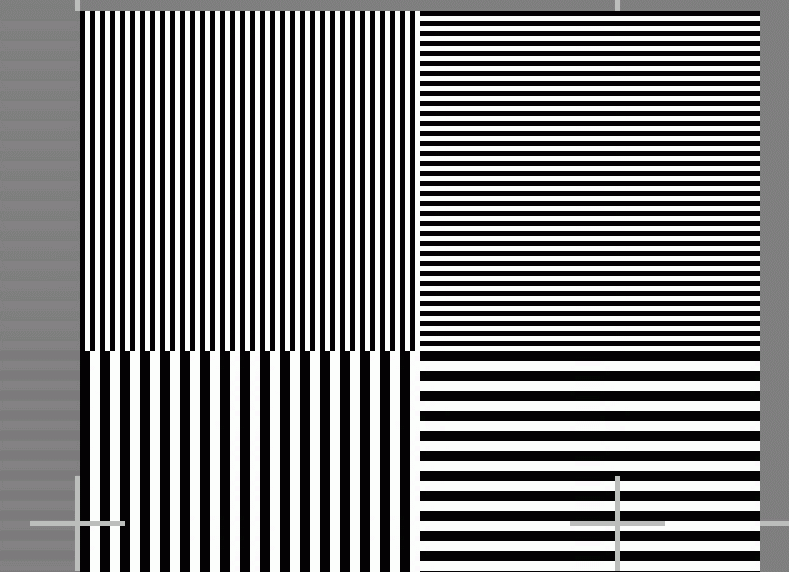
I have already switched off the system... But I don't think that's peaking, the vertical lines are on the left, AFAIK peaking is affecting the rise time, but in this case that would be the fall time, but more likely it is a simple pixel coincidence, see above, this is what I've used (Ecrabb's SMPTE pattern)
| Description: |
|
| Filesize: |
23.61 KB |
| Viewed: |
3090 Time(s) |
|
_________________
projectors in the past : NEC 6-9PG xtra, Electrohome Marquee 6-7500, NEC XG 1351 LC ( with super modified Electrohome VNB neckboard !!!)
current: VDC Marquee 9500LC
The MOD: VNB-DB, VIM-DB
|
|
| Back to top |
|
|
stridsvognen
Guest
|
| Posted: Fri Nov 22, 2013 7:57 pm Post subject: |
|
|
Here is a standard Marquee VIM with peaking, 1080P 72hz adjustet to high, but even at perfect level, it will display a bit of peak in the start of the horisontal line, and it will not be able to make a linear output whan changing output level.
And thats shows its not a real bandwidth, but faked with peaking.
|
|
| Back to top |
|
|
stridsvognen
Guest
|
| Posted: Fri Nov 22, 2013 8:02 pm Post subject: |
|
|
|
Here you have a real clean bandwidth with no peaking, 1080P 72hz, 188Mhz
|
|
| Back to top |
|
|
gjaky
Joined: 05 Jun 2010
Posts: 2802
Location: Budapest, Hungary
|
| Posted: Fri Nov 22, 2013 8:06 pm Post subject: |
|
|
The peaking itself is not a problem, in fact it is good, as it helps to eliminate parasitic effects, the problem is the overshoot, but that isn't an issue if it is held in limits... Actually what I can see in your picture is that your vertical lines are brighter than the horizontal lines so that is over adjusted. If you watch my 1080P-75Hz pictures the vertical lines are nowhere near as bright as the horizontal lines, yet there is the brighter line at transition between the horizontal and vertical lines.
_________________
projectors in the past : NEC 6-9PG xtra, Electrohome Marquee 6-7500, NEC XG 1351 LC ( with super modified Electrohome VNB neckboard !!!)
current: VDC Marquee 9500LC
The MOD: VNB-DB, VIM-DB
|
|
| Back to top |
|
|
gjaky
Joined: 05 Jun 2010
Posts: 2802
Location: Budapest, Hungary
|
| Posted: Fri Nov 22, 2013 8:08 pm Post subject: |
|
|
| stridsvognen wrote: | | Here you have a real clean bandwidth with no peaking, 1080P 72hz, 188Mhz |
The difference is that you have dark line between horizontal and vertical lines, and I have a white line, that's why it looked brighter there, check it!
_________________
projectors in the past : NEC 6-9PG xtra, Electrohome Marquee 6-7500, NEC XG 1351 LC ( with super modified Electrohome VNB neckboard !!!)
current: VDC Marquee 9500LC
The MOD: VNB-DB, VIM-DB
|
|
| Back to top |
|
|
stridsvognen
Guest
|
| Posted: Fri Nov 22, 2013 8:28 pm Post subject: |
|
|
| gjaky wrote: | | stridsvognen wrote: | | Here you have a real clean bandwidth with no peaking, 1080P 72hz, 188Mhz |
The difference is that you have dark line between horizontal and vertical lines, and I have a white line, that's why it looked brighter there, check it! |
I know, but that should not elevate the output in that area.. look the pattern below, its built the same.
If you look the native pattern its still only 100% ire where the lines meet.. Not 110% 
So it is a error..
|
|
| Back to top |
|
|
gjaky
Joined: 05 Jun 2010
Posts: 2802
Location: Budapest, Hungary
|
| Posted: Fri Nov 22, 2013 8:34 pm Post subject: |
|
|
| stridsvognen wrote: | | gjaky wrote: | | stridsvognen wrote: | | Here you have a real clean bandwidth with no peaking, 1080P 72hz, 188Mhz |
The difference is that you have dark line between horizontal and vertical lines, and I have a white line, that's why it looked brighter there, check it! |
I know, but that should not elevate the output in that area.. look the pattern below, its built the same.
If you look the native pattern its still only 100% ire where the lines meet.. Not 110%
So it is a error.. |
I don't know... the pixels are so crowded there, they are heavily overlapped (thus giving more light output) due to the small tube size, it's hard to tell...
_________________
projectors in the past : NEC 6-9PG xtra, Electrohome Marquee 6-7500, NEC XG 1351 LC ( with super modified Electrohome VNB neckboard !!!)
current: VDC Marquee 9500LC
The MOD: VNB-DB, VIM-DB
|
|
| Back to top |
|
|
stridsvognen
Guest
|
| Posted: Fri Nov 22, 2013 8:38 pm Post subject: |
|
|
| gjaky wrote: | | stridsvognen wrote: | | gjaky wrote: | | stridsvognen wrote: | | Here you have a real clean bandwidth with no peaking, 1080P 72hz, 188Mhz |
The difference is that you have dark line between horizontal and vertical lines, and I have a white line, that's why it looked brighter there, check it! |
I know, but that should not elevate the output in that area.. look the pattern below, its built the same.
If you look the native pattern its still only 100% ire where the lines meet.. Not 110%
So it is a error.. |
I don't know... the pixels are so crowded there, they are heavily overlapped (thus giving more light output) due to the small tube size, it's hard to tell... |
Well no matter what its a damn nice resolving of 1080P 60Hz from a standard CRT.
Enough of this.. I think the thread starter now got a idea to see where his bandwidth limitations are, so he can push his performance to the max.
And not push the bandwidth of the machine where he will limit the dynamic range and ansi contrast on high resolution content in the movies.
|
|
| Back to top |
|
|
|
|
|
|
|
You cannot post new topics in this forum
You cannot reply to topics in this forum
You cannot edit your posts in this forum
You cannot delete your posts in this forum
You cannot vote in polls in this forum
You cannot attach files in this forum
You can download files in this forum
|
Forum powered by phpBB © phpBB Group
|
|




