| Author |
Message |
napos
Joined: 21 Oct 2006
Posts: 164
Location: Athens, Greece
|
| Posted: Mon Nov 11, 2013 3:50 am Post subject: "Shaky" image on Marquee 8500!!! PLEASE HELP!!! |
|
|
My Marquee has recently started displaying a shaky image. It usually happens if it's been running for a few hours. It is a slight shake all over the image. It is visible on internal test patterns as well as video sources.
I Used another Moome card, and another VIM board and it is still there. My VIM and neck boards are modded by Mike Parker. They are the latest version of the mods. I tried using a VIM with 2006 version mods and it didn't work at all. When I plugged it the projector the safety fuse for my room went down. I tried later on, the projector will turn on, but will not display any image with the 2006 version modded board. I then tried a stock VIM and I will get internal test patterns, but no source image. the shaking is still there. I then switched back to the latest version VIM and I got back internal test patterns and source image, but the shake is there.
Here are 2 videos of the shake:
https://www.youtube.com/watch?v=w_8i4Hirxlc
http://www.youtube.com/watch?v=fgDPjKWdK8Q&feature=youtu.be
Could it be that the VIM and the neck boards need to work together due to their increased bandwidth performance? Is that the reason that I couldn't get a source image with the other VIMs?
What could be causing the shake on the image? I am using a Moome HDMI 1.3 board 2011 version with MP mods.
I also tried a previous 2010 HDMI Moome board and the shake was still there.
PLEASE HELP!!!
P.S. Two or three years ago, I had a similar problem, which was solved by switching my Horizontal Deflection Module with another board from my 9500 Ultra. About a month ago I started getting a shaky image again and used my original HDM board which was repaired by a local tech. Now I am getting a similar issue with the board that has been repaired, which was the original board of my 8500. Could it be that I just need a new Horizontal Deflection Module?
_________________
Marquee 9500LC Ultra with MP mods, Moome HDMI 1.3 card, Lumagen Radiance XS, Oppo 83 BluRay, Toshiba XE-1 HD-DVD, HTPC with Media Player Classic.
|
|
| Back to top |
|
 |
Nashou66

Joined: 12 Jan 2007
Posts: 16171
Location: West Seneca NY
|
| Posted: Mon Nov 11, 2013 4:31 am Post subject: |
|
|
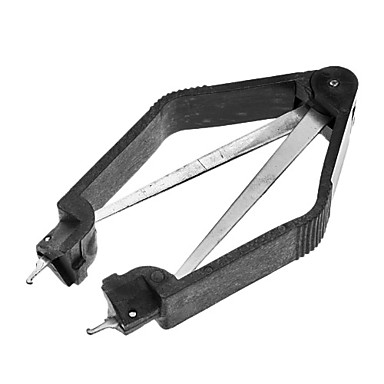
Clean the chips on the CLM and the DPB especially U7 on the DPB. you'll need a chip puller to remove them and put them back in.
there is also a daughter board on the HDM with removable chips as well remove the board and reseat it and clean the contacts.
At least twice a year you should clean all board contacts and removable chips and treat them with either Stabilant22 or DeOxit protectant. Especially since you live in Athens an the salt air might cause more oxidation than usual.
Try that first and see what happens. if not then if you can down load the settings for your PJ with the Marquee loader Program and the initialize the set and re load the settings Might just be a corrupt memory from the power issue you had.
Athanasios
_________________
Don't blame your underwear for your crooked ass~ unknown Greek philosopher
"Republicans believe every day is the Fourth of July, but the Democrats believe every day is April 15." --- President Reagan
One Smart Dog!!!
Marquee High Performance Bellows now shipping!!
Marquee Modifications and Performance Enhancement
Marquee C-element and Bellow removal
|
|
| Back to top |
|
|
napos
Joined: 21 Oct 2006
Posts: 164
Location: Athens, Greece
|
| Posted: Mon Nov 11, 2013 4:48 am Post subject: |
|
|
Should I try switching the CLM board from my 9500 Ultra to see if that solves the issue?
I am not comfortable messing with boards, and I fear that I will break something.
Should I find a local tech and ask him to use some cleaning solution for the contacts that is available in the local market?
I do however vaguely remember that I tried switching CLM boards the first time I had this issue 2-3 years ago and that didn't work. Switching the HDM solved the issue, but I fear that my HDM needs a repair now.
_________________
Marquee 9500LC Ultra with MP mods, Moome HDMI 1.3 card, Lumagen Radiance XS, Oppo 83 BluRay, Toshiba XE-1 HD-DVD, HTPC with Media Player Classic.
|
|
| Back to top |
|
|
Nashou66
Joined: 12 Jan 2007
Posts: 16171
Location: West Seneca NY
|
|
| Back to top |
|
|
Curt Palme
CRT Tech
Joined: 08 Mar 2006
Posts: 24396
Location: Langley, BC
TV/Projector: All of them!
|
| Posted: Mon Nov 11, 2013 2:42 pm Post subject: |
|
|
|
Yes, swap the CLM and HDM and also the HVPS to see if the problem switches sets.
|
|
| Back to top |
|
|
stridsvognen
Guest
|
| Posted: Mon Nov 11, 2013 2:48 pm Post subject: |
|
|
If your room fuse went down, i think you need to look at the LVPS, or HVPS, i doubt any of the boards will be able to blow your room fuse.
Im sure there is some sort of protection in the ps to prevent a short in the projector to blow your room fuse.
|
|
| Back to top |
|
|
napos
Joined: 21 Oct 2006
Posts: 164
Location: Athens, Greece
|
| Posted: Mon Nov 11, 2013 3:16 pm Post subject: |
|
|
Thank you all for the quick reply.
I took out the HDM and the CLM. I simply pressed down on the chips to make sure they were secure. I also twisted the mini RCAs that connect the VIM to the neck boards to make they are secure in place. I disconnected the scan reversal connectors and cleaned them with a paper tissue slightly. After all this I reconnected the HDM and the CLM and the problem went away.
Also the image is "brighter", i.e. it has more punch than before. What is especially noticeable is that the ANSI contrast went up, and the picture is sharper. I guess it had more to do with the mini RCAs on the VIM and the neck boards.
Thank you all for the quick reply. I will keep you posted if something changes.
Nicholas
_________________
Marquee 9500LC Ultra with MP mods, Moome HDMI 1.3 card, Lumagen Radiance XS, Oppo 83 BluRay, Toshiba XE-1 HD-DVD, HTPC with Media Player Classic.
|
|
| Back to top |
|
|
Nashou66
Joined: 12 Jan 2007
Posts: 16171
Location: West Seneca NY
|
|
| Back to top |
|
|
napos
Joined: 21 Oct 2006
Posts: 164
Location: Athens, Greece
|
| Posted: Mon Nov 11, 2013 7:02 pm Post subject: |
|
|
Thank you Thanasi! I will definitely get it. I will ask a tech to come over for the first time I will remove chips and clean contacts, so that he can show me the safe way to do it. Can you recommend a proper tool for removing the chips from the board?
_________________
Marquee 9500LC Ultra with MP mods, Moome HDMI 1.3 card, Lumagen Radiance XS, Oppo 83 BluRay, Toshiba XE-1 HD-DVD, HTPC with Media Player Classic.
|
|
| Back to top |
|
|
Tim in Phoenix

Joined: 21 Oct 2006
Posts: 4409
Location: Phoenix
|
| Posted: Mon Nov 11, 2013 7:05 pm Post subject: |
|
|
Hello
You will need a PLCC chip puller, usually found on Ebay for $5-6
|
|
| Back to top |
|
|
Nashou66
Joined: 12 Jan 2007
Posts: 16171
Location: West Seneca NY
|
|
| Back to top |
|
|
napos
Joined: 21 Oct 2006
Posts: 164
Location: Athens, Greece
|
| Posted: Tue Nov 12, 2013 5:35 pm Post subject: |
|
|
Thank you all for the suggestions for the right tools. It seems that it is something very inexpensive, so I will get it and arrange for a tech to walk me through the procedure of removing the chips, cleaning the contacts and reinserting the chips.
It seems that my Marquee is stable now, but the maintenance procedure is a a must.
Nicholas
_________________
Marquee 9500LC Ultra with MP mods, Moome HDMI 1.3 card, Lumagen Radiance XS, Oppo 83 BluRay, Toshiba XE-1 HD-DVD, HTPC with Media Player Classic.
|
|
| Back to top |
|
|
|
|