|
As this forum is rarely used anymore, we've locked it. Feel free to browse and read. Questions? Please reach out to us directly. Cheers! |

|
 |
|
|
| Author |
Message |
ecrabb
Forum Moderator

Joined: 13 Mar 2006
Posts: 15909
Location: Utah
TV/Projector: JVC RS40, Epson 5010
|
| Posted: Thu Nov 21, 2013 6:48 am Post subject: |
|
|
| mp20748 wrote: | | ecrabb wrote: | | mp20748 wrote: | | ecrabb wrote: | | mp20748 wrote: | ...I'm sure you got an idea where I'm going to go with this.. |
I don't... This thread is a car accident, and I'm on the edge of my seat to see what you're going to tell us about those grainy, noisy, low-resolution screen shots.
SC |
So what are you saying.. do you think the noise and graininess is coming from the camera? |
Absolutely, without question.
SC |
LOl... no that's not the camera. That looks like an extreme case of software enhancement (scaled down, re sized or maybe even sharpened). |
Any recent iPhone has an 8MP camera in it, and those images are just under 1MP... So, of course it was scaled down... Actually, resampled would be more precise.
I would also agree that it's been sharpened (either after resampling, or as part of an 'image size' transformation). But, my question to you is, so what?
Earlier, when I answered your question about whether the noise was coming from the camera, I answered 'yes' because I thought you were asking whether the noise was in the camera image or on the projection screen. Now, I see you meant to ask whether the noise was from the camera or from post-processing.
Even with a better understanding of what you were intending to ask, I stand by my answer. Yes, there was some sharpening applied somewhere. Certainly that sharpening made inherent image sensor noise more pronounced than it would have been had the image only been resampled (which would have the opposite effect, obfuscating image sensor noise). The fact still remains however, that the noise still originated from the camera sensor. As good as the iPhone camera is, it's not known for its low-light performance, resulting in significant noise from the tiny sensor.
I would also point out that resampling causes loss of image detail, so some sharpening is often apropos to retain image detail lost in during resampling.
You do realize that all your screenshots have all had 'processing' applied to them too, right?
SC
|
|
| Back to top |
|
 |
mp20748
Joined: 12 Sep 2006
Posts: 5689
Location: Maryland
TV/Projector: 9500LC Ultra / Super 02 and 03 VIM
|
| Posted: Thu Nov 21, 2013 11:11 am Post subject: |
|
|
| ecrabb wrote: | | mp20748 wrote: | | ecrabb wrote: | | mp20748 wrote: | | ecrabb wrote: | | mp20748 wrote: | | ...I'm sure you got an idea where I'm going to go with this.. |
I don't... This thread is a car accident, and I'm on the edge of my seat to see what you're going to tell us about those grainy, noisy, low-resolution screen shots.
SC |
So what are you saying.. do you think the noise and graininess is coming from the camera? |
Absolutely, without question.
SC |
LOl... no that's not the camera. That looks like an extreme case of software enhancement (scaled down, re sized or maybe even sharpened). |
Any recent iPhone has an 8MP camera in it, and those images are just under 1MP... So, of course it was scaled down... Actually, resampled would be more precise.
I would also agree that it's been sharpened (either after resampling, or as part of an 'image size' transformation). But, my question to you is, so what?
Earlier, when I answered your question about whether the noise was coming from the camera, I answered 'yes' because I thought you were asking whether the noise was in the camera image or on the projection screen. Now, I see you meant to ask whether the noise was from the camera or from post-processing.
Even with a better understanding of what you were intending to ask, I stand by my answer. Yes, there was some sharpening applied somewhere. Certainly that sharpening made inherent image sensor noise more pronounced than it would have been had the image only been resampled (which would have the opposite effect, obfuscating image sensor noise). The fact still remains however, that the noise still originated from the camera sensor. As good as the iPhone camera is, it's not known for its low-light performance, resulting in significant noise from the tiny sensor.
I would also point out that resampling causes loss of image detail, so some sharpening is often apropos to retain image detail lost in during resampling.
You do realize that all your screenshots have all had 'processing' applied to them too, right?
SC |
A lot of this has nothing to do with what is going on in his shots. All of the Point and Shoot cameras have some level of enhancement going on, but what is happening in his shots is extreme - not typical.
The ONLY way to get a Point and Shoot to create that level of noise would be to open it up (iris) while also taking shots at dark objects or in the dark itself.
His shots look like they are software enhanced because the pattern he is shooting should never put a camera in the grunge mode, especially since it is a super bright digital projector. When I go after that same pattern, I had to decrease contrast to get a better capture of it, but that's only when shooting at it very close to the screen. when going after a rear room shot (like the other shot he took) there's no need to decrease contrast, and in his case, he should have been able to take a perfect (no discernible noise) shot at the rear of the room.
|
|
| Back to top |
|
|
ElTopo

Joined: 07 Nov 2006
Posts: 1640
|
| Posted: Thu Nov 21, 2013 1:23 pm Post subject: |
|
|
I think two BR909 in a blend setup can easily be on par with the VW1000 or better.
_________________
Barco Cine 9 the one and only
|
|
| Back to top |
|
|
stridsvognen
Guest
|
| Posted: Thu Nov 21, 2013 1:32 pm Post subject: |
|
|
| ElTopo wrote: | | I think two BR909 in a blend setup can easily be on par with the VW1000 or better. |
I think thats still a preference.. running a blend also means bigger screen, and we still cant beat digital on ansi contrast..
(Measured.)
2nd a blend is not perfect to im sure.. lots of work/ processing to split the image, blend zone and so on.
There should always be a benefit of keeping the signal path simple. ( no processing)
|
|
| Back to top |
|
|
Andreas21
Joined: 02 Oct 2013
Posts: 582
|
| Posted: Thu Nov 21, 2013 3:17 pm Post subject: |
|
|
| mp20748 wrote: | | ecrabb wrote: | | mp20748 wrote: | | ecrabb wrote: | | mp20748 wrote: | | ecrabb wrote: | | mp20748 wrote: | | ...I'm sure you got an idea where I'm going to go with this.. |
I don't... This thread is a car accident, and I'm on the edge of my seat to see what you're going to tell us about those grainy, noisy, low-resolution screen shots.
SC |
So what are you saying.. do you think the noise and graininess is coming from the camera? |
Absolutely, without question.
SC |
LOl... no that's not the camera. That looks like an extreme case of software enhancement (scaled down, re sized or maybe even sharpened). |
Any recent iPhone has an 8MP camera in it, and those images are just under 1MP... So, of course it was scaled down... Actually, resampled would be more precise.
I would also agree that it's been sharpened (either after resampling, or as part of an 'image size' transformation). But, my question to you is, so what?
Earlier, when I answered your question about whether the noise was coming from the camera, I answered 'yes' because I thought you were asking whether the noise was in the camera image or on the projection screen. Now, I see you meant to ask whether the noise was from the camera or from post-processing.
Even with a better understanding of what you were intending to ask, I stand by my answer. Yes, there was some sharpening applied somewhere. Certainly that sharpening made inherent image sensor noise more pronounced than it would have been had the image only been resampled (which would have the opposite effect, obfuscating image sensor noise). The fact still remains however, that the noise still originated from the camera sensor. As good as the iPhone camera is, it's not known for its low-light performance, resulting in significant noise from the tiny sensor.
I would also point out that resampling causes loss of image detail, so some sharpening is often apropos to retain image detail lost in during resampling.
You do realize that all your screenshots have all had 'processing' applied to them too, right?
SC |
A lot of this has nothing to do with what is going on in his shots. All of the Point and Shoot cameras have some level of enhancement going on, but what is happening in his shots is extreme - not typical.
The ONLY way to get a Point and Shoot to create that level of noise would be to open it up (iris) while also taking shots at dark objects or in the dark itself.
His shots look like they are software enhanced because the pattern he is shooting should never put a camera in the grunge mode, especially since it is a super bright digital projector. When I go after that same pattern, I had to decrease contrast to get a better capture of it, but that's only when shooting at it very close to the screen. when going after a rear room shot (like the other shot he took) there's no need to decrease contrast, and in his case, he should have been able to take a perfect (no discernible noise) shot at the rear of the room. |
If you think the VW1000 shows alot of noise when displaying this picture you are totally wrong, it is noise free. But if you put up a JVC with the same testpattern you can see some noise if you move close to the screen. I find you clueless when you don´t understand that is is the camera and compression that makes the picture full of noise.
_________________
http://www.minhembio.com/21Andreas
|
|
| Back to top |
|
|
stridsvognen
Guest
|
| Posted: Thu Nov 21, 2013 3:28 pm Post subject: |
|
|
Andreas21
I think you need to define NOISE, or calibrate your meaning of noise to Mikes meaning of it before it make much more cense to talk about it.
Sometimes a topic like this needs a open mind to understand each other.
|
|
| Back to top |
|
|
Andreas21
Joined: 02 Oct 2013
Posts: 582
|
| Posted: Thu Nov 21, 2013 3:35 pm Post subject: |
|
|
I have an open mind, but I think you guys also need to have that.
If I need to define noise in that picture I rest my case!
_________________
http://www.minhembio.com/21Andreas
|
|
| Back to top |
|
|
mp20748
Joined: 12 Sep 2006
Posts: 5689
Location: Maryland
TV/Projector: 9500LC Ultra / Super 02 and 03 VIM
|
| Posted: Thu Nov 21, 2013 3:38 pm Post subject: |
|
|
| Andreas21 wrote: |
If you think the VW1000 shows alot of noise when displaying this picture you are totally wrong, it is noise free. But if you put up a JVC with the same testpattern you can see some noise if you move close to the screen. I find you clueless when you don´t understand that is is the camera and compression that makes the picture full of noise. |
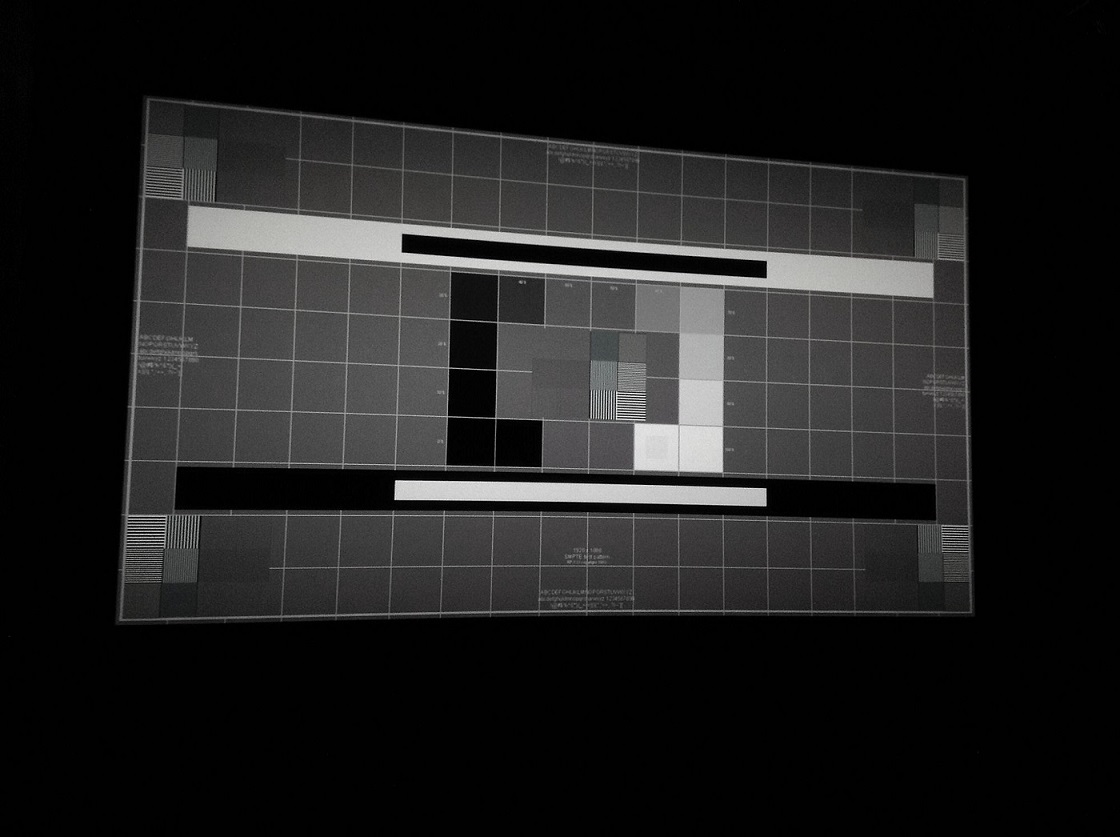
Ok, let's for the sake of getting you to a different place, and this is something that has absolutely nothing to do with noise, or camera. Because we use a similar test to make certain adjustments in the commercial projectors when there's a lot of scaling going on. And in this case, that's what has to happen in order to convert 1080P to 4K.
Look at the entire center group in that full image. Notice that each of the patterns in the pattern group are all different in both black and white lines. To also notice that some gray has gotten in where either black or white should be.
And oh, if you look at the same pattern group picture taking of the JVC, it would show them all being equal. And that's mainly because it's pixel to pixel.
Be very mindful what i said previously and there's no way around it. When dealing with High End digital display, native rate is a MUST -- otherwise you are dealing with an compromised image!
| Description: |
|
| Filesize: |
146.55 KB |
| Viewed: |
2806 Time(s) |
|
Last edited by mp20748 on Thu Nov 21, 2013 3:41 pm; edited 1 time in total
|
|
| Back to top |
|
|
stridsvognen
Guest
|
| Posted: Thu Nov 21, 2013 3:38 pm Post subject: |
|
|
| Andreas21 wrote: | I have an open mind, but I think you guys also need to have that.
If I need to define noise in that picture I rest my case! |
Dont help anything to give up.
And im open to learn something new.. You can start telling me what noise is to you, and what you can evaluate from that SMPTE testpatter, maybe u know something i dont know..
Lets start there, and later look at the screen or pictures
|
|
| Back to top |
|
|
Andreas21
Joined: 02 Oct 2013
Posts: 582
|
| Posted: Thu Nov 21, 2013 4:06 pm Post subject: |
|
|
| mp20748 wrote: | | Andreas21 wrote: |
If you think the VW1000 shows alot of noise when displaying this picture you are totally wrong, it is noise free. But if you put up a JVC with the same testpattern you can see some noise if you move close to the screen. I find you clueless when you don´t understand that is is the camera and compression that makes the picture full of noise. |
Ok, let's for the sake of getting you to a different place, and this is something that has absolutely nothing to do with noise, or camera. Because we use a similar test to make certain adjustments in the commercial projectors when there's a lot of scaling going on. And in this case, that's what has to happen in order to convert 1080P to 4K.
Look at the entire center group in that full image. Notice that each of the patterns in the pattern group are all different in both black and white lines. To also notice that some gray has gotten in where either black or white should be.
And oh, if you look at the same pattern group picture taking of the JVC, it would show them all being equal. And that's mainly because it's pixel to pixel.
Be very mindful what i said previously and there's no way around it. When dealing with High End digital display, native rate is a MUST -- otherwise you are dealing with an compromised image! |
That is correct, but the problem here is that the picture does not show what I can see on the screen. If you are an profefessional I am surpriced you would even try to make a comment on this picture that is clearly full og compression artifacts and noise.
I have never said that I don´t understand the VW1000 has its problems, but if you look at the picturequality when it upscales it is the best 2D picture you can get from a HT projector right now. And I am not new to 4k and the ohhs and the ahhs have setteled down a long time ago.
And you must also remember that you told me the VW1000 has nothing to to with High End! 
_________________
http://www.minhembio.com/21Andreas
|
|
| Back to top |
|
|
stridsvognen
Guest
|
| Posted: Thu Nov 21, 2013 4:14 pm Post subject: |
|
|
Would be nice if someone grab a camera who shows how it looks like on screen then..
I dont understand the meaning in posting something where the camera have shifted colors and gray level from area to area..
Even my sh*tty iphone 3 images display very well the difference in light and color shift. As i see it on the screen to.
|
|
| Back to top |
|
|
ecrabb
Forum Moderator
Joined: 13 Mar 2006
Posts: 15909
Location: Utah
TV/Projector: JVC RS40, Epson 5010
|
| Posted: Thu Nov 21, 2013 4:29 pm Post subject: |
|
|
| mp20748 wrote: | | Look at the entire center group in that full image. Notice that each of the patterns in the pattern group are all different in both black and white lines. To also notice that some gray has gotten in where either black or white should be. |
Mike! For Pete's sake, stop! You CAN NOT glean that information from a wide-angle screen shot from an iPhone that has extremely poor low-light performance (and resultant image sensor gain noise), which has then been resampled, sharpened, then compressed 17:1 to a JPG!!! ALL the detail is GONE from the center pattern in that wide shot! The single-pixel lines look like gray because there isn't enough spatial resolution in the image you're looking at to render the detail! You have to look at the closeup shot, which DOES NOT exhibit those "differences in both black and white lines". In fact, it looks pretty much perfect, at least as far as we can tell from a low-resolution, processed, compressed photo!
Look at THIS photo and tell us what's wrong with it...

SC
|
|
| Back to top |
|
|
ecrabb
Forum Moderator
Joined: 13 Mar 2006
Posts: 15909
Location: Utah
TV/Projector: JVC RS40, Epson 5010
|
| Posted: Thu Nov 21, 2013 4:31 pm Post subject: |
|
|
| stridsvognen wrote: | | Even my sh*tty iphone 3 images display very well the difference in light and color shift. As i see it on the screen to. |
I don't know what you're talking about, since older iPhones are notoriously HORRIBLE at rendering even color balance uniformly across an image (as are many phone cameras, even today). Take a picture of a white piece of paper that mostly fills the frame and you'll see what I'm talking about.
SC
|
|
| Back to top |
|
|
stridsvognen
Guest
|
| Posted: Thu Nov 21, 2013 4:39 pm Post subject: |
|
|
| ecrabb wrote: | | stridsvognen wrote: | | Even my sh*tty iphone 3 images display very well the difference in light and color shift. As i see it on the screen to. |
I don't know what you're talking about, since older iPhones are notoriously HORRIBLE at rendering even color balance uniformly across an image (as are many phone cameras, even today). Take a picture of a white piece of paper that mostly fills the frame and you'll see what I'm talking about.
SC |
Im talking about color balance, but color shift..
You can not evaluate grayscale or collor temperature, or resolution, but you can see if one area changes color from the next, or the light level are around the same in to areas next to each other, unless its so white its clipping.
Those 6 resolution groups should display the same level of light and hold the same color.. If you move far back so you cant see the resolution.
They are all made of ½ black and ½ light.
Most projectors cant get that right.. Crt normaly not at all.
Resolution is 3 dimensional, its more than just seeing that there is lines, and how sharp they are.
|
|
| Back to top |
|
|
Andreas21
Joined: 02 Oct 2013
Posts: 582
|
| Posted: Thu Nov 21, 2013 4:45 pm Post subject: |
|
|
| ecrabb wrote: | | mp20748 wrote: | | Look at the entire center group in that full image. Notice that each of the patterns in the pattern group are all different in both black and white lines. To also notice that some gray has gotten in where either black or white should be. |
Mike! For Pete's sake, stop! You CAN NOT glean that information from a wide-angle screen shot from an iPhone that has extremely poor low-light performance (and resultant image sensor gain noise), which has then been resampled, sharpened, then compressed 17:1 to a JPG!!! ALL the detail is GONE from the center pattern in that wide shot! The single-pixel lines look like gray because there isn't enough spatial resolution in the image you're looking at to render the detail! You have to look at the closeup shot, which DOES NOT exhibit those "differences in both black and white lines". In fact, it looks pretty much perfect, at least as far as we can tell from a low-resolution, processed, compressed photo!
Look at THIS photo and tell us what's wrong with it...
SC |
+100
This picture is closer to what is shown at the screen, but it is still far from it!
_________________
http://www.minhembio.com/21Andreas
Last edited by Andreas21 on Thu Nov 21, 2013 4:50 pm; edited 1 time in total
|
|
| Back to top |
|
|
Andreas21
Joined: 02 Oct 2013
Posts: 582
|
| Posted: Thu Nov 21, 2013 4:49 pm Post subject: |
|
|
| stridsvognen wrote: | | ecrabb wrote: | | stridsvognen wrote: | | Even my sh*tty iphone 3 images display very well the difference in light and color shift. As i see it on the screen to. |
I don't know what you're talking about, since older iPhones are notoriously HORRIBLE at rendering even color balance uniformly across an image (as are many phone cameras, even today). Take a picture of a white piece of paper that mostly fills the frame and you'll see what I'm talking about.
SC |
Im talking about color balance, but color shift..
You can not evaluate grayscale or collor temperature, or resolution, but you can see if one area changes color from the next, or the light level are around the same in to areas next to each other, unless its so white its clipping.
Those 6 resolution groups should display the same level of light and hold the same color.. If you move far back so you cant see the resolution.
They are all made of ½ black and ½ light.
Most projectors cant get that right.. Crt normaly not at all.
Resolution is 3 dimensional, its more than just seeing that there is lines, and how sharp they are. |
When we look at the 6 resolution groups at the screen it shows about the same level of light. What Mike says about some gray have gotten in where it should be black or white is not shown on screen.
_________________
http://www.minhembio.com/21Andreas
Last edited by Andreas21 on Thu Nov 21, 2013 4:53 pm; edited 1 time in total
|
|
| Back to top |
|
|
ecrabb
Forum Moderator
Joined: 13 Mar 2006
Posts: 15909
Location: Utah
TV/Projector: JVC RS40, Epson 5010
|
| Posted: Thu Nov 21, 2013 4:50 pm Post subject: |
|
|
| stridsvognen wrote: | | Im talking about color balance, but color shift.. |
No, you're talking about color balance. Older iPhones did not do a good job with uniform color balance.
| stridsvognen wrote: | | You can not evaluate grayscale or collor temperature, or resolution, but you can see if one area changes color from the next, or the light level are around the same in to areas next to each other, unless its so white its clipping. |
No, you really can't - for the reason I just mentioned. Because the color balance uniformity is so poor, you can't make judgments about how "one area changes color from the next".
| stridsvognen wrote: | | Those 6 resolution groups should display the same level of light and hold the same color.. If you move far back so you cant see the resolution. |
There should BE NO COLOR. If there is, it's either the projector or the camera imparting the color. As you say, in the case of CRT, the single-pixel lines often blend together toward a solid gray, but with a color shift. In this case however, it's the camera, since the closeup shot clearly reveals there are nice, sharp, well-rendered horizontal and vertical lines. Even Mike's suggestion that there is a bunch of processing going on, while true, is a bit specious. The bottom line is that the horizontal and vertical lines are extremely well-defined - far more so than any CRT - in spite of the upscaling!
| stridsvognen wrote: | | Resolution is 3 dimensional, its more than just seeing that there is lines, and how sharp they are. |
The b/w alternating lines are all about measuring frequency response, which actually is all about the lines and how sharp they are. Of course there are other image quality parameters, but that's not what we're discussing at the moment.
SC
|
|
| Back to top |
|
|
ecrabb
Forum Moderator
Joined: 13 Mar 2006
Posts: 15909
Location: Utah
TV/Projector: JVC RS40, Epson 5010
|
| Posted: Thu Nov 21, 2013 4:52 pm Post subject: |
|
|
| Andreas21 wrote: | +100
This picture is closer to what is shown at the screen, but it is still far from it! |
Absolutely! Far from reality indeed.
SC
|
|
| Back to top |
|
|
Andreas21
Joined: 02 Oct 2013
Posts: 582
|
| Posted: Thu Nov 21, 2013 5:01 pm Post subject: |
|
|
| ecrabb wrote: | | stridsvognen wrote: | | Im talking about color balance, but color shift.. |
No, you're talking about color balance. Older iPhones did not do a good job with uniform color balance.
| stridsvognen wrote: | | You can not evaluate grayscale or collor temperature, or resolution, but you can see if one area changes color from the next, or the light level are around the same in to areas next to each other, unless its so white its clipping. |
No, you really can't - for the reason I just mentioned. Because the color balance uniformity is so poor, you can't make judgments about how "one area changes color from the next".
| stridsvognen wrote: | | Those 6 resolution groups should display the same level of light and hold the same color.. If you move far back so you cant see the resolution. |
There should BE NO COLOR. If there is, it's either the projector or the camera imparting the color. As you say, in the case of CRT, the single-pixel lines often blend together toward a solid gray, but with a color shift. In this case however, it's the camera, since the closeup shot clearly reveals there are nice, sharp, well-rendered horizontal and vertical lines. Even Mike's suggestion that there is a bunch of processing going on, while true, is a bit specious. The bottom line is that the horizontal and vertical lines are extremely well-defined - far more so than any CRT - in spite of the upscaling!
| stridsvognen wrote: | | Resolution is 3 dimensional, its more than just seeing that there is lines, and how sharp they are. |
The b/w alternating lines are all about measuring frequency response, which actually is all about the lines and how sharp they are. Of course there are other image quality parameters, but that's not what we're discussing at the moment.
SC |
I think he have about the same opinion of this and I am trying to say here that what is shown on these screenshots has nothing to do with what I see on screen with my VW1000. Normally I don´t spend so much time with testpatterns because I consentrate on what the VW1000 is meant for and that is watching movies. I use testpatterns to check convergence, uniformity and to set brightness and contrast when I get a new projector and my calibrator of course uses it when he calibrates my machines. I wish I had greater knowledge about testpatterns, but I think I get the basics quite well. Maby I will learn some more in the future.
_________________
http://www.minhembio.com/21Andreas
|
|
| Back to top |
|
|
ecrabb
Forum Moderator
Joined: 13 Mar 2006
Posts: 15909
Location: Utah
TV/Projector: JVC RS40, Epson 5010
|
| Posted: Thu Nov 21, 2013 5:08 pm Post subject: |
|
|
| Andreas21 wrote: | | ...I am trying to say here that what is shown on these screenshots has nothing to do with what I see on screen with my VW1000. |
Absolutely correct.
| Andreas21 wrote: | | Normally I don´t spend so much time with testpatterns because I consentrate on what the VW1000 is meant for and that is watching movies. I use testpatterns to check convergence, uniformity and to set brightness and contrast when I get a new projector and my calibrator of course uses it when he calibrates my machines. I wish I had greater knowledge about testpatterns, but I think I get the basics quite well. Maby I will learn some more in the future. |
Agreed. I think some people here could take some lessons from the both of us.
SC
|
|
| Back to top |
|
|
|
|
|
|
|
You cannot post new topics in this forum
You cannot reply to topics in this forum
You cannot edit your posts in this forum
You cannot delete your posts in this forum
You cannot vote in polls in this forum
You cannot attach files in this forum
You can download files in this forum
|
Forum powered by phpBB © phpBB Group
|
|




