| Author |
Message |
daveb859
Joined: 11 Jan 2011
Posts: 12
|
| Posted: Fri Jun 28, 2013 3:44 pm Post subject: Sony vph-1271q sync-on-green problem |
|
|
|
I have a Sony vph-1271q projector that I have used for years with a basic pc that acts as the dvd player. I used a common vga cable with an rgbhv adapter to plug in to the projector. Recently, I bought a Zinwell set-top box so I could watch HD material, and have plugged that into the projector instead. I attached a component adapter to the end of the vga cable that I was using with the pc and plugged that into the component out from the Zinwell. I simply unplugged the H and V part of the adapter from the projector at the other end. When I fired everything up, i changed the resolution in the Zinwell settings to 1080i. The picture I got was the main Zinwell menu in an all green color, and it would play most videos with a scrambled picture. Going into the settings of the projector, it lists Sync-on-green as negative, and I can't seem to find how to change it to positive anywhere in the manual. How do I get the projector to sync on green? The video input used on the projector says g/g sync, so I think it's capable. I think SOG is the problem here, but any advice would be appreciated. Thanks
|
|
| Back to top |
|
 |
the big E
Joined: 20 Apr 2013
Posts: 1928
Location: speedwell Tn.
|
| Posted: Fri Jun 28, 2013 4:28 pm Post subject: Re: Sony vph-1271q sync-on-green problem |
|
|
| daveb859 wrote: | | I have a Sony vph-1271q projector that I have used for years with a basic pc that acts as the dvd player. I used a common vga cable with an rgbhv adapter to plug in to the projector. Recently, I bought a Zinwell set-top box so I could watch HD material, and have plugged that into the projector instead. I attached a component adapter to the end of the vga cable that I was using with the pc and plugged that into the component out from the Zinwell. I simply unplugged the H and V part of the adapter from the projector at the other end. When I fired everything up, i changed the resolution in the Zinwell settings to 1080i. The picture I got was the main Zinwell menu in an all green color, and it would play most videos with a scrambled picture. Going into the settings of the projector, it lists Sync-on-green as negative, and I can't seem to find how to change it to positive anywhere in the manual. How do I get the projector to sync on green? The video input used on the projector says g/g sync, so I think it's capable. I think SOG is the problem here, but any advice would be appreciated. Thanks |
I think the negitive sync is on the horazotial and vertical plugs
My Ecp claims sync on green yet I get on picture with a source that uses it so maybe it applies to that also
Mine is negitive sync on the h and v plugs
_________________
crt king of black
|
|
| Back to top |
|
|
Tim in Phoenix

Joined: 21 Oct 2006
Posts: 4409
Location: Phoenix
|
| Posted: Fri Jun 28, 2013 4:39 pm Post subject: |
|
|
Guys
With sync on green, the sync pulse is Always negative going.
.
|
|
| Back to top |
|
|
the big E
Joined: 20 Apr 2013
Posts: 1928
Location: speedwell Tn.
|
| Posted: Fri Jun 28, 2013 4:43 pm Post subject: |
|
|
| Tim in Phoenix wrote: | Guys
With sync on green, the sync pulse is Always negative going.
. |
Well that confirms it (rats) and here I was hoping I could use my second rgb input on my ecp for something without a transcoder
I think it mentioned somewhere in the documention I got with my Ecp about this and Tim is right
_________________
crt king of black
|
|
| Back to top |
|
|
vid1900
Joined: 02 Jan 2011
Posts: 3
|
| Posted: Fri Jun 28, 2013 7:25 pm Post subject: Re: Sony vph-1271q sync-on-green problem |
|
|
| daveb859 wrote: | | I have a Sony vph-1271q projector that I have used for years with a basic pc that acts as the dvd player. I used a common vga cable with an rgbhv adapter to plug in to the projector. Recently, I bought a Zinwell set-top box so I could watch HD material, and have plugged that into the projector instead. I attached a component adapter to the end of the vga cable that I was using with the pc and plugged that into the component out from the Zinwell. I simply unplugged the H and V part of the adapter from the projector at the other end. When I fired everything up, i changed the resolution in the Zinwell settings to 1080i. The picture I got was the main Zinwell menu in an all green color, and it would play most videos with a scrambled picture. Going into the settings of the projector, it lists Sync-on-green as negative, and I can't seem to find how to change it to positive anywhere in the manual. How do I get the projector to sync on green? The video input used on the projector says g/g sync, so I think it's capable. I think SOG is the problem here, but any advice would be appreciated. Thanks |
That is the most convoluted question I've ever read.
Does the input card on your projector do SOG?
|
|
| Back to top |
|
|
daveb859
Joined: 11 Jan 2011
Posts: 12
|
| Posted: Fri Jun 28, 2013 9:06 pm Post subject: |
|
|
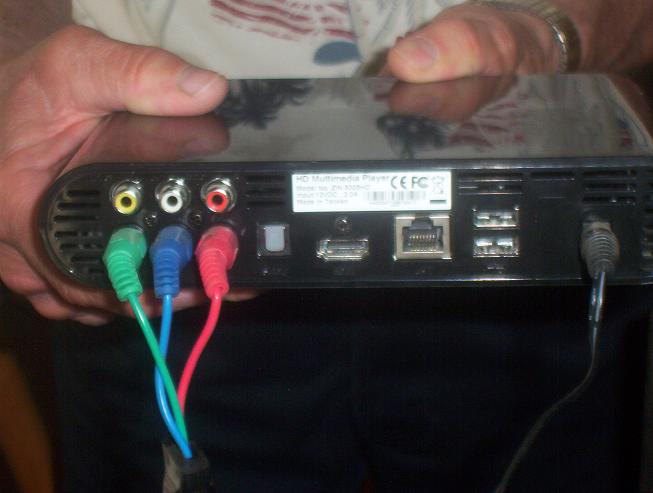
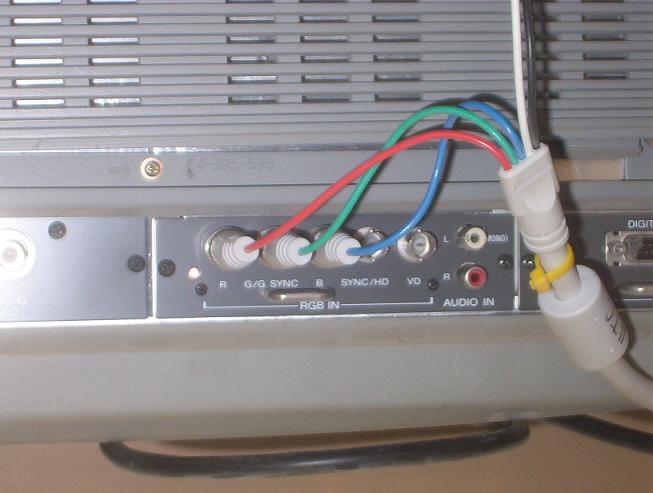
Thanks for the responses. I realize my question was given poorly, so I will try again with pictures.
I have a Zinwell media player I have hooked up from its component out to the video input card on the Sony projector. As far as I know the video input card does sync-on-green.
The resulting picture is all green, and some videos I try to play have a scrambled picture. Are there jumpers that need to be reset in the Sony video input card? Or does something else have to be done?
I could not find an answer in the manual for the Sony.
Here are pictures of the back of both.
Thanks.
| Description: |
|
| Filesize: |
35.69 KB |
| Viewed: |
8678 Time(s) |
|
| Description: |
|
| Filesize: |
43.7 KB |
| Viewed: |
8678 Time(s) |
|
|
|
| Back to top |
|
|
Tim in Phoenix
Joined: 21 Oct 2006
Posts: 4409
Location: Phoenix
|
| Posted: Fri Jun 28, 2013 9:14 pm Post subject: |
|
|
Hello
The picture says everything. Component is Not RGB, a transcoder from YPrPb to RGB will be needed.
.
|
|
| Back to top |
|
|
CasetheCorvetteman

Joined: 09 Nov 2008
Posts: 6326
Location: Australia
|
| Posted: Sat Jun 29, 2013 2:04 am Post subject: |
|
|
|
Hold on, i think you may find the 1271 has component input....
|
|
| Back to top |
|
|
AnalogRocks
Forum Moderator

Joined: 08 Mar 2006
Posts: 26706
Location: Toronto, Ontario, Canada
TV/Projector: Sony 1252Q, AMPRO 4000G
|
| Posted: Sat Jun 29, 2013 2:06 am Post subject: |
|
|
| CasetheCorvetteman wrote: | | Hold on, i think you may find the 1271 has component input.... |
Really?
_________________
Tech support for nothing
CRT.
HD done right!
|
|
| Back to top |
|
|
CasetheCorvetteman
Joined: 09 Nov 2008
Posts: 6326
Location: Australia
|
| Posted: Sat Jun 29, 2013 2:18 am Post subject: |
|
|
| AnalogRocks wrote: | | CasetheCorvetteman wrote: | | Hold on, i think you may find the 1271 has component input.... |
Really? |
Apparently according to Curt's list of specs in the Sony section, i just checked and it is alleged that they all do except the 1270, im sure i read somewhere there is a change you need to make inside it somewhere.
|
|
| Back to top |
|
|
CasetheCorvetteman
Joined: 09 Nov 2008
Posts: 6326
Location: Australia
|
| Posted: Sat Jun 29, 2013 2:21 am Post subject: |
|
|
|
Sync on green is not component either Daveb859, different.
|
|
| Back to top |
|
|
the big E
Joined: 20 Apr 2013
Posts: 1928
Location: speedwell Tn.
|
| Posted: Sat Jun 29, 2013 4:50 am Post subject: |
|
|
| CasetheCorvetteman wrote: | | Sync on green is not component either Daveb859, different. |
i have a digital projector that does sync on green and it works with component video via component to vga adaptor
_________________
crt king of black
|
|
| Back to top |
|
|
CasetheCorvetteman
Joined: 09 Nov 2008
Posts: 6326
Location: Australia
|
| Posted: Sat Jun 29, 2013 5:41 am Post subject: |
|
|
At the risk of repeating myself...
| CasetheCorvetteman wrote: | | Sync on green is not component Big E, different. |
|
|
| Back to top |
|
|
ecrabb
Forum Moderator

Joined: 13 Mar 2006
Posts: 15909
Location: Utah
TV/Projector: JVC RS40, Epson 5010
|
| Posted: Sat Jun 29, 2013 6:28 am Post subject: |
|
|
| CasetheCorvetteman wrote: | | AnalogRocks wrote: | | CasetheCorvetteman wrote: | | Hold on, i think you may find the 1271 has component input.... |
Really? |
Apparently according to Curt's list of specs in the Sony section, i just checked and it is alleged that they all do except the 1270, im sure i read somewhere there is a change you need to make inside it somewhere. |
No. Component input on a 12xx is only possible with an IFB-12 card. The poster has an IFB-10 or IFB-11 card, which was the typical card in a 12xx and RGB-only.
Further, I had (still have, actually) an IFB-12, and I was never able to get HD component to display on my 1271. Dicked with every dipswitch setting I could on the IFB-12, and never could get it to work.
If you really want to use analog, there should be some Kimcoders kicking around for not much money. Personally, I'd rather go HDMI via HD Fury for something more flexible in the future.
SC
|
|
| Back to top |
|
|
CasetheCorvetteman
Joined: 09 Nov 2008
Posts: 6326
Location: Australia
|
| Posted: Sat Jun 29, 2013 6:42 am Post subject: |
|
|
|
Thanks Crabb, i knew i had read about how it was done many years ago, but i couldnt remember much about it. The list does say component but its in brackets, maybe for the very reason you state above.
|
|
| Back to top |
|
|
daveb859
Joined: 11 Jan 2011
Posts: 12
|
| Posted: Sat Jun 29, 2013 1:10 pm Post subject: |
|
|
Thanks for all the replys everyone.
It appears I will need to buy either a transcoder or an hdmi card for my projector.
I'll look into it.
Thanks, again.
|
|
| Back to top |
|
|
AnalogRocks
Forum Moderator
Joined: 08 Mar 2006
Posts: 26706
Location: Toronto, Ontario, Canada
TV/Projector: Sony 1252Q, AMPRO 4000G
|
|
| Back to top |
|
|
SisterOfMercy

Joined: 31 Oct 2007
Posts: 155
Location: Zwart Nazareth, The Netherlands
|
| Posted: Sat Jun 29, 2013 11:00 pm Post subject: |
|
|
The other option is getting something that outputs RGBHV... which may be easier depending on your computer knowledge.
_________________
The kissing and the colour come crashing down
|
|
| Back to top |
|
|
daveb859
Joined: 11 Jan 2011
Posts: 12
|
| Posted: Sun Jun 30, 2013 9:33 pm Post subject: |
|
|
Thanks for the links analogrocks.
Good idea sisterofmercy. I might try looking for a media player with a vga out.
Thanks all.
|
|
| Back to top |
|
|
the big E
Joined: 20 Apr 2013
Posts: 1928
Location: speedwell Tn.
|
| Posted: Thu Jul 04, 2013 4:25 am Post subject: |
|
|
| daveb859 wrote: | Thanks for the links analogrocks.
Good idea sisterofmercy. I might try looking for a media player with a vga out.
Thanks all. |
Eg a htpc
_________________
crt king of black
|
|
| Back to top |
|
|
|
|




