|
As this forum is rarely used anymore, we've locked it. Feel free to browse and read. Questions? Please reach out to us directly. Cheers! |

|
 |
|
|
| Author |
Message |
stridsvognen
Guest
|
| Posted: Wed May 01, 2013 2:12 pm Post subject: |
|
|
| mp20748 wrote: | | Have you removed both Contrast and Acon boards from the slot above the CLM? |
First thing that went into the garbadge.
|
|
| Back to top |
|
 |
stridsvognen
Guest
|
| Posted: Wed May 01, 2013 2:20 pm Post subject: |
|
|
| Nashou66 wrote: | Its the Glycol. it should not be yellow Kurt.
Take a pic of the blue tube with no lens if you can.
I do not think it is any of the boards.
I found calibrating these later model marquee's that you have to approach them differently than the older ones. Something Changed but I have no idea what. I also tried starting with tims numbers but thats not the way.
You'll get it but it will take many different attempts at G2 and drive settings.
Nashou |
well i was going to check the glycol, but its full and starts running all over when i take the screw, Damn its anoying.. Ill find tubes and stuff to pull some glycol out asap. Then it will show.
I just find it strange that it behaves the same with all boards changed, same kind of tubes neckboards and so on.
What i do is putting a low level IRE pattern up 2% and adjust G2 untill its visible on all tubes, then iadjust the drive at 80 or 90% going back adjusting G2 Again and so on.. untill it levels out.. But for some reason i can only make low and high level match, and mid level is all green.
Somewhere i hope its just some cheese in the glycol from that guy that forgot the ground wire to the vertical BD.
Damn those sloppy Americans.. 
|
|
| Back to top |
|
|
stridsvognen
Guest
|
| Posted: Wed May 01, 2013 2:22 pm Post subject: |
|
|
| Nashou66 wrote: | oh and one other thing. the i1 Pro does not read well for red at low IRE's it is not a stable reading. So I would Profile the i1
to a tri stimulus probe for the low IRE's.
I never use the i1 Pro for calibration just to profile my 1 one D3 probe. This way the D3 is as accurate as the i1 but it reads more stable at lower light levels.
Athanasios |
http://www.xrite.com/product_overview.aspx?id=1454
Thats the probe..
I always look at the low level.. i trust my eyes more than any probe i had..
|
|
| Back to top |
|
|
stridsvognen
Guest
|
| Posted: Wed May 01, 2013 3:04 pm Post subject: |
|
|
|
Blue tube
|
|
| Back to top |
|
|
Nashou66

Joined: 12 Jan 2007
Posts: 16171
Location: West Seneca NY
|
|
| Back to top |
|
|
stridsvognen
Guest
|
| Posted: Wed May 01, 2013 4:27 pm Post subject: |
|
|
| Nashou66 wrote: | Its the blue, I found adjusting the G2 for say 20% white wil also affect 80% white just as much and it shouldn't.
So I found having a low Blue Drive and using the G2 to get both 20 and 80 ire's as close as possible.
Nashou |
Sure i see that to. so i can match all 3 colors at 20 and 80% IRE, but ill have way to much blue in 5-15% and to much green from 30-70%
its like i just cant change the linearity of the green color.. i can match red and blue, but green just don run along as usual.
last time i was using time messing with blue.. now im not even so close that i think about the blue colo, im just fighting green.
What i like to know is if its normal that green tracks that bad? i know that blue have the bump, and how to put it out of focus, but this time i just cant get even close to a decent calibration. i normaly use time to tweak small details, but im quite sure i can bring back my old 9500, and do a decent grayscale in 10 min.
So what i Wonder most is can tubes or glycol make a bump on the green color with about 20% around 50% IRE,
|
|
| Back to top |
|
|
Nashou66
Joined: 12 Jan 2007
Posts: 16171
Location: West Seneca NY
|
| Posted: Wed May 01, 2013 7:02 pm Post subject: |
|
|
Kurt this how you have to do it.
Set green drive to about 70-75 and never touch it again.
Now set Green G2 till you do do not see the raster. 0% white should not bee seen on the tube face.
never touch green G2 again
Now use only red and blue.
Now her is the trick, every once in while when you see your having trouble getting a flat Greyscale lower brightness a few clicks( 30 clicks with Marquee control program) and raise contrast one click. I think I ended up with Brightness at 48 and contrast at 73.
My G2's were very low, below 60's
Now the only thing I can think of is that your tubes emissions are shot.
It should have the newer LVPS with the good heater element fix but you never know how they had this thing set up. even if there is no tube wear there might have been cathode wear. And that could be why your having low output and trouble calibrating.
Nashou
_________________
Don't blame your underwear for your crooked ass~ unknown Greek philosopher
"Republicans believe every day is the Fourth of July, but the Democrats believe every day is April 15." --- President Reagan
One Smart Dog!!!
Marquee High Performance Bellows now shipping!!
Marquee Modifications and Performance Enhancement
Marquee C-element and Bellow removal
|
|
| Back to top |
|
|
Nashou66
Joined: 12 Jan 2007
Posts: 16171
Location: West Seneca NY
|
| Posted: Wed May 01, 2013 7:27 pm Post subject: |
|
|
Oh you have the i1 Pro D3. that is a tri stimulus and will drift over time. Also if your using HCFR I know they started up again and have not kept up on the thread at AVS. But I remember someone saying they got the new i1 Display Pro top work with old driver but they had issues.
If you look on E-bay people are dumping the older version of the i1 Pro Spectro-radiometer that I have.
You should get one of those to use to profile your Display Pro with.
Also what is your video chain? Are you sure you have the right Video level and the right Color spaces all the way through out.
I was going back and forth with Spectracal about my i1 Pro Spectro thinking it was bad, they said they never had a bad one go through their lab, even 10 year old ones. So After months of getting aggravated I realized I had two different color spaces BD was set at 442 and the Processor was at 444 in and out.
Athanasios
_________________
Don't blame your underwear for your crooked ass~ unknown Greek philosopher
"Republicans believe every day is the Fourth of July, but the Democrats believe every day is April 15." --- President Reagan
One Smart Dog!!!
Marquee High Performance Bellows now shipping!!
Marquee Modifications and Performance Enhancement
Marquee C-element and Bellow removal
|
|
| Back to top |
|
|
stridsvognen
Guest
|
| Posted: Wed May 01, 2013 8:03 pm Post subject: |
|
|
Well for now its not so much about the probe.. it is how it is.. OK.. My grayramp supports my readings, ill look at probes when i get my HT up Again, but untill now ill do wit what i have, i just calibrated my JVC X7 to feath with this one.. and it looks amasing even beeing a digital.
Chain is OPPO 83 Lumagen Radiance XS+ moome V3 im using the radiance test patterns, and i tested both 422 and RGB out, same result, as it should be.
Its getting dark now, so im giving it one more shot at calibrating a decent grayscale.
HCFT is working fine with the probe, the only problem i have is with the new HCFR i cant adjust dark reading time, and that seems to be needet with CRT.
|
|
| Back to top |
|
|
Nashou66
Joined: 12 Jan 2007
Posts: 16171
Location: West Seneca NY
|
|
| Back to top |
|
|
ronaldus
Joined: 25 Dec 2010
Posts: 183
Location: france
|
| Posted: Wed May 01, 2013 8:46 pm Post subject: |
|
|
Hi everybody,
Could it be that kurt has a P43 phosfor? Those give lower light output at 60 or 72 Hz. Since the projector comes from some simulator it could well be a 3d simulator.
It's just an idea.
Cheers,
Ron.
|
|
| Back to top |
|
|
stridsvognen
Guest
|
| Posted: Wed May 01, 2013 9:34 pm Post subject: |
|
|
Put all the ultra boards back, but its teasing me a bit, its like brightness is not rhe same every time i turn it on, sometimes i have to turn it Down to 0 or the tubes will be bright with a 0% IRE, other time 50 is ok.. And then there is some anoying bugs in the 5.0 firmware.. when calibrating if pressing mute to remove the info when adjusting G2, if pressing exit your stuck, and need to restart the projector and start all over Again.
And now suddently convergense is cracy, starting with green and red, its fine in the center.. green id the fixed pattern, but when moving to anywhere outside the center it starts to move the green instead of red.. Im getting a bit anoyed..
|
|
| Back to top |
|
|
Nashou66
Joined: 12 Jan 2007
Posts: 16171
Location: West Seneca NY
|
|
| Back to top |
|
|
barclay66

Joined: 27 Jun 2011
Posts: 1304
Location: Germany
TV/Projector: Marquee 9500 Ultra
|
| Posted: Wed May 01, 2013 9:55 pm Post subject: |
|
|
Hi,
Just another idea concerning the calibration problem:
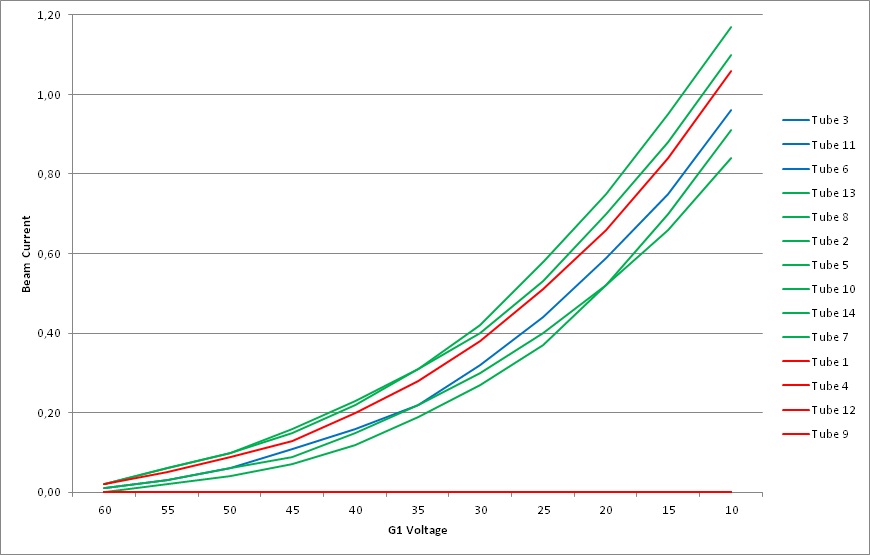
Using a tube tester/regenerator (Müter BMR 90) I made some measurements (beam current vs G1 voltage) on my spare tubes. I was interested how the tube's age would have an influence on its system's emission capability. As we know, most tubes don't reach their end of life due to low emission. Instead, they are replaced because of phosphor wear or burn. Well, with my measurements I could verify that the emission capability really isn't too much different between almost new and really worn tubes (regarding their phosphor). It can be recognized as an overall degradation of the beam current.
BUT: Each tube has its own characteristic emission curve (see picture with some samples)!
So, Your problem could be the tube itself. Maybe Your green has a bump in its emission curve and this nonlinear behaviour is causing the phenomenom described (deviation in color balance over different intensity levels).
Regards,
barclay66
| Description: |
|
| Filesize: |
79 KB |
| Viewed: |
9551 Time(s) |
|
|
|
| Back to top |
|
|
stridsvognen
Guest
|
| Posted: Wed May 01, 2013 10:18 pm Post subject: |
|
|
| Nashou66 wrote: | you hooked up the HDM cables wrong.
Why oh Why did you take it apart all together?
Oh and for mute just press mute again to see the menu, exit closes everything out.
Like I said use the Marquee controller program to calibrate. No need for the remote or onscreen display at all.
Nashou |
I know i can press mute Again and the menu go back on, just not if you press exit first.. then there is no response anymore, no way it will Work with you Again before a restart.
It was the red and green changed on the convergence board.. 
Well if it had worked as i expected im sure it would not have been opened, but its just teasing me big time with this calibration.
|
|
| Back to top |
|
|
stridsvognen
Guest
|
| Posted: Wed May 01, 2013 10:20 pm Post subject: |
|
|
| barclay66 wrote: | Hi,
Just another idea concerning the calibration problem:
Using a tube tester/regenerator (Müter BMR 90) I made some measurements (beam current vs G1 voltage) on my spare tubes. I was interested how the tube's age would have an influence on its system's emission capability. As we know, most tubes don't reach their end of life due to low emission. Instead, they are replaced because of phosphor wear or burn. Well, with my measurements I could verify that the emission capability really isn't too much different between almost new and really worn tubes (regarding their phosphor). It can be recognized as an overall degradation of the beam current.
BUT: Each tube has its own characteristic emission curve (see picture with some samples)!
So, Your problem could be the tube itself. Maybe Your green has a bump in its emission curve and this nonlinear behaviour is causing the phenomenom described (deviation in color balance over different intensity levels).
Regards,
barclay66 |
I hope not, but if i dont get it calibrated soon, ill go grab another green tube and test that.
Anyway ill be getting a new tube from Curt soon and i have to test that one anyway, before putting it under the bed.
|
|
| Back to top |
|
|
stridsvognen
Guest
|
| Posted: Wed May 01, 2013 11:10 pm Post subject: |
|
|
|
well its over for today, just got smoke out of the blue channel on the convergence board.. dont know why.. Ill pull it out and not touch anything else today..
|
|
| Back to top |
|
|
stridsvognen
Guest
|
| Posted: Wed May 01, 2013 11:46 pm Post subject: |
|
|
|
Anyone with a a diagram of the convergence board so its possible to see the value of R669 and R671, they are 2 resistors in paralel to the center leg of the transistor, ill think around 1,6 ohm
|
|
| Back to top |
|
|
Nashou66
Joined: 12 Jan 2007
Posts: 16171
Location: West Seneca NY
|
|
| Back to top |
|
|
Nashou66
Joined: 12 Jan 2007
Posts: 16171
Location: West Seneca NY
|
|
| Back to top |
|
|
|
|
|
|
|
You cannot post new topics in this forum
You cannot reply to topics in this forum
You cannot edit your posts in this forum
You cannot delete your posts in this forum
You cannot vote in polls in this forum
You cannot attach files in this forum
You can download files in this forum
|
Forum powered by phpBB © phpBB Group
|
|




