| Author |
Message |
CZ Eddie
Joined: 23 Mar 2006
Posts: 1601
Location: Austin, TX
|
| Posted: Tue Jan 29, 2013 6:38 am Post subject: Can 4:3 Sony Wega XBR CRT TV's display 800x600 via the DVI? |
|
|
I'm looking to pick up an Sony FD Trinitron WEGA KV-40XBR800 40" CRT TV. It's a 4:3 model, not widescreen. And it has a "DVI-HDTV" input on the back. The manual says it's not designed to be used with computers.
Does anyone know if I buy it, can I still use my computer with it and display 800x600 or 1024x768 properly?
I've googled everywhere and have yet to find a definitive answer to this or the similar 36XBR800 TV.
_________________
Back after a digital sabatical.
|
|
| Back to top |
|
 |
ecrabb
Forum Moderator

Joined: 13 Mar 2006
Posts: 15909
Location: Utah
TV/Projector: JVC RS40, Epson 5010
|
| Posted: Tue Jan 29, 2013 7:32 am Post subject: |
|
|
If memory serves, the only thing that port was really ever used with was a couple of OTA and satellite DVRs. I'd bet money 800x600 and 1024x768 will be no-go's. If you want to use it with a computer, I think you'll need a video card that will produce a standard 1080i HD timing. 720p might be an option (but I'd suspect probably not), and if any 4:3 resolution would work, it would be standard line-doubled NTSC (480p).
SC
|
|
| Back to top |
|
|
CZ Eddie
Joined: 23 Mar 2006
Posts: 1601
Location: Austin, TX
|
| Posted: Tue Jan 29, 2013 7:40 am Post subject: |
|
|
I hope you're wrong.
I'm hoping this TV is the answer to my garage located Internet surfing and youtube'ing.
It'll be a busy spring in my Garage and I want to have a big assed monitor/TV, but in 4:3. Not widescreen.
Hope you're doing good, btw. I don't get around here much lately. 
_________________
Back after a digital sabatical.
|
|
| Back to top |
|
|
ecrabb
Forum Moderator
Joined: 13 Mar 2006
Posts: 15909
Location: Utah
TV/Projector: JVC RS40, Epson 5010
|
| Posted: Tue Jan 29, 2013 8:05 am Post subject: |
|
|
My problem with that set would be how effin' big and heavy the damn would be to move around. Literally heavier than most CRT projectors, but more awkward and unwieldy. I'm at the point, where if somebody said they'd PAY me $50 to pick that set up and put in my house, I don't think I would.
If you don't mind me asking, what's somebody asking for this set, or are they basically giving it away? If it's much money at all, and "big-ass" is what you're after, I'm seeing LCD's and smallish RPTV's going on craigslist around for very cheap prices. Who cares of it's widescreen? A lot of the sh*t you'll watch on YouTube will be, too.
Welcome back. Definitely haven't seen you around in awhile. Last I remember, you were selling some gear off to pay a friend or relative for a little lapse in judgment. 
Watcha working on in the garage? Anything fun?
SC
|
|
| Back to top |
|
|
CZ Eddie
Joined: 23 Mar 2006
Posts: 1601
Location: Austin, TX
|
| Posted: Tue Jan 29, 2013 9:04 am Post subject: |
|
|
Hahah! Yeah, I finally paid off that ATV of my cousins that I wrapped around a tree. Well, dented a tree with. lol
Financially though,, things haven't gotten any easier since then. I moved my Mom in with me a few months ago. Her health has taken a downward turn and I've been trying to help out since I'm her only child.
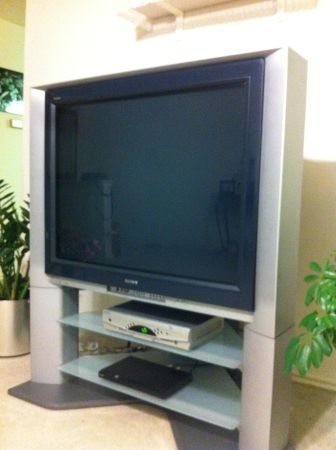
The Sony is $80 and in mint condition. Comes with the stock stand. I think it'll be great for the garage, since I'll be spending so much time in there remodeling it to become a downstairs bedroom for my Mom to live in. I'll put it on a furniture rolling cart so I can scoot it around as needed.
It'll be too big for anyone to steal when I walk away and leave the garage door open. hahah 
And honestly, I'm looking forward to playing with it since it's CRT. Something new to fiddle around with/tweak/adjust/calibrate/etc.
| Description: |
|
| Filesize: |
19.5 KB |
| Viewed: |
131 Time(s) |
|
_________________
Back after a digital sabatical.
|
|
| Back to top |
|
|
macgyver655
Joined: 22 Aug 2007
Posts: 8508
|
| Posted: Tue Jan 29, 2013 3:26 pm Post subject: |
|
|
According to the service manual, that TV is capable of the following resolutions:
Component input: 480i, 480p, 720p and 1080i.
DVI: 480i, 480p, VGA, 720p and 1080i.
|
|
| Back to top |
|
|
Untuned
Joined: 03 Dec 2011
Posts: 93
Location: Pooler, GA
|
| Posted: Tue Jan 29, 2013 4:47 pm Post subject: |
|
|
I have the KV-36XBR800. I think it's a great tv; based on the image, I can't justify throwing it out to get a flatscreen, unless I wanted a bigger image or a smaller footprint. It does weigh around 165 lbs and is a beast to move around.
My laptop is old and only has the vga and s-video ports. I have connected to the tv with the s-video and it accepts 800x600 and 1024x768. I suspect it would look better through the dvi port on the tv (I assume you have the hdmi port on your computer). I have a blu-ray player hooked up to the tv through the dvi port: whether I feed it 480p, 720p or 1080i, they all look the same to me. It might be partly explained by this quote from cnet:
| Quote: | "It can display 1080i HDTV when connected to an outboard HDTV tuner, and it converts incoming 720p signals to high-resolution 1080i; some sets down-convert 720p to 480p. The 16:9 Enhanced feature, which displays the full vertical resolution of anamorphic, enhanced-for-wide-screen DVDs, turns on automatically when the set detects such a disc.
"The advanced video controls, including Digital Reality Creation (DRC) multifunction modes, optimize how you view other sources, namely regular TV and VHS. DRC comes in three flavors: Interlaced, Progressive, or CineMotion. Interlaced mode will convert standard-definition 480i sources up to 960i, while Progressive converts them to 480p. CineMotion converts sources to 480p and adds reverse 3:2 pull-down, which helps to eliminate artifacts created in the transfer of film to video." |
Most people desperately want to get rid of their mammoth tv's for flatscreens, as such, many are given away, such as the crt RPTV's. I would think you could talk him down from $80...
Good luck!
|
|
| Back to top |
|
|
macgyver655
Joined: 22 Aug 2007
Posts: 8508
|
| Posted: Tue Jan 29, 2013 4:56 pm Post subject: |
|
|
| Untuned wrote: | I have the KV-36XBR800. I think it's a great tv; based on the image, I can't justify throwing it out to get a flatscreen, unless I wanted a bigger image or a smaller footprint. It does weigh around 165 lbs and is a beast to move around.
My laptop is old and only has the vga and s-video ports. I have connected to the tv with the s-video and it accepts 800x600 and 1024x768. I suspect it would look better through the dvi port on the tv (I assume you have the hdmi port on your computer). I have a blu-ray player hooked up to the tv through the dvi port: whether I feed it 480p, 720p or 1080i, they all look the same to me. It might be partly explained by this quote from cnet:
| Quote: | "It can display 1080i HDTV when connected to an outboard HDTV tuner, and it converts incoming 720p signals to high-resolution 1080i; some sets down-convert 720p to 480p. The 16:9 Enhanced feature, which displays the full vertical resolution of anamorphic, enhanced-for-wide-screen DVDs, turns on automatically when the set detects such a disc.
"The advanced video controls, including Digital Reality Creation (DRC) multifunction modes, optimize how you view other sources, namely regular TV and VHS. DRC comes in three flavors: Interlaced, Progressive, or CineMotion. Interlaced mode will convert standard-definition 480i sources up to 960i, while Progressive converts them to 480p. CineMotion converts sources to 480p and adds reverse 3:2 pull-down, which helps to eliminate artifacts created in the transfer of film to video." |
Most people desperately want to get rid of their mammoth tv's for flatscreens, as such, many are given away, such as the crt RPTV's. I would think you could talk him down from $80...
Good luck! |
I dont think your S video is actually sending those resolutions and even if it was possible the tv would not except them.
Only component and DVI can except any resolution over 480i.
I also don't believe this is a multi sync tv so any resolution would be scaled to the deflection resolution. This is why it always looks the same.
And I would think he could convince the guy to pay him to move that beast out. I have passed on many, many tv's because of to large and heavy......
|
|
| Back to top |
|
|
CZ Eddie
Joined: 23 Mar 2006
Posts: 1601
Location: Austin, TX
|
| Posted: Tue Jan 29, 2013 8:38 pm Post subject: |
|
|
Yep, this is why I'm going nuts.
Every bit of info I've found so far talks about using the S-Video port.
Or when talking about the DVI port (which is what I want), it only talks about running widescreen type resolutions. Nobody is talking about the full-screen resolution capability that I want. 
_________________
Back after a digital sabatical.
|
|
| Back to top |
|
|
CZ Eddie
Joined: 23 Mar 2006
Posts: 1601
Location: Austin, TX
|
| Posted: Tue Jan 29, 2013 8:40 pm Post subject: |
|
|

_________________
Back after a digital sabatical.
|
|
| Back to top |
|
|
macgyver655
Joined: 22 Aug 2007
Posts: 8508
|
| Posted: Tue Jan 29, 2013 8:55 pm Post subject: |
|
|
|
Well the simple answer is, for 800X600, is nope. But you never know. It doesn't actually display the resolution it is sent anyways. It just depends on whether it will except what it's being sent and able to convert it. You can try it, you never know otherwise.
|
|
| Back to top |
|
|
CZ Eddie
Joined: 23 Mar 2006
Posts: 1601
Location: Austin, TX
|
| Posted: Tue Jan 29, 2013 10:46 pm Post subject: |
|
|
| macgyver655 wrote: | | Well the simple answer is, for 800X600, is nope. But you never know. It doesn't actually display the resolution it is sent anyways. It just depends on whether it will except what it's being sent and able to convert it. You can try it, you never know otherwise. |
So you're saying that no matter what resolution I send it, it will internally convert that to 1080i?
Sheesh. That means I'll have black bars on the top & bottom of the screen because it'll go widescreen on me.
_________________
Back after a digital sabatical.
|
|
| Back to top |
|
|
AnalogRocks
Forum Moderator

Joined: 08 Mar 2006
Posts: 26706
Location: Toronto, Ontario, Canada
TV/Projector: Sony 1252Q, AMPRO 4000G
|
| Posted: Tue Jan 29, 2013 11:08 pm Post subject: |
|
|
Hi Eddie,
I didn't end up with the 40" because it would't fit through my door 
I bought a 32" instead. What I found was it would actually accept 800x600, 1024x768 1280x720 and 1080i
However, as soon as you get into a higher scan rate the TV switched to 16:9. All my testing was done via component. You may be able to get 480p full screen but I can't remember for sure.
What I do know is once the scan rate went up the option to switch 4:3/16:9 was grayed out in the TV's menu.
_________________
Tech support for nothing
CRT.
HD done right!
|
|
| Back to top |
|
|
CZ Eddie
Joined: 23 Mar 2006
Posts: 1601
Location: Austin, TX
|
| Posted: Wed Jan 30, 2013 12:32 am Post subject: |
|
|
Thank you, AR!
| AnalogRocks wrote: |
However, as soon as you get into a higher scan rate the TV switched to 16:9. All my testing was done via component. You may be able to get 480p full screen but I can't remember for sure.
What I do know is once the scan rate went up the option to switch 4:3/16:9 was grayed out in the TV's menu. |
Arrgh, I was hoping you would respond, but I wanted a different answer!
So you put 800x600 or 1024x768 into it, but it gets squished down to widescreen and you don't get the full screen 4:3 option. Well that sucks.
Hopefully the guy with the RCA MM36100 will reply to my emails soon. That 36" set has a VGA input and I know for a fact it does 800x600 just fine. I spent $2500 on the same set back in the 90's and he's selling it for $50. I offered $30 but he hasn't responded.
Thanks guys!
_________________
Back after a digital sabatical.
|
|
| Back to top |
|
|
CasetheCorvetteman

Joined: 09 Nov 2008
Posts: 6326
Location: Australia
|
| Posted: Mon Feb 11, 2013 4:56 am Post subject: |
|
|
I have a question...
Why buy one of these heaps of junk instead of a Sony PVM or an NEC XM29????
|
|
| Back to top |
|
|
AnalogRocks
Forum Moderator
Joined: 08 Mar 2006
Posts: 26706
Location: Toronto, Ontario, Canada
TV/Projector: Sony 1252Q, AMPRO 4000G
|
| Posted: Mon Feb 11, 2013 5:14 am Post subject: |
|
|
| CasetheCorvetteman wrote: | I have a question...
Why buy one of these heaps of junk instead of a Sony PVM or an NEC XM29???? |
Price and availability. The picture isn't half bad either
_________________
Tech support for nothing
CRT.
HD done right!
|
|
| Back to top |
|
|
CasetheCorvetteman
Joined: 09 Nov 2008
Posts: 6326
Location: Australia
|
| Posted: Mon Feb 11, 2013 6:17 am Post subject: |
|
|
Yeah... You can get a 2950 PVM for bugger all though, and itll smoke a Wega... Will also do 1024x768 no dramas....
Horses for courses... One is a domestic grade TV, the other is a pro grade monitor, which is really what this bloke is after...
|
|
| Back to top |
|
|
AnalogRocks
Forum Moderator
Joined: 08 Mar 2006
Posts: 26706
Location: Toronto, Ontario, Canada
TV/Projector: Sony 1252Q, AMPRO 4000G
|
| Posted: Mon Feb 11, 2013 6:41 am Post subject: |
|
|
I never see those around here or I'd own half a dozen.
_________________
Tech support for nothing
CRT.
HD done right!
|
|
| Back to top |
|
|
ecrabb
Forum Moderator
Joined: 13 Mar 2006
Posts: 15909
Location: Utah
TV/Projector: JVC RS40, Epson 5010
|
| Posted: Mon Feb 11, 2013 7:02 am Post subject: |
|
|
| CasetheCorvetteman wrote: | | Why buy one of these heaps of junk instead of a Sony PVM or an NEC XM29???? |
Well, for one thing... 40" > 29".
Plus, like Jeremy said, even with the switch from SD to HD, I really haven't seen many PVM's around.
Plus, are you sure the 2940 will do XGA? Most of the PVMs of that vintage were only good to line-doubled NTSC 480p / PAL 576p.
SC
|
|
| Back to top |
|
|
AnalogRocks
Forum Moderator
Joined: 08 Mar 2006
Posts: 26706
Location: Toronto, Ontario, Canada
TV/Projector: Sony 1252Q, AMPRO 4000G
|
| Posted: Mon Feb 11, 2013 7:04 am Post subject: |
|
|
| ecrabb wrote: | | CasetheCorvetteman wrote: | | Why buy one of these heaps of junk instead of a Sony PVM or an NEC XM29???? |
Well, for one thing... 40" > 29".
Plus, like Jeremy said, even with the switch from SD to HD, I really haven't seen many PVM's around.
Plus, are you sure the 2940 will do XGA? Most of the PVMs of that vintage were only good to line-doubled NTSC 480p / PAL 576p.
SC |
I did see an NEC that would do 480p but really low res screen.
_________________
Tech support for nothing
CRT.
HD done right!
|
|
| Back to top |
|
|
|
|




