|
As this forum is rarely used anymore, we've locked it. Feel free to browse and read. Questions? Please reach out to us directly. Cheers! |

|
 |
|
|
| Author |
Message |
gjaky

Joined: 05 Jun 2010
Posts: 2802
Location: Budapest, Hungary
|
| Posted: Sat Jan 12, 2013 3:10 pm Post subject: |
|
|
| CasetheCorvetteman wrote: | The NEC is very easy to set up. Especially the later ones. Ive never set up a Barco though.
From the PG PLUS they all have HD144 or HD145 lenses.
If you follow the procedures on the tech section of this site you cant go wrong. If you run each menu up and down its very obvious what they all do. |
One thing what I don't understand, if one use the built in setup manager on a NEC (for example on a PG xtra) the menu tells totally wrong setup order...  don't know about XGs though. don't know about XGs though.
_________________
projectors in the past : NEC 6-9PG xtra, Electrohome Marquee 6-7500, NEC XG 1351 LC ( with super modified Electrohome VNB neckboard !!!)
current: VDC Marquee 9500LC
The MOD: VNB-DB, VIM-DB
|
|
| Back to top |
|
 |
Zolzar
Joined: 26 Jun 2009
Posts: 252
|
| Posted: Sun Jan 13, 2013 2:52 am Post subject: |
|
|
I'm happy to report that so far I have changed all the caps on the Deflection, Wave, System , and Point boards and the projector is working well. I found at least 20 leaking caps between these four boards. I was actually surprised to find so many. Unfortunately I missed a few caps in my order so a few were not changed. Mostly the bipolars. No big deal as I have notes and I will order and replace them once I've been through round one with this machine and have the total count. I'll hit the iron in the morning. The convergence boards are next. Not too many caps on those so it should be easy....although I noticed I'm missing a 50V2000uF cap already.
John
|
|
| Back to top |
|
|
overclkr

Joined: 08 Mar 2006
Posts: 4227
|
| Posted: Sun Jan 13, 2013 4:08 am Post subject: |
|
|
|
This.........thread........is.........now.........useless........without.........SCREENSHOTS.
|
|
| Back to top |
|
|
Zolzar
Joined: 26 Jun 2009
Posts: 252
|
| Posted: Sun Jan 13, 2013 11:59 pm Post subject: |
|
|
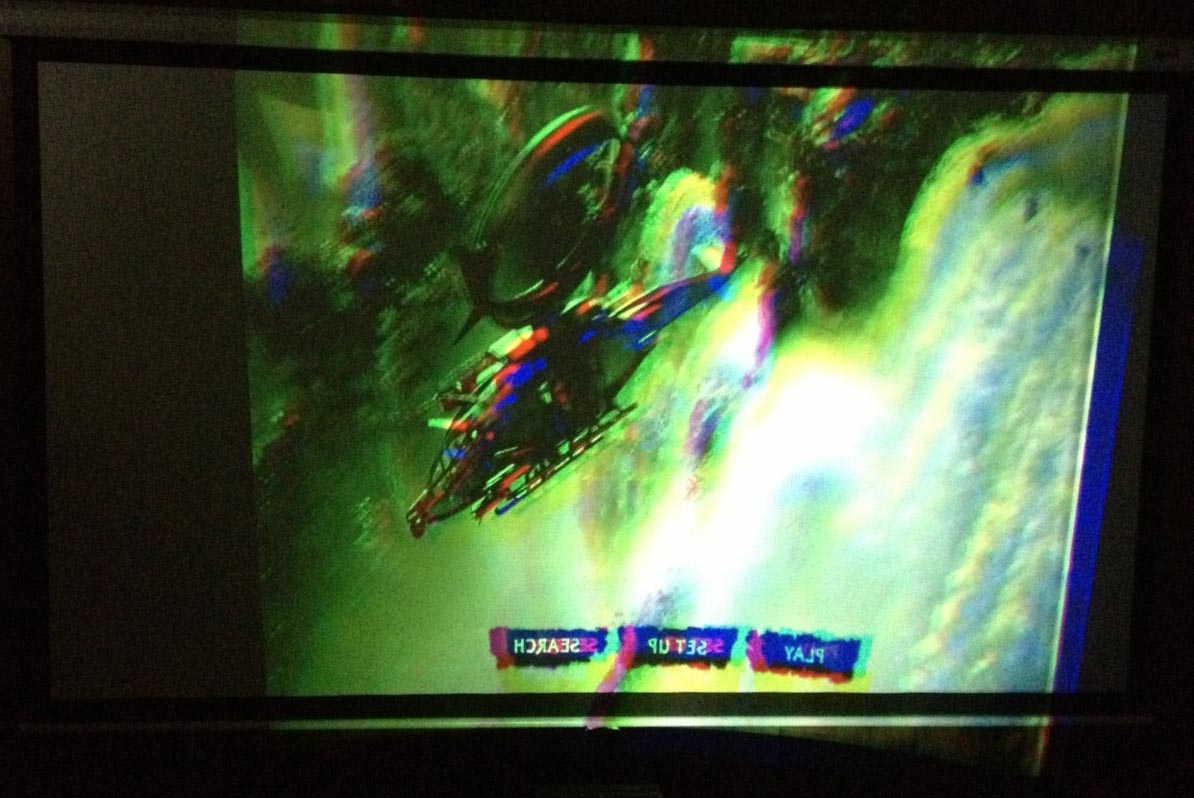
Here is the screen shot of the PG10 so far.
| Description: |
|
| Filesize: |
133.38 KB |
| Viewed: |
7367 Time(s) |
|
|
|
| Back to top |
|
|
rtart
Joined: 16 Jun 2008
Posts: 132
|
| Posted: Mon Jan 14, 2013 2:21 am Post subject: |
|
|
|
Nice to see I have company with my 10PG. Rare as hen's teeth, but throws an amazing picture.
|
|
| Back to top |
|
|
CasetheCorvetteman

Joined: 09 Nov 2008
Posts: 6326
Location: Australia
|
| Posted: Mon Jan 14, 2013 4:18 am Post subject: |
|
|
| gjaky wrote: |
One thing what I don't understand, if one use the built in setup manager on a NEC (for example on a PG xtra) the menu tells totally wrong setup order... don't know about XGs though. |
No idea, ive never used it.
What order does it sugest?
|
|
| Back to top |
|
|
gjaky
Joined: 05 Jun 2010
Posts: 2802
Location: Budapest, Hungary
|
| Posted: Mon Jan 14, 2013 8:41 am Post subject: |
|
|
| CasetheCorvetteman wrote: | | gjaky wrote: |
One thing what I don't understand, if one use the built in setup manager on a NEC (for example on a PG xtra) the menu tells totally wrong setup order... don't know about XGs though. |
No idea, ive never used it.
What order does it sugest? |
You can access that either CTL+ADJUST or CTL+OPERATE (can't recall right now) it's like: do focus, then geometry, then convergence, white balance, and adjust static convergence at the end
_________________
projectors in the past : NEC 6-9PG xtra, Electrohome Marquee 6-7500, NEC XG 1351 LC ( with super modified Electrohome VNB neckboard !!!)
current: VDC Marquee 9500LC
The MOD: VNB-DB, VIM-DB
|
|
| Back to top |
|
|
CasetheCorvetteman
Joined: 09 Nov 2008
Posts: 6326
Location: Australia
|
| Posted: Mon Jan 14, 2013 10:22 am Post subject: |
|
|
Sounds about right. Static is zero on most of my settings.
The order i do it when i start goes something like this ( assuming the machine is allready on the ceiling ready to start setup ) :
Lens flapping settings, lens focus.
PHASE
Rough Keystone, Amplitude and raster centering on green with image from a source
Astig rings
check image is centered
electronic astig ( edges then corners )
Set electronic center focus to -10 then adjust focus pots
Electronic focus ( center which should be spot on, edges, corners )
Raster shift, center image within raster and raster centered on tube face
position check of projector with green image centered
mechanical alignment of red and blue but dont tighten up
Rough horizontal linearity of red and blue
Raster center red and blue again ( cause it moves with linearity )
check and adjust mechanical alignment of red and blue and tighten, then check lens focus.
At this point, it should all be pointing pretty much perfectly at the screen center, and the 3 rasters should be spot on tube face center with the source image centered on both the tube face and the screen, and linearity should be so close it wont matter too much if you have to adjust it. Everything should be tight and mechanically not moved again, covers all put back on.
CHECK PHASE
Tilt / skew, then bow and center line distortion
Rough keystone, amplitude, linearity and pin cushion
Recheck Tilt / skew, bow and line distortion
Keystone
Key-balance
Aplitude
Linearity ( should be almost nothing on green anyway )
Pincushion
Pin-balance
STORE
Green should now be perfect, and if its not and you simply cant get it perfect due to surface imperfections, use POINT ( RGB POINT ).
With red and blue they should be pretty much dead centerbut check static, then do them in the same order as green was done above. Its dead easy, cause its basically the same for each colour. Then STORE and save that to the DEFAULT, so you can use it when you start any other inputs, which youll start off with adjusting PHASE, then check the rest.
I typed that up in a bit of a rush, so anyone sees ive missed something or put it in a questionable order, speak up! 
|
|
| Back to top |
|
|
gjaky
Joined: 05 Jun 2010
Posts: 2802
Location: Budapest, Hungary
|
| Posted: Mon Jan 14, 2013 10:42 am Post subject: |
|
|
But how do you manage to get the red static convergence without electronic correction, because the metal frame around the deflection board affects the red convergence (deflection board open vs. closed) therefore centering magnets needs to be corrected electrically.
now I checked the step through manager on the NEC, it says:
1. signal entry
2.focus
3.alignment
4.convergence
5.white balance
6.position
7.static
8.picture
_________________
projectors in the past : NEC 6-9PG xtra, Electrohome Marquee 6-7500, NEC XG 1351 LC ( with super modified Electrohome VNB neckboard !!!)
current: VDC Marquee 9500LC
The MOD: VNB-DB, VIM-DB
|
|
| Back to top |
|
|
CasetheCorvetteman
Joined: 09 Nov 2008
Posts: 6326
Location: Australia
|
| Posted: Mon Jan 14, 2013 12:19 pm Post subject: |
|
|
| gjaky wrote: | But how do you manage to get the red static convergence without electronic correction, because the metal frame around the deflection board affects the red convergence (deflection board open vs. closed) therefore centering magnets needs to be corrected electrically.
|
Easy, cause it doesnt do that on an XG
But yes i know about that on a PG, and that is easy too, you compensate for it when you are almost finished the initial alignment ( all done with the lid open, final centering done last, but before main geometry and convergence, as per my list where i say the machine should have all covers in place and everything tight ), Plain and PLUS are abit more time consuming cause they are done with the magnets, but its not hard.
Here's how i do it, and its quick and easy 2nd time round:
Mark the screen center
Green on only, close DEF board and lid, observe movement. Open lid and DEF board, adjust centering magnets opposite to direction of movement, then check. Keep doing that til its spot on when you have it all closed.
Next is red, and there is two ways, either line it up with Green, or line it up with center mark, i use cause i reckon its easier. Same method as above.
Blue is very easy, cause for one it moves less, and two you dont need to open the DEF board either.
When youre done, the 3 colours will be spot on centered with the DEF board and lid CLOSED.
On an XTRA its a simple case of going into the raster centering menu, since there is no raster centering magnets.
There is NO EXCUSE for using STATIC convergence to correct that movement when you shut the DEF board and lid!!! 
|
|
| Back to top |
|
|
gjaky
Joined: 05 Jun 2010
Posts: 2802
Location: Budapest, Hungary
|
| Posted: Mon Jan 14, 2013 12:42 pm Post subject: |
|
|
There is no raster centering menu on Xtra, it still uses manual magnets, however the frame around the DEF board is made from aluminium, and has less effect on convergence, than on a PG plain. Of course I tried to compensate that with the magnets, but if you just close the def board it not gets in it's place because of the screws so I should screw them in and out all time for ultimate perfection, lately I don't care to use static convergence until it is in +/-5% range or so, that is maybe a quarter testpattern line thickness.
_________________
projectors in the past : NEC 6-9PG xtra, Electrohome Marquee 6-7500, NEC XG 1351 LC ( with super modified Electrohome VNB neckboard !!!)
current: VDC Marquee 9500LC
The MOD: VNB-DB, VIM-DB
|
|
| Back to top |
|
|
CasetheCorvetteman
Joined: 09 Nov 2008
Posts: 6326
Location: Australia
|
| Posted: Mon Jan 14, 2013 12:55 pm Post subject: |
|
|
|
Ive only seen one XTRA, and i was sure it had a menu for it simular to the XG. Could be wrong there, i did also check out two XGs that day. Is there a menu called Ref Adjust?
|
|
| Back to top |
|
|
gjaky
Joined: 05 Jun 2010
Posts: 2802
Location: Budapest, Hungary
|
| Posted: Mon Jan 14, 2013 1:05 pm Post subject: |
|
|
I've gone through on 3 xtras, and none of them had, however they were mid '95 early '96 models, but the 6PG xtra was in production until '98, I think there were a refined version of PG xtra, that had the white collar HD144 lenses, maybe they had that menu, note the last PG xtra was manufactured after the release of the XG 2 series!
_________________
projectors in the past : NEC 6-9PG xtra, Electrohome Marquee 6-7500, NEC XG 1351 LC ( with super modified Electrohome VNB neckboard !!!)
current: VDC Marquee 9500LC
The MOD: VNB-DB, VIM-DB
|
|
| Back to top |
|
|
CasetheCorvetteman
Joined: 09 Nov 2008
Posts: 6326
Location: Australia
|
| Posted: Mon Jan 14, 2013 1:18 pm Post subject: |
|
|
|
This was a 9 XTRA, ill have to see if i can find out next time im there. Its never been in service so its never been set up, only turned on to see hour meter.
|
|
| Back to top |
|
|
Zolzar
Joined: 26 Jun 2009
Posts: 252
|
| Posted: Mon Jan 21, 2013 1:57 am Post subject: |
|
|
Should I skip recapping the V4-DEC board since it handles the composit and S video which I will not be using? More than half if the caps on this board are leaking. This is the worst board so far. It's amazing how many caps were leaking in this machine, most of which were not obvious until they were removed.
Almost done. I finished up the video output board this afternoon and now the video noise I had in the blue is cleared up. I'm running low on caps which is a good thing. I still have to order a bunch of non-polarized caps but that will be a small project in comparison to the whole.
John
|
|
| Back to top |
|
|
freidich
Joined: 15 Oct 2012
Posts: 54
Location: Philadelphia, PA & Providence, RI
|
| Posted: Mon Jan 21, 2013 2:57 am Post subject: |
|
|
@Case
I was bored and reading this thread and stumbled upon your excellent guide for setting up XG's, thanks! Will be doing that after I mount my new screen.
|
|
| Back to top |
|
|
gjaky
Joined: 05 Jun 2010
Posts: 2802
Location: Budapest, Hungary
|
| Posted: Mon Jan 21, 2013 7:58 am Post subject: |
|
|
| Zolzar wrote: | Should I skip recapping the V4-DEC board since it handles the composit and S video which I will not be using? More than half if the caps on this board are leaking. This is the worst board so far. It's amazing how many caps were leaking in this machine, most of which were not obvious until they were removed.
|
Pull that board out, it's just wasting power and generating heat.
_________________
projectors in the past : NEC 6-9PG xtra, Electrohome Marquee 6-7500, NEC XG 1351 LC ( with super modified Electrohome VNB neckboard !!!)
current: VDC Marquee 9500LC
The MOD: VNB-DB, VIM-DB
|
|
| Back to top |
|
|
Zolzar
Joined: 26 Jun 2009
Posts: 252
|
| Posted: Mon Jan 21, 2013 12:06 pm Post subject: |
|
|
|
Excellent....thanks!
|
|
| Back to top |
|
|
CasetheCorvetteman
Joined: 09 Nov 2008
Posts: 6326
Location: Australia
|
| Posted: Mon Jan 21, 2013 11:42 pm Post subject: |
|
|
| freidich wrote: | @Case
I was bored and reading this thread and stumbled upon your excellent guide for setting up XG's, thanks! Will be doing that after I mount my new screen. |
No problem  i had written a more comprehensive one a couple years back, but i dont know where i wrote it. i had written a more comprehensive one a couple years back, but i dont know where i wrote it.
|
|
| Back to top |
|
|
Zolzar
Joined: 26 Jun 2009
Posts: 252
|
| Posted: Tue Jan 22, 2013 12:28 am Post subject: |
|
|
|
How about the Rubycon power supply under the tubes? Should I start replacing any of these caps? Some of these look as if they are application specific. I have to say the service manual parts list did not cover any of the parts in here. I have a feeling I should leave this al
|
|
| Back to top |
|
|
|
|
|
|
|
You cannot post new topics in this forum
You cannot reply to topics in this forum
You cannot edit your posts in this forum
You cannot delete your posts in this forum
You cannot vote in polls in this forum
You cannot attach files in this forum
You can download files in this forum
|
Forum powered by phpBB © phpBB Group
|
|




