| Author |
Message |
ronaldus
Joined: 25 Dec 2010
Posts: 183
Location: france
|
| Posted: Mon Aug 06, 2012 6:56 pm Post subject: My marquee won't switch on |
|
|
Hi everybody,
since my marquee is on the ceiling I have now and then problems switching it on. When I press power nothing happens.
I reseated the HDM (incl daughter board) and the Focus boards a few times and then it started normally.
I've put now also some ductape inside the covers for both cards to hold them in place. still no luck.
yesterday we watched a film without any problems and today it didn't switch on anymore. I reseated again the boards and put some contact spray. and the projector switched on but after a minute or so It switched off again.
What else could be wrong? In table mount i allways worked perfectly.
Any suggestions are welcome.
Cheers,
Ron.
|
|
| Back to top |
|
 |
Curt Palme
CRT Tech
Joined: 08 Mar 2006
Posts: 24396
Location: Langley, BC
TV/Projector: All of them!
|
| Posted: Mon Aug 06, 2012 7:03 pm Post subject: |
|
|
|
When in standby, do the power supply fans spin? Is the yellow standby light on on the CLM board?
|
|
| Back to top |
|
|
ronaldus
Joined: 25 Dec 2010
Posts: 183
Location: france
|
| Posted: Mon Aug 06, 2012 8:23 pm Post subject: |
|
|
Hi curt,
When I connect the power plug I hear a tick and then the ventilators starts spinning ( I feel the air blowing because they are inaudible after my sound mod) I see some yellow glow behind the projector so that must be the yellow standby led. (My projector is too close to the back wall to see the status leds). It switched on normally now (it's night over here and a little coolerr than this afternoon when it didn't start)
Must be some bad contact.
Cheers,
Ron
|
|
| Back to top |
|
|
Curt Palme
CRT Tech
Joined: 08 Mar 2006
Posts: 24396
Location: Langley, BC
TV/Projector: All of them!
|
| Posted: Mon Aug 06, 2012 8:50 pm Post subject: |
|
|
|
I would guess the CLM or the LVPS. THe LVPS comes out the front (the box that the power cord plugs into), the CLM comes out the back of the unit, so you'd have to take the projector down by what you're describing.
|
|
| Back to top |
|
|
ronaldus
Joined: 25 Dec 2010
Posts: 183
Location: france
|
| Posted: Mon Aug 06, 2012 11:08 pm Post subject: |
|
|
Hi curt,
My projector can be moved away from the wall electrically (home made) just enough to have acces to all the boards and to open the back heatsink. (there are pictures in my photo album) I'll check the LVPS first because i think i have never cleaned those contacts (all the others I did).
Thanks again,
Ron.
|
|
| Back to top |
|
|
ronaldus
Joined: 25 Dec 2010
Posts: 183
Location: france
|
| Posted: Mon Aug 06, 2012 11:10 pm Post subject: |
|
|
|
I could also be connector of the remote sensor?
|
|
| Back to top |
|
|
Curt Palme
CRT Tech
Joined: 08 Mar 2006
Posts: 24396
Location: Langley, BC
TV/Projector: All of them!
|
| Posted: Tue Aug 07, 2012 12:02 am Post subject: |
|
|
|
It could be, but you can bypass that by using the internal wired keypad, or change the jumper in the remote to wired mode and plug it into the wire under the lens cover.
|
|
| Back to top |
|
|
ronaldus
Joined: 25 Dec 2010
Posts: 183
Location: france
|
| Posted: Mon Aug 13, 2012 7:22 am Post subject: |
|
|
Hi everybody,
Just some feedback about the marquee.
I haven't checked the LVPS or CLM yet but I discovered when I tap gently on the side (where the blue tube is) towards the back the projector switched on! I had pressed on the power button for a few seconds a minute before but nothing happend.
For me this means that the CLM is OK and has received the Remote control command and put out the power on command to the LVPS.
Could this be a good hint?
Any comments welcome.
Regards,
Ron.
|
|
| Back to top |
|
|
Curt Palme
CRT Tech
Joined: 08 Mar 2006
Posts: 24396
Location: Langley, BC
TV/Projector: All of them!
|
| Posted: Mon Aug 13, 2012 1:08 pm Post subject: |
|
|
|
That's where the wiring harness from the LVPS is. Bad contact pin or bad solder joint on the motherboard?
|
|
| Back to top |
|
|
Tim in Phoenix

Joined: 21 Oct 2006
Posts: 4409
Location: Phoenix
|
| Posted: Mon Aug 13, 2012 2:17 pm Post subject: |
|
|
Hello
Pull the lvps out and look at the connector mounted in the bulkhead; perhaps one of the contacts is not fully seated in the connector body. If so, you may be able to pull the contact forward with needlenose pliers until it clicks into place.
.
|
|
| Back to top |
|
|
draganm

Joined: 08 Mar 2006
Posts: 8990
Location: Colorado
|
| Posted: Mon Aug 13, 2012 4:33 pm Post subject: |
|
|
| ronaldus wrote: | | I haven't checked the LVPS or CLM yet but I discovered when I tap gently on the side (where the blue tube is) towards the back the projector switched on! I had pressed on the power button for a few seconds a minute before but nothing happend. Ron. |
most of the connectors in the machine are pretty robust, and gently tapping on the cover would not affect them IMO.
The one exception is the video neck-boards. They're just kind of hanging there off the back of the tube. The video coaxial lead is also just a push on friction fit, and if it's oxidized it will keep the HV down to protect the tube from spot burn. I would pull off the video neck board and clean it thoroughly, then put it back on. Use contact cleaner.
You can look at the HD mod's instructions in my signature line link to help you with this, it's got pictures and shows what the wires are and where they go. Be careful if the connections look different , then you might have Barco tube in there (rare but possible)
|
|
| Back to top |
|
|
ronaldus
Joined: 25 Dec 2010
Posts: 183
Location: france
|
| Posted: Mon Aug 13, 2012 8:30 pm Post subject: |
|
|
Hi Dragamn,
I don't think it's a problem with the HV not coming up cause by the neck boards (I've modified those with new caps and new chips and have taken them off a few times) because nothing comes up. Not even the belly fans. When it doesn't want to start it really stays in standby. Then when I gently tapped on the side the belly fans came on and you here some relay's clicking and the usual start up sounds from the LVPS and then the HV comes up. Then after I watched for three hours without a hickup.
Cheers,
Ron.
|
|
| Back to top |
|
|
Curt Palme
CRT Tech
Joined: 08 Mar 2006
Posts: 24396
Location: Langley, BC
TV/Projector: All of them!
|
| Posted: Mon Aug 13, 2012 9:04 pm Post subject: |
|
|
|
It sounds like the problem is an open circuit rather than a short circuit.
|
|
| Back to top |
|
|
J Kildare
Joined: 28 Sep 2006
Posts: 164
|
| Posted: Mon Aug 13, 2012 9:41 pm Post subject: |
|
|
Did you try as Curt suggested, using the wired remote?
If I remember correctly there is a key sequence that renders it useless. ( I think I managed it twice in the dark )
|
|
| Back to top |
|
|
draganm
Joined: 08 Mar 2006
Posts: 8990
Location: Colorado
|
| Posted: Tue Aug 14, 2012 4:11 pm Post subject: |
|
|
| ronaldus wrote: | Hi Dragamn,
I don't think it's a problem with the HV not coming up cause by the neck boards (I've modified those with new caps and new chips and have taken them off a few times) because nothing comes up. Not even the belly fans. When it doesn't want to start it really stays in standby.
Ron. |
then do what tim and Curt suggested and pull the LVPS. look at the socket it plugs into, make sure it's not cracked or damaged in any way. From there, check the harness from the LVPS to where it connects to the Mobo under the blue tube
|
|
| Back to top |
|
|
ronaldus
Joined: 25 Dec 2010
Posts: 183
Location: france
|
| Posted: Wed Sep 26, 2012 9:57 pm Post subject: |
|
|
Hi Everybody,
It's been a while when i last replied but after holidays and other things I finally had a chance to switch it back on again.
I know I still have to pull out the LVPS (i even have a spare one) but just to share my symptoms with everybody else I'll tell you my findings. Today again I had to tap on the side and the projector switched on. If I tap again It switches of again (handy: touch control!!) but the focus is very bad and it changes when I ramp up the contrast. At certain values the focus suddenly gets better (but still not good) and one percent more and it "jumps to bad again". With a test grid I see while ramping the contrast that the unsharpness moves around from corner to corner. To my conclusion there must be a bad voltage bus with contact resistance.
What do you guys think?
Regards,
Ron.
|
|
| Back to top |
|
|
Nashou66

Joined: 12 Jan 2007
Posts: 16171
Location: West Seneca NY
|
|
| Back to top |
|
|
HK-Steve

Joined: 15 Jul 2006
Posts: 849
Location: Switzerland
TV/Projector: Marquee 9500, Epson 8100
|
| Posted: Thu Sep 27, 2012 6:31 am Post subject: |
|
|
I would also check the wire harness where the belly fans are,
as the projector was floor mounted, now is ceiling mounted, maybe the LVPS is shutting the projector down because a fan is stopped by the harness??
Just a thought.
Cheers
_________________

|
|
| Back to top |
|
|
ronaldus
Joined: 25 Dec 2010
Posts: 183
Location: france
|
| Posted: Thu Sep 27, 2012 9:14 am Post subject: |
|
|
Hi everybody,
yes i cleaned the chips.
And Steve i don't think that the belly fans are the problem because then when the LVPS switches on the focus should be good from the beginning.
It must be a bad contact on the Focus or LVPS.
The focus is not bad on all three colors at the same time. When I switch on only red then it could be good and when I then switch to green only its out of focus. But if I go back to red and ramp the contrast i get the same behaviour of the focus.
I need to get it solved because I have a complete set of Blue rays from James Bond coming in that I want to watch.
Regards,
Ron.
|
|
| Back to top |
|
|
ronaldus
Joined: 25 Dec 2010
Posts: 183
Location: france
|
| Posted: Fri Sep 28, 2012 8:57 am Post subject: |
|
|
Hi everybody,
Yesterday I pulled out the LVPS and I heard a piece moving around in there!!
It was one of the screws that fix the PCB to the housing. Imagine what damage that could have done!
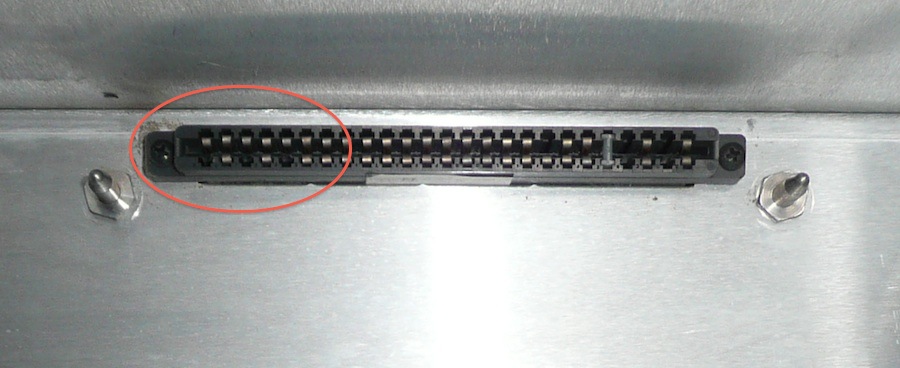
Any way I cleaned all the contacts and also the the female connector in the projector.
When I've put everything back in. Bingo! The projector fired up and no focus wiggling around while ramping up the contrast anymore.
I'll attach a picture of the female connector because there are a few pins that I don't know if they are correct.
Could one of you confirm that this is normal.
Thanks for your help.
Regards,
Ron.
| Description: |
|
| Filesize: |
90.78 KB |
| Viewed: |
7438 Time(s) |
|
|
|
| Back to top |
|
|
|
|




