| Author |
Message |
macgyver655
Joined: 22 Aug 2007
Posts: 8508
|
| Posted: Thu Jul 12, 2012 5:20 pm Post subject: |
|
|
| dturco wrote: | | macgyver655 wrote: | | Pull all the jumpers for the test. |
OK I will remove them all and re-test.
Re-test done still no output. |
You hooked it up to your other amp already?
|
|
| Back to top |
|
 |
dturco

Joined: 06 Feb 2009
Posts: 3778
Location: Eastern Shore Maryland
TV/Projector: Runco DLP VX-3000i Marquee 9500 parts doner
|
| Posted: Thu Jul 12, 2012 5:24 pm Post subject: |
|
|
| dturco wrote: | | macgyver655 wrote: | | Ok. Well if you could check those preamp outs it would help with locating the problem. This receiver does have the jumper connectors on the back for 6 of the output channels, correct? |
Yes it does. I will pull the front right channel jumper and put the out put to my Bryston and see what happens.
Ok I did the swap. I put the NAD next to my rack puled the speaker wires from the Bryston pulled the XLr's from the Bryston, put the RCA input cable to the NAD then to the Bryston, switched to single ended input on the Bryston, swapped out the speaker wires so I could use expendable speakers, and pushed test on the NAD
Nothing. |
Yes.
_________________
Firefly rules. Can't stop the signal.
http://www.hulu.com/firefly
|
|
| Back to top |
|
|
macgyver655
Joined: 22 Aug 2007
Posts: 8508
|
| Posted: Thu Jul 12, 2012 5:59 pm Post subject: |
|
|
|
Well now your going to have to start checking voltages like Curt said. Looks like most of the regulators are on the main board. How easy is it to get to and test on the main board?
|
|
| Back to top |
|
|
dturco
Joined: 06 Feb 2009
Posts: 3778
Location: Eastern Shore Maryland
TV/Projector: Runco DLP VX-3000i Marquee 9500 parts doner
|
| Posted: Thu Jul 12, 2012 6:24 pm Post subject: |
|
|
I don't know

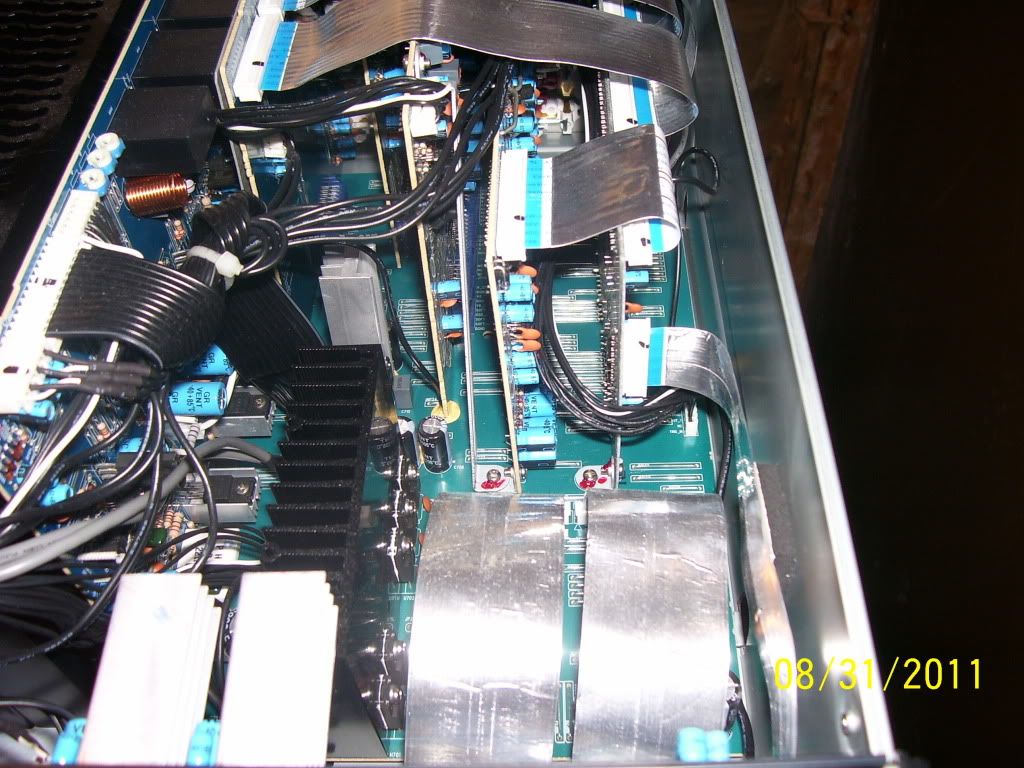


_________________
Firefly rules. Can't stop the signal.
http://www.hulu.com/firefly
|
|
| Back to top |
|
|
macgyver655
Joined: 22 Aug 2007
Posts: 8508
|
| Posted: Thu Jul 12, 2012 8:21 pm Post subject: |
|
|
|
well I can give you the points to test at if your up to it, lol. Sometimes it's easier to solder wires to the test points if they are hard to get at cause they have to be tested hot.
|
|
| Back to top |
|
|
dturco
Joined: 06 Feb 2009
Posts: 3778
Location: Eastern Shore Maryland
TV/Projector: Runco DLP VX-3000i Marquee 9500 parts doner
|
| Posted: Thu Jul 12, 2012 9:35 pm Post subject: |
|
|
Sure I have nothing to lose by trying on this piece.
_________________
Firefly rules. Can't stop the signal.
http://www.hulu.com/firefly
|
|
| Back to top |
|
|
macgyver655
Joined: 22 Aug 2007
Posts: 8508
|
| Posted: Thu Jul 12, 2012 10:34 pm Post subject: |
|
|
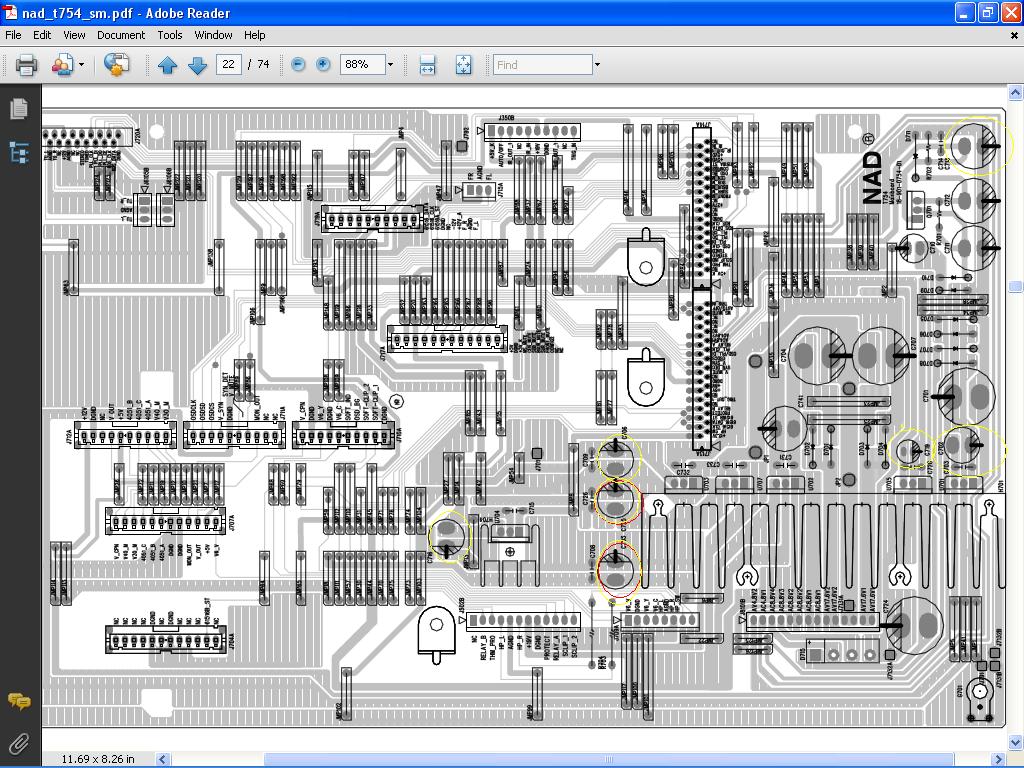
Ok. I'm going to have you test across some capacitors. It's easier then trying to probe the regulators themselves. Set your DMM to DC scale. When I give you a cap number just test across it with your positive probe on the + side and the neg probe on the - side. Make a list of the caps I give you and then add the voltage you test it has so I can see what you have. Ready?
Oh, and do I need to say that the receiver must be turn on to test the voltage?
C705 = _______
C706 = _______
C725 = _______
C713 = _______
C716 = _______
C702 = _______
C719 = _______
|
|
| Back to top |
|
|
dturco
Joined: 06 Feb 2009
Posts: 3778
Location: Eastern Shore Maryland
TV/Projector: Runco DLP VX-3000i Marquee 9500 parts doner
|
| Posted: Thu Jul 12, 2012 10:53 pm Post subject: |
|
|
Thanks Mac, But I'll need a little more hand ho;ding...What board are they on? And where in the unit is it?
_________________
Firefly rules. Can't stop the signal.
http://www.hulu.com/firefly
|
|
| Back to top |
|
|
macgyver655
Joined: 22 Aug 2007
Posts: 8508
|
| Posted: Thu Jul 12, 2012 11:06 pm Post subject: |
|
|
It's the main board. Not sure from your pics but it has a heat sink on it. Look at the image and I also circled the caps you need to find.
| Description: |
|
| Filesize: |
203.55 KB |
| Viewed: |
17455 Time(s) |
|
|
|
| Back to top |
|
|
dturco
Joined: 06 Feb 2009
Posts: 3778
Location: Eastern Shore Maryland
TV/Projector: Runco DLP VX-3000i Marquee 9500 parts doner
|
| Posted: Thu Jul 12, 2012 11:29 pm Post subject: |
|
|
OK I found them They are on the bottom most board. In my second picture there are two foil strip connectors then two "red" screws, to the left there is black heatsink and a smaller aluminum heatsink. The capacitor between them is C-706 and the pins face down so I can't place the probe on them.
_________________
Firefly rules. Can't stop the signal.
http://www.hulu.com/firefly
|
|
| Back to top |
|
|
macgyver655
Joined: 22 Aug 2007
Posts: 8508
|
| Posted: Thu Jul 12, 2012 11:44 pm Post subject: |
|
|
|
Welcome to the wonderful world of troubleshooting AVR's.. LOL. Does it have a removable bottom cover? Some do. If not then you can try probing the regulators themselves but if you slip, you can take out a good regulator plus other components.
|
|
| Back to top |
|
|
dturco
Joined: 06 Feb 2009
Posts: 3778
Location: Eastern Shore Maryland
TV/Projector: Runco DLP VX-3000i Marquee 9500 parts doner
|
| Posted: Thu Jul 12, 2012 11:50 pm Post subject: |
|
|
No to the removable bottom cover. Sure let's try the regulator.
_________________
Firefly rules. Can't stop the signal.
http://www.hulu.com/firefly
|
|
| Back to top |
|
|
macgyver655
Joined: 22 Aug 2007
Posts: 8508
|
| Posted: Fri Jul 13, 2012 12:03 am Post subject: |
|
|
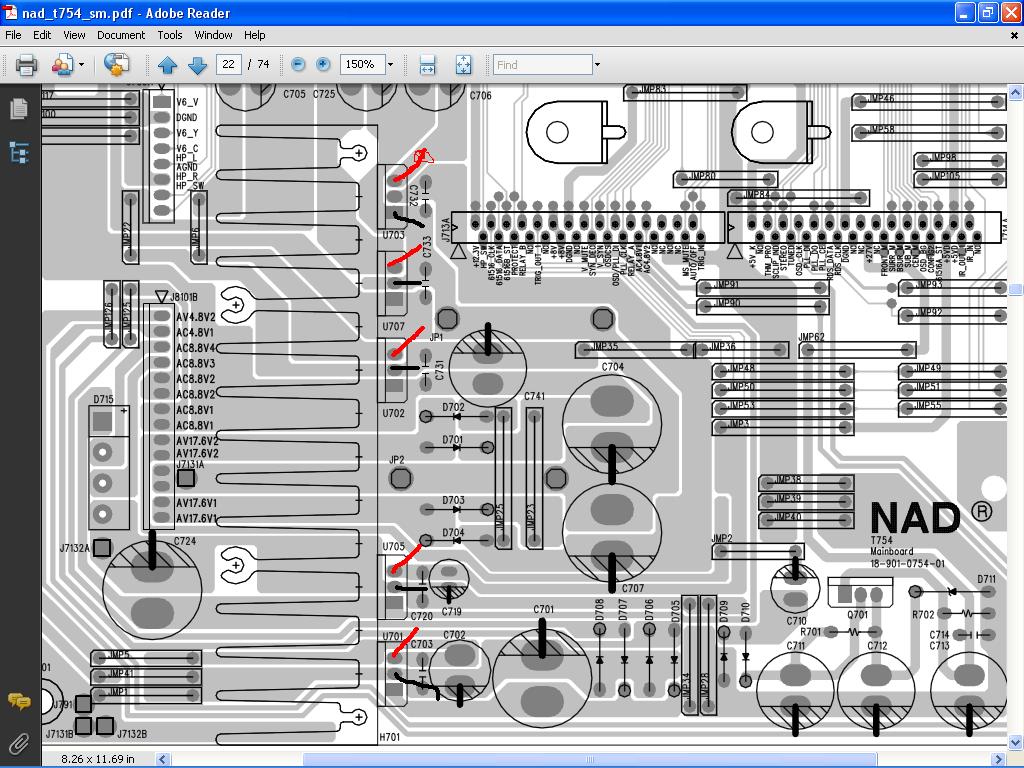
Now your making it difficult on me, lol. We will start with the regulators on the heatsink. The attached image shows where to place your probes to test. Red for + and black for -. Fill in the voltage blanks for these 5.
| Description: |
|
| Filesize: |
177.91 KB |
| Viewed: |
17439 Time(s) |
|
|
|
| Back to top |
|
|
dturco
Joined: 06 Feb 2009
Posts: 3778
Location: Eastern Shore Maryland
TV/Projector: Runco DLP VX-3000i Marquee 9500 parts doner
|
| Posted: Fri Jul 13, 2012 12:21 am Post subject: |
|
|
Well Mac I don't think I can get to them either. The foil connectors are right in the way and the pins are naturally way down low on that board so...I just don't think that's going to be possible.
_________________
Firefly rules. Can't stop the signal.
http://www.hulu.com/firefly
|
|
| Back to top |
|
|
macgyver655
Joined: 22 Aug 2007
Posts: 8508
|
| Posted: Fri Jul 13, 2012 12:33 am Post subject: |
|
|
|
Then you will have to disassemble somewhat, solder on some wires, reassemble and test. We could try to figure out what voltages are on what connectors but that can also be very difficult and time consuming. Soldering on wires is actually easier. Sorry but I can't make it much easier for you. I go through this all the time. I use very thin gauge, insulated magnet wire. I then tape them to a piece of cardboard and mark the voltage they should be on the cardboard.
|
|
| Back to top |
|
|
dturco
Joined: 06 Feb 2009
Posts: 3778
Location: Eastern Shore Maryland
TV/Projector: Runco DLP VX-3000i Marquee 9500 parts doner
|
| Posted: Fri Jul 13, 2012 12:59 am Post subject: |
|
|
Mac, I appreciate you having taken the time to diagnose this for me. But I see no way to get at the places needed to test other than a complete dis-assembly. The case is a U-shaped drop in, the side do not come off. The back is held together by hidden screws, I have removed 16 so far and it will not come off.
It appears to me that main board is like the Backplane on a Marquee, you have to tear it all down just to get at it. I just don't see that amount off work, just to test, as being worth it. I think I'll just stop here.
Again, thank you for helping.
_________________
Firefly rules. Can't stop the signal.
http://www.hulu.com/firefly
|
|
| Back to top |
|
|
macgyver655
Joined: 22 Aug 2007
Posts: 8508
|
| Posted: Fri Jul 13, 2012 12:59 pm Post subject: |
|
|
|
If you want I can probably give you other boards that you can test for voltages. It will take more time for me to locate them but if it's that hard to test on that main then this would be possible. However if it does turn out to be a regulator on that main board then you will have to remove it. Let me know if you want me to look for other locations to test.
|
|
| Back to top |
|
|
dturco
Joined: 06 Feb 2009
Posts: 3778
Location: Eastern Shore Maryland
TV/Projector: Runco DLP VX-3000i Marquee 9500 parts doner
|
| Posted: Fri Jul 13, 2012 1:09 pm Post subject: |
|
|
Sure, I was worn down yesterday and annoyed. Let's try somewhere else. Also When I do have to take it apart is there a diagram on the back panel screws?
_________________
Firefly rules. Can't stop the signal.
http://www.hulu.com/firefly
|
|
| Back to top |
|
|
macgyver655
Joined: 22 Aug 2007
Posts: 8508
|
| Posted: Fri Jul 13, 2012 1:27 pm Post subject: |
|
|
|
I'll check the manual in a little while.
|
|
| Back to top |
|
|
macgyver655
Joined: 22 Aug 2007
Posts: 8508
|
|
| Back to top |
|
|
|
|





