|
As this forum is rarely used anymore, we've locked it. Feel free to browse and read. Questions? Please reach out to us directly. Cheers! |

|
 |
|
|
| Author |
Message |
CasetheCorvetteman

Joined: 09 Nov 2008
Posts: 6326
Location: Australia
|
| Posted: Sun Jul 15, 2012 7:45 am Post subject: |
|
|
Yes CTRL and Normal together will clear it.
The only problems from too much point is that it will run abit warmer and be less stable, ive never ever seen it cause banding, not to say it wont, but ive certainly never seen it.
It does nothing at all to the signal sent to the tubes, its what is sent to the magnetics on the tube necks that it affects.
You should NEVER need to use POINT in the middle.
Converging with POINT disabled is pointless, leave it on, and null all the POINT settings. Otherwise, when you do turn it back on, it will revert to where it all was last time.
Gjaky, where you do or dont need to use POINT depends alot on what surface youre projecting onto and how flat it is. If its onto a wall made of plasterboard, its not going to be perfectly flat, and you will likely need POINT to get it perfect.
Fuchs, what i think you should do is zero everything, press adjust on the the remote then press CTRL and Normal together on the ALIGNMENT heading, and same again on the CONVERGENCE setting. This way, youre starting from full on zero.
First thing is to make sure your rasters are all centered on your tubes, then go and set the phase, this has to be done to get the cross in the middle and the edges straight. Do all this with your source connected and running.
Then i would go into alignment and do the keystone, followed by the amplitude while you look at the green image ( blue and red off ) til the image is about the right size on the tube face ( or til its perfectly in the exsisting wear pattern, whatever is first.... ). If its too big on your wall, move it closer, too small, move it back. The image should be dead center of the tube face.
Go through and do all the ALIGNMENT and get it as perfect as you can, then check again that the image is spot on center of the tube face. Now that youve done that, you want to display CROSS COARSE and use the green point to correct any lines that are not perfect or very close to it. It should only be outer areas unless you have a bump in the wall.
Then once youve got the green looking good, go back to cross hair and set the tilt/skew and bow for both red and green, followed by linearity and amplitude, then keystone and pin-cusion, also using the key balance and pin balance settings, and it should be so damn close to perfect you should only need very small POINT adjustments.
Before you do any of this you should have allready done the astig rings, and focus each lens starting with the center and then the outer, recheck the center, then recheck the outer. Adjusting any of that will affect the convergence to the point that it needs to be redone.
|
|
| Back to top |
|
 |
fuchs
Joined: 27 Jun 2012
Posts: 153
Location: the NL
|
| Posted: Mon Jul 16, 2012 8:28 am Post subject: |
|
|
Okay, well as I'm still busy (  ) waiting for my screen to dry ... ) waiting for my screen to dry ...
i thought some more about NVidia interlacing.
So here's a Windows-related post today.
Powerstrip didn't really do the job, as for some reason my height is doubled in overlay.
Besides, it doesn't start until I'm logged on to my home network.
| fuchs wrote: | | The internal NVidia driver kept insisting my "monitor" doesn't do interlaced video. |
OK, this seems to have more to do with setting a monitor, than setting a resolution.
I've already tried adding custom resolutions with NV_MODES registry key:
| Code: | 1280x960x32=C04C;
... or ...
1280x960x32=401F;
|
The first one should set a custom+interlaced mode of 76 Hz (76 decimal = 4C hex).
The second one should set a 'multiple' interlaced mode of 60/75/85 Hz.
None worked, those resolutions didn't even show up in the "Display all modes" dialog. 
Actually I got it to work by using a "monitor" description in the NV_R&T registry key:
| Code: | | R&T0000=1280,960,*,*,*,CRTX,OEM,,1728,64,160,506,1,3,++I |
I deleted all the other R&T values because I own none of the ones listed.
This R&T line is in effect for any VGA-connected display (*,CRTX) that is configured for 1280x960 operation (1280,960,*,*).
It then sets the mode to Interlace with +/+ (H/V) sync, at whatever frequency is selected.
The values for H en V (note that 506 is 0.5 * 1012 pixels, because it's interlaced) all come from the NVidia 'custom menu'. That is funny, because the custom menu really refuses to apply them, while they -apparently- do actually work.
This does, in fact, convert all 1280x960 modes into interlaced ones.
It worked! I've selected 100Hz (results in about 50kHz horizontal scan speed, according to the PJ).
Now the computer boots up in 1280x960 in 100Hz interlaced, without other programs needed.
I hope this is useful for anyone.
I can't converge yet as my screen is not finished.
So we'll see .... 
_________________
onkel fuchs' cheapskate cinema
NEC plain 9PG
|
|
| Back to top |
|
|
CasetheCorvetteman
Joined: 09 Nov 2008
Posts: 6326
Location: Australia
|
| Posted: Mon Jul 16, 2012 3:20 pm Post subject: |
|
|
Brilliant work  There is lots of people that will be happy to read that!! Which version of the driver are you using?? There is lots of people that will be happy to read that!! Which version of the driver are you using??
I use 285.62 on mine here at the moment, was having issues with blurays on 296.10 which i cured or seem to have cured, however i reverted because i lost 1080i @60Hz from the list and instead of dicking around with it, it was easier to just revert to 285.62 and its done, just like that.
|
|
| Back to top |
|
|
fuchs
Joined: 27 Jun 2012
Posts: 153
Location: the NL
|
| Posted: Mon Jul 16, 2012 9:38 pm Post subject: |
|
|
I have it working on versions 197.x and 280.x
That's both the workhorse and the HTPC, both have a GF6200.
While we're talking about sync, is there a "best" or "industry standard" ?
My PG doesn't seem to mind if I'm feeding it negative or positive syncs.
I'd say the MultiSync name has something to do with it.
_________________
onkel fuchs' cheapskate cinema
NEC plain 9PG
|
|
| Back to top |
|
|
CasetheCorvetteman
Joined: 09 Nov 2008
Posts: 6326
Location: Australia
|
| Posted: Tue Jul 17, 2012 2:28 am Post subject: |
|
|
|
Dont think it matters when youre using a projector that can take both, some projectors only take it one way though.
|
|
| Back to top |
|
|
fuchs
Joined: 27 Jun 2012
Posts: 153
Location: the NL
|
| Posted: Fri Jul 20, 2012 7:26 am Post subject: |
|
|
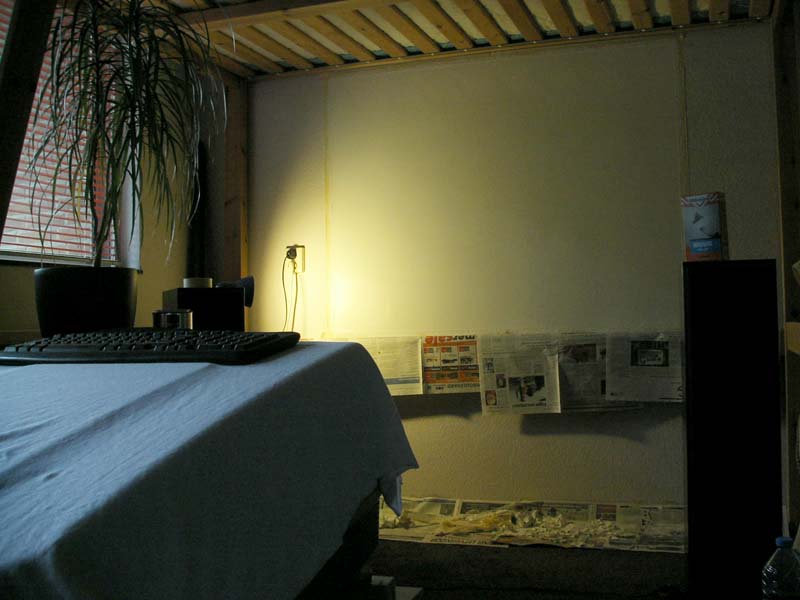
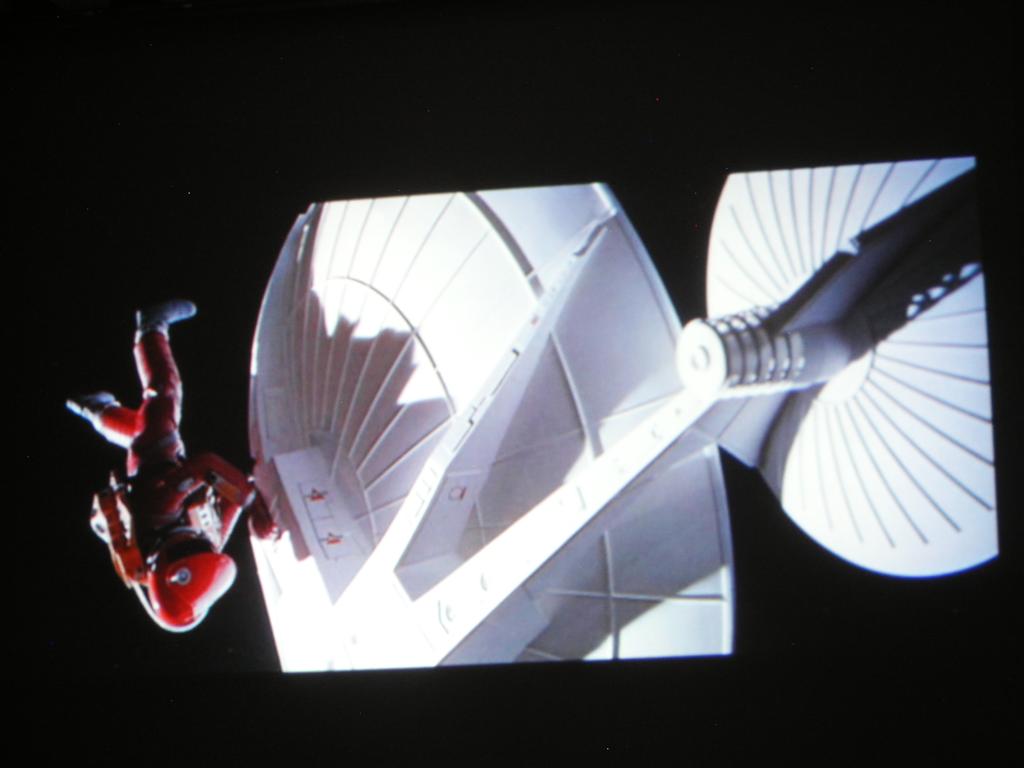
My screen is finished 
I started out by cutting out the wallpaper and making the surface flat with diluted wall hole filler paste.
Then I painted that, with multiple layers of pure white concrete paint that was on sale.
It covered the wall okay, but it was too reflective.
I couldn't try to sand it either, as it has a 'rubbery' surface.
Then I got an idea: I mixed the wallfiller with the concrete paint in 2:3 ratio, and lots of water.
So now I have a pretty bright area that doesn't reflect, sanded with a fine grain.
It's about 65" diagonal and it's good enough for me.
| Description: |
|
| Filesize: |
62.49 KB |
| Viewed: |
9104 Time(s) |
|
| Description: |
|
| Filesize: |
57.23 KB |
| Viewed: |
9107 Time(s) |
|
_________________
onkel fuchs' cheapskate cinema
NEC plain 9PG
Last edited by fuchs on Tue Jul 24, 2012 9:44 am; edited 1 time in total
|
|
| Back to top |
|
|
CasetheCorvetteman
Joined: 09 Nov 2008
Posts: 6326
Location: Australia
|
| Posted: Fri Jul 20, 2012 3:48 pm Post subject: |
|
|
Only 65 inch?? Do the lenses focus perfectly at that? How much tube face are you using?? Make sure youre using enough, cause they will wear faster if you go too small.
Being that you have the screen up so high, is there any chance you can get the projector up about the screen center height? Would it be possible to hang it?
|
|
| Back to top |
|
|
fuchs
Joined: 27 Jun 2012
Posts: 153
Location: the NL
|
| Posted: Mon Jul 23, 2012 1:40 pm Post subject: |
|
|
Yes, you are right. 65" isn't very large, but I'm restricted because I can't really move the PJ further back without hanging it.
At this point, I'm not comfortable with the idea of sitting right under a PJ. I know it can be done and I'm sure that a proper installation can handle 10 times the weight, but I'm not yet ready for it
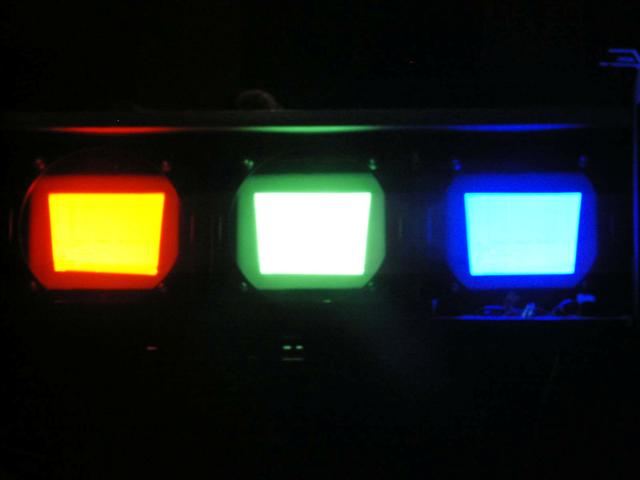
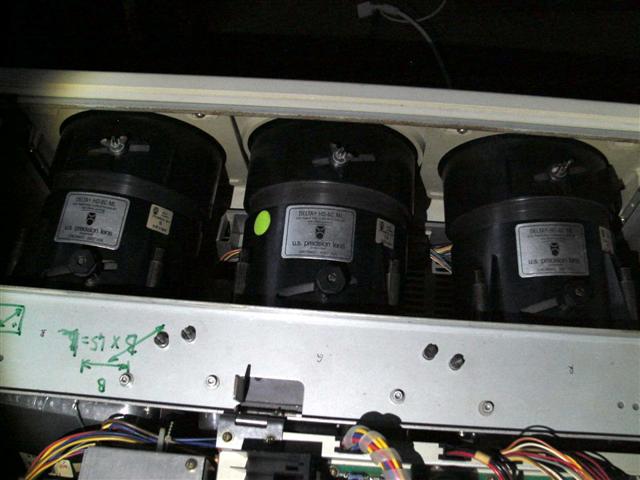
Here's some pictures of tube usage and lens settings. Do you think it's about right ?
As far a tube face usage goes, I've understood that the 9PG is not designed to use the full tube face.
| Description: |
|
| Filesize: |
22.75 KB |
| Viewed: |
9042 Time(s) |
|
| Description: |
|
| Filesize: |
47.87 KB |
| Viewed: |
9042 Time(s) |
|
_________________
onkel fuchs' cheapskate cinema
NEC plain 9PG
Last edited by fuchs on Mon Jul 23, 2012 1:56 pm; edited 1 time in total
|
|
| Back to top |
|
|
fuchs
Joined: 27 Jun 2012
Posts: 153
Location: the NL
|
| Posted: Mon Jul 23, 2012 1:53 pm Post subject: |
|
|
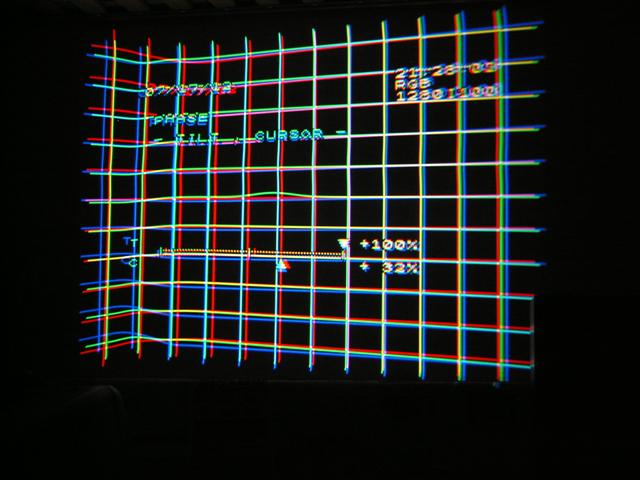
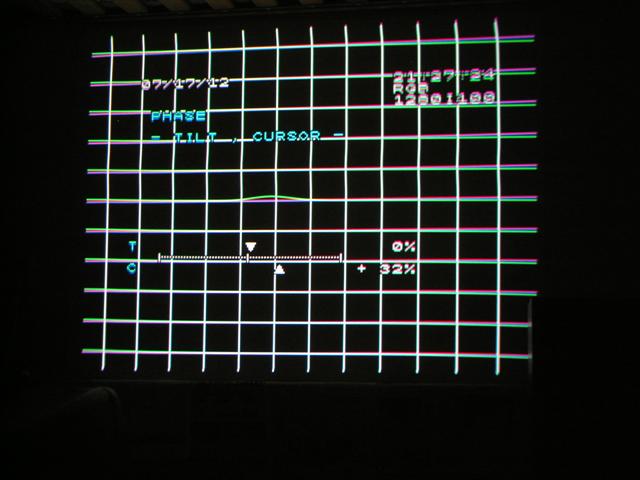
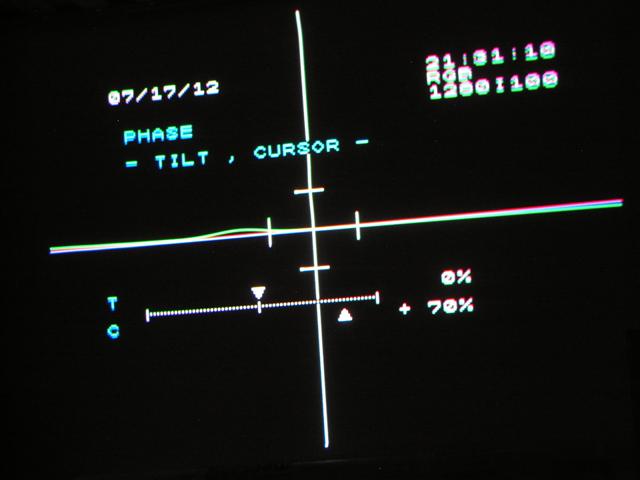
Now something else: How should I set "PHASE" ?
The menu entry isn't listed or described in the service manual at all, so I think I've got a service manual from an early model that did not (yet) feature digital Phase adjustment.
Should I set H-Phase to something that "looks good"? Or should I set it to have e.g. the straightest crosshatch?
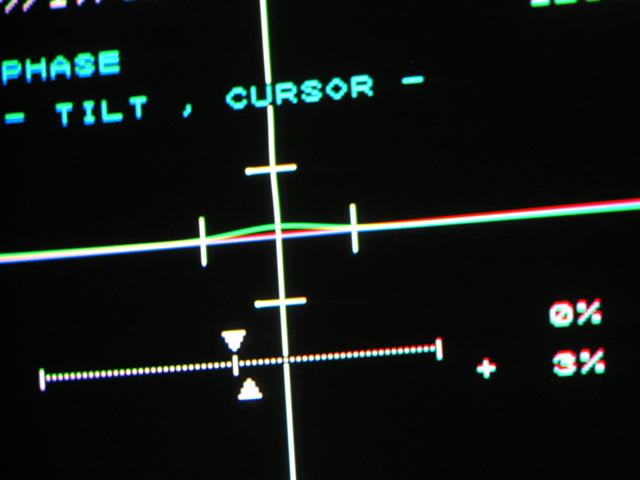
And should I set the V-Phase to 'hit' the blip? or get it as far out as possible?
I couldn't (yet) find a post on the forum that discusses this, maybe because it probably appeared in later versions of the Service Manual anyway
| Description: |
|
| Filesize: |
57.47 KB |
| Viewed: |
9043 Time(s) |
|
| Description: |
|
| Filesize: |
47.83 KB |
| Viewed: |
9043 Time(s) |
|
| Description: |
|
| Filesize: |
30.29 KB |
| Viewed: |
9043 Time(s) |
|
| Description: |
|
| Filesize: |
28.15 KB |
| Viewed: |
9043 Time(s) |
|
_________________
onkel fuchs' cheapskate cinema
NEC plain 9PG
|
|
| Back to top |
|
|
gjaky

Joined: 05 Jun 2010
Posts: 2802
Location: Budapest, Hungary
|
| Posted: Tue Jul 24, 2012 10:32 am Post subject: |
|
|
Your tube usage seems just about right to me.
The two adjustments in the phase menu affects the test generator, and the whole convergence system for your input signal.
You should set tilt to as straight as you can, and with cursor set the cross hatch to the center of your screen
_________________
projectors in the past : NEC 6-9PG xtra, Electrohome Marquee 6-7500, NEC XG 1351 LC ( with super modified Electrohome VNB neckboard !!!)
current: VDC Marquee 9500LC
The MOD: VNB-DB, VIM-DB
|
|
| Back to top |
|
|
CasetheCorvetteman
Joined: 09 Nov 2008
Posts: 6326
Location: Australia
|
| Posted: Wed Jul 25, 2012 6:56 am Post subject: |
|
|
Yes the tube usage is good, you dont want to go any bigger than that.
And yes again on the PHASE description above.
Set the BOW and TILT/SKEW first, then go to PHASE, get that cross hair as close to the dead center of your screen as you can. The little hump is the center of the convergence system in relation to the displayed test pattern, so you want that hump to be as close to the center of the screen as you can. When you adjust POINT, youll notice that the distance from the dead center of the cross hair to the center of the hump is the same amount as the POINT box will be from the actual point of adjustment. Its not a big deal, and youll quite likely figure that out pretty quickly, and youll know what i am talking about.
The other setting is the one that you set using cross coarse, and just get the line distortion out of the test pattern as best you can. On the later NECs there is a setting for line distortion separately, but on your PG Plain it is done in the PHASE menu. The way i do it is i set the phase til both sides are pretty much distortion free, then i exit that menu and look again with cross hair to see that the line is as flat as it can be. Again youll figure it all out.
When i have PHASE set, what i have done in the past on the PG Plain is put BOW and TILT/SKEW back to 0 again, then i get the green cross hair perfect as possible mechanically, then i start on electronic alignment.
Make sure the green cross hair is in the dead center of the tube face when it is on the dead center of your screen, and that your projector is dead square to the screen. If not, doesnt matter that you have the rasters perfectly centered, cause its the image that MUST be.
When you set the mechanical tube swing for red and blue, you MUST be sure you put the image back into the center of those 2 tubes after convergence, youll see exactly what i mean if you watch the red or blue tube and adjust the LINEARITY on either one. You will see that on red and blue, the center of the image is NOT the center of the tube face, and this is cause these 2 tubes shoot on an angle, so the picture doesnt have perfect linearity on them. Another thing youll figure out along the way
Be sure STATIC is set to zero on all 3 tubes!!
|
|
| Back to top |
|
|
fuchs
Joined: 27 Jun 2012
Posts: 153
Location: the NL
|
| Posted: Fri Jul 27, 2012 8:48 pm Post subject: |
|
|
I set everything quite okay now
I'm very pleased with the picture.
Now tonight, after about 10 minutes of power-on, I heard a (most likely high-voltage) pop.
The image wasn't influenced, but I jumped forward and shut down the projector anyway.
I guess it's a leaky HV lead or something. We're having some very humid and warm weather right now.
Oh well... there goes my movie night. I guess I'll have to seal or replace the leads.
I've already seen quite a few topics discussing it.
_________________
onkel fuchs' cheapskate cinema
NEC plain 9PG
|
|
| Back to top |
|
|
gjaky
Joined: 05 Jun 2010
Posts: 2802
Location: Budapest, Hungary
|
| Posted: Fri Jul 27, 2012 9:43 pm Post subject: |
|
|
The NEC projectors are famous for their rock solid high voltage section, however there could be a problem. I would suggest to clean the high voltage hardwares with an alcoholic towel. Some time ago I pulled out the tubes from my pg xtra, since I put them back I got some intermittent HV leak, but since I reconnected the cables at the splitter -again- I haven't heard the spark yet.
_________________
projectors in the past : NEC 6-9PG xtra, Electrohome Marquee 6-7500, NEC XG 1351 LC ( with super modified Electrohome VNB neckboard !!!)
current: VDC Marquee 9500LC
The MOD: VNB-DB, VIM-DB
|
|
| Back to top |
|
|
CasetheCorvetteman
Joined: 09 Nov 2008
Posts: 6326
Location: Australia
|
| Posted: Sat Jul 28, 2012 2:11 am Post subject: |
|
|
|
Ive never had an issue or even heard of an issue with an NEC having an arcing problem!!
|
|
| Back to top |
|
|
fuchs
Joined: 27 Jun 2012
Posts: 153
Location: the NL
|
| Posted: Sat Jul 28, 2012 5:06 pm Post subject: |
|
|
oh. thanks! I'll see where I can get cleaning alcohol.
The lid was closed when it happened, so I've started taking the wires out at the splitter side.
In the process of hanging them 'elsewhere', i've touched the CPC magnets (I think they are CPC) on the blue tube.
They are so loose that a mere touch will rotate them. Oh well, I'll have something to do when I get the PJ to power on without sparks.
_________________
onkel fuchs' cheapskate cinema
NEC plain 9PG
|
|
| Back to top |
|
|
CasetheCorvetteman
Joined: 09 Nov 2008
Posts: 6326
Location: Australia
|
| Posted: Sun Jul 29, 2012 5:34 am Post subject: |
|
|
|
The blue astig isnt hard to get right, its the green i had touble with!! Its hard to move the rings round the neck with all the sh*t they have near them.
|
|
| Back to top |
|
|
fuchs
Joined: 27 Jun 2012
Posts: 153
Location: the NL
|
| Posted: Sun Jul 29, 2012 9:34 am Post subject: |
|
|
indeed it wasn't. I can see why the other tubes are harder to adjust.
I cleaned the cables yesterday and ...... no explosions so far !
I've also put a few folded pieces of cardboard between the HV leads and the gounded metal parts, where they come out of the splitter and have to bend to get to the tubes. Maybe that extra millimeter of distance helps a little...
many thanks again, the NEC lives to project another day
_________________
onkel fuchs' cheapskate cinema
NEC plain 9PG
|
|
| Back to top |
|
|
CasetheCorvetteman
Joined: 09 Nov 2008
Posts: 6326
Location: Australia
|
| Posted: Sun Jul 29, 2012 1:02 pm Post subject: |
|
|
|
Id probably not use cardboard... Its quite combustable... Maybe use plastic if you like...
|
|
| Back to top |
|
|
fuchs
Joined: 27 Jun 2012
Posts: 153
Location: the NL
|
| Posted: Mon Jul 30, 2012 10:05 am Post subject: |
|
|
Good thinking. The fire hazard didn't even cross my mind.
I'm glad you're here
_________________
onkel fuchs' cheapskate cinema
NEC plain 9PG
|
|
| Back to top |
|
|
CasetheCorvetteman
Joined: 09 Nov 2008
Posts: 6326
Location: Australia
|
| Posted: Mon Jul 30, 2012 11:38 am Post subject: |
|
|
|
So am i!! Id hate to see a thread here later in the week saying "My NEC caught on fire!!"
|
|
| Back to top |
|
|
|
|
|
|
|
You cannot post new topics in this forum
You cannot reply to topics in this forum
You cannot edit your posts in this forum
You cannot delete your posts in this forum
You cannot vote in polls in this forum
You cannot attach files in this forum
You can download files in this forum
|
Forum powered by phpBB © phpBB Group
|
|




