| Author |
Message |
bishop
Joined: 19 Jun 2012
Posts: 5
Location: australia
|
| Posted: Fri Jun 22, 2012 6:42 am Post subject: barco graphics 808s fault |
|
|
Hi all, just wondering of all the very knowledgeable people that contribute to this forum if any one can help me rectify a fault i have with a barco graphics 808s i'm new to crt projectors but have some skills as an electrician that may help .
I've read the layout and setup tips section and i believe the RGB Switcher board has a red led illuminated on it it appears to be a different model card to the one in the tips section the leds are surface mount not pin through, the v output board also has a red led lit, but not on the h board. i have fed a signal in in the Svideo port 2 and switched the input to that port with Green led indication.
The tube elements are glowing dimly and it sounds as though the HV is running but there is no picture does any one recognise these symptoms or can assist/ instruct me on how it rectify these issues
Thanks in advance for any and all help
Bishop
|
|
| Back to top |
|
 |
barclay66

Joined: 27 Jun 2011
Posts: 1304
Location: Germany
TV/Projector: Marquee 9500 Ultra
|
| Posted: Fri Jun 22, 2012 6:57 am Post subject: |
|
|
Hi,
I don't have a definite answer for You at the moment. But if You aren't sure about the identity of the boards, You could post their part numbers (R76.....) here and we'll find out what You have before starting the diagnosis...
Regards,
barclay66
|
|
| Back to top |
|
|
bishop
Joined: 19 Jun 2012
Posts: 5
Location: australia
|
| Posted: Fri Jun 22, 2012 8:04 am Post subject: |
|
|
i was checking the part numbers and though after what i've read so far that i may not have an input signal due to the rgb and v board fault lights having checked this the dvd player i was using the svideo was faulty so i now have svideo signal and these two fault lights are out but the tubes will still not illuminate is there any other tests i can do or settings i can change to fix this problem
the card numbers are R7622686 v board
R762719 RGB board
Regards
Bishop
|
|
| Back to top |
|
|
barclay66
Joined: 27 Jun 2011
Posts: 1304
Location: Germany
TV/Projector: Marquee 9500 Ultra
|
| Posted: Fri Jun 22, 2012 10:15 am Post subject: |
|
|
Ouch,
I hardly can decipher what You're writing. Could You make use of some basic grammar rules please? I don't know if You're new to forums but You should know that those which phrase their questions properly are the most likely being helped. But now back to topic:
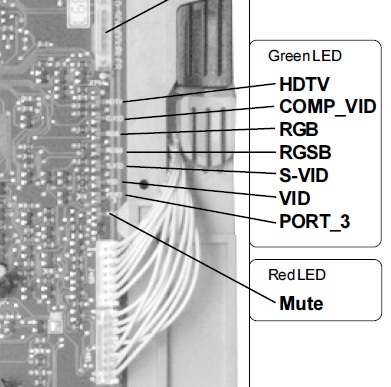
Please take a look at the picture attached. It shows the LEDs on Your RGB input & switching board. As long as the red LED is lit You won't get any picture. The LED only shuts off if a valid input signal is present. Such can be a RGB video signal with separate sync signal(s) or a combined video input signal (Video or S-Video).
For processing a combined video signal You will need an additional Decoder Board mounted on the backside of the RGB input & switching board. If it isn't present You only will get a picture when feeding a RGB source.
Do You get any messages displayed when You press a button on the remote?
Try pressing the "Text" button. The PJ could be in Pause mode (picture mute). Try the "Pause" button.
Regards,
barclay66
| Description: |
|
| Filesize: |
54.8 KB |
| Viewed: |
3503 Time(s) |
|
|
|
| Back to top |
|
|
km987654

Joined: 25 Jul 2007
Posts: 2874
Location: Australia
TV/Projector: Barco BG809s
|
| Posted: Fri Jun 22, 2012 10:17 am Post subject: |
|
|
|
The dim glow in the tubes are the heaters and they should be dim. Are you certain you have HV. Do you hear any HV crackle when you power up the set? You should be able to display the internal test pattern by pressing "ADJ" on the remote.
|
|
| Back to top |
|
|
bishop
Joined: 19 Jun 2012
Posts: 5
Location: australia
|
| Posted: Fri Jun 22, 2012 11:45 am Post subject: |
|
|
| Quote: | Please take a look at the picture attached. It shows the LEDs on Your RGB input & switching board. As long as the red LED is lit You won't get any picture. The LED only shuts off if a valid input signal is present. Such can be a RGB video signal with separate sync signal(s) or a combined video input signal (Video or S-Video).
For processing a combined video signal You will need an additional Decoder Board mounted on the backside of the RGB input & switching board. If it isn't present You only will get a picture when feeding a RGB source |
To answer these questions
1/ the picture, that is the led in question
2/ i now have a valid input signal and the red led has shut off
3/ there is an additional Decoder Board mounted on the backside of the RGB input & switching board.
I am still not getting any light from the lenses at all, no test patern,no picture,no menu i hope this informaition helps.
Its my first day using this forum so i am still a little green
| Quote: | | Are you certain you have HV. Do you hear any HV crackle when you power up the set? You should be able to display the internal test pattern by pressing "ADJ" on the remote |
i can hear what i think is the HV, I have a HV tester that needs batteries so when i get them i will confirm it is on . as i stated above i have no out put out of the tubes/light or picture, this may be just a setting or something i have missed its my first time working on a CRT
thanks for the help
|
|
| Back to top |
|
|
barclay66
Joined: 27 Jun 2011
Posts: 1304
Location: Germany
TV/Projector: Marquee 9500 Ultra
|
| Posted: Fri Jun 22, 2012 12:04 pm Post subject: |
|
|
Hi,
So far, so good. Checking the HV with a suitable tester is a good idea. Be careful though: After all it's really High Voltage!
There are other boards with diagnostic LEDs:
Could You please indicate which LEDs are lit/off on the SMPS2/G2/Diagnostic board?
See here for reference: http://www.curtpalme.com/Barco808_Layout7.shtm
Is the red LED lit on the EHT board?
See here for reference: http://www.curtpalme.com/Barco808_Layout8.shtm
I'd expect that not all of the green LEDs on the SMPS2/G2/Diagnostic board are lit...
Regards,
barclay66
|
|
| Back to top |
|
|
bishop
Joined: 19 Jun 2012
Posts: 5
Location: australia
|
| Posted: Fri Jun 22, 2012 12:49 pm Post subject: |
|
|
the LEDs are lit on the SMPS2/G2/Diagnostic board with the exception of the red led
the red LED is lit on the EHT board
i hope this helps i had not noticed that led earlier
|
|
| Back to top |
|
|
barclay66
Joined: 27 Jun 2011
Posts: 1304
Location: Germany
TV/Projector: Marquee 9500 Ultra
|
| Posted: Fri Jun 22, 2012 1:02 pm Post subject: |
|
|
Hi,
In this case I think You can skip the HV test as there won't be any HV present. There is a hardware error.
A red LED on the EHT board indicates a problem with the HV supply. Possible causes:
- Bad EHT board (common)
- Bad Quadrupler (most common)
- Bad HV-Splitter (common)
- Shorted Tube (seldomly)
You could ask Curt for replacements. I just can repeat what he's writing about it:
"The EHT board, quadrupler and HV splitter all work in conjunction with each other. A failure in any of these can and will usually trigger the EHT shutdown LED as indicated on the board. The only user serviceable part on the EHT board, quadrupler and HV splitter is the fuse on the EHT board. DO NOT go adjusting the trimpots. Serious injury and imploding tubes can result, not to mention excessive low level X ray radiation if these trimpots are misadjusted. If the fuse blows a second time, the EHT board is bad.
Note that if the EHT red LED is on, the problem can be the EHT board itself, the quadrupler or the splitter. Short of replacement, there’s no way of telling which component is bad."
Sorry, I don't have better news than that...
Regards,
barclay66
|
|
| Back to top |
|
|
bishop
Joined: 19 Jun 2012
Posts: 5
Location: australia
|
| Posted: Fri Jun 22, 2012 1:27 pm Post subject: |
|
|
|
at least i know what it is now thanks for the help
|
|
| Back to top |
|
|
|
|





