|
As this forum is rarely used anymore, we've locked it. Feel free to browse and read. Questions? Please reach out to us directly. Cheers! |

|
 |
|
|
| Author |
Message |
frauleinnatasha
Joined: 18 Jan 2010
Posts: 15
|
| Posted: Fri Apr 27, 2012 10:16 pm Post subject: D50 woes |
|
|
I had posted a reply in a recent post, but it may have been off-topic and I have additional info, so I'm just starting a new post.
First off, most recently (read 4am this morning), I wanted to watch streaming video from my laptop to my pj. I hooked up a dvi/hdmi cable from my dell latitude d830 docking station to the hdfury/rgb (input A) and started adjusting settings on the computer. The immediate display was a rolling pic with aweful green color, intermittently overtaken by a completely black/gray pixelated "fuzz". I was able to change the bias, gain, hue, color to achieve a barely acceptable pic, but I can only avoid the rolling by setting the dell desktop setting (thankfully registering as hdfury automatically) to 526i. Changing any other input related setting on the pj didn't seem to have any affect, if not making it worse. attempting 7xx or 1080 from the dell settings renders my screen to horizontal lines void of any image or a complete loss of signal and and error message of "out of range". Is there any way to use my dell fed into the fury to view 1080? My sony home theater dav-hdx285 hooks up to the fury without any issues. Or should I just feed an s-vid from the docking station to the sony theater system? I'd like to keep hdmi options if at all possible.
Separately, and less importantly, from my other post "my blue refuses to completely focus. The green and red do quite well with the manual adjustments (though I'm sure it could be better, I wouldn't know), but the photo is as good as the blue gets. ideas?"
You guys rock!
| Description: |
|
| Filesize: |
35.29 KB |
| Viewed: |
4233 Time(s) |

|
|
|
| Back to top |
|
 |
Curt Palme
CRT Tech
Joined: 08 Mar 2006
Posts: 24396
Location: Langley, BC
TV/Projector: All of them!
|
| Posted: Fri Apr 27, 2012 10:21 pm Post subject: |
|
|
I didn't comment on the other thread, as it appears to be an HDFury issue. Reboot, check resolutions, try a different (shorter) HDMI cable, etc. If the menus are solid, the projector should be OK.
As for the focusing, there are focus pots on the side of the chassis. Try tweaking those. It's normal for the blue to focus a bit less than the other two colors, and if the rear of the lenses and front of the tubes are clean, then it's probably as good as you'll get. THere may be dust between the lenses and tubes, pull the lenses to check and clean with lens paper. It looks from the above pix that you may have slight haloing from dust particles on the back of the lens.
|
|
| Back to top |
|
|
frauleinnatasha
Joined: 18 Jan 2010
Posts: 15
|
| Posted: Fri Apr 27, 2012 11:07 pm Post subject: |
|
|
| Curt Palme wrote: | I didn't comment on the other thread, as it appears to be an HDFury issue. Reboot, check resolutions, try a different (shorter) HDMI cable, etc. If the menus are solid, the projector should be OK.
|
You mean "Reboot, check resolutions" for the computer? And we are using the same length HDMI cable as the one from the sony theater system. Though I've noticed if it isn't positioned precisely at the fury, it drops the signal entirely. The menus on the pj are solid.
|
|
| Back to top |
|
|
Curt Palme
CRT Tech
Joined: 08 Mar 2006
Posts: 24396
Location: Langley, BC
TV/Projector: All of them!
|
| Posted: Fri Apr 27, 2012 11:28 pm Post subject: |
|
|
|
OK, so this is a source issue. Do you have the AC adapter for the Fury? Have you tried a short (1m/3ft) HDMI cable from the computer to the Fury? Have you started at a lower resolution, like 640 X 480 and worked your way up?
|
|
| Back to top |
|
|
frauleinnatasha
Joined: 18 Jan 2010
Posts: 15
|
| Posted: Sat Apr 28, 2012 12:29 am Post subject: |
|
|
| Curt Palme wrote: |
As for the focusing, there are focus pots on the side of the chassis. Try tweaking those. It's normal for the blue to focus a bit less than the other two colors, and if the rear of the lenses and front of the tubes are clean, then it's probably as good as you'll get. THere may be dust between the lenses and tubes, pull the lenses to check and clean with lens paper. It looks from the above pix that you may have slight haloing from dust particles on the back of the lens. |
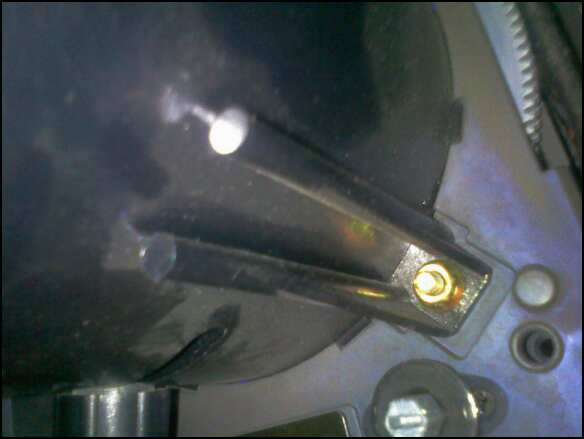
Good grief, the pots are right there, I read that 130 page service manual I don't know how many times and never saw mention of those! It did make a difference, but if I do remove the lenses, is there anything I need to know? It's ceilling mounted, so I hope i can do it without taking it down. Is it the nuts shown in the pic?
| Curt Palme wrote: |
OK, so this is a source issue. Do you have the AC adapter for the Fury? Have you tried a short (1m/3ft) HDMI cable from the computer to the Fury? Have you started at a lower resolution, like 640 X 480 and worked your way up? |
Got it! I had tried stepping up from the lower resolution and it always ended on 526p. THIS time however, I had adjusted the cable and got all the way to 1080i (the last option it gives me). But when I tried to view a vid, it cut out again. Now I can at least view vids at 720p, but I'll be getting a new cable. Also, no matter what I do, the pic from the computer is extremely saturated in green. I have to turn the color in the pj settings almost out (25 of 100), to get anything close to normal looking, and the green bias/gain are as low as I can tolerate (80-90 of 250). Am I missing something?
| Description: |
|
| Filesize: |
52.2 KB |
| Viewed: |
4203 Time(s) |
|
|
|
| Back to top |
|
|
Curt Palme
CRT Tech
Joined: 08 Mar 2006
Posts: 24396
Location: Langley, BC
TV/Projector: All of them!
|
| Posted: Sat Apr 28, 2012 12:51 am Post subject: |
|
|
Yes, take off those 4 nuts on each lens, and it will come right off. It's about 3Kg, so beware that they don't drop.
Do you have the AC adapter for the Fury?
|
|
| Back to top |
|
|
frauleinnatasha
Joined: 18 Jan 2010
Posts: 15
|
| Posted: Sat Apr 28, 2012 1:01 am Post subject: |
|
|
|
Yeah, What about it? We have it plugged into the fury hooked up to our pj. I thought that was necessary for the fury to function? Oh and I was wrong, we-re running fury/5bnc not fury/rgb.
|
|
| Back to top |
|
|
frauleinnatasha
Joined: 18 Jan 2010
Posts: 15
|
| Posted: Sat Apr 28, 2012 1:22 am Post subject: |
|
|
|
You've got to be kidding me. I unplugged the power, and plugged it back in, heard a little *click* and now I can't see sh*t. What happened? Is my fury busted? Is there a warranty on it?
|
|
| Back to top |
|
|
frauleinnatasha
Joined: 18 Jan 2010
Posts: 15
|
| Posted: Sat Apr 28, 2012 1:29 am Post subject: |
|
|
|
phew, blue light is back on, I've got 720p. Jeeze what a scare, I'm going to quit fiddling with it for resolution until I get the new cord. Still want to hear what you had to say about the power cord though.
|
|
| Back to top |
|
|
CasetheCorvetteman

Joined: 09 Nov 2008
Posts: 6326
Location: Australia
|
| Posted: Sat Apr 28, 2012 10:14 am Post subject: |
|
|
| frauleinnatasha wrote: | | Yeah, What about it? We have it plugged into the fury hooked up to our pj. I thought that was necessary for the fury to function? Oh and I was wrong, we-re running fury/5bnc not fury/rgb. |
5 BNC will be RGB-HV. Its the same thing. The HD Fury only puts out RGB-HV ( as far as i know ) if its the first version, not sure about the second version.
|
|
| Back to top |
|
|
|
|
|
|
|
You cannot post new topics in this forum
You cannot reply to topics in this forum
You cannot edit your posts in this forum
You cannot delete your posts in this forum
You cannot vote in polls in this forum
You cannot attach files in this forum
You can download files in this forum
|
Forum powered by phpBB © phpBB Group
|
|



