| Author |
Message |
jsepps
Joined: 17 Apr 2012
Posts: 18
Location: Rancho Mirage, CA
|
| Posted: Sun Apr 22, 2012 11:47 pm Post subject: Delta HD-10 |
|
|
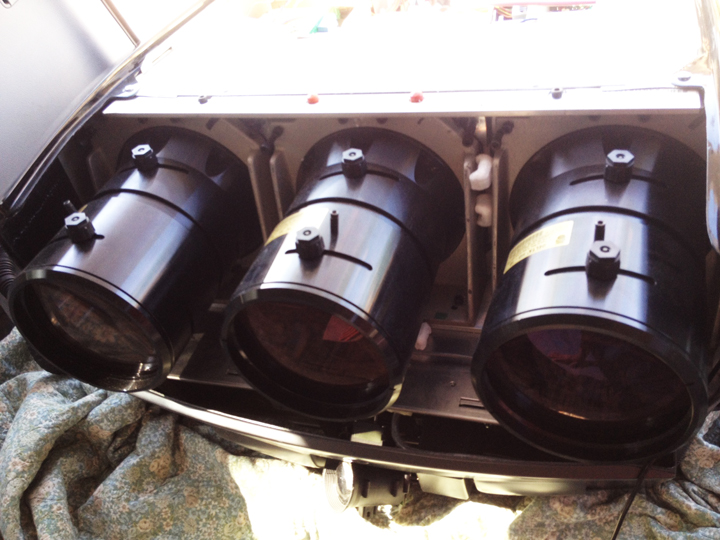
Here are all 3.
| Description: |
|
| Filesize: |
280.38 KB |
| Viewed: |
9838 Time(s) |
|
|
|
| Back to top |
|
 |
Nashou66

Joined: 12 Jan 2007
Posts: 16171
Location: West Seneca NY
|
| Posted: Mon Apr 23, 2012 12:53 am Post subject: |
|
|
The two PJ's are different Tube size's so you can not swap tubes or lenses. However every other board will switch over with the exception of possible the tube neck card or video amps as we call them VNB's ( video neck Board) .
These are very easy to work on and and also easy to trouble shoot. id keep them both for parts and try to get the 9 inch unit working.
First thing you need to go buy is some Electronics contact cleaner or better yet DeOxit from radio shack. While there grab an ic chip puller so you can remove and clean some chips on the control board. we will get to that later.
First thing to try is to re seat all the boards in the PJ.
here is the layout fro the Marquee and clones. Curt used an 8500 not the 9500 fort he pics but they are the same PJ in essence.
http://www.curtpalme.com/ElectrohomeMarquee_Layout1.shtm
So now when firing up the 9500LC( 9 inch set) are there any error lights lit up on the Control board
in the rear of the PJ and look for any error lights up front with the lower power supply cover removed
on the Low Voltage Power supply(LVPS). it is locate on the bottom left front.
we'll go from there.
Athanasios
_________________
Don't blame your underwear for your crooked ass~ unknown Greek philosopher
"Republicans believe every day is the Fourth of July, but the Democrats believe every day is April 15." --- President Reagan
One Smart Dog!!!
Marquee High Performance Bellows now shipping!!
Marquee Modifications and Performance Enhancement
Marquee C-element and Bellow removal
|
|
| Back to top |
|
|
draganm

Joined: 08 Mar 2006
Posts: 8990
Location: Colorado
|
| Posted: Mon Apr 23, 2012 2:16 am Post subject: |
|
|
| Nashou66 wrote: | | First thing you need to go buy is some Electronics contact cleaner or better yet DeOxit from radio shack. While there grab an ic chip puller so you can remove and clean some chips on the control board. |
NO, please don't do that. Nash do you have any idea how many butchered CLM's Ive seen from people who "just tried to clean the chips". Bent pins, broken and missing pins. This is not something for the average Joe.
| Nashou66 wrote: | So now when firing up the 9500LC( 9 inch set) are there any error lights lit up on the Control board
in the rear of the PJ and look for any error lights up front with the lower power supply cover removed
on the Low Voltage Power supply(LVPS). it is locate on the bottom left front.
we'll go from there.
Athanasios |
it's most likely a bad High voltage power supply or oxidation on HDM daughter board
|
|
| Back to top |
|
|
Curt Palme
CRT Tech
Joined: 08 Mar 2006
Posts: 24396
Location: Langley, BC
TV/Projector: All of them!
|
| Posted: Mon Apr 23, 2012 2:29 am Post subject: |
|
|
|
I agree, it's not the best idea to get a newbie with no projector or electronics experience to pull chips and fill the chassis with contact cleaner.
|
|
| Back to top |
|
|
ecrabb
Forum Moderator

Joined: 13 Mar 2006
Posts: 15909
Location: Utah
TV/Projector: JVC RS40, Epson 5010
|
| Posted: Mon Apr 23, 2012 2:31 am Post subject: |
|
|
Oh, and since nobody's mentioned it... Since you're carting these things around in a van, the one with the metal lenses that you just picked up... Keep that bad boy out of the sun. If sunlight enters the lenses, it will damage the C-elements (lenses) attached to the tube mounts. They're a pain in the ass to replace. Just make sure you throw a blanket or something over the machine if it's anywhere sun might shine directly into the lenses.
SC
|
|
| Back to top |
|
|
Nashou66
Joined: 12 Jan 2007
Posts: 16171
Location: West Seneca NY
|
| Posted: Mon Apr 23, 2012 2:33 am Post subject: |
|
|
Well i guess i have too much trust in peoples abilities. Its not hard to do. You never learn if you don't try.
Imagine if I listened, back in 2005, to Mac and Chip when i had a LVPS issue. Id never have touched anything electronic again.
I knew nothing at all , But i was determined and taught myself. I'm glad I did. TSE encouraged me to ignore everyone and give it a shot. That was a pivotal moment in my life. Now i am not afraid to try and fix anything .
Athanasios
_________________
Don't blame your underwear for your crooked ass~ unknown Greek philosopher
"Republicans believe every day is the Fourth of July, but the Democrats believe every day is April 15." --- President Reagan
One Smart Dog!!!
Marquee High Performance Bellows now shipping!!
Marquee Modifications and Performance Enhancement
Marquee C-element and Bellow removal
|
|
| Back to top |
|
|
mc86

Joined: 20 Sep 2008
Posts: 767
Location: pittsburgh, pa
TV/Projector: ECP 4500 (Vidikron box), ECP4500+, wanting 07MS/07MTS, evaluating pc soft-blend
|
| Posted: Mon Apr 23, 2012 2:34 am Post subject: |
|
|
Jsepps -
Just want to chime in here -- you are a) one lucky duck and b) don't feel overwhelmed -- Tim, Nash, Dragan, Curt, and others will see you through this!  Even something like the high voltage power supply (HVPS) swap (IF it turns out to be bad) won't seem crazy after you've done it! Even something like the high voltage power supply (HVPS) swap (IF it turns out to be bad) won't seem crazy after you've done it!
Matt, who is wondering who takes these to a goodwill...there is a guy with awesome toys!
|
|
| Back to top |
|
|
Phoenixed
Joined: 13 Oct 2011
Posts: 514
Location: The mitten
|
| Posted: Mon Apr 23, 2012 4:19 am Post subject: |
|
|
My community service is gonna kick ass now!!!
_________________
Planar PD-8150/Runco LS-5
|
|
| Back to top |
|
|
barclay66

Joined: 27 Jun 2011
Posts: 1304
Location: Germany
TV/Projector: Marquee 9500 Ultra
|
| Posted: Mon Apr 23, 2012 7:40 am Post subject: Re: I retreived the 2nd projector! |
|
|
| jsepps wrote: | | Also I looked into the lenses with a flashlight as suggested and I see no burn or browning on the inside. Does that mean they should still light up? |
Hi,
From the pictures it is visible that the tubes do have some signs of wear. You can see that on the green tube especially where the center area is somewhat darker than the tube's edges. The wear itself won't be a problem as long as the new setup will produce an image on the tubes which stays inside the current area. Here's more information on this topic: http://www.curtpalme.com/TubeCondition_RatingChart.shtm
Using this chart I would rate Your tubes: Red -> 8, Green -> 7, Blue -> 7.
This type of wear shoudn't have anything to do with the tube's abillity to light up or not. Even badly worn tubes may still produce light. Unfortunately not the type of light which would be able to produce a high quality picture though...
Regards,
barclay66
|
|
| Back to top |
|
|
macgyver655
Joined: 22 Aug 2007
Posts: 8508
|
| Posted: Mon Apr 23, 2012 1:34 pm Post subject: |
|
|
| Nashou66 wrote: |
Imagine if I listened, back in 2005, to Mac and Chip when i had a LVPS issue.
s |
Couldn't of been me. I wasn't here in '05.
|
|
| Back to top |
|
|
Curt Palme
CRT Tech
Joined: 08 Mar 2006
Posts: 24396
Location: Langley, BC
TV/Projector: All of them!
|
| Posted: Mon Apr 23, 2012 1:59 pm Post subject: |
|
|
OK, I'll start from scratch. Here's what I recommend:
Pull the lenses off both projectors. One bolt in each corner at the 2, 4, 8 and 10 oclock positions will take the lenses off. Post a pix of each set of tube faces. If you can see wear through the lenses, it will look worse with the lenses off. That's a starting point. Then, rather than jumping into messing with stuff at the chip level, let's see if we can't get the Vision 1 running.
Do not take any other screws out other than the ones that hold the lenses on.
|
|
| Back to top |
|
|
barclay66
Joined: 27 Jun 2011
Posts: 1304
Location: Germany
TV/Projector: Marquee 9500 Ultra
|
| Posted: Mon Apr 23, 2012 2:04 pm Post subject: |
|
|
| Curt Palme wrote: | | Do not take any other screws out other than the ones that hold the lenses on. |
...or it could get messy!!!
|
|
| Back to top |
|
|
draganm
Joined: 08 Mar 2006
Posts: 8990
Location: Colorado
|
| Posted: Mon Apr 23, 2012 3:48 pm Post subject: |
|
|
| Curt Palme wrote: | | I agree, it's not the best idea to get a newbie with no projector or electronics experience to pull chips and fill the chassis with contact cleaner. |
yeah I forgot about that one. Chips literally swimming in a pool of De-oxit.  That stuff should not be available for sale in a spray bottle without a license IMO That stuff should not be available for sale in a spray bottle without a license IMO 
| Curt Palme wrote: | | One bolt in each corner at the 2, 4, 8 and 10 oclock positions will take the lenses off.Do not take any other screws out other than the ones that hold the lenses on. |
2,4,8,10 remove the lens. 12,3,6,9 destroy the machine 
|
|
| Back to top |
|
|
Curt Palme
CRT Tech
Joined: 08 Mar 2006
Posts: 24396
Location: Langley, BC
TV/Projector: All of them!
|
| Posted: Mon Apr 23, 2012 3:56 pm Post subject: |
|
|
|
Don't laugh, I had a guy do that once to a first generation BGW electronic crossover. It was one where you changed resistor modules to change the crossover frequency. He dumped literally 3/4 of a can of contact cleaner into the DIP socket, and the whole unit was swimming in the stuff. Of course he had problems elsewhere in the sound system....
|
|
| Back to top |
|
|
Jeremy112

Joined: 28 Sep 2006
Posts: 2649
Location: Fond du Lac, WI
|
| Posted: Mon Apr 23, 2012 3:56 pm Post subject: |
|
|
I don't exactly know where the OP is on this, since this topic seems to be a bit all over here, but if the OP is still trying to hook up a PS3 (assuming its a PS3) then there should be (at least there is with the Xbox 360) a VGA Cable option for the PS3. Otherwise, You could always go from the PS3 with HDMI to DVI cable and get a Female DVI to female VGA adapter, and finally use a VGA to BNC cable and voila - PS3 in HD goodness 
Lot of converting but it should work since the HDMI signal is the same that would be output with a computer video card that has HDMI.
Just my 2 cents, hopefully you wont need much more 
_________________
When I'm asking for a Model number, that doesn't mean I'm asking for a nude photo with your number on it
|
|
| Back to top |
|
|
RayN999

Joined: 25 May 2010
Posts: 207
Location: Minneapolis, MN
TV/Projector: Sony VPL-VW60 and Toshiba 65H84 CRT RPTV
|
| Posted: Mon Apr 23, 2012 5:23 pm Post subject: |
|
|
Jeremy, the HDMI doesn't carry analog signals, so the last step of DVI to VGA and then to BNC won't work. There are Component video cables for the PS3 which could be used with an external moome (or similar) to then transcode to VGA. That would probably be best bet for maintaining any kind of HD quality throughout the chain. Or if going with a Moome box, could use DVI or HDMI to get HDCP handshaked VGA out of the deal.
I might be wrong....
Ray
_________________
Ray Nelson
N9QBV
|
|
| Back to top |
|
|
draganm
Joined: 08 Mar 2006
Posts: 8990
Location: Colorado
|
| Posted: Tue Apr 24, 2012 4:03 pm Post subject: |
|
|
| RayN999 wrote: | | Jeremy, the HDMI doesn't carry analog signals, so the last step of DVI to VGA and then to BNC won't work. Ray |
right. Jeremy's thinking of DVI-I like you find on a PC graphics card. There is an analog signal there and you can go straight DVI-I to 5-BNC breakout.
|
|
| Back to top |
|
|
jsepps
Joined: 17 Apr 2012
Posts: 18
Location: Rancho Mirage, CA
|
| Posted: Tue Apr 24, 2012 7:45 pm Post subject: |
|
|
|
Yeah, I'm pretty good a electronics tinkering but I don't think I want to go spraying Ito the unit at this point. I think for the time being I'll just worry about the one that works. Under the diagnostics on the non working unit I'm not getting any errors. It only flashes under "C" when any button on the remote is pushed. Same as the working unit. Neither flash any errors.
|
|
| Back to top |
|
|
draganm
Joined: 08 Mar 2006
Posts: 8990
Location: Colorado
|
| Posted: Tue Apr 24, 2012 10:55 pm Post subject: |
|
|
| jsepps wrote: | | Yeah, I'm pretty good a electronics tinkering but I don't think I want to go spraying Ito the unit at this point. I think for the time being I'll just worry about the one that works. Under the diagnostics on the non working unit I'm not getting any errors.. |
flashing C just means the control module is receiving commands. IT's either going ot be oxidation on the Horizontal board and it's daughter board (easy fix) , or a bad high voltage supply, also easy fix (swap).
However leaving the Vision 1 alone for now and learning on the Vision 2 is a pretty dam good idea. I have a very simple setup doc. with pics that's a lot easier to follow than the factory manual.
E-mail me through my signature link and I can send it to you .
|
|
| Back to top |
|
|
Phoenixed
Joined: 13 Oct 2011
Posts: 514
Location: The mitten
|
| Posted: Tue Apr 24, 2012 11:05 pm Post subject: |
|
|
Did OP ever post where he was from?
_________________
Planar PD-8150/Runco LS-5
|
|
| Back to top |
|
|
|
|




