| Author |
Message |
draganm

Joined: 08 Mar 2006
Posts: 8990
Location: Colorado
|
| Posted: Sat Jan 14, 2012 4:03 am Post subject: V1.3 card, jumper position? |
|
|
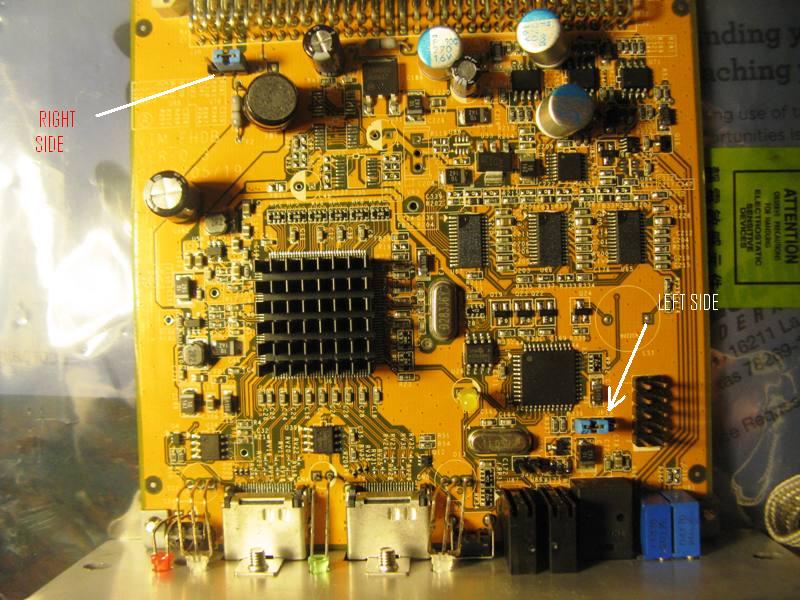
Can anyone (moome?) verify the jumper locations are correct on this board? green channel on VIM went bad after only a few days and I want to make sure this card is good.
| Quote: | My low hour Marquee 9500LC's green tube went bad few days after installed the new Moome's V3 HDMI card , The green tube still on but is very dim. and if look into the tube from the front PJ (with video signal fed) there is sort of un-sync white noise floating on top of green backgroud, while the red and blue still have a normal video signal.
Take advanced of Moomy board on sale at Kurt web side before Christmas. First day install the board seem working OK on most of HDMI sources but very greenish with Netflix video, then later find out need to set to Auto Detect Input Color Space and all seem work on that day..Well next evening, turn a 9500LC on...green tube gone..I means gone since all the Marquee menus displays on green characters.. now just the bunch of black empty boxes |
| Description: |
|
| Filesize: |
103.96 KB |
| Viewed: |
5915 Time(s) |
|
|
|
| Back to top |
|
 |
HK-Steve

Joined: 15 Jul 2006
Posts: 849
Location: Switzerland
TV/Projector: Marquee 9500, Epson 8100
|
| Posted: Sun Jan 15, 2012 10:09 am Post subject: |
|
|
My board in the latest version, v3
Ver. 0.2
2009/10/12
JP13 which is on the top left, jumper on pins 1 and 2
JP 15 which is bottom right, jumper on pins 1 and 2
Not sure this helps you.
Cheers
Steve

|
|
| Back to top |
|
|
HK-Steve
Joined: 15 Jul 2006
Posts: 849
Location: Switzerland
TV/Projector: Marquee 9500, Epson 8100
|
| Posted: Sun Jan 15, 2012 10:18 am Post subject: |
|
|
Does the internal test pattern on the VIM work correctly?
If not, then a VNB may be the problem.
Cables from VIM to VNB also should be checked.
Cheers
_________________

|
|
| Back to top |
|
|
draganm
Joined: 08 Mar 2006
Posts: 8990
Location: Colorado
|
| Posted: Mon Jan 16, 2012 5:06 pm Post subject: |
|
|
| HK-Steve wrote: | Does the internal test pattern on the VIM work correctly?
If not, then a VNB may be the problem.
Cables from VIM to VNB also should be checked.
Cheers |
thanks Steve, the test patterns weren't working either on the G channel and my concern was that it was related to the card. However Moome replied that it basically impossible for the HDMI card to damage the VIM.
The problem was deeper into the board than the primary CL449 buffering amp so I am pretty sure it wasn't related to the card. Just wanted to make sure before risking another VIM but I think it's ok
|
|
| Back to top |
|
|
HK-Steve
Joined: 15 Jul 2006
Posts: 849
Location: Switzerland
TV/Projector: Marquee 9500, Epson 8100
|
| Posted: Tue Jan 17, 2012 7:11 am Post subject: |
|
|
Change out the VIM, if that solves the problem, then great,
If not then look at VNB.
Hope you get it worked out.
Cheers
_________________
|
|
| Back to top |
|
|
Nashou66

Joined: 12 Jan 2007
Posts: 16171
Location: West Seneca NY
|
|
| Back to top |
|
|
|
|




