| Author |
Message |
CRT_Ben
Joined: 28 Aug 2006
Posts: 1684
Location: Northern Virginia
|
| Posted: Sun Dec 04, 2011 5:27 am Post subject: Marquee - HV comes up but no picture or internal patterns |
|
|
Hey all,
I put together a spare 8500 and powered it up. HV comes up and there are no error LEDs lit on the back, but there is no picture at all - no internal patterns. Haven't tried putting a source into it because I figure if the internal patterns don't work, nothing will.
I tried a search and found a mention of the green fuse-things on the VIM so I'm going to check those now. If those are good, anything else that would be suspect? It seems like a video-path specific problem...
Thanks!
Ben
|
|
| Back to top |
|
 |
HK-Steve

Joined: 15 Jul 2006
Posts: 849
Location: Switzerland
TV/Projector: Marquee 9500, Epson 8100
|
| Posted: Sun Dec 04, 2011 8:35 am Post subject: |
|
|
Check
G2 on the neck boards,
Video cables plugged in on VIM and Neck Boards.
Let us know what you find.
Cheers
_________________

|
|
| Back to top |
|
|
Tim in Phoenix

Joined: 21 Oct 2006
Posts: 4409
Location: Phoenix
|
| Posted: Sun Dec 04, 2011 2:29 pm Post subject: |
|
|
Hello
Locate R76 on the neckboard, you should measure 500 volts dc +- at the tip, that is the G2 supply and the tubes don't fire without it. Make sure your high voltage power supply is fully seated. Make sure also your contrast is above zero.
.
|
|
| Back to top |
|
|
CRT_Ben
Joined: 28 Aug 2006
Posts: 1684
Location: Northern Virginia
|
| Posted: Sun Dec 04, 2011 4:04 pm Post subject: |
|
|
Thanks Steve and Tim!
Steve - G2 cables are plugged in and the video cables are firmly seated on both the VNBs and the VIM. So far I've swapped VIM and LVPS with my working machine to no avail.
Tim - I think you nailed it. I turned on the machine, hit Contrast on the wired remote and held the up button for about 10 seconds, so it should be at 100. I measured the voltage between one leg of R76 and ground and it's 125-130V - does this indicate a bad HVPS?
Thanks again!
Edit: I did pull and repeat the hvps before running the R76 test.
|
|
| Back to top |
|
|
Tim in Phoenix
Joined: 21 Oct 2006
Posts: 4409
Location: Phoenix
|
| Posted: Sun Dec 04, 2011 5:17 pm Post subject: |
|
|
Hello
Something is wrong. Are the tubes all stock 180DMBs? Can you try another HVPS? Can you go into the service menu and try advancing the G2s?
.
|
|
| Back to top |
|
|
CRT_Ben
Joined: 28 Aug 2006
Posts: 1684
Location: Northern Virginia
|
| Posted: Sun Dec 04, 2011 7:18 pm Post subject: |
|
|
| Tim in Phoenix wrote: | Hello
Something is wrong. Are the tubes all stock 180DMBs? Can you try another HVPS? Can you go into the service menu and try advancing the G2s?
. |
Hey Tim,
They're actually stock P19LCP 9" tubes, but this machine used to be an 8500. I can try the HVPS from my main machine, but before that I'm going to see if I can use my good projector to navigate through the menu blind and do a complete initialization - that should rule out anything like contrast or G2 settings. I'll let you all know how it goes.
Thanks!
Ben
|
|
| Back to top |
|
|
CRT_Ben
Joined: 28 Aug 2006
Posts: 1684
Location: Northern Virginia
|
| Posted: Sun Dec 04, 2011 7:58 pm Post subject: |
|
|
|
Initialization worked - the PJ turned off like it's supposed to - but the voltage is even lower now at 115-120v. Gonna switch hvps now.
|
|
| Back to top |
|
|
Nashou66

Joined: 12 Jan 2007
Posts: 16171
Location: West Seneca NY
|
|
| Back to top |
|
|
CRT_Ben
Joined: 28 Aug 2006
Posts: 1684
Location: Northern Virginia
|
| Posted: Sun Dec 04, 2011 9:14 pm Post subject: |
|
|
| Nashou66 wrote: | Ben Just want to check this, are you sure you have the meter set for DC?
Athanasios |
Hey Nash, it was set to autoranging AC/DC but it was locking onto a DC voltage - I forced it to DC and got the same result.
I also switched out the HVPS for a known good one and got the same result. Boards / modules switched so far: VIM, LVPS, HVPS.
I did take a look at my cheap-o radioshack DMM and it looks like it's only rated for 500v, so it may not be able to handle the full G2 voltage - however, it looks like it's reading a valid voltage, the reading fluctuates slightly, etc. It doesn't look like an error, but I guess it could have a really weird way of handling overvoltage.
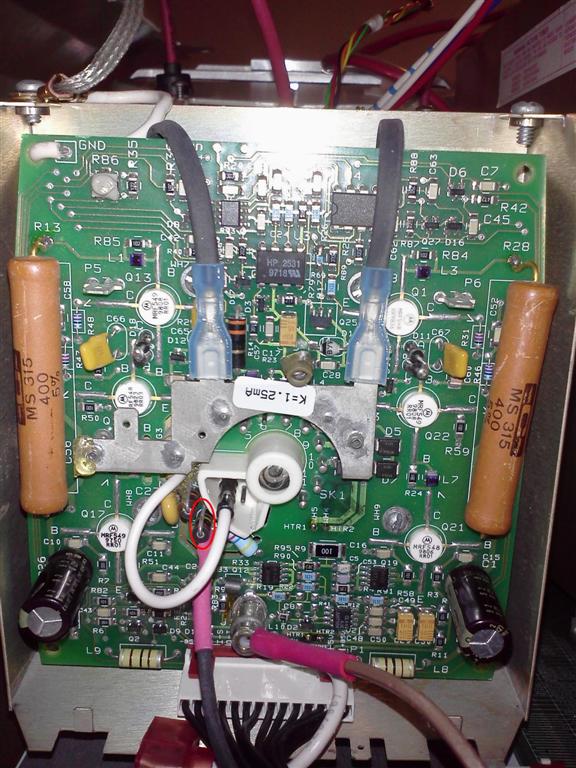
Just to get a reality check I've attached a picture of the VNB and circled how I'm taking the reading.
Thanks guys!
| Description: |
|
| Filesize: |
109.74 KB |
| Viewed: |
7037 Time(s) |
|
|
|
| Back to top |
|
|
Nashou66
Joined: 12 Jan 2007
Posts: 16171
Location: West Seneca NY
|
|
| Back to top |
|
|
CRT_Ben
Joined: 28 Aug 2006
Posts: 1684
Location: Northern Virginia
|
| Posted: Sun Dec 04, 2011 9:52 pm Post subject: |
|
|
Victory! It's the CLM. I swapped it with the CLM from my working machine and it's good!
Before I go off to find a spare, do you all think this is the "real" problem or could there be something else? Loaded question I know. Thanks for the help!
Edit: I did pull the daughterboards off the bad CLM and reseat the chips on all three boards until they "popped". Reinstalled but no change - still busted.
|
|
| Back to top |
|
|
Nashou66
Joined: 12 Jan 2007
Posts: 16171
Location: West Seneca NY
|
|
| Back to top |
|
|
CRT_Ben
Joined: 28 Aug 2006
Posts: 1684
Location: Northern Virginia
|
| Posted: Mon Dec 05, 2011 4:31 pm Post subject: |
|
|
| Nashou66 wrote: | Well try cleaning the chips and connectors on the faulty CLM first.
Athanasios |
I have some contact stabilant I bought at ratshack awhile back - is that what I should use? I don't know if I can pull the chips, I don't have a chip puller. But then again if I ruin it it's already broken, right? 
|
|
| Back to top |
|
|
Nashou66
Joined: 12 Jan 2007
Posts: 16171
Location: West Seneca NY
|
| Posted: Mon Dec 05, 2011 7:15 pm Post subject: |
|
|
| CRT_Ben wrote: | | Nashou66 wrote: | Well try cleaning the chips and connectors on the faulty CLM first.
Athanasios |
I have some contact stabilant I bought at ratshack awhile back - is that what I should use? I don't know if I can pull the chips, I don't have a chip puller. But then again if I ruin it it's already broken, right? |
Thats the thing, it might not be broken. For now you can just place the CLM with the DPB removed on a flat surface and press down on all socketed chips. Some might make a snap sound as the press into place. That will clean some of the contact surface for now.
Athanasios
_________________
Don't blame your underwear for your crooked ass~ unknown Greek philosopher
"Republicans believe every day is the Fourth of July, but the Democrats believe every day is April 15." --- President Reagan
One Smart Dog!!!
Marquee High Performance Bellows now shipping!!
Marquee Modifications and Performance Enhancement
Marquee C-element and Bellow removal
|
|
| Back to top |
|
|
CRT_Ben
Joined: 28 Aug 2006
Posts: 1684
Location: Northern Virginia
|
| Posted: Tue Dec 06, 2011 3:45 am Post subject: |
|
|
Hey Nash,
I did try to reseat all the chips - quite forcefully until each made a snapping sound as it reseat itself. No change in behavior though.
Thanks!
Ben
|
|
| Back to top |
|
|
|
|





