| Author |
Message |
pm
Joined: 23 Aug 2010
Posts: 85
Location: Hants UK
|
| Posted: Tue Nov 01, 2011 2:45 pm Post subject: Sony 1252 Focus - Points of Reference Please... |
|
|
Hi,
I'm using my old 1252 whilst my B1209s is off the ceiling at the moment.
After being sat in the corner for over year, it fired up without a glitch. Very happy.
When it came to dialling it in, it pretty much went by the book with no drama at all. Good raster size, all easily centred and converged very easily indeed. Virtually nothing needed tweaking from their mid point numbers +/- 10-20%
My only gripe is the focus.
I've checked the G2 voltages. All were close but are now spot on 4.0V
Using the internal H pattern, I can get reasonably sharp focus on the red, ok on the green but the blue is poor.
Mechanically, I can get even results across the entire screen on all 3.
The G2 volumes work fine in that they will focus/defocus, but its not resulting in any better focus.
My question, is how sharp a focus should I be expecting?
The manual says that the H pattern is made of "squares" and that I should be able to distinguish them. Well, I can't! Not even on the red tube. The H pattern looks sharp from the viewing position but close up one cannot distinguish the seperate bits of the H.
Any suggestions please?
The only thing that I can see I havent tried are the Astig magnets on the tube. The dot test pattern on the Sony doesnt look too bad to me, no particular flaring in any discernable direction. But, I have no point of reference to know what it should look like or even whether the Sonys' dot is reliably "round."
It's not my main machine, so I'm happy to experiment and "play" a little with it.
Any suggestions welcome!
Cheers,
PM.
|
|
| Back to top |
|
 |
rosenbush
Joined: 14 May 2010
Posts: 94
Location: Brownsville Texas
|
| Posted: Wed Nov 02, 2011 3:24 am Post subject: |
|
|
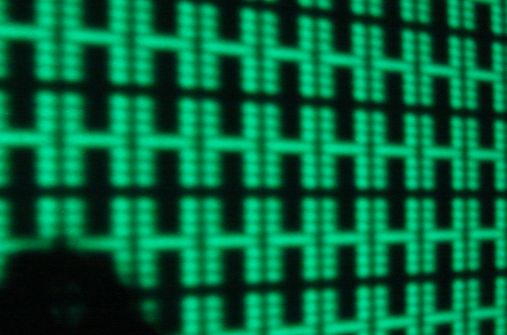
Here a sample, not as good as it shoul be, but you 'll get the idea how the 'H's look.
You will need to try your best with mechanical focus, and the best way is do the mod for the lenses ( as 'Mooneyass' sugest
) and then go further with the magnets.
| Description: |
|
| Filesize: |
42.2 KB |
| Viewed: |
7617 Time(s) |
|
|
|
| Back to top |
|
|
km987654

Joined: 25 Jul 2007
Posts: 2874
Location: Australia
TV/Projector: Barco BG809s
|
| Posted: Wed Nov 02, 2011 9:20 am Post subject: |
|
|
|
The 1252 is an ES focus projector right. How sharp do you think it should be? It would be hard looking at the image from an ES projector after using an EM projector as you have. Don't get me wrong I liked the image from my ES PJ but its was never what you would call sharp after looking at an EM PJ and Blue was always the color hardest to focus.
|
|
| Back to top |
|
|
rosenbush
Joined: 14 May 2010
Posts: 94
Location: Brownsville Texas
|
| Posted: Wed Nov 02, 2011 3:18 pm Post subject: |
|
|
|
Yeah, EM will be much more sharp, How sharp can be? no clue, I have no parameters to refer to. But you can get a very nice image from the 125*/127* sony projectors with out getting to the sharpest point and they are cheap and reliable. Remember, for human eye the blue color the hardest color to focus, so, dont blame all to the CRT.
|
|
| Back to top |
|
|
AnalogRocks
Forum Moderator

Joined: 08 Mar 2006
Posts: 26706
Location: Toronto, Ontario, Canada
TV/Projector: Sony 1252Q, AMPRO 4000G
|
| Posted: Wed Nov 02, 2011 4:18 pm Post subject: |
|
|
PLUS the blue is supposed to be electronicly defocused which plays with the eyes too.
_________________
Tech support for nothing
CRT.
HD done right!
|
|
| Back to top |
|
|
pm
Joined: 23 Aug 2010
Posts: 85
Location: Hants UK
|
| Posted: Thu Nov 03, 2011 4:37 pm Post subject: Thank you.... |
|
|
Thanks for the replies guys!
A special thanks for the photo! A picture is worth a thousand words. I can get nothing like that at the moment. I can see the scan lines but can't differentiate the individual parts of the H. The blobs blend into each other.
I knew, and wasnt expecting 1209 performance from my Sony. But, when the manual says I should be able to see the blocks of the H, I'm concerned when I cant. Knowing that it should be acheivable, and having a picture that shows what is possible is invaluable.
It looks like I'm going to have to delve into the machine...... I'm convinced Ive done the best job possible on the mechanical focus.... where's those rubber gloves?!
I can now go away and try and replicate that, so thank you all.
PM
|
|
| Back to top |
|
|
pm
Joined: 23 Aug 2010
Posts: 85
Location: Hants UK
|
| Posted: Mon Nov 07, 2011 3:29 pm Post subject: UPDATE |
|
|
Update!
Coming on, but still got problems!
I can now get an H patern showing the discrete parts of the H like in the manual and the above photo......
But only on a channel with no input to it.
If I try the same test on the input I use from my HTPC then I still have the same issues as before. i.e. the H blends into a solid figure with softer edges. I have tried a multitude of resolutions and frequencies with little, if any, change.
Is this normal and to be expected?
The second problem is baffling me.
I've been trying to refine the focus with the astig rings. Neither the front or rear (4/2) rings make any significant change to the circularity of the defocused dots or the position of the bright spot in the centre of the flare.
With the stock astig settings ex factory, the spot sits slightly high of centre of an otherwise circular flare. No amount of astig movement changes things.
What am I doing wrong? Am I missing something obvious?
Thanks in advance!
PM
|
|
| Back to top |
|
|
AnalogRocks
Forum Moderator
Joined: 08 Mar 2006
Posts: 26706
Location: Toronto, Ontario, Canada
TV/Projector: Sony 1252Q, AMPRO 4000G
|
| Posted: Mon Nov 07, 2011 4:05 pm Post subject: |
|
|
What resolution are you trying to run into the projector from the PC?
_________________
Tech support for nothing
CRT.
HD done right!
|
|
| Back to top |
|
|
pm
Joined: 23 Aug 2010
Posts: 85
Location: Hants UK
|
| Posted: Mon Nov 07, 2011 4:30 pm Post subject: |
|
|
So far I've tried;
1280 x 960 @ 60Hz
Down to,
800 x 600 @ 48 Hz
With a huge number of combinations between the two.
One setup document I read suggested 888 x 666 as the best compromise.
I couldn't detect much difference in any of them.....
Cheers,
PM
|
|
| Back to top |
|
|
pm
Joined: 23 Aug 2010
Posts: 85
Location: Hants UK
|
| Posted: Mon Nov 07, 2011 5:48 pm Post subject: |
|
|
I think I've answered my own question about the H pattern resolution from a bit more research in the archives.....
However I'm still wondering why moving the astig rings has little/no effect on the circularity/flare position.
PM
|
|
| Back to top |
|
|
jarseneau

Joined: 06 Nov 2007
Posts: 323
Location: WI
|
| Posted: Mon Nov 07, 2011 6:02 pm Post subject: |
|
|
One thing that makes a big difference in seeing the H pattern dots is the height adjustment. With the height adjustment at a lower value, the scan lines are compressed closer together, thus pushing the dots of the H pattern on top of each other.
It is also good to know how the ring adjustments work. The direction of the adjustment is determined by the position of the pair of rings as a unit. The strength of the adjustment is determined by the spread of the rings within the pair.
_________________
Jerry
|
|
| Back to top |
|
|
pm
Joined: 23 Aug 2010
Posts: 85
Location: Hants UK
|
| Posted: Tue Nov 08, 2011 5:07 pm Post subject: |
|
|
Hi,
I understand what the astig rings do, I'm having a problem understanding why they no effect on my machine!
I expected them to be very sensitive, like everything else that's adjustable seems to be.
Gross movement of the tabs (90-180deg) has little effect.
Through searching, I've seen that others (with different machines) have had to replace the rings completely due to them having no effect.
Do the Sony components have a history of this?
|
|
| Back to top |
|
|
jarseneau
Joined: 06 Nov 2007
Posts: 323
Location: WI
|
| Posted: Tue Nov 08, 2011 6:27 pm Post subject: |
|
|
You probably already know this but I'll state it just to be sure...
I would say that ASTIG adjustments are more subtle that just about any other adjustment. The electronic focus adjustment needs to be set to 0 or 100 assuming 50 is best focus. In other words, you need to be unfocused to see the ASTIG affect.
As far as replacing the ASTIG rings, there's not a lot that can go wrong with them since they are just plastic and some magnets. They can however become brittle and snap but as long as they are in one piece, they should function. The other possibility is that they are not placed on the tube neck properly. You could try them at different positions forward/back but take a picture for reference to help get back to a starting point if you need to later.
_________________
Jerry
|
|
| Back to top |
|
|
AnalogRocks
Forum Moderator
Joined: 08 Mar 2006
Posts: 26706
Location: Toronto, Ontario, Canada
TV/Projector: Sony 1252Q, AMPRO 4000G
|
| Posted: Tue Nov 08, 2011 7:28 pm Post subject: |
|
|
| pm wrote: | So far I've tried;
1280 x 960 @ 60Hz
Down to,
800 x 600 @ 48 Hz
With a huge number of combinations between the two.
One setup document I read suggested 888 x 666 as the best compromise.
I couldn't detect much difference in any of them.....
Cheers,
PM |
Check the hours on your 1252. If it's past 8000 or so you may never get great focus. Also keep in mind the counter is 4 digits only so if it says 1200 hours it may be 11 200 
_________________
Tech support for nothing
CRT.
HD done right!
|
|
| Back to top |
|
|
rosenbush
Joined: 14 May 2010
Posts: 94
Location: Brownsville Texas
|
| Posted: Wed Nov 09, 2011 5:08 am Post subject: Re: UPDATE |
|
|
| pm wrote: | the H blends into a solid figure with softer edges. I have tried a multitude of resolutions and frequencies with little, if any, change.
Is this normal and to be expected?
|
In what color are you getting this? some times the red is the easiest to focus, try that one first.
Also, as Jarseneau mention, the ASTIG adjustments are very subtle, you can not fix focus problems with that adjustment. If you have not good focus, you will see no changes at all.
How about the electronic focus?, you did not mention how affect that. You need to electronic de-focus a little bit before try the astig adjustment, but if you dont have good focus, is to soon to get in to astig adjustment now
|
|
| Back to top |
|
|
pm
Joined: 23 Aug 2010
Posts: 85
Location: Hants UK
|
| Posted: Fri Nov 11, 2011 3:12 am Post subject: |
|
|
Thanks for the further replies guys.
The tubes all have 7125 hrs on them.
I've tried the electronic focus in conjunction with the mechanical focus and found it incredibly sensitive. I'm pretty sure I've got it focused as good as can be got from it at the moment.
I did defocus the dot picture before attempting to fine tune the astig rings. I still find the effect so subtle as to be un-noticeable! To be honest, the stock factory setting as sealed was pretty good anyway. I've not been able to improve on it, so that's where it still is.
Despite realising its limitations, I was probably still asking a bit much from it. I think the concensus is that, with the best will in the world, an old ES machine with tubes of that age is going to appear a little soft.
Despite that, I'm happy for the time I've spent on it. It's been useful practise and I've re-learned a few lessons without killing the machine or me!
I've got large, centred rasters. I optimised the PJ distance to fill the screen with those rasters. The R&B tubes were mechanically toed in to converge on the green with hardly any electrical correction necessary. From there, the convergence was a doddle. Only minor adjustments were necessary in a few zones.
I feed the picture from my HTPC Nvidia card at 888x666. With the Sony left on its stock setting of B-50 and C-80, any adjustments for grey scale and white levels were made on the card. Again, not much deviation from mid point settings were required.
The result is that I think I've got the best I can realistically expect out of it. Films that are bright, close up "character" type films are a joy to watch. Lovely colours and contrast and very filmic.
Films that are dark and broody with a lots of small detail going on are a lot more of a challenge.
It's enough to scratch the itch for now whilst I concentrate on sorting out my B1209s and its new ceiling mounting.
Cheers guys.
PM
|
|
| Back to top |
|
|
wipron

Joined: 09 May 2006
Posts: 50
Location: Minnesota
|
| Posted: Fri Nov 25, 2011 10:23 am Post subject: |
|
|
I also have a 1252 and was wondering where the CRT timer is. On the 1272 its on page 5, but there is no page 5 on the 1252 I have. So, anyone, where is it? Thanks!!
_________________
Life is EASY! It's just some of the people in it that make it hard!
|
|
| Back to top |
|
|
Curt Palme
CRT Tech
Joined: 08 Mar 2006
Posts: 24396
Location: Langley, BC
TV/Projector: All of them!
|
| Posted: Fri Nov 25, 2011 2:58 pm Post subject: |
|
|
|
You need to get into the service menu to unlock page 5 where the hour meter is located.
|
|
| Back to top |
|
|
wipron
Joined: 09 May 2006
Posts: 50
Location: Minnesota
|
| Posted: Sun Nov 27, 2011 5:02 pm Post subject: |
|
|
I was in the Service Menu. It shows to Page 4, when you try to get to the next page, it is blank, hit page again and it goes back to page 1. Is there some other thing I'm not doing correctly? Thanks!
_________________
Life is EASY! It's just some of the people in it that make it hard!
|
|
| Back to top |
|
|
|
|





