| Author |
Message |
Rua
Joined: 05 Aug 2011
Posts: 36
Location: Hamilton New Zealand
|
| Posted: Tue Sep 06, 2011 9:39 am Post subject: Using a PC as a remote connecting to a RUNCO 930/NEC 6PGxtra |
|
|
Now I've made the cable, installed the NEC PC control software v3.0, with 9600,8,odd,1, can anyone offer any words of wisdom before I connect it to my projector that will benefit me besides RTFM ? cheers from NZ. 
_________________
If you don't have a go you won't know
|
|
| Back to top |
|
 |
AnalogRocks
Forum Moderator

Joined: 08 Mar 2006
Posts: 26706
Location: Toronto, Ontario, Canada
TV/Projector: Sony 1252Q, AMPRO 4000G
|
| Posted: Tue Sep 06, 2011 10:28 am Post subject: |
|
|
Yeah buy a proper remote. I banged my head against the wall with my 930 for a week. 
Your luck may be better
_________________
Tech support for nothing
CRT.
HD done right!
|
|
| Back to top |
|
|
Rua
Joined: 05 Aug 2011
Posts: 36
Location: Hamilton New Zealand
|
| Posted: Wed Sep 07, 2011 6:28 am Post subject: |
|
|
Yes well it don't work with windows XP so I'm going to dig up my windows 98 laptop and try that and if that docent work I'm going to find the close'it wall, cheers.
_________________
If you don't have a go you won't know
|
|
| Back to top |
|
|
Rua
Joined: 05 Aug 2011
Posts: 36
Location: Hamilton New Zealand
|
| Posted: Wed Sep 07, 2011 8:02 am Post subject: |
|
|
I might try version 2 first
_________________
If you don't have a go you won't know
|
|
| Back to top |
|
|
gjaky

Joined: 05 Jun 2010
Posts: 2802
Location: Budapest, Hungary
|
| Posted: Wed Sep 07, 2011 8:41 am Post subject: |
|
|
I use the controll sw ver3 with XP SP3, and did work on threee different hw configuration, with a 6PG xtra, and a 9PG xtra too. I suggest to recheck your cable's pin assignment,
The controll sw ver.:2 is for the older plain PGs I think.
|
|
| Back to top |
|
|
Rua
Joined: 05 Aug 2011
Posts: 36
Location: Hamilton New Zealand
|
| Posted: Thu Sep 08, 2011 5:42 am Post subject: |
|
|
Could you enlighten me on the pin confiuration plse I used the PC to PJ in Tips and Manuals, but I will re-check my pin out diagrams again, they could be back to forward, cheers.
_________________
If you don't have a go you won't know
|
|
| Back to top |
|
|
gjaky
Joined: 05 Jun 2010
Posts: 2802
Location: Budapest, Hungary
|
| Posted: Thu Sep 08, 2011 6:28 am Post subject: |
|
|
Yes, that's it.
Also there are switches on the main cpu board one of them switches between RS422 and RS232 communication (you need RS232), maybe you can check that too
|
|
| Back to top |
|
|
Rua
Joined: 05 Aug 2011
Posts: 36
Location: Hamilton New Zealand
|
| Posted: Thu Sep 08, 2011 7:19 am Post subject: |
|
|
Hey thanks for that, that could be the last peice of info. I'll check which board that is and investigate, cheers.
_________________
If you don't have a go you won't know
|
|
| Back to top |
|
|
Rua
Joined: 05 Aug 2011
Posts: 36
Location: Hamilton New Zealand
|
| Posted: Thu Sep 08, 2011 8:14 am Post subject: |
|
|
Well just had a quick look through the Tips and Manuals section and could not quite see which board that is, did a quick visual look also and nothing.
Could you possibly describe which board this is and where it might be located please.
I would have thought it would be easy to access and find this switch to change it, will continue to look, cheers from New Zealand.
_________________
If you don't have a go you won't know
|
|
| Back to top |
|
|
gjaky
Joined: 05 Jun 2010
Posts: 2802
Location: Budapest, Hungary
|
| Posted: Thu Sep 08, 2011 10:41 am Post subject: |
|
|
Sorry, I didn't named that board right. It can be found as system PWB, it is located in the metal cage, there should be a sticker on the cage which indicates which board is which.
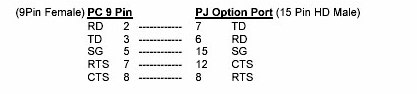
Just for sure: are you connected your cable to the 'option' port, and are you made the cable in the picture?
| Description: |
|
| Filesize: |
7.43 KB |
| Viewed: |
6629 Time(s) |
|
|
|
| Back to top |
|
|
Rua
Joined: 05 Aug 2011
Posts: 36
Location: Hamilton New Zealand
|
| Posted: Sat Sep 10, 2011 3:49 am Post subject: |
|
|
Yes all is correct, cable, PWB board setting, but the only 15 pin port is called remote and external control, I have connected to remote port and can not connect.
_________________
If you don't have a go you won't know
|
|
| Back to top |
|
|
AnalogRocks
Forum Moderator
Joined: 08 Mar 2006
Posts: 26706
Location: Toronto, Ontario, Canada
TV/Projector: Sony 1252Q, AMPRO 4000G
|
| Posted: Sat Sep 10, 2011 3:50 am Post subject: |
|
|
Anyone have a PG remote for Rua to save him an aching head?
_________________
Tech support for nothing
CRT.
HD done right!
|
|
| Back to top |
|
|
Rua
Joined: 05 Aug 2011
Posts: 36
Location: Hamilton New Zealand
|
| Posted: Sat Sep 10, 2011 4:51 am Post subject: |
|
|
Hey AnalogRocks thanks for that I actually do have a RUNCO Super HDTV/NEC6010 remote but being new to CRT's I should have asked how to use it to program different inputs.
Tho I was looking for the bigger remote or use my PC as the remote, without buying a NEC6051 or 6321, cheers.
_________________
If you don't have a go you won't know
|
|
| Back to top |
|
|
AnalogRocks
Forum Moderator
Joined: 08 Mar 2006
Posts: 26706
Location: Toronto, Ontario, Canada
TV/Projector: Sony 1252Q, AMPRO 4000G
|
| Posted: Sat Sep 10, 2011 5:09 am Post subject: |
|
|
You need the bigger of the two remotes.
_________________
Tech support for nothing
CRT.
HD done right!
|
|
| Back to top |
|
|
gjaky
Joined: 05 Jun 2010
Posts: 2802
Location: Budapest, Hungary
|
|
| Back to top |
|
|
Rua
Joined: 05 Aug 2011
Posts: 36
Location: Hamilton New Zealand
|
| Posted: Sun Sep 11, 2011 8:47 am Post subject: |
|
|
Thanks everyone looks like the remote is the way, am looking at one in the Buy and Sell section and Ebay, and save my head, cheers from New Zealand, where the "Rugby World Cup" is being fought.
_________________
If you don't have a go you won't know
|
|
| Back to top |
|
|
Rua
Joined: 05 Aug 2011
Posts: 36
Location: Hamilton New Zealand
|
| Posted: Mon Sep 12, 2011 5:01 am Post subject: |
|
|
Well checked some pictures of a NEC and RUNCO changed the outlet from option to external connection and my PC connects to the projector and now I'm going to hit my head against the garage wall, sometimes the obvious stares you in the face, yet its not till you open the other eye do you truly see the obvious. Hope these service codes work, cheers everyone.
_________________
If you don't have a go you won't know
|
|
| Back to top |
|
|
AnalogRocks
Forum Moderator
Joined: 08 Mar 2006
Posts: 26706
Location: Toronto, Ontario, Canada
TV/Projector: Sony 1252Q, AMPRO 4000G
|
| Posted: Mon Sep 12, 2011 5:04 am Post subject: |
|
|
Congrats, let us know how it goes
_________________
Tech support for nothing
CRT.
HD done right!
|
|
| Back to top |
|
|
Rua
Joined: 05 Aug 2011
Posts: 36
Location: Hamilton New Zealand
|
| Posted: Mon Sep 12, 2011 7:48 am Post subject: |
|
|
Well, well, well, it works funny that, the "remote" 15 pin connects to a switcher the "external connection" connects to a PC.
Wasn't till I looked at gjakys' comments of "option port" for a NEC pj that it dawned on me, cheers again.
_________________
If you don't have a go you won't know
|
|
| Back to top |
|
|
gjaky
Joined: 05 Jun 2010
Posts: 2802
Location: Budapest, Hungary
|
| Posted: Mon Sep 12, 2011 8:05 am Post subject: |
|
|
I'm glad it is working now. I didn't know that the port was renamed on Runcos. I also don't have the remote for it, so I have to use the PC, I also went through these things 
|
|
| Back to top |
|
|
|
|




