| Author |
Message |
goro007
Joined: 28 Aug 2011
Posts: 3
|
| Posted: Sun Aug 28, 2011 8:36 am Post subject: Gamma curve dives - help needed!! |
|
|
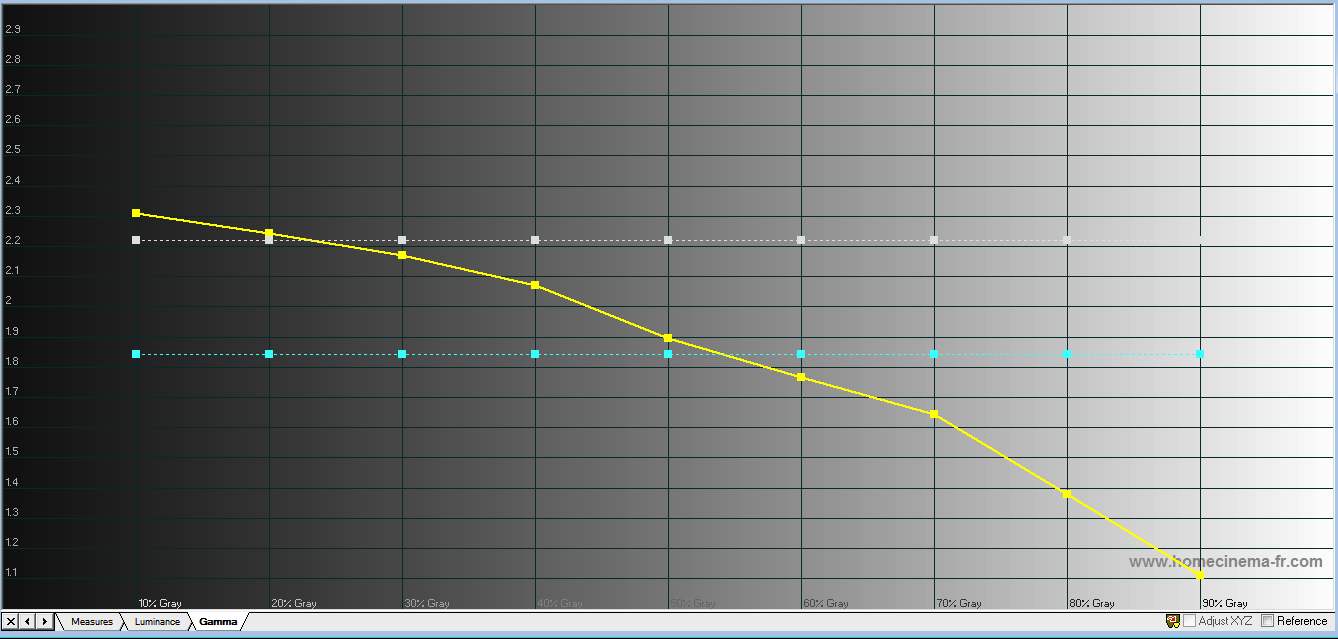
Hi guys. I have Eye One Display 2, Color Hcfr and Pioneer Kuro. No matter what I do I can't flatten my gamma curve which dives significantly at about 50 IRE and goes off the scale. I must have spent 20 hours trying to get it to improve but nothing really helps. Any suggestions on what's causing this? Thanx
| Description: |
|
| Filesize: |
79.44 KB |
| Viewed: |
35 Time(s) |
|
|
|
| Back to top |
|
 |
kal
Forum Administrator

Joined: 06 Mar 2006
Posts: 18114
Location: Ottawa, Canada
TV/Projector: JVC DLA-NZ7
|
| Posted: Sun Aug 28, 2011 1:11 pm Post subject: |
|
|
Show all your curves, not just gamma - or upload the ColorHCFR file. Something else may be telling. For example, sometimes you run out of a certain colour drive on the high end that causes odd issues and the only way to fix it is to lower contrast. Not saying that's your issue, just saying that by showing more information things sometimes get more obvious.
Kal
_________________

Support our site by using our affiliate links. We thank you!
My basement/HT/bar/brewery build 2.0
|
|
| Back to top |
|
|
CIR Engineering

Joined: 25 Aug 2008
Posts: 4269
Location: Chicago USA & Berlin Germany
|
| Posted: Sun Aug 28, 2011 2:42 pm Post subject: Re: Gamma curve dives - help needed!! |
|
|
| goro007 wrote: | | Hi guys. I have Eye One Display 2, Color Hcfr and Pioneer Kuro. No matter what I do I can't flatten my gamma curve which dives significantly at about 50 IRE and goes off the scale. I must have spent 20 hours trying to get it to improve but nothing really helps. Any suggestions on what's causing this? Thanx |
With a digital set, the signal processing internally can be made to do about anything. Thus an unnatural gamma curve can be created in the digital domain that is not adjustable by the normal ways...
That being said, I have calibrated tons of Kuro panels and I never have had an instance where I could not get a sweet gamma off the panel. Things to mess with on this panel include the brightness and contrast controls, the gamma setting its self, and also the user mode preset (PURE, CINEMA, USER, DYNAMIC, or whatever your panel has). Chances are that you need to start out with the correct preset to get a good gamma response. Usually on a Kuro you should choose PURE if it is available, if not than in this order of availability; natural, movie, user.
My guess is that you may be on a preset such as DYNAMIC which is designed to rocket the gamma curve like this to exaggerate dark areas and give the impression of better black levels while highlighting bright areas giving the impression of more contrast...
craigr
_________________
JETI 1501-HiRes 2nm Spectroradiometer
JETI 1211 Spectroradiometer
Photo Research PR-650 Spectroradiometer
Klein K10-A Colorimeter
Murideo Fresco SIX-G HDMI 2.x Multimedia Generator
Murideo Fresco SIX-A HDMI 2.x Analyzer
Light Illusion ColourSpace XPT Color Calibration Software
Light Illusion LightSpace XPT Pro Version 10.x Color Calibration Software
OMARDRIS JVC Software Patch to use K10-A and Jeti with JVC OEM AutoCal Software!
Sencore CR7000 CRT Tube Analyzer / Rejuvenater
Authorized Dealer for Lumagen & just about everything worth buying 
www.CIR-Engineering.com - craigr@cir-engineering.com
Phone: 865-405-6892
|
|
| Back to top |
|
|
goro007
Joined: 28 Aug 2011
Posts: 3
|
| Posted: Mon Aug 29, 2011 8:10 am Post subject: |
|
|
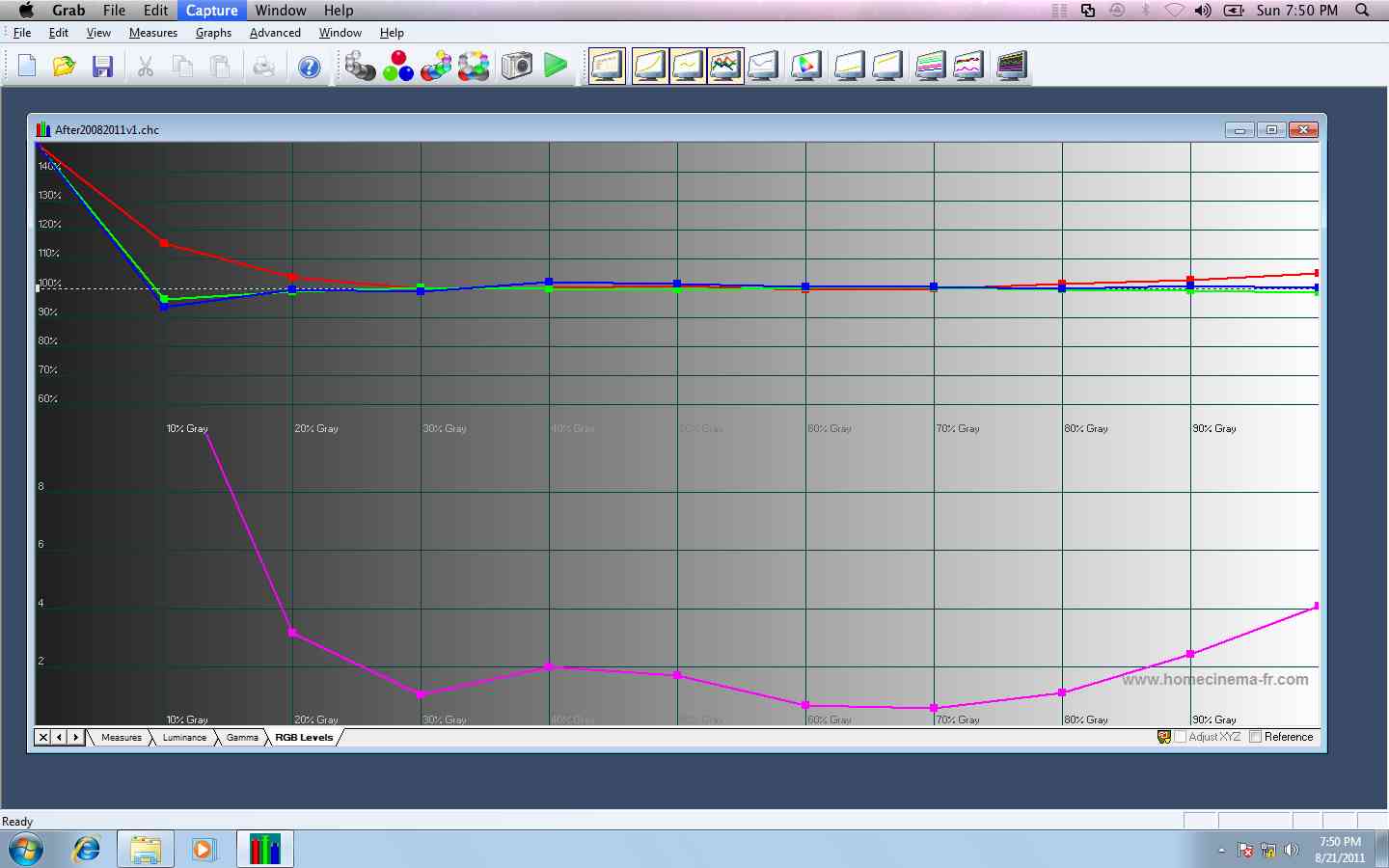
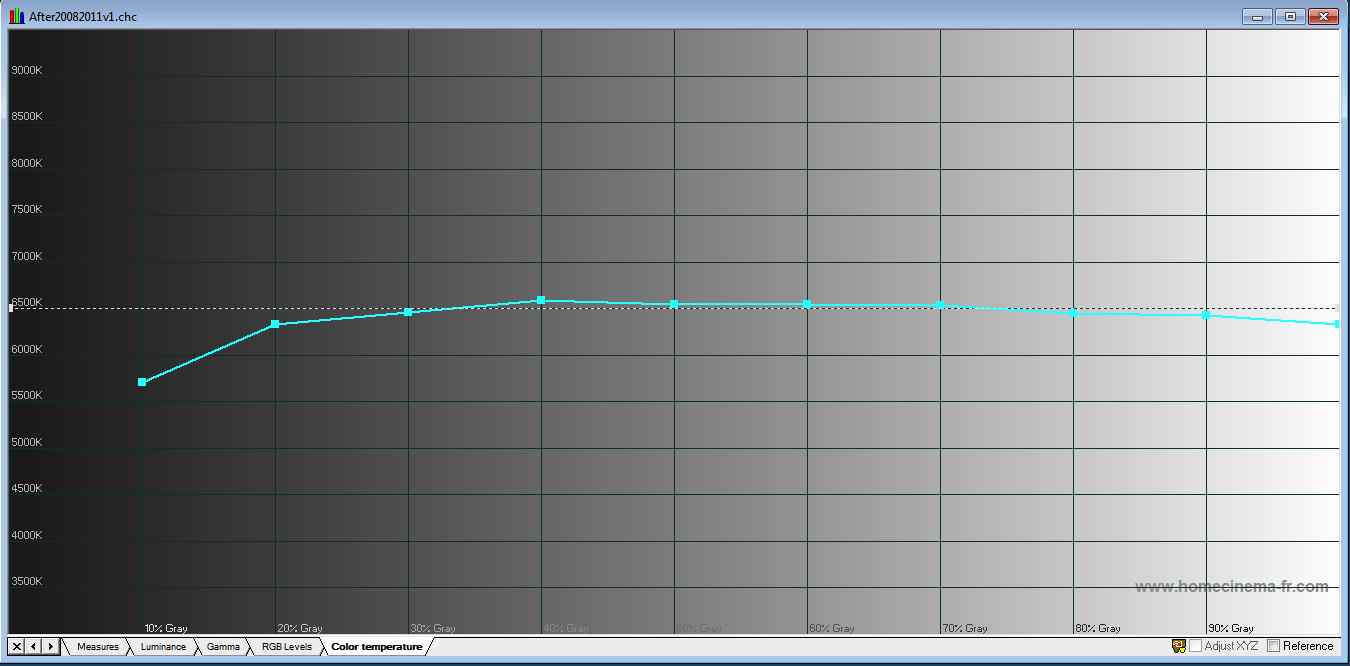
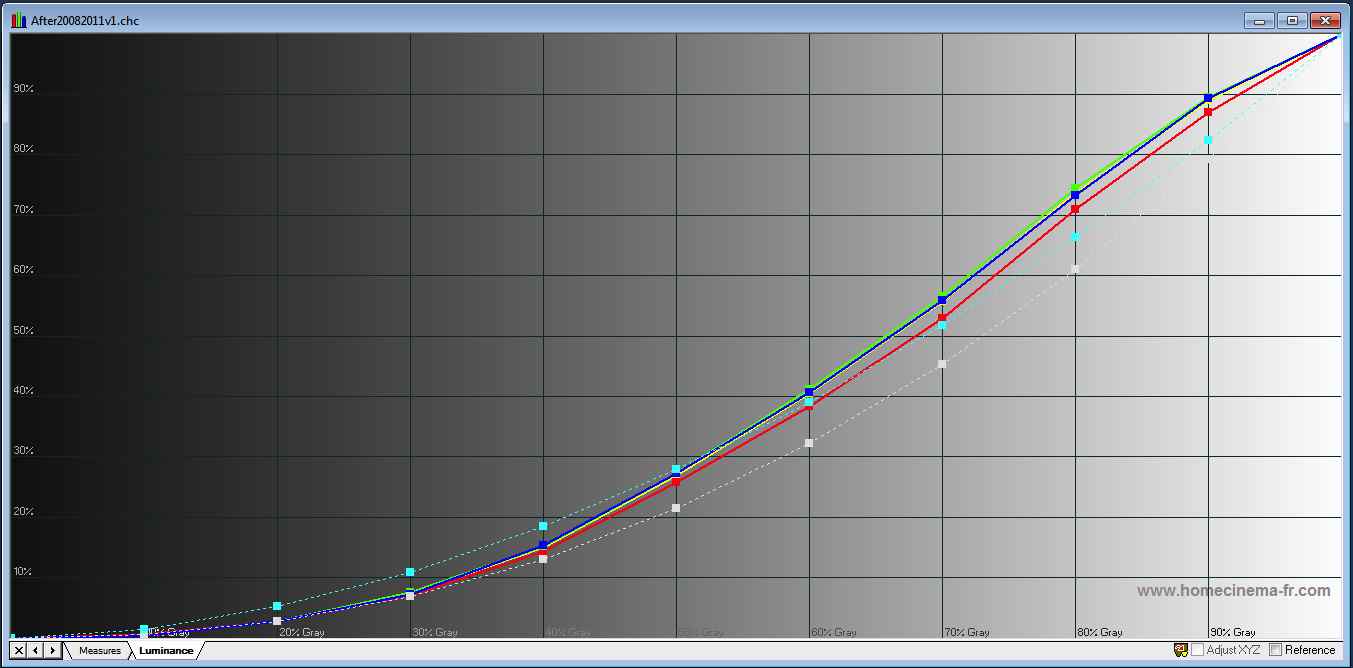
Hi guys. I've attached the graphs as suggested. Note I have gamma on the Pioneer set to 2, Black level=off, mode=user.
Thanks for your help
| Description: |
|
| Filesize: |
86.95 KB |
| Viewed: |
25 Time(s) |
|
| Description: |
|
| Filesize: |
55.1 KB |
| Viewed: |
23 Time(s) |
|
| Description: |
|
| Filesize: |
60.85 KB |
| Viewed: |
24 Time(s) |
|
| Description: |
|

Download |
| Filename: |
After20082011v1.chc |
| Filesize: |
64.45 KB |
| Downloaded: |
13 Time(s) |
|
|
| Back to top |
|
|
Damo
Joined: 29 Dec 2011
Posts: 4
Location: http://www.damienpetrilli.com
|
| Posted: Thu Dec 29, 2011 1:33 am Post subject: |
|
|
Hi Goro - Im not sure if it is too late to help you now, but I had a similar problem with my Samsung plasma, and for the longest time I couldnt figure out what was causing it.
I modified everything from the backlight intensity, to the gamma adjustment, brightness, contrast - nothing seemed to work.
I seemed to have a heavily downward sloping gamma and a luminance graph that severely humped between 30-80IRE.
If you have a 'dynamic contrast' option (as I did) turn it off! After doing this I recalibrated and my gamma was near ruler flat at 2.2, and my luminance tracked beautifully.
Worth a shot anyway!
|
|
| Back to top |
|
|
goro007
Joined: 28 Aug 2011
Posts: 3
|
| Posted: Thu Dec 29, 2011 11:55 am Post subject: |
|
|
Hey Damo
Thanks for the suggestion. I've checked all the settings and switched them all 'off'. I'm still working on it but the only way I can get it to improve is turn the contrast right down (from 42 to 24) which helps a lot but the picture seems flat. I'm not sure on what else to try...
|
|
| Back to top |
|
|
Spwill
Joined: 12 Jan 2012
Posts: 1
|
| Posted: Thu Jan 12, 2012 3:27 am Post subject: |
|
|
|
This happened on my kuro the first time I tried to calibrate it. Check if your bluray player has adjustable settings and lower contrast or white level on pioneer br players by one click. This should now allow you to see above white up to to 240. Then you should use small windows like the ones on the avshd disc. Too large of windows will trigger the abl of the tv and cause the gamma that you see in your graphs. If these steps don't work, then you can also use the apl patterns.
|
|
| Back to top |
|
|
|
|





