| Author |
Message |
v1rtu0s1ty
Joined: 29 Oct 2007
Posts: 110
|
| Posted: Mon Jul 18, 2011 2:17 am Post subject: Barco Graphics 808 |
|
|
Hey folks,
I have the first version of HD Fury. I'm thinking that the HDFury is the culprit. I am not able to display anything from either HDDVD or Pioneer Bluray player at 1080i, not even 480i. When I hook up my linux using RGBHV cable directly hook up to the projector, I can see it fine. The same RGBHV cable, the HDDVD and Bluray players works on my Sony 1272 but not on the Barco Graphics 808.
Can someone please shed some light on this? It's making me nuts.
Thanks.
Nei
|
|
| Back to top |
|
 |
Tom.W

Joined: 09 Mar 2006
Posts: 6635
|
| Posted: Mon Jul 18, 2011 5:33 am Post subject: |
|
|
|
Barco's like negative sync. Try input 3
|
|
| Back to top |
|
|
barclay66

Joined: 27 Jun 2011
Posts: 1304
Location: Germany
TV/Projector: Marquee 9500 Ultra
|
| Posted: Mon Jul 18, 2011 7:44 am Post subject: |
|
|
Hi,
unfortunately neither HDFury nor HDFury II allow altering sync polarity. Only HDFury III has dip switches which let you set sync inversion and/or forced polarity (a feature I'm using for my BG801s). Therefore you might need an additional box which would be placed between HDFury and the Barco.
This box would have to invert all incoming positive sync signals (H & V) or leave them as they are if they already would be negative. If it was me facing this problem I already would be sitting in my home's basement with my soldering iron at my site and looking through some of the many example circuits that can easily can be found on the web. But, of course I don't know if DIY is an option for you.
You might as well go with a commercially available box. I haven't seen any boxes wich do sync processing only. What seems to be an alternative is the RTC2200 box. You likely won't need the component conversion but the additional gamma boost feature could be a nice additional benefit.
Regards,
barclay66
|
|
| Back to top |
|
|
AnalogRocks
Forum Moderator

Joined: 08 Mar 2006
Posts: 26706
Location: Toronto, Ontario, Canada
TV/Projector: Sony 1252Q, AMPRO 4000G
|
| Posted: Mon Jul 18, 2011 8:10 am Post subject: |
|
|
Try a BUF2000: http://www.curtpalme.com/BUF2000.shtm
If you don't need the component input it's the box for you.
_________________
Tech support for nothing
CRT.
HD done right!
|
|
| Back to top |
|
|
barclay66
Joined: 27 Jun 2011
Posts: 1304
Location: Germany
TV/Projector: Marquee 9500 Ultra
|
| Posted: Mon Jul 18, 2011 8:27 am Post subject: |
|
|
| AnalogRocks wrote: | | Try a BUF2000 |
Cool! Hadn't seen this one. And its much cheaper too!
Regards,
barclay66
|
|
| Back to top |
|
|
Tom.W
Joined: 09 Mar 2006
Posts: 6635
|
| Posted: Mon Jul 18, 2011 8:44 am Post subject: |
|
|
|
Input 3 can handle both negative and positive sync. The HD fury 1 works quite well on my BD808 on input 3...
|
|
| Back to top |
|
|
RaWsHaRk
Joined: 01 May 2009
Posts: 131
Location: Finland
|
| Posted: Mon Jul 18, 2011 9:12 am Post subject: |
|
|
in my 801S, the input 3 is also sharper but I heard somewhere than on 808 its the opposite..?
_________________
Electrohome Marquee 7500.
|
|
| Back to top |
|
|
v1rtu0s1ty
Joined: 29 Oct 2007
Posts: 110
|
| Posted: Mon Jul 18, 2011 12:31 pm Post subject: |
|
|
Wow, lots of good recommendations!!! 
I can't believe I forgot what I wrote on a thread before, LOL. http://www.avsforum.com/avs-vb/showthread.php?t=1305727
I'll use port 3 then. Hopefully, the pin configuration for HD15 to DB9 I wrote on that thread is correct. I'll make one later.
The pin configuration is exactly found here, http://www.avsforum.com/avs-vb/showpost.php?p=19851688&postcount=10
Can someone please confirm?
I also like barclay66's diy suggestion regarding "invert all incoming positive sync signals". Hopefully you can help me find a howto for it. For now, I'll just make an HD15 to pin9 cable.
Oh, last night, I hooked up my linux machine on port 4/5 via an RGBHV cable. I am soooo very shocked with what I witnessed.
First, I rotated the lens to get it as sharp as possible. I was able to make it sharp as close as possible to the sharpness of my Sony 1272. I thought that it was it. I was happy.
Few hours later while playing with the projector, specifically the INSTALLATION menu, I was brought to this FOCUSING menu. OMG, I can't believe what I saw with my 2 eyes after moving the arrows. This projector is so friggin sharp. I don't think my 1272 can match its sharpness.
Anyways, just wanted to share and I'm sure you had the same experience.
I'll go out later to buy a 15pin connector. I already have 9pin.
Ooops, I almost forgot. I want to converge it. Red is quite far and moving the arrow button is not enough. What is the first step in converging? Do I also buy a spring and put it on the len's screw like what I did to my Sony 1272? This allows me to physically align the lenses.
Thanks everyone!
|
|
| Back to top |
|
|
v1rtu0s1ty
Joined: 29 Oct 2007
Posts: 110
|
| Posted: Tue Jul 19, 2011 3:55 am Post subject: |
|
|
YES!!! The pin configuration I posted worked! I am now able to watch HDDVD and Bluray on port 3 at 1080i. It can't resolve 1080p just like what was mentioned somewhere. Forgot where I saw it. Now, I need how to learn how to converge it. That's my next project. I just couldn't find where A & B port or screws are. The text on the screen says it's the first thing that needs to be done.
Hopefully someone here with a kind heart would provide a link on how to start the conv properly. I tried it yesterday but I can't get the red to meet Green. Blue is fine.
|
|
| Back to top |
|
|
AnalogRocks
Forum Moderator
Joined: 08 Mar 2006
Posts: 26706
Location: Toronto, Ontario, Canada
TV/Projector: Sony 1252Q, AMPRO 4000G
|
| Posted: Tue Jul 19, 2011 4:03 am Post subject: |
|
|
| v1rtu0s1ty wrote: | YES!!! The pin configuration I posted worked! I am now able to watch HDDVD and Bluray on port 3 at 1080i. It can't resolve 1080p just like what was mentioned somewhere. Forgot where I saw it. Now, I need how to learn how to converge it. That's my next project. I just couldn't find where A & B port or screws are. The text on the screen says it's the first thing that needs to be done.
Hopefully someone here with a kind heart would provide a link on how to start the conv properly. I tried it yesterday but I can't get the red to meet Green. Blue is fine. |
Have you done the mechanical swing on the lenses?
_________________
Tech support for nothing
CRT.
HD done right!
|
|
| Back to top |
|
|
v1rtu0s1ty
Joined: 29 Oct 2007
Posts: 110
|
| Posted: Tue Jul 19, 2011 4:19 am Post subject: |
|
|
|
The only thing I have done right now is the convergence by pressing up and down arrow. I am not familiar with that. How is it done?
|
|
| Back to top |
|
|
AnalogRocks
Forum Moderator
Joined: 08 Mar 2006
Posts: 26706
Location: Toronto, Ontario, Canada
TV/Projector: Sony 1252Q, AMPRO 4000G
|
|
| Back to top |
|
|
v1rtu0s1ty
Joined: 29 Oct 2007
Posts: 110
|
| Posted: Tue Jul 19, 2011 4:50 am Post subject: |
|
|
|
I've read a few. However, I'm having a hard time understanding the pictures. It's dark. I'll read it again.
|
|
| Back to top |
|
|
Tom.W
Joined: 09 Mar 2006
Posts: 6635
|
|
| Back to top |
|
|
AnalogRocks
Forum Moderator
Joined: 08 Mar 2006
Posts: 26706
Location: Toronto, Ontario, Canada
TV/Projector: Sony 1252Q, AMPRO 4000G
|
| Posted: Tue Jul 19, 2011 5:29 am Post subject: |
|
|
Thanks link Meister! 
_________________
Tech support for nothing
CRT.
HD done right!
|
|
| Back to top |
|
|
v1rtu0s1ty
Joined: 29 Oct 2007
Posts: 110
|
| Posted: Tue Jul 19, 2011 5:53 am Post subject: |
|
|
|
is the sync conversion circuit installed on the barco?
|
|
| Back to top |
|
|
barclay66
Joined: 27 Jun 2011
Posts: 1304
Location: Germany
TV/Projector: Marquee 9500 Ultra
|
| Posted: Tue Jul 19, 2011 7:11 am Post subject: |
|
|
Hi,
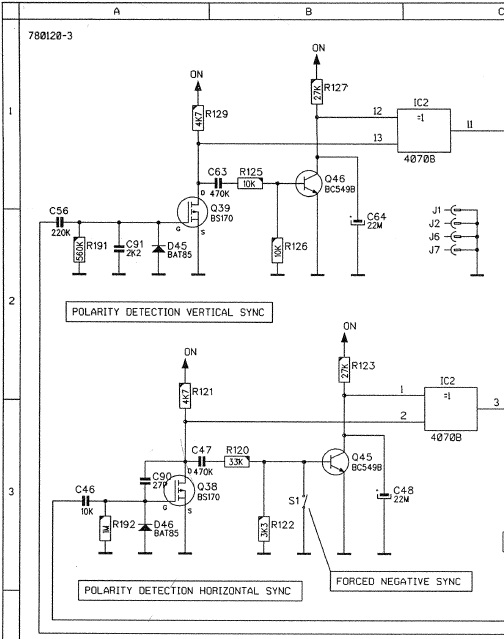
there is a sync processing circuit installed on the Barco. It is to be found on the second RGB input board (R7620155) which is the board that input 3 is connected to. Therefore it works for you on input 3 but not on inputs 4/5.
Please see the excerpt from the service manual below.
Initially I was using input 3 too. As I don't use any scaler (3 sources: BluRay Player set to 1080i / HD Cable Receiver set to 1080i / Computer set to 1280x1024, all connected to HDFury III through HDMI switcher) I experienced sync issues quite often. These were resolved entirely when I set the HDFury to forced negative sync and connected it to input 5 (RGBs). The picture quality improved quite a bit, especially sharpness was improved. I did a little analysis of the schematics and it seems that using inputs 4/5 you will have one video processing stage less within the video chain. So this is one stage less where bandwith and signal quality could be affected.
I then was able to remove the second RGB input board which would reduce the load on the SMPS (switch mode power supply) and let the projector run a little bit cooler...
Regards,
barclay66
| Description: |
|
| Filesize: |
77.7 KB |
| Viewed: |
13781 Time(s) |
|
|
|
| Back to top |
|
|
Tom.W
Joined: 09 Mar 2006
Posts: 6635
|
|
| Back to top |
|
|
v1rtu0s1ty
Joined: 29 Oct 2007
Posts: 110
|
| Posted: Tue Jul 19, 2011 1:33 pm Post subject: |
|
|
|
Yeah, especially, I am not that good in reading schematic diagrams.
|
|
| Back to top |
|
|
v1rtu0s1ty
Joined: 29 Oct 2007
Posts: 110
|
| Posted: Tue Jul 19, 2011 2:17 pm Post subject: |
|
|
|
I still don't know if I should mount this on my ceiling just like how my 1272 is mounted now. I'm just worried about the 4 small screws that are holding up the metal bar. Right now, it's on the floor and picture is getting projected on floor and screen. hehehe. For folks who have his projector on table, how high is it from floor?
|
|
| Back to top |
|
|
|
|




