|
As this forum is rarely used anymore, we've locked it. Feel free to browse and read. Questions? Please reach out to us directly. Cheers! |

|
 |
|
|
| Author |
Message |
Jeremy112

Joined: 28 Sep 2006
Posts: 2649
Location: Fond du Lac, WI
|
| Posted: Mon Apr 18, 2011 4:28 pm Post subject: |
|
|
I had to replace the green tube in my XG1100 about a month ago, when I did I had the same concerns as you Brent. I have to say if powered off it is fairly easy to pull the wire in question off without dying (My #1 concern).
To pull the big red wire for the green tube off the splitter I just pulled straight up (carefully and slowly) and it came off with a little effort.
At least you didn't have a cracked tube in that beast like I did 
_________________
When I'm asking for a Model number, that doesn't mean I'm asking for a nude photo with your number on it 
|
|
| Back to top |
|
 |
Curt Palme
CRT Tech
Joined: 08 Mar 2006
Posts: 24396
Location: Langley, BC
TV/Projector: All of them!
|
| Posted: Mon Apr 18, 2011 4:59 pm Post subject: |
|
|
| Jeremy112 wrote: |
To pull the big red wire for the green tube off the splitter I just pulled straight up (carefully and slowly) and it came off with a little effort.
: |
If you pulled on the wire and it didn't rip out, you're lucky. 
Grab the rubber boot only. Been there, done that.
|
|
| Back to top |
|
|
rungabic
Joined: 17 Apr 2011
Posts: 17
|
| Posted: Tue Apr 19, 2011 3:16 am Post subject: |
|
|
Curt (and MacGyver and all the rest of you who have put up with me) --
I have some additional info that I hope and pray might mean that the PJ is actually fine, and the problem might be in my NEC ISS switcher (?)
Here's what happened:
1. I finally got all the damn covers off -- no problems -- and gained access to the HV splitter cutout.
2. I didn't mess with swapping leads yet, and I first just tried to press the green lead's boot in hard (I felt no movement at all -- didn't feel like I was accomplishing anything).
3. When I turned on the PJ to see if anything had changed, I nearly screamed with joy when I saw normal, nice-looking, in-focus. internal NEC menu lettering appear! I threw up the crosshair pattern, and all 3 colors were good!
4. THEN I REALIZED -- in taking off the rear cover, I had to unplug the BNC input cable, so the PJ was not synced to any signal. When I plugged the cable back in, thereby syncing up to one of my active sources, then my green tube went back to the same defocused, jittery mess. I A/B'd this a few times to confirm.
SO...does the fact that everything is normal when the projector is unsynced necessarily mean that the problem is upstream from the projector? (God, I hope so.)
A couple other findings:
5. My setup is one component video source (Tivo) that goes into a transcoder card (from Piotr I think) in my NEC ISS switcher, and then my HTPC goes into one of the stock BNC input cards in the switcher. Then a BNC-BNC cable goes out from the switcher to the PJ. I pulled each input card, one at a time, and the green issue persisted (although I just now realized I have a few unused BNC input cards in there...maybe I should have pulled them or swapped them out).
6. I also discovered that if I switched to the component input, the PJ would stay on as normal, but look terrible because of the green problems. However, every time I switched to the other input card, the green would also be a mess, but the PJ turned itself off (or the switcher turned it off...who knows) after like 5 seconds. This was repeatable and has NEVER EVER happened before the "green problem" suddenly occurred a couple of nights ago.
Now the obvious test is to bypass the switcher and see if the green is good or bad. Until I go to Radio Shack tomorrow and pick up 5 female-female BNC couplers, I can't do that test. I won't be able to hook up the Tivo, since I have no standalone transcoder, but I can certainly connect the HTPC directly to the PJ, bypassing the ISS switcher completely. If that works, then obviously the PJ must be fine.
Until that time, if anyone's awake & reading (especially Curt, who I assume might know the answer with certainty) -- if my green was good with no inputs synced, then is my PJ absolutely, definitely, and totally in the clear? Or could there still be some projector issue that could cause this, only when a signal is present? Regardless, it must not have anything to do with those HV leads or splitter, right?
I'm going to bed very hopeful tonight -- I'd MUCH rather deal with fixing/replacing the switcher, as opposed to fixing (or more likely -- not being able to fix) the projector. Fingers crossed.
Brent
|
|
| Back to top |
|
|
rungabic
Joined: 17 Apr 2011
Posts: 17
|
| Posted: Tue Apr 19, 2011 2:11 pm Post subject: Disappointment |
|
|
Well, apparently the fault is in the PJ itself, and not in the ISS switcher or its I/O cards...
I just returned from the Shack with 5 female BNC-BNC couplers, and I joined the BNC cable coming out from the HTPC with the BNC cable going into the projector, thereby bypassing the switcher.
When I turned on the PJ, same thing: the green was blurry and vibrating, plus the PJ shut itself down after about 5-10 seconds. (Note - this is the same source that leads to this shutdown behavior, whereas my other source just has the messed up green, yet stays on. Also, nothing has changed resolution or timing-wise on my HTPC source, and actually I tried booting the HTPC with the projector on, and the PJ kept shutting off, even though the bootup stages are at a variety of different (and lower) resolutions than my final Windows resolution.)
And once again, after I turned off the HTPC (ie, no signal going into the PJ), all 3 tubes display perfectly normal test patterns (despite the fact that they're kind of jumpy, but I think that's normal with no input source synced up).
Curt -- I would assume all this means that the HV lead/splitter was a red herring (?) but what do I know?
Any guesses or things to test?
I did notice that it seems I have some duplicate entries or something odd in my input list (I must confess to never really having had a good grasp on how the input memories work)...but I don't think this is anything new. That might have happened when I changed resolutions on my HTPC and tweaked some things. But could anything strange in my input list actually cause the crazy green and the shutdown of only one source? I wouldn't think so, but I don't know enough to say...
Lastly, for whatever it's worth, I'll note that earlier last week, we had a brief power outage while I was running the PJ (surprisingly I don't think that's ever happened before)...but I continued watching right afterward with no problem, and also used it the next day with no apparent issues, before it started acting up that night.
Not understanding the inner workings of the projector, I don't know what the situation is with the shutdown on one source & not on the other, but this has just got to be more than coincidence, having occurred right when the green went crazy. Unless it is a coincidence, and my HTPC's video card was also somehow damaged during that power outage.
Thanks again for your advice,
Brent
|
|
| Back to top |
|
|
Curt Palme
CRT Tech
Joined: 08 Mar 2006
Posts: 24396
Location: Langley, BC
TV/Projector: All of them!
|
| Posted: Tue Apr 19, 2011 2:15 pm Post subject: |
|
|
Brent, I'll simply voice my frustration here. I never understand why a non CRT tech comes onto the forum asking advice, gets advice.. and then doesn't do anything that's suggested.
I'm not picking on you, it's happened before, but what's the point of asking advice when you're not going to take it? It's great that you're giving us a whole bunch more info, but it's not really relevant, when I believe I've already narrowed the problem down for you.
|
|
| Back to top |
|
|
rungabic
Joined: 17 Apr 2011
Posts: 17
|
| Posted: Tue Apr 19, 2011 2:30 pm Post subject: |
|
|
Hi Curt --
I do apologize. In fact, I feel guilty for everyone's help, and would be happy to pay you for a personal long-distance consultation if it would be beneficial.
I did take your advice in terms of trying to push in the green HV lead (though as I said, I'm not sure whether I pushed hard enough -- I pushed as hard as I could).
I stopped short of attempting to swap leads, because my coincidental discovery of normal G operation when unsynced, coupled with the brand-new behavior of one specific source shutting down the projector, I BELIEVED (no shouting intended) might be really important for you to know. Maybe it's possible that an HV problem can result in the green tube working perfectly when unsynced to a source, yet is a mess when synced -- I guess that's what you're saying, but in my mind I figured that I might have ruled that out, and so I wanted to check with you on that before I tried swapping leads and possibly broke something that didn't need to be touched.
So I took it upon myself to eliminate the possibility of an ISS issue, which is now eliminated, and wanted to see whether all this new information caused you say, "It's not an HV issue -- it's your RGB input board...or your flux capacitor...etc."
I hope you understand my intent was to be helpful and not waste your time, as opposed to not accepting your advice. After discovering these additional things last night, I felt like I had given you only 50% of the information you might need to make your diagnosis.
Thanks,
Brent
|
|
| Back to top |
|
|
macgyver655
Joined: 22 Aug 2007
Posts: 8508
|
| Posted: Tue Apr 19, 2011 2:49 pm Post subject: |
|
|
Hey Brent. Neither Curt, myself or anyone else here is upset with you. We are just trying to get you to do what we ask.
If it ends up being something else, so be it. But things have to be diagnosed in a certain way so as to not be running around the rabbit hole.
So just take your time and swap those wires. Its not rocket science. 
And don't be afraid to ask more questions if you need to.
|
|
| Back to top |
|
|
rungabic
Joined: 17 Apr 2011
Posts: 17
|
| Posted: Tue Apr 19, 2011 3:19 pm Post subject: |
|
|
| macgyver655 wrote: | Hey Brent. Neither Curt, myself or anyone else here is upset with you. We are just trying to get you to do what we ask.
If it ends up being something else, so be it. But things have to be diagnosed in a certain way so as to not be running around the rabbit hole.
So just take your time and swap those wires. Its not rocket science.
And don't be afraid to ask more questions if you need to. |
Thanks -- I really appreciate it. I was truly trying to help out and be respectful of all your time by not withholding information that seemed potentially relevant (at least to me)...
So while you're here, I noticed there seems to be like a 1-2 mm gap between the bottom of each rubber boot and the surface of the splitter. So where exactly I am supposed to be "prying"? I had imagined (based on other things I had read about removing these leads) that the bottoms of those boots would be flush against the surface of the splitter, and I would be prying to break some seal ("suction" I read -- how does that occur?).
Anyway, I just want to know where I need to pry, in order to avoid mangling and damaging anything. Having never seen these leads off of the splitter, I don't really understand how they fit on and off.
And again, just for my curiosity, apparently it's not out of the question that everything works fine with no source synced. I'm just trying to grasp that, since I figured if there was a bad connection to the tube, there would be a bad connection always, and not only when the PJ was synced.
Thanks!
Brent
|
|
| Back to top |
|
|
rungabic
Joined: 17 Apr 2011
Posts: 17
|
| Posted: Wed Apr 20, 2011 3:18 am Post subject: |
|
|
Good news (at least from a diagnostic standpoint):
1. I swapped the red & green HV leads at the splitter. Powered it up, and all problems were still exactly the same. At least I managed to do the swap and didn't break anything.
2. Then, it somehow dawned on me that the 2-digit numeric display on the back of the projector was off (it's been in a hushbox, and probably Terry turned it off years ago -- I completely forgot that the display could even be defeated). So guess what -- when set to my Tivo input, the display reads 00. But when I switch to my HTPC input, the projector shuts down after about 10 seconds (which I told you already), and the display flashes F9 (which I obviously didn't tell you before -- SORRY!).
I found an old thread on AVS where someone had virtually the same issues as me: perfect Red and Blue; funky out of focus and jittery Green; one input that remained powered on just fine; and another input that always shut down the projector in 10 seconds and threw an F9 code. Curt's diagnosis in that case was a bad focus board.
So, I'll leave it to Curt (& macgyver) to pass final judgment. If this is indeed the culprit, apparently it can be fixed (not sure about the price)...but the more pressing question for me is whether I can remove and replace this board, considering my level of skill and apprehension about working in there. And also whether it can be done on the ceiling.
Thanks guys,
Brent
|
|
| Back to top |
|
|
Curt Palme
CRT Tech
Joined: 08 Mar 2006
Posts: 24396
Location: Langley, BC
TV/Projector: All of them!
|
| Posted: Wed Apr 20, 2011 3:21 am Post subject: |
|
|
OK, that's NOT what I was expecting to happen.
But yes, the focus board is bad. I can repair it. These fail pretty often, so I would recommend against getting a used one, as they usually fail again down the road.
Here's how to drop the card cage to access the focus board. A bit daunting, no question it's easier to do it the first time while on the floor, but it can be done while ceiling mounted. A bit of a PITA though:
http://www.curtpalme.com/NECXG_Layout2.shtm
|
|
| Back to top |
|
|
rungabic
Joined: 17 Apr 2011
Posts: 17
|
| Posted: Wed Apr 20, 2011 3:42 am Post subject: |
|
|
Curt -- sending you a PM right now!
Brent
|
|
| Back to top |
|
|
macgyver655
Joined: 22 Aug 2007
Posts: 8508
|
| Posted: Wed Apr 20, 2011 3:15 pm Post subject: |
|
|
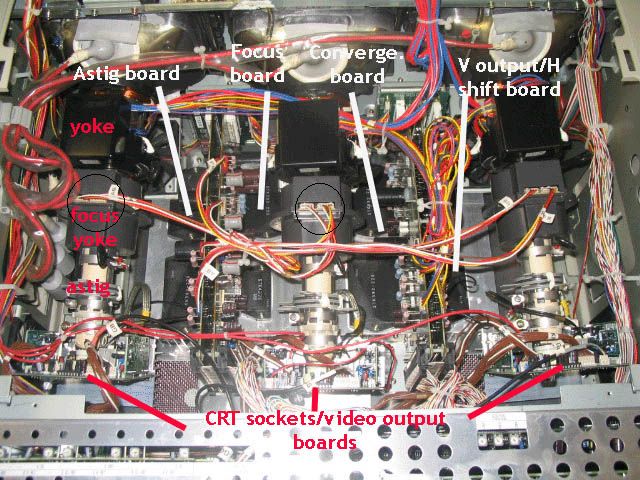
If it were me I would want to verify the focus board. I would swap the focus wires between the green and red, as circled in the pic below.
| Description: |
|
| Filesize: |
109.59 KB |
| Viewed: |
4204 Time(s) |
|
|
|
| Back to top |
|
|
rungabic
Joined: 17 Apr 2011
Posts: 17
|
| Posted: Wed Apr 20, 2011 5:46 pm Post subject: |
|
|
| macgyver655 wrote: | | If it were me I would want to verify the focus board. I would swap the focus wires between the green and red, as circled in the pic below. |
Hi Macgyver,
I'm still waiting on Curt to hear what repairing the board will cost -- I have no idea whether it's a relatively small expense or a big one...
But in any event, are you suggesting that if I swap those wires, and then it's my red tube that's defocused and jittery, then that confirms that it's the focus board, as opposed to something else?
I'm also quite curious what this would have to do with one input shutting down with the F9 code, whereas the other input remains on, but just looks crappy. And the input that shuts down (HTPC) does so even in the initial VGA-type resolutions it cycles through at boot up, so it's not the case that it's simply a matter of the higher-res input shutting down. It's encouraging (though still I don't understand) that someone else apparently had the same exact issue.
Anyway, besides the cost of the repair, I'm also concerned about how easy it will be for me to pull that board (or even just be able to do your swap-wire test). Curt said it can be done while ceiling-mounted, but it's a big PITA. If he's referring to it being a PITA for him, then it might be impossible for me (?) And as always, I'm concerned about whether I'm also going into dangerous shock territory getting inside there (?)
Thanks again for your help!
Brent
|
|
| Back to top |
|
|
rungabic
Joined: 17 Apr 2011
Posts: 17
|
| Posted: Fri Apr 22, 2011 12:07 pm Post subject: |
|
|
Hey macgyver -- wanted to let you know that Curt also suggested the focus wire swap test, simultaneous with your suggestion. I did that last night, and the blurry, jittery green became a blurry, jittery red, so apparently it's confirmed as a focus board problem. Still a bit of mystery why only one of my two inputs shuts down with the F9 code (especially since it's not just a resolution/timing issue, since that input shuts down at different resolutions, ranging from VGA on the HTPC bootup, all the way up to HD resolutions...not sure whether this can be explained, but I certainly hope that just goes away, along with the focus/jitter issue, once the board is fixed.
I'm now waiting for more specific instructions from Curt about each exact step necessary to pull the focus board -- I don't want to mess anything up now in the process. If you have any guides, feel free to let me know!
Thanks,
Brent
|
|
| Back to top |
|
|
|
|
|
|
|
You cannot post new topics in this forum
You cannot reply to topics in this forum
You cannot edit your posts in this forum
You cannot delete your posts in this forum
You cannot vote in polls in this forum
You cannot attach files in this forum
You can download files in this forum
|
Forum powered by phpBB © phpBB Group
|
|



