| Author |
Message |
jeffslife

Joined: 17 Apr 2010
Posts: 4190
Location: ohio usa
|
| Posted: Mon Apr 04, 2011 8:10 pm Post subject: I lost color,hue and sharp |
|
|
Moome board installed sucessfully but now when I am in
PICTURE CTRL I only have 2 options available CONTRAST and BRIGHT
I no longer can assess color,hue and sharp
How do I get those controls back ?
_________________
We are ALL job creators !
|
|
| Back to top |
|
 |
ecrabb
Forum Moderator

Joined: 13 Mar 2006
Posts: 15909
Location: Utah
TV/Projector: JVC RS40, Epson 5010
|
| Posted: Mon Apr 04, 2011 8:34 pm Post subject: |
|
|
You shouldn't have had those controls before either, Jeff... Color, hue, and sharpness only work with 480i-source signal, and only from the composite or s-video inputs. The controls won't work with component or BNC inputs at all regardless of signal, IIRC.
SC
|
|
| Back to top |
|
|
jeffslife
Joined: 17 Apr 2010
Posts: 4190
Location: ohio usa
|
| Posted: Mon Apr 04, 2011 8:38 pm Post subject: |
|
|
When the old moome board was in I had ALL those controls I only lost them when I went with the fury.
Now I got a Moome board back ,I thought i would get those controls back.
_________________
We are ALL job creators !
|
|
| Back to top |
|
|
jeffslife
Joined: 17 Apr 2010
Posts: 4190
Location: ohio usa
|
| Posted: Mon Apr 04, 2011 8:40 pm Post subject: |
|
|
So now I have NO WAY of adjusting my Color Hue or Sharpness, THAT SUCKS !
_________________
We are ALL job creators !
|
|
| Back to top |
|
|
MikeEby

Joined: 24 Jun 2007
Posts: 5237
Location: Osceola, Indiana
|
| Posted: Mon Apr 04, 2011 8:40 pm Post subject: |
|
|
| jeffslife wrote: | When the old moome board was in I had ALL those controls I only lost them when I went with the fury.
Now I got a Moome board back ,I thought i would get those controls back. |
I don't think so Jeff...They won't work with any RGB source.
Mike
_________________
Doing HD since the last century!
|
|
| Back to top |
|
|
jeffslife
Joined: 17 Apr 2010
Posts: 4190
Location: ohio usa
|
| Posted: Mon Apr 04, 2011 8:41 pm Post subject: |
|
|
I wonder how it worked before, because it did work, BEFORE.
NO REALLY ,IT DID.
So what now ? adjust grayscale and thats it ?
Before I was using 1080I now 1080P and new Moome board.
_________________
We are ALL job creators !
Last edited by jeffslife on Mon Apr 04, 2011 8:48 pm; edited 1 time in total
|
|
| Back to top |
|
|
km987654

Joined: 25 Jul 2007
Posts: 2874
Location: Australia
TV/Projector: Barco BG809s
|
| Posted: Mon Apr 04, 2011 8:46 pm Post subject: |
|
|
| jeffslife wrote: | I wonder how it worked before, because it did work, BEFORE.
NO REALLY ,IT DID.
So what now ? adjust grayscale and thats it ? |
Could you have been using an S video or composite input.
|
|
| Back to top |
|
|
jeffslife
Joined: 17 Apr 2010
Posts: 4190
Location: ohio usa
|
| Posted: Mon Apr 04, 2011 8:50 pm Post subject: |
|
|
I was using the old moome board I just mailed to nash
HDMI coming out of denon receiver at 1080I
I also fed it directly from the BD a couple times and the OTA TUNER also
_________________
We are ALL job creators !
|
|
| Back to top |
|
|
jeffslife
Joined: 17 Apr 2010
Posts: 4190
Location: ohio usa
|
| Posted: Mon Apr 04, 2011 8:56 pm Post subject: |
|
|
OK so it is what it is so how do I adjust ANYTHING. Set grayscale only ?
Any other options ?
_________________
We are ALL job creators !
|
|
| Back to top |
|
|
ecrabb
Forum Moderator
Joined: 13 Mar 2006
Posts: 15909
Location: Utah
TV/Projector: JVC RS40, Epson 5010
|
| Posted: Mon Apr 04, 2011 9:02 pm Post subject: |
|
|
Jeff, again... I'm about 99.9% positive those controls never worked for you unless perhaps you're remember before you started using the Moome card. Those controls - color, hue, and sharpness - control the NTSC color decoder on the composite and y/c inputs... That color decoder isn't in the signal path when you're not using one of those two inputs, so it's disabled. Even if something were wrong and the controls were available when you were using the Moome board (when they shouldn't be), they wouldn't have done anything.
So... On the projector, you can adjust individual bias and gain, brightness and contrast. That's all. Unless you go to a full-on CMS on an outboard scaler, that's all you need to adjust.
SC
|
|
| Back to top |
|
|
jeffslife
Joined: 17 Apr 2010
Posts: 4190
Location: ohio usa
|
| Posted: Mon Apr 04, 2011 9:14 pm Post subject: |
|
|
Steve, First of all thanks, I always had moome on this pj I bought it that way. It was only just recently I put on the Fury.Prior to that
I had the fury on my old zenith in the playroom. I am SURE that I had those controls before BUT I did have to change the input setting
on the g70 to RGB on input B in order to get the new moome to sync. It was set to Y ,P, something something So maybe thats why.
It would also explain a lot of other problems I was having before that I could not correct no matter how hard I tried.
Does that make any sense ?
_________________
We are ALL job creators !
|
|
| Back to top |
|
|
draganm

Joined: 08 Mar 2006
Posts: 8990
Location: Colorado
|
| Posted: Tue Apr 05, 2011 3:35 pm Post subject: |
|
|
| jeffslife wrote: | I wonder how it worked before, because it did work, BEFORE.
NO REALLY ,IT DID.
So what now ? adjust grayscale and thats it ?
Before I was using 1080I now 1080P and new Moome board. |
dude, take a pill 
Those controls never work with RGB because with bias,gain, contrast and brigtness is ALL YOU NEED to get perect gray scale. I don't think CRT is the problem in Jeff's HT, want me to send you some of my Wellbutrin? 
|
|
| Back to top |
|
|
ecrabb
Forum Moderator
Joined: 13 Mar 2006
Posts: 15909
Location: Utah
TV/Projector: JVC RS40, Epson 5010
|
| Posted: Tue Apr 05, 2011 3:42 pm Post subject: |
|
|
Jeff's high blood pressure and veins popping out of his forehead aside... 
Re-reading his post, I'm wondering... Dragan... Do you remember if perhaps those controls function when using the YPrPb input, perhaps? Could the color, hue, and sharpness transforms be applied in the colorspace conversion from YPrPb to RGB? I don't think I've ever used component on my G70, so if they did work, it wouldn't have ever happened to me.
SC
|
|
| Back to top |
|
|
jeffslife
Joined: 17 Apr 2010
Posts: 4190
Location: ohio usa
|
| Posted: Tue Apr 05, 2011 3:44 pm Post subject: |
|
|
YEAh, I found the problem the pj was not set at rgb all along.
I bought it with the moome board in it and just assumed it was installed properly.
When I plugged in an hdmi cable it did work but the PJ was NOT SET to RGB Thats why i had the other controls working.
When I installed the new moome and changed to RGB I no longer had use of those controls, as it should be.
_________________
We are ALL job creators !
|
|
| Back to top |
|
|
Spanky Ham

Joined: 22 Mar 2006
Posts: 5643
Location: Comedy Central
|
| Posted: Tue Apr 05, 2011 4:48 pm Post subject: |
|
|
|
Could that have been the problem with the other Moome board? Did Erik miss that?
|
|
| Back to top |
|
|
MikeEby
Joined: 24 Jun 2007
Posts: 5237
Location: Osceola, Indiana
|
| Posted: Tue Apr 05, 2011 4:59 pm Post subject: |
|
|
I'm not following at all...Erik would have noticed if it was running 480i...The scan lines would be HUGE.
Mike
_________________
Doing HD since the last century!
|
|
| Back to top |
|
|
Spanky Ham
Joined: 22 Mar 2006
Posts: 5643
Location: Comedy Central
|
| Posted: Tue Apr 05, 2011 5:55 pm Post subject: |
|
|
|
That is why I am confused. How was it doing it all along and it wasn't doing it when Erik was there?
|
|
| Back to top |
|
|
jeffslife
Joined: 17 Apr 2010
Posts: 4190
Location: ohio usa
|
| Posted: Tue Apr 05, 2011 6:23 pm Post subject: |
|
|
erik came to the conclusion that the moome board was bad and hooked up my fury instead.
I was running 1080I out of the BD and the moome was syncing to it, The problem I saw was
rolling bands of light in bright scenes. The fury was synced to a different input that was set at RGB.
When I installed the new Moome board it wouldnt sync, I checked the moome manual and it said to
set it at RGB. When I did it synced ans the picture was decent I still have an issue with a red "haze"
though.
Now I think I have bigger problems as I believe my DC drive board is going out. (alarm 30 )
I have a spare g70 if I knew what the board was I would attempt to replace it. But I dont and I
really cant afford to spend anymore on this pj at the moment.
So all the other stuff could be a moot point.
_________________
We are ALL job creators !
|
|
| Back to top |
|
|
draganm
Joined: 08 Mar 2006
Posts: 8990
Location: Colorado
|
| Posted: Tue Apr 05, 2011 6:27 pm Post subject: |
|
|
| jeffslife wrote: | Now I think I have bigger problems as I believe my DC drive board is going out. (alarm 30 )
I have a spare g70 if I knew what the board was I would attempt to replace it. But I dont and I
really cant afford to spend anymore on this pj at the moment.
So all the other stuff could be a moot point. |
it's called the DC board by Sony and it's a 3 minute swap, shown here
http://www.curtpalme.com/SonyG70_Layout4.shtm
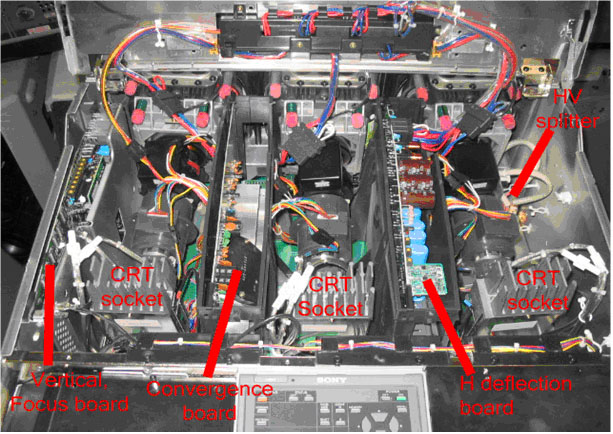
|
|
| Back to top |
|
|
draganm
Joined: 08 Mar 2006
Posts: 8990
Location: Colorado
|
| Posted: Tue Apr 05, 2011 6:42 pm Post subject: |
|
|
| ecrabb wrote: | Dragan... Do you remember if perhaps those controls function when using the YPrPb input, perhaps? Could the color, hue, and sharpness transforms be applied in the colorspace conversion from YPrPb to RGB? I don't think I've ever used component on my G70, so if they did work, it wouldn't have ever happened to me.
SC |
that I don't know, I would expect those controls to not be active with YpBR but who knows with Sony? I can see ho Jeff got tripped up if bought the machine with moome card in it and expected it to be set correctly but you simply can't assume anything like, your likely buying a machine from someone who didn't know much more than you.
Way back in the day when i sold MArquee's for the first year or 2 I could verufy the machine was working properly but didn't set thig like stig, flare, and recall memeory's until later on when I really got a feel for the machine.
|
|
| Back to top |
|
|
|
|




