| Author |
Message |
Lar407
Joined: 11 Jan 2009
Posts: 25
Location: Orlando Florida
|
| Posted: Wed Jan 26, 2011 2:25 am Post subject: Logitech Harmony 550 not learning. |
|
|
I recently purchased a Grandview LF-92 motorized tab tensioned projector screen with IR remote. For some unknown reason my Logitech Harmony Remote detects the "Up, Down, Stop, Micro up, and Micro down keys": but it isn't loading these controls on the remote. The fact that the commands didn't load during update is further confirmed by the fact that the screen doesn't respond on powering up the activities. I also have an old Marantz RC2000II learning remote and I couldn't get it to "learn" my screen controls either. Does anyone know what's going on with this?
_________________
Larry - Orlando, FL
|
|
| Back to top |
|
 |
Curt Palme
CRT Tech
Joined: 08 Mar 2006
Posts: 24396
Location: Langley, BC
TV/Projector: All of them!
|
| Posted: Wed Jan 26, 2011 3:26 pm Post subject: |
|
|
|
I'm guessing the IR codes are way off the map when it comes to trying to program them. I've never bought a Grandview screen even though they are stocked locally as I've always dealt with Draper. I'd return the screen.
|
|
| Back to top |
|
|
zaphod

Joined: 16 Jun 2006
Posts: 2002
Location: Cloverdale
|
| Posted: Wed Jan 26, 2011 3:55 pm Post subject: |
|
|
call harmony. they love to get stuff into their database and you can even send them the remote for them to do finer analysis on the IR output.
worst case is that the Grandview is using PPM IR and not the usual IR technology. you can wiki the difference, but it has to do with how the IR signal is modulated to impart data into the IR stream. the two methods are incompatible. I have a slew of PPM remotes that i have been unable to get a universal (including the harmony) to learn.
_________________
walk gently. leave a good impression.
|
|
| Back to top |
|
|
Lar407
Joined: 11 Jan 2009
Posts: 25
Location: Orlando Florida
|
| Posted: Thu Jan 27, 2011 3:59 am Post subject: |
|
|
Thanks guys, for the prompt responses. I chose the Grandview screen because it's the most economical tab-tensioned screen on the market. Returning it is not an option I can afford. Anyway, the same time I posted here, I also shot off an e-mail to Grandview. They told me that even though the Harmony program confirms "key detected" during the learning process, their system loads the remote off their data base rather than "learning the code." They advised me that if I dug deeper into the Harmony set up menu I should be able to find a way to override this feature. The Granview folks were right. The process wasn't intuitive, but after trying several different things I eventually found that there was indeed a way to transfer the"raw" signal from my Grandview Screen remote into the Logitec Harmony
550. Good to know if anyone else encounters a similar problem.
_________________
Larry - Orlando, FL
|
|
| Back to top |
|
|
avonord
Joined: 27 Mar 2011
Posts: 1
|
| Posted: Sun Mar 27, 2011 5:12 am Post subject: |
|
|
| Lar407 wrote: | Thanks guys, for the prompt responses. I chose the Grandview screen because it's the most economical tab-tensioned screen on the market. Returning it is not an option I can afford. Anyway, the same time I posted here, I also shot off an e-mail to Grandview. They told me that even though the Harmony program confirms "key detected" during the learning process, their system loads the remote off their data base rather than "learning the code." They advised me that if I dug deeper into the Harmony set up menu I should be able to find a way to override this feature. The Granview folks were right. The process wasn't intuitive, but after trying several different things I eventually found that there was indeed a way to transfer the"raw" signal from my Grandview Screen remote into the Logitec Harmony
550. Good to know if anyone else encounters a similar problem. |
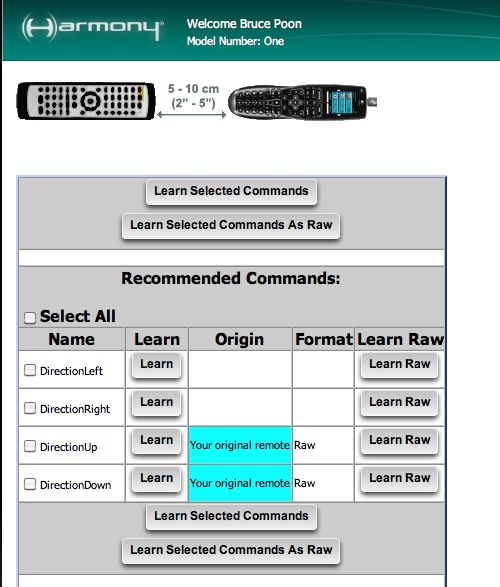
Thanks! Got it working thanks to you. But just to elaborate, in order to program in the "raw", you have to go into the "Learn IR" under the device, and then click on the "Custom" button at the bottom. After that, for each of the command in the list above the button, there will be a button called "Learn Raw". Just click on that and follow the instruction.
| Description: |
|
| Filesize: |
87.95 KB |
| Viewed: |
6556 Time(s) |
|
|
|
| Back to top |
|
|
|
|





