| Author |
Message |
dochlywd
Joined: 25 Apr 2006
Posts: 346
Location: Saint Louis, Missouri
|
| Posted: Sun Sep 26, 2010 6:19 pm Post subject: Mac or anyone else..problem with lcd panel *UPDATE* |
|
|
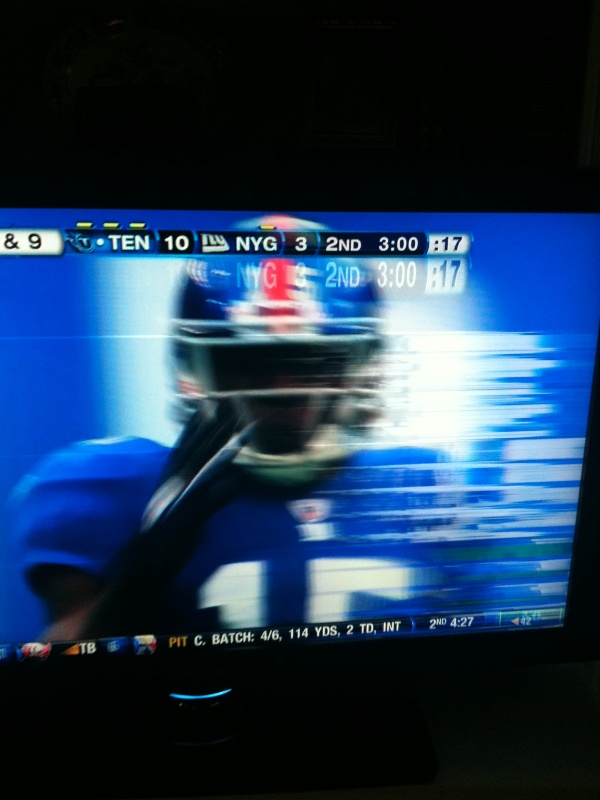
My buddy's Samsung just started displaying this problem where the right side(mainly) will start to go kind of crazy with a flickering of lines so to speak. We have swapped out cables and DirectTV boxes with no luck. It is about 3 years old and I have a attached a pic.
Any ideas of what the problem is??
Thanks!
Doc
| Description: |
|
| Filesize: |
112.98 KB |
| Viewed: |
5621 Time(s) |
|
Last edited by dochlywd on Mon Oct 04, 2010 4:09 pm; edited 1 time in total
|
|
| Back to top |
|
 |
stefuel

Joined: 07 Mar 2006
Posts: 3353
Location: Green Harbor MA USA
|
| Posted: Sun Sep 26, 2010 6:29 pm Post subject: |
|
|
Did you try the internal menu to see if it's stable?
Did you try a different input (component vs HDMI)
_________________
Chip
A Barco is only a AmPro with training wheels
Card carrying member of the AVS chain gang.
|
|
| Back to top |
|
|
Jeremy112

Joined: 28 Sep 2006
Posts: 2649
Location: Fond du Lac, WI
|
| Posted: Sun Sep 26, 2010 6:30 pm Post subject: |
|
|
Either the Video IP Board is getting ready to die, or the Panel. If its the panel its pretty much shot as replacing a panel can cost as much as buying a new TV,
if its the IP board then you may be able to find a replacement on ebay or somewhere else online.
I recommend calling samsung if its under warranty yet. I have warrantied several monitors and TV's through them with no hassle whatsoever.
Good luck! But dont hold your breath on repairing it. LCD's are throw aways sadly.
_________________
When I'm asking for a Model number, that doesn't mean I'm asking for a nude photo with your number on it 
|
|
| Back to top |
|
|
Jeremy112
Joined: 28 Sep 2006
Posts: 2649
Location: Fond du Lac, WI
|
| Posted: Sun Sep 26, 2010 6:30 pm Post subject: |
|
|
Also try a different source like a PC or something other than the DTV box
_________________
When I'm asking for a Model number, that doesn't mean I'm asking for a nude photo with your number on it
|
|
| Back to top |
|
|
dochlywd
Joined: 25 Apr 2006
Posts: 346
Location: Saint Louis, Missouri
|
| Posted: Sun Sep 26, 2010 7:53 pm Post subject: |
|
|
|
Thanks! I'll have him try this this evening. By the way, what's the IP board......Input?
|
|
| Back to top |
|
|
macgyver655
Joined: 22 Aug 2007
Posts: 8508
|
| Posted: Sun Sep 26, 2010 10:34 pm Post subject: |
|
|
Since the lines appear to be white its probably not the panel. I would check the cabling for a poor connection.
What is the exact model number?
|
|
| Back to top |
|
|
macgyver655
Joined: 22 Aug 2007
Posts: 8508
|
| Posted: Sun Sep 26, 2010 10:37 pm Post subject: |
|
|
|
Oh, and like Chip asked, hows the menu? Plus, with no video, how does the blue screen look?
|
|
| Back to top |
|
|
dochlywd
Joined: 25 Apr 2006
Posts: 346
Location: Saint Louis, Missouri
|
| Posted: Mon Sep 27, 2010 2:52 am Post subject: |
|
|
He went to the Rams game this afternoon and since they finally won a damn game, he didn't make it home until late. I'll post back once I check on your suggestions.
Thanks!
Doc
|
|
| Back to top |
|
|
dochlywd
Joined: 25 Apr 2006
Posts: 346
Location: Saint Louis, Missouri
|
| Posted: Mon Oct 04, 2010 4:15 pm Post subject: |
|
|
So, he tried HDMI input 2 with no change. He even had Direct Tv come out and replace the box with no luck. Different cabling.......no luck. He said that when it does start, if he walks up and kind of gives it a shake it stops for a while before starting again. Is there any chance that his kids hit it with a ball or something and one of the boards needs to be re-seated? It's no longer under warranty so where would be the best place for him to take it for repair??? The model number is: Samsung LN-T4671F. I am somewhat handy and swapped out boards in my G90 as well as tube replacement. So, I'd be more than happy to try something within my means but board level troubleshooting is out of my league. Just ask Mac!!!!!
Thanks!
Doc
|
|
| Back to top |
|
|
macgyver655
Joined: 22 Aug 2007
Posts: 8508
|
| Posted: Mon Oct 04, 2010 4:21 pm Post subject: |
|
|
| dochlywd wrote: | So, I'd be more than happy to try something within my means but board level troubleshooting is out of my league. Just ask Mac!!!!!
Thanks!
Doc |
LOL. Yeah, I remember that well.
The cables that I said to check.... I meant internal cabling, meaning cables from P/S, main, TCON, etc. A loose connector on one of the boards can cause the displayed issue. I would remove the back but dont touch anything. Then hook it up and turn it on and use a mirror to see the screen. Hopfully the problem will be there. Then wiggle or shake various harnesses to see if anything makes a difference. Post back your results.
Oh, stay away from the inverter wires though. They wont cause this problem, plus you dont want to get wacked by inverter voltage.
And dont actually disconnect anything with the tv on. Just wiggle or push. Or check the connectors with the tv off if you dont like playing with it on.
|
|
| Back to top |
|
|
stefuel
Joined: 07 Mar 2006
Posts: 3353
Location: Green Harbor MA USA
|
| Posted: Mon Oct 04, 2010 8:52 pm Post subject: |
|
|
If tapping the set causes a reaction, then it shouldn't be to hard to find it with the back off. I would start at the ribbon connector between the LCD panel and circuit board. Then if there's a input daughter board, check the interconnect for that next.
Damn, I was going to tell him to check the inverter board  
The input to it is low voltage but the output.................hair curling
_________________
Chip
A Barco is only a AmPro with training wheels
Card carrying member of the AVS chain gang.
|
|
| Back to top |
|
|
dochlywd
Joined: 25 Apr 2006
Posts: 346
Location: Saint Louis, Missouri
|
| Posted: Wed Oct 06, 2010 2:45 am Post subject: |
|
|
O.K. so I was finally able to get over to his house and see the issue with my own eyes. It only does it for like the first 5 minutes of turning it on. Once it warms up, it seems fine until you turn it off and let it sit for a while. When you turn it back on, it's there again immediately at start up. I grabbed the top and bottom of the side of the t.v. that is effected and kind of torqued the panel and it directly effects the issue when it's happening. However, once it warms up, torqueing the panel has no effect. We popped off the back panel and check all connections. They seemed to be fine and wiggling them had no effect. I didn't want to dig deeper than what was visible and touchable in view.
Is this thing worth getting worked on and where would you suggest taking it?? It is only 3 years old.
Thanks!
Doc
|
|
| Back to top |
|
|
Jeremy112
Joined: 28 Sep 2006
Posts: 2649
Location: Fond du Lac, WI
|
| Posted: Wed Oct 06, 2010 4:43 am Post subject: |
|
|
Im betting its one of the boards integrated into the LCD panel itself, if it is there really isnt a fix besides sending it in to a service center which all they will do is swap panels or the whole TV...
3 years old, sounds about right for an LCD life span, its a bummer but of the 500+ LCD monitors I have fixed I would say its not a repairable issue 
Good luck to your friend I hope he finds a solution, a nice CRT projector would make an excellent replacement to that techni-color flat panel 
_________________
When I'm asking for a Model number, that doesn't mean I'm asking for a nude photo with your number on it
|
|
| Back to top |
|
|
macgyver655
Joined: 22 Aug 2007
Posts: 8508
|
| Posted: Wed Oct 06, 2010 1:42 pm Post subject: |
|
|
|
Spray cooling is now whats needed to locate the problem.
|
|
| Back to top |
|
|
dochlywd
Joined: 25 Apr 2006
Posts: 346
Location: Saint Louis, Missouri
|
| Posted: Wed Oct 06, 2010 3:12 pm Post subject: |
|
|
Thanks! I think his best best would be to put this t.v. downstairs for the kids and just buy a new one. The only thing that would make this economically make sense is if he could do the repair himself.
Thanks again!
Doc
|
|
| Back to top |
|
|
macgyver655
Joined: 22 Aug 2007
Posts: 8508
|
| Posted: Wed Oct 06, 2010 3:49 pm Post subject: |
|
|
| dochlywd wrote: | Thanks! I think his best best would be to put this t.v. downstairs for the kids and just buy a new one. The only thing that would make this economically make sense is if he could do the repair himself.
Thanks again!
Doc |
Come'on Doc. Isn't it time you dug your hands in another electronic device?????? You should have had some experience after that last adventure.... If you make a mistake you only get shocked a little..... honestly......
|
|
| Back to top |
|
|
CRTChris
Joined: 20 Sep 2010
Posts: 17
|
| Posted: Thu Oct 07, 2010 3:45 pm Post subject: |
|
|
|
Sounds like a cold solder joint or one of the chips going bad. so just look really closely and have a good soldering iron.
|
|
| Back to top |
|
|
|
|





