| Author |
Message |
HK-Steve

Joined: 15 Jul 2006
Posts: 849
Location: Switzerland
TV/Projector: Marquee 9500, Epson 8100
|
| Posted: Tue Sep 14, 2010 1:15 pm Post subject: |
|
|
Thanks Craig for the info,
I will order from Curt when he replies to my email.
Cheers
Steve
|
|
| Back to top |
|
 |
RaWsHaRk
Joined: 01 May 2009
Posts: 131
Location: Finland
|
| Posted: Tue Sep 14, 2010 6:41 pm Post subject: |
|
|
| HK-Steve wrote: | Man I love to get a new toy to play with.
Now I have been into the service menu, and found that only 3180hrs on the tubes,
which explains why they are in pretty good condition.
Steve |
actually thats quite a lot for a sony, I have seen D50´s with worse tubes and a lot LESS hours. mine has something like 2500 hours and the blue is much worse than yours.
if anyone in europe has a good blue I might be interested in buying one...
_________________
Electrohome Marquee 7500.
|
|
| Back to top |
|
|
virusc
Joined: 11 Apr 2007
Posts: 358
Location: Massachusetts
|
| Posted: Tue Sep 14, 2010 6:53 pm Post subject: |
|
|
|
I heard that the tubes are similar or the same as 07ms but with very different housings. Is this true? If so has anyone managed to put a 07MS into a D50?
|
|
| Back to top |
|
|
HK-Steve
Joined: 15 Jul 2006
Posts: 849
Location: Switzerland
TV/Projector: Marquee 9500, Epson 8100
|
| Posted: Tue Sep 14, 2010 6:58 pm Post subject: |
|
|
I just bought the remote from Curt, Man does he sleep.
Look forward to the remote arriving, but before it does, the projector will be bolted to the ceiling ready to go.
I don't know of any other tubes in Europe, but will let you know if I stumble onto anything.
I am learning a lot here, Marquee is a very different menu system.
but that is part of the fun.
Now, I need a screen, off to search.
Hey Curt, Do you have screen material also??
Cheers
Steve
|
|
| Back to top |
|
|
Nashou66

Joined: 12 Jan 2007
Posts: 16171
Location: West Seneca NY
|
|
| Back to top |
|
|
HK-Steve
Joined: 15 Jul 2006
Posts: 849
Location: Switzerland
TV/Projector: Marquee 9500, Epson 8100
|
| Posted: Thu Sep 16, 2010 2:54 pm Post subject: |
|
|
1.5m wide should be enough,
I will keep an eye out for the Hurley screens. Thanks for the tip.
Cheers
Steve
|
|
| Back to top |
|
|
HK-Steve
Joined: 15 Jul 2006
Posts: 849
Location: Switzerland
TV/Projector: Marquee 9500, Epson 8100
|
| Posted: Mon Jun 20, 2011 11:01 am Post subject: |
|
|
Hey All,
Finally got some time to get my workshop organised,
built my shelf unit, with a 1.2m wide screen, which is a door, LP's and LD's behind.
Don't have the D50 on the ceiling yet, want to learn more before I do.
Currently Brightness set at 40 and Contrast 80, seems high for contrast, Yes , No ??
As this is my first ES focus CRT, Where do I find Focus, or adjust it??
Bias and G2??
Would be great to reset everything back to factory like a Marquee in 1 step, is it possible with the D50?
Appreciate any comments and help.
Cheers Steve
Shelf Built

Screen Canvas

Screen Cut

Screen installed

frame painted black

screen door

Finished

|
|
| Back to top |
|
|
garyfritz

Joined: 08 Apr 2006
Posts: 12088
Location: Fort Collins, CO
|
| Posted: Mon Jun 20, 2011 1:54 pm Post subject: |
|
|
|
Contrast 80 seems REALLY high for such a small screen, but I've never seen a D50 so I don't know if that's unusual. But if it takes 80 for a 1.2m wide screen, there's no way that thing could light up a more "normal" 2-2.5m screen...
|
|
| Back to top |
|
|
HK-Steve
Joined: 15 Jul 2006
Posts: 849
Location: Switzerland
TV/Projector: Marquee 9500, Epson 8100
|
| Posted: Mon Jun 20, 2011 2:45 pm Post subject: |
|
|
Agree, that is why I asked, as my Marquee 9500LC is contrast 56 for a 98inch wide screen.
I do remember Curt saying, when I was looking for my next CRT, the D50 is pushed pertty hard tube wise.
His suggestion was to buy a Marquee 8111+, which was my 2nd CRT, had a Sony 1020 as my first, which was not very bright.
I can backdown the contrast on the D50 to 70, with not too much loss of quality, is also a little sharper, which is expected.
Appreciate the comment Gary,
Cheers
Steve
_________________

|
|
| Back to top |
|
|
kschmit2
Joined: 09 Mar 2006
Posts: 1141
Location: Heidelberg, Germany
|
| Posted: Mon Jun 20, 2011 3:34 pm Post subject: |
|
|
|
Marquee/Sony/Nec/Barco contrast numbers are model or brand specific, but not necessarily comparable between brands
|
|
| Back to top |
|
|
Jeremy112

Joined: 28 Sep 2006
Posts: 2649
Location: Fond du Lac, WI
|
| Posted: Mon Jun 20, 2011 4:23 pm Post subject: |
|
|
Nice machine for $100, those tubes look very very nice. Clear and sharp!
_________________
When I'm asking for a Model number, that doesn't mean I'm asking for a nude photo with your number on it 
|
|
| Back to top |
|
|
HK-Steve
Joined: 15 Jul 2006
Posts: 849
Location: Switzerland
TV/Projector: Marquee 9500, Epson 8100
|
| Posted: Mon Jun 20, 2011 6:49 pm Post subject: |
|
|
Thanks, a lucky find. especially here in Switzerland, not many around at all.
Currently taking down my track lighting and ceiling fan, ready to drill and bolt this lightweight to the ceiling tomorrow, fingerscrossed.
Are thre any Sony guy's out there who can voice their experience??
Much Appreciated
Cheers
Steve
_________________
|
|
| Back to top |
|
|
drice1234

Joined: 07 Oct 2006
Posts: 1309
Location: Allen, Texas
|
| Posted: Mon Jun 20, 2011 8:24 pm Post subject: |
|
|
|
I run 80 brightness 80 contrast on my D50 with a 110" screen. I have extra D50's in the attic so I don't care if I wear it out quickly. Most of the focusing adjustments are through software with the remote. I don't know about the G2 setting, if there is one I never had to mess with it. I believe there is a setting in the software to set everything back to factory defaults.
|
|
| Back to top |
|
|
HK-Steve
Joined: 15 Jul 2006
Posts: 849
Location: Switzerland
TV/Projector: Marquee 9500, Epson 8100
|
| Posted: Tue Jun 21, 2011 6:03 am Post subject: |
|
|
Thanks for your setup info, that helps,
unfortunately I don't have any spare tubes, or projectors, but would like to get about 3000hrs out of this set,
before I replace tubes cheap, or replace the projector with an other CRT.
I didn't find any focus adjustment yet, will go back through the manual again and see what I can find.
Cheers
_________________
|
|
| Back to top |
|
|
drice1234
Joined: 07 Oct 2006
Posts: 1309
Location: Allen, Texas
|
| Posted: Tue Jun 21, 2011 12:45 pm Post subject: |
|
|
|
Are you pushing enter-enter-up arrow-down arrow-enter to get into the programming mode? Then most of the focusing adjustment keys are along the bottom of the remote. If you download the manual from the setup tips & manuals page on this forum it will walk you through it step by step.
|
|
| Back to top |
|
|
HK-Steve
Joined: 15 Jul 2006
Posts: 849
Location: Switzerland
TV/Projector: Marquee 9500, Epson 8100
|
| Posted: Tue Jun 21, 2011 2:37 pm Post subject: |
|
|
Hmmmmmm.
On my remote I have MG Focus, but I get "not applicable"
I am in service mode.
Back to the manual.
Cheers
_________________
|
|
| Back to top |
|
|
drice1234
Joined: 07 Oct 2006
Posts: 1309
Location: Allen, Texas
|
| Posted: Tue Jun 21, 2011 9:43 pm Post subject: |
|
|
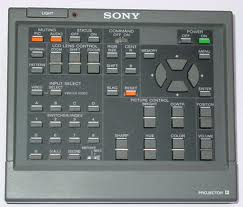
Is this the remote that you have? If so you can flip down the flap on the bottom to show a bunch of buttons related to focus.
| Description: |
|
| Filesize: |
8.17 KB |
| Viewed: |
11524 Time(s) |
|
|
|
| Back to top |
|
|
HK-Steve
Joined: 15 Jul 2006
Posts: 849
Location: Switzerland
TV/Projector: Marquee 9500, Epson 8100
|
| Posted: Wed Jun 22, 2011 5:58 am Post subject: |
|
|
Yes, that is the remote I have,
When I press MG Focus, it said "not applicable"
I tried in control and service mode, but same thing happened.
Cheers
_________________
|
|
| Back to top |
|
|
drice1234
Joined: 07 Oct 2006
Posts: 1309
Location: Allen, Texas
|
| Posted: Wed Jun 22, 2011 1:19 pm Post subject: |
|
|
|
I do not believe I have ever used the mg focus button. You really need to go step by step from the manual. I did and setup went smoothly. Make sure you do every step and don't skip any.
|
|
| Back to top |
|
|
The_JoE

Joined: 18 May 2011
Posts: 14
Location: Jackson, MI
|
| Posted: Wed Jun 22, 2011 5:18 pm Post subject: |
|
|
I have a D50HT with that remote and I was able to get it picture perfect without using that MG Focus button. I think that that button doesn't apply to this projector just like some of the other options are specific to certain Sony projectors. I adjusted the focus for mine by rotating the lenses, using focus knobs on the right side of the unit (if you are looking from the back), and then tweaking with the remote.
I keep mine at 50 focus most of the time and turn it up to 70 or 80 when I want the extra light. Mine is in the basement though so I don't have to worry about any other light sources.
Steve, do the Brightness controls do anything for your picture? It doesn't seem to make any difference for me...
_________________
"The golden rule does not apply to masochists" -JoE
|
|
| Back to top |
|
|
|
|




