|
As this forum is rarely used anymore, we've locked it. Feel free to browse and read. Questions? Please reach out to us directly. Cheers! |
|
|
 |
|
|
| Author |
Message |
perisoft

Joined: 29 Aug 2007
Posts: 2920
Location: Ithaca, NY
|
| Posted: Tue Sep 07, 2010 2:08 am Post subject: |
|
|
Oh, here's something funny. I figured I'd do an auto-levels check on the red lens to see if there's some hidden wear. There isn't. But I did find this...
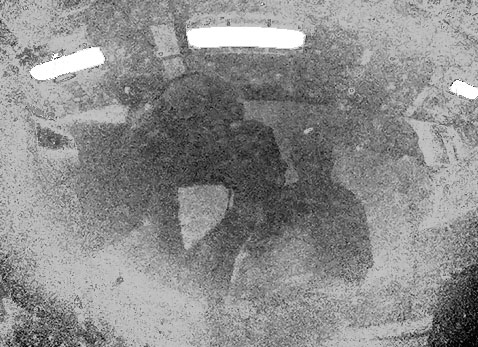
I'm on the left, the guy I'm buying it from is standing behind me. There are fluorescent lights overhead.
Rotate 180 degrees, pull green channel, auto levels, cut the fluorescent lights out to avoid them screwing with the levels and auto levels again... Since there's a lot of 'hotspotting', I copied the layer and did a severe rotary blur around the center of the 'hotspot' (coldspot?). I duped it and mirrored the bottom to the top, because the top had holes. The blur gets rid of the high frequency information (the image reflection) but not the low frequency (the overall shading). I did it rotary because if you blur on all axes it'd affect the position of the hotspot.
So, then invert that, put it over the last step and fade until you get nice solid gray edge to edge. Copy that merged, auto levels THAT to spread it out, do some manual selecting of bright spots and hand-leveling, denoise, fill the 'bright lights' back in with white, and voila!
Anyway, so, yeah, I don't think there's any burn in there.
_________________

|
|
| Back to top |
|
 |
Elaine Benes
Joined: 25 Apr 2006
Posts: 1416
|
| Posted: Tue Sep 07, 2010 2:10 am Post subject: |
|
|
| Nashou66 wrote: |
Paul, i have had 5 moome products and all still work flawlessly. Not one issue ever, and extremely well built.
Athanasios |
We all know you are a VERY lucky man ! 
My experience has been a contrast to that, some of the dozen or so devices I've tried have not completely worked. I held onto my original HDFury for years and years because it would always work when the trendy new Moome device I was trying didn't..
I have had a lot of Moome devices over the years, so my less than stellar opinion isn't based on a small sample size, I can't even remember all the devices I've had, but I do recall two separate ones needed to be returned for repair.
To be fair, my current Moome device works flawlessly, it is an old NEC ISS input card with the fixed gamma circuit. And I've had two of the older DVI input boards for Marquee's which also worked properly.
|
|
| Back to top |
|
|
perisoft
Joined: 29 Aug 2007
Posts: 2920
Location: Ithaca, NY
|
| Posted: Tue Sep 07, 2010 4:00 am Post subject: |
|
|
All right, all right, gentlemen. You can settle your differences outside the bar. 
_________________
|
|
| Back to top |
|
|
draganm

Joined: 08 Mar 2006
Posts: 8990
Location: Colorado
|
| Posted: Tue Sep 07, 2010 10:24 am Post subject: |
|
|
| perisoft wrote: | I did get some pictures. Anyone know a rough build date from the serial?
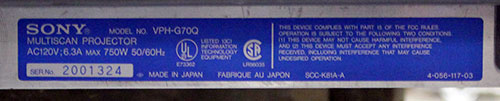 . . |
the DOM is on the other blue sticker
|
|
| Back to top |
|
|
secstate
Joined: 20 Mar 2006
Posts: 720
|
| Posted: Tue Sep 07, 2010 12:46 pm Post subject: |
|
|
|
It looks like a nice set if the price is right I'd go with it. Seems like a decent upgrade.
|
|
| Back to top |
|
|
ecrabb
Forum Moderator

Joined: 13 Mar 2006
Posts: 15909
Location: Utah
TV/Projector: JVC RS40, Epson 5010
|
| Posted: Tue Sep 07, 2010 1:35 pm Post subject: |
|
|
Wow, the tubes look minty! That looks like nearly as nice of a machine as mine. Once you iron out the issue (if there is one), you'll have a hell of a machine. There will only be a couple of CRT projectors in existence that would be an upgrade... Should keep upgrade-itis away for at least a year or two. 
SC
|
|
| Back to top |
|
|
perisoft
Joined: 29 Aug 2007
Posts: 2920
Location: Ithaca, NY
|
| Posted: Tue Sep 07, 2010 5:28 pm Post subject: |
|
|
| ecrabb wrote: | Wow, the tubes look minty! That looks like nearly as nice of a machine as mine. Once you iron out the issue (if there is one), you'll have a hell of a machine. There will only be a couple of CRT projectors in existence that would be an upgrade... Should keep upgrade-itis away for at least a year or two.
SC |
He said the G and B have ten hours on them, and I can't see anything in there to contradict it. I damn near stuck my eyeball into the c-elements.
Haha, yeah. I'm not even sure I could fit a G90 or 909 into the room, much less have it make any sense to do so. I'm running a 83" screen with 1.3 gain; the Barco was already pretty damn bright. If this guy didn't have the contrast cranked to 90 it seems like the G70 will be brighter yet. Maybe a G90/909 might be a bit sharper for 1080p, but I don't know that I care that much about that. At this point I've also got a cruddy 1080p digital I can use if I want blazing bright and razor sharp for TV or games.
I noticed that there seems to be hotspot correction in software in the G70, which could be kinda cool.
Anyway, yeah, the hardware thing is a little strange. I asked him to try putting the Moome card back in, and I guess the PJ still works. But it all seems strange:
| Quote: | "With the Moome card in the G70, INPUT A was still set to RGB when you left. When I reconnected the Zenith DVB318 [1080i upconverting dvd player] only the green tube was working. I reset INPUT A back to HDTV-YPbPr and it works fine with all three tubes. When I set INPUT A to COMPONENT it didn't lock on the signal (presumably because component is not set to accept a 1080i signal). When I set INPUT A to HDTV-GBR it did not work either.
Why I had trouble with projector only turning on the red tube remains a mystery. Possibly trying different settings with INPUT A with the Moome card connected might have caused the G70 to hang up. Removing the Moome card might have allowed the G70 to reset and work properly. At any rate, the G70 appears to be working fine via INPUT A and hopefully will continue to do so for a long time to come." |
I'm not sure if the firmware in a G70 is complex enough to get itself into a failed state which can be reset by pulling a card, but it seems possible if unlikely.
Given that he's not clear on the difference between RGBHV and Component (it's so obvious for the general consumer! RGBHV is red, green, blue, and black/white cables plugged in with a high resolution source! Component is reg, green, and blue cables plugged into the same connectors with a high resolution source!) it's entirely possible that he plugged the G component output into the R RGB input on the G70, set it for RGB input, and got only red output. Who knows.
At any rate, I'm gonna (attempt to) rumble up the cash and grab it. If it turns out to be dead I can part it, but with those tubes it's too good a deal to pass up if I can do it.
The LC benefit was apparent just on a wall with the lights turned off and s-video input, too. Yikes. 
Most amazing part of this? My wife said, "Well, it's some money and time to set up, but we've had the other one a few years so it's not bad to upgrade..."
_________________
|
|
| Back to top |
|
|
garyfritz

Joined: 08 Apr 2006
Posts: 12088
Location: Fort Collins, CO
|
| Posted: Tue Sep 07, 2010 5:52 pm Post subject: |
|
|
| perisoft wrote: | | Most amazing part of this? My wife said, "Well, it's some money and time to set up, but we've had the other one a few years so it's not bad to upgrade..." |
I agree, to me that's even more amazing than the minty tubes...
|
|
| Back to top |
|
|
Spanky Ham

Joined: 22 Mar 2006
Posts: 5643
Location: Comedy Central
|
| Posted: Wed Sep 08, 2010 9:12 pm Post subject: |
|
|
Excellent score with the add ons as icing on the cake. I have always thought that LC was a significant upgrade, but that is just me.
I have to ask this question. Why do some people recommend the Moome over the Fury?
|
|
| Back to top |
|
|
Hdale85
Joined: 06 Sep 2010
Posts: 56
Location: Masury, Ohio
|
| Posted: Wed Sep 08, 2010 10:13 pm Post subject: |
|
|
|
How much is he giving it to you for?
|
|
| Back to top |
|
|
Nashou66

Joined: 12 Jan 2007
Posts: 16171
Location: West Seneca NY
|
| Posted: Wed Sep 08, 2010 10:16 pm Post subject: |
|
|
| Spanky Ham wrote: | Excellent score with the add ons as icing on the cake. I have always thought that LC was a significant upgrade, but that is just me.
I have to ask this question. Why do some people recommend the Moome over the Fury? |
Analog conversion right on the card in the PJ. much more elegant solution. one cable into the PJ not a break out
5 cable RGBHV. Plus no dip switches etc. Remote control is nice too.
Athanasios
_________________
Don't blame your underwear for your crooked ass~ unknown Greek philosopher
"Republicans believe every day is the Fourth of July, but the Democrats believe every day is April 15." --- President Reagan
One Smart Dog!!!
Marquee High Performance Bellows now shipping!!
Marquee Modifications and Performance Enhancement
Marquee C-element and Bellow removal
|
|
| Back to top |
|
|
Spanky Ham
Joined: 22 Mar 2006
Posts: 5643
Location: Comedy Central
|
| Posted: Wed Sep 08, 2010 10:33 pm Post subject: |
|
|
| Nashou66 wrote: | | Spanky Ham wrote: | Excellent score with the add ons as icing on the cake. I have always thought that LC was a significant upgrade, but that is just me.
I have to ask this question. Why do some people recommend the Moome over the Fury? |
Analog conversion right on the card in the PJ. much more elegant solution. one cable into the PJ not a break out
5 cable RGBHV. Plus no dip switches etc. Remote control is nice too.
Athanasios |
Those are interesting points that seem to be contrasted with the higher price and higher incident of problems.
|
|
| Back to top |
|
|
|
|
|
|
|
You cannot post new topics in this forum
You cannot reply to topics in this forum
You cannot edit your posts in this forum
You cannot delete your posts in this forum
You cannot vote in polls in this forum
You cannot attach files in this forum
You can download files in this forum
|
Forum powered by phpBB © phpBB Group
|
|




