| Author |
Message |
Sparky015

Joined: 12 May 2009
Posts: 1185
Location: Cleveland / Akron, OH
|
| Posted: Fri Aug 27, 2010 12:46 am Post subject: |
|
|
You said the previous owner is an accomplished solderer, but I would check his work over with a magnifying glass too. You wouldn't believe how a minor cold solder joint behaves as temperature changes, and most can't be picked up by the naked eye. 5-10X magnifying power if you got it. I would definitely look over the HDM and it's connections though.
_________________
~Paul
|
|
| Back to top |
|
 |
Elaine Benes
Joined: 25 Apr 2006
Posts: 1416
|
| Posted: Fri Aug 27, 2010 1:37 am Post subject: |
|
|
There's an increasing in loudness high pitched whine that comes from the HVPS when the convergence grid is up, the whine subsides when video is back on the screen.
Also, when adjusting the side pin, it "snapped" to a no adjustment position, even though the setting was in the mid 30's. A slight touch to the adjustment put it back to normal...
Is Geometry control also on the HDM ? That would certainly point more to that board than another one, wouldn't it ?
The fluctuating brightness looks more like a lack of control over the baseline G2 and drive than a video problem. Sometimes the image looks very dull and lifeless, like the G2 and drive are way too low, then bam, its a really punchy, bright image...And the fluctuating happens with internally generated patterns as well as video...
I'm trying to capture these symptoms on video, but they come and go quickly. When its working properly, it looks very good...
PS: The previous owner payed someone, a semi-professional, to do the mods on the neckboards, I would trust the soldering job, I've seen his work before, it is good. Also, I'm not capable of actually doing any soldering myself. Never had the opportunity to get any training, and learning on my own isn't something I'm capable of. I can do some deductive trouble shooting, and have a fairly good memory of fixes that I've read about, but not having any soldering capabilities is pretty much why this will likely end up parted if I can't nail it down to something that can be solved with a board swap...
|
|
| Back to top |
|
|
mp20748
Joined: 12 Sep 2006
Posts: 5689
Location: Maryland
TV/Projector: 9500LC Ultra / Super 02 and 03 VIM
|
| Posted: Fri Aug 27, 2010 1:46 am Post subject: |
|
|
| Elaine Benes wrote: |
The fluctuating brightness |
would happen only on the early version (34kv) HVPS found in the 8000/9000 model Marquees when the HVPS fails or is failing.
The later version (34.9kv) replacement HVPS that was mostly found in the 8110, 8500 and 9500 Marquees would not have this same problem.
It would either work or not work, period.
The problem appears to be more common to HDM and glycol leakage into the set.
|
|
| Back to top |
|
|
tse
Joined: 03 May 2006
Posts: 1014
Location: Sweatbucket, Fl.
|
| Posted: Fri Aug 27, 2010 1:47 am Post subject: |
|
|
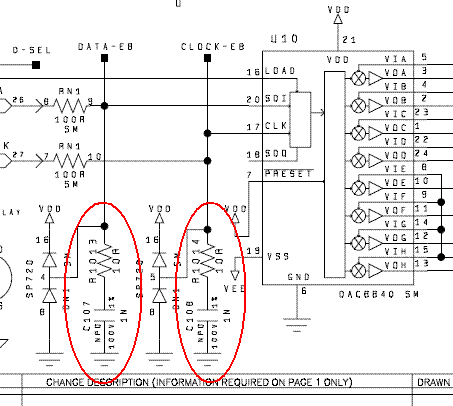
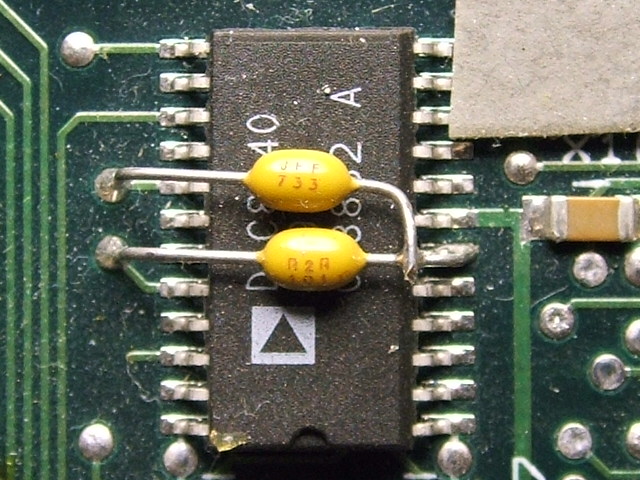
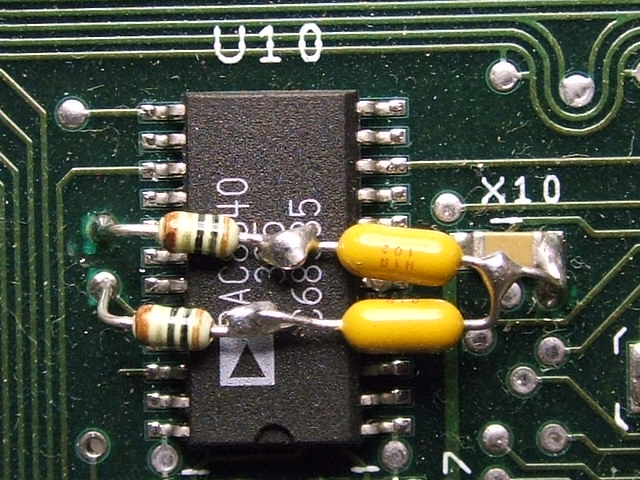
There is an IC on one of the boards (sorry, no schematics at home) that has two caps soldered to it. Little yellow guys. There is a change to that mod that puts a couple of resistors in series with the caps that helps to filter out some garbage on the serial bus that runs throughout the projector. The garbage on the bus causes stuff like what you descibe. Settings changing then snap back to the right setting with just a touch of the remote control buttons. I'll get more info tomorrow.
Scott
_________________
"Were we directed from Washington when to sow and when to reap, we would soon want bread."
Thomas Jefferson
|
|
| Back to top |
|
|
Nashou66

Joined: 12 Jan 2007
Posts: 16171
Location: West Seneca NY
|
|
| Back to top |
|
|
Elaine Benes
Joined: 25 Apr 2006
Posts: 1416
|
| Posted: Fri Aug 27, 2010 2:08 am Post subject: |
|
|
| mp20748 wrote: | | Elaine Benes wrote: |
The fluctuating brightness |
would happen only on the early version (34kv) HVPS found in the 8000/9000 model Marquees when the HVPS fails or is failing.
The later version (34.9kv) replacement HVPS that was mostly found in the 8110, 8500 and 9500 Marquees would not have this same problem.
It would either work or not work, period.
The problem appears to be more common to HDM and glycol leakage into the set. |
Thanks for this post, the HVPS is the correct one for the set, it is a 34.9kv model.
I checked VERY thoroughly for ANY sign ANYWHERE of ANY glycol leakage into the set, there is none at all. The set was ceiling mounted and the leak in the red bellows/c-element was very, very, very slow.
|
|
| Back to top |
|
|
Elaine Benes
Joined: 25 Apr 2006
Posts: 1416
|
| Posted: Fri Aug 27, 2010 2:38 am Post subject: |
|
|
This is a brief piece of video showing the fluctuating brightness:
View My Video
Here's one showing, towards the end, the size snapping:
View My Video
The VIM is an 50-2035-03P VIM, and I don't see any caps or anything added over any chips anywhere on it...is this one of the "good" VIM's ?

Last edited by Elaine Benes on Fri Aug 27, 2010 3:03 am; edited 2 times in total
|
|
| Back to top |
|
|
zGman
Joined: 22 May 2006
Posts: 599
|
| Posted: Fri Aug 27, 2010 2:57 am Post subject: |
|
|
Thats a good shot on the video...
Two things I noticed re-reading this thread - besides all the great ideas,
I didn't get the "LC" part initially, that should look really nice and be worth
saving, and second, I wondered if you had tried Scott's idea of disconnecting
the VNB's individually? It seemed that you had swapped them around, but that's not quite
the same if one is somehow internally shorting, etc...??? And I am not certain from
his post exactly which wires should be disconnected, probably don't want G2 lying around?
G
|
|
| Back to top |
|
|
Elaine Benes
Joined: 25 Apr 2006
Posts: 1416
|
| Posted: Fri Aug 27, 2010 3:01 am Post subject: |
|
|
In the past when I was told to disconnect a VNB, it was by unplugging the white multi pin connector at the bottom, I assume that is how I'd do it now ?
You're right, I haven't tried that as a trouble shooting step, I've only swapped neckboards between tubes without changing the symptoms at all...
You're also right about it looking REALLY nice...when it works properly for a few minutes at a time...and its certainly worth "saving" by the quality of the image, but I can't afford to put hundreds of dollars into doing it, regardless of how nice the image is, unfortunately....its not 2001 any more...
|
|
| Back to top |
|
|
Nashou66
Joined: 12 Jan 2007
Posts: 16171
Location: West Seneca NY
|
|
| Back to top |
|
|
Elaine Benes
Joined: 25 Apr 2006
Posts: 1416
|
| Posted: Fri Aug 27, 2010 4:05 am Post subject: |
|
|
Looking at the VIM, I noticed this:

What does that chip do ?
|
|
| Back to top |
|
|
stefuel

Joined: 07 Mar 2006
Posts: 3353
Location: Green Harbor MA USA
|
| Posted: Fri Aug 27, 2010 10:42 am Post subject: |
|
|
Unplug the Marquee and plug in a AmPro 
_________________
Chip
A Barco is only a AmPro with training wheels
Card carrying member of the AVS chain gang.
|
|
| Back to top |
|
|
HK-Steve

Joined: 15 Jul 2006
Posts: 849
Location: Switzerland
TV/Projector: Marquee 9500, Epson 8100
|
| Posted: Fri Aug 27, 2010 10:56 am Post subject: |
|
|
The pulsing brightness I have seen before on a friends projector,
The VIM was the problem, and I was never able to fix it.
Changed the VIM, had no pulsing after that.
Hopefully you have a spare VIM or someone close that can swap one in to try.
Cheers
Steve
|
|
| Back to top |
|
|
HK-Steve
Joined: 15 Jul 2006
Posts: 849
Location: Switzerland
TV/Projector: Marquee 9500, Epson 8100
|
| Posted: Fri Aug 27, 2010 10:59 am Post subject: |
|
|
That corrosion, or what ever it is around the 5 pins of U35,
Get some contact cleaner, and scrub gently it with a toothbrush.
I don't think that is causing any issues, but it should not be there.
Cheers
Steve
Last edited by HK-Steve on Fri Aug 27, 2010 11:09 am; edited 1 time in total
|
|
| Back to top |
|
|
HK-Steve
Joined: 15 Jul 2006
Posts: 849
Location: Switzerland
TV/Projector: Marquee 9500, Epson 8100
|
|
| Back to top |
|
|
Sparky015
Joined: 12 May 2009
Posts: 1185
Location: Cleveland / Akron, OH
|
| Posted: Fri Aug 27, 2010 12:29 pm Post subject: |
|
|
There is a tech bulletin for the "snapping" as Tim and Steve pointed out. You need soldering skills for those, although I'm a bit surprised an 2001 wouldn't have them all already. I have an 02P VIM with all the tech bulletins done to it. Not sure where in the US you are, but I'd be willing to send it to you to swap in if you like. It's my spare VIM, so it's just sitting.
Good video of the fluctuating brightness. Very annoying! I can see why you wouldn't want to live with it.
_________________
~Paul
|
|
| Back to top |
|
|
Sparky015
Joined: 12 May 2009
Posts: 1185
Location: Cleveland / Akron, OH
|
|
| Back to top |
|
|
Elaine Benes
Joined: 25 Apr 2006
Posts: 1416
|
| Posted: Fri Aug 27, 2010 1:20 pm Post subject: |
|
|
| HK-Steve wrote: | That corrosion, or what ever it is around the 5 pins of U35,
Get some contact cleaner, and scrub gently it with a toothbrush.
I don't think that is causing any issues, but it should not be there.
Cheers
Steve |
Actually, the picture of the corroded pins on U35 was taken AFTER I'd cleaned it...before cleaning, it was almost a solid mass...
I'm beginning to think that the corrosion may be responsible for some weird manifestations. AFTER attempting to clean the corrosion, the blue internal patterns have disappeared. They're still being generated, you can see ghostly outlines of them on a screen when no other colors are turned on, but the internally generated blue patterns are absent. Even when an adjustment box it displayed, the color is yellow, not white. VIDEO, however, appears normal, and, in fact, looks BETTER than it did before...
Also, disconnecting the RED neckboard multi pin connector *seems* to stop the fluctuating brightness...but that issue comes and goes, so its difficult to say for sure if its ACTUALLY stopped when disconnected, or simply not manifesting itself co-incidentally when its disconnected...
|
|
| Back to top |
|
|
tse
Joined: 03 May 2006
Posts: 1014
Location: Sweatbucket, Fl.
|
| Posted: Fri Aug 27, 2010 1:50 pm Post subject: |
|
|
The fluctuating brightness might be a VIM problem. The serial bus (dac bus) evidently has had problems from the beginning. Electrohome put 100pF or 330pF caps from the clock and data lines of U10 to ground. When VDC made the split pack (two box w/umbilical cable) units the bus started acting up again. Attaches are pics of the schematic (VDC) and mod on the PCB. A couple of 100pF caps will probably fix it. If not try the VDC mod of 10 ohm resistors in series with 1000pF caps.
Scott
| Description: |
|
| Filesize: |
14.85 KB |
| Viewed: |
9100 Time(s) |
|
| Description: |
|
| Filesize: |
122.83 KB |
| Viewed: |
9100 Time(s) |
|
| Description: |
|
| Filesize: |
128.59 KB |
| Viewed: |
9100 Time(s) |
|
_________________
"Were we directed from Washington when to sow and when to reap, we would soon want bread."
Thomas Jefferson
|
|
| Back to top |
|
|
Nashou66
Joined: 12 Jan 2007
Posts: 16171
Location: West Seneca NY
|
|
| Back to top |
|
|
|
|




