|
As this forum is rarely used anymore, we've locked it. Feel free to browse and read. Questions? Please reach out to us directly. Cheers! |

|
 |
|
|
| Author |
Message |
laikaislost
Joined: 16 Jul 2010
Posts: 10
Location: denver, co
|
| Posted: Wed Aug 25, 2010 1:50 am Post subject: Barco Data 808 questions... |
|
|
Okay, I have a few problems that need to be resolved. #3 is the most pressing issue.
1.) First, does anyone know of a link to point me to a good tutorial on adjusting the g2 settings? They were all messed up when i got the pj, and i just kind of eyeballed it within reason, but ultimately don't want to mess up my tubes.
2.) My blue tube is from a Barco graphics 808s, while all the others are BD808 is this a problem? the tube acts a little funny (real bright in black scenes with lots of artifacts, and extra lines on edge of phosphor without blanking on)
3.) Using a vga to BNC for port 5 (no port 3 card) it does not take a signal (obviously needs a negative sync). So, I got an hdFury Gamma x to get the negative sync, but it only takes an 800X600 @ 60hz resolution with Positive sync  What the heck?! Am I doing something wrong? how can I get my higher resolutions? Currently all it does at other resolutions (defined on my mac with) is just not change to that signal. Just a black screen not even the green text informing me of the selected source and bandwidth. What the heck?! Am I doing something wrong? how can I get my higher resolutions? Currently all it does at other resolutions (defined on my mac with) is just not change to that signal. Just a black screen not even the green text informing me of the selected source and bandwidth.
Please help, Especially on #3... I invested the money into the gammaX to get 1080i on the projector, and its looking to be useless... WHAT AM I DOING WRONG?
|
|
| Back to top |
|
 |
Tom.W

Joined: 09 Mar 2006
Posts: 6635
|
|
| Back to top |
|
|
laikaislost
Joined: 16 Jul 2010
Posts: 10
Location: denver, co
|
| Posted: Wed Aug 25, 2010 2:42 am Post subject: |
|
|
Thank you for the G2 links, but I forgot to mention that 2 of the three LEDs for the g2 are broken, so they do not turn off when they should. namely the blue and red. Yes, I do turn the pots slower than molasses, but they do not turn off at any level. The tubes are nice, the tubes are between an 8 and 9 in quality still. So its just the LEDs problem.
FUNNY ENOUGH... I actually bought that guy's (Stinger72) barco... HAHA... the red g2 was basically off, and blue cranked to heck with tube temp low. And everything was WAY out of alignment (washers in wrong places for good focus)
im going to try deleting all the memory blocks and seeing what happens... wish me luck.
Any more ideas for resolution, and known problems with using the different BG808s tube with the BD808 tubes?
|
|
| Back to top |
|
|
Tom.W
Joined: 09 Mar 2006
Posts: 6635
|
| Posted: Wed Aug 25, 2010 2:46 am Post subject: |
|
|
|
What numbers do you see on the tubes ?
|
|
| Back to top |
|
|
laikaislost
Joined: 16 Jul 2010
Posts: 10
Location: denver, co
|
| Posted: Wed Aug 25, 2010 7:14 am Post subject: Tube numbers and picture of the problem |
|
|
on the BD808 tubes (red and green) the number is 1091911
on the BG808s tube (blue) the number is 1100624
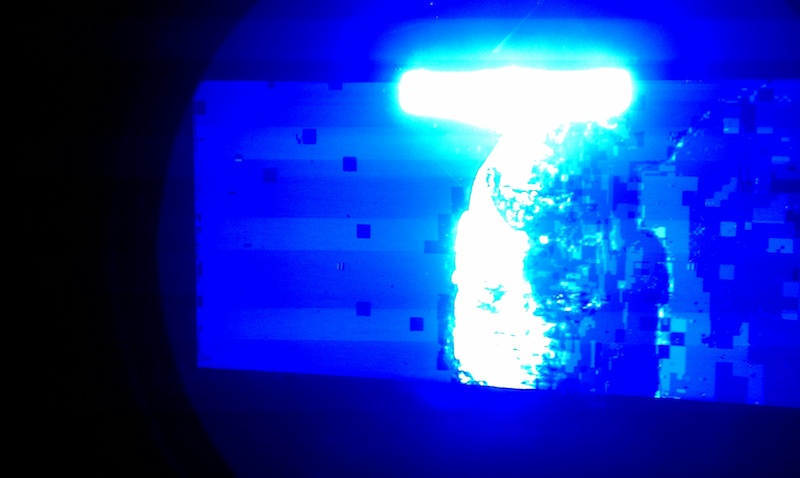
The blue tube dosn't focus as sharp as the red and green, and in scenes with a single source of light and the rest black, the blue lights up (barely noticeable on screen) and pixelizes. The photo is a scene from There Will Be Blood, and like the other tubes, should be only a figure and the rest black. If I turn the brightness and contrast way down the tube doesn't act this way anymore, but the rest of the picture suffers.
Also, using switchResX for my mac, I got 1280X720 @110hz to work. Other resolutions and frequencies I got to show, but it seems that all the vertical syncs are off because the picture moves down rapidly and reappears at the top about 8 times per second... any ideas?
| Description: |
| picture of blue tube, should be figure with all black |
|
| Filesize: |
71.07 KB |
| Viewed: |
3350 Time(s) |
|
|
|
| Back to top |
|
|
Ile

Joined: 09 Mar 2006
Posts: 1491
Location: Jyväskylä, Finland
|
| Posted: Wed Aug 25, 2010 8:14 am Post subject: |
|
|
1&2
G2 seem to be too high, least for for blue.
That pixelation is normal packing artefact for dvd black areas, when G2 is adjusted correctly that crap can't be seen at screen.
G2 adjustment without leds:
-Set 6500K from color menu
-Adjust brightness to 50 and contrast to 0
-Project black test picture and adjust pots so that all tubes have barely visible rasters when you look to tubes. All tubes must have same intensity.
3
Don't have any experience about newer macs, but it could be that also these use monitor info from vga 4,7,10 pins. If those pins aren't connected (like in your system) that can cause problems.
"By checking the state of these three pins the macintosh determines what kind of monitor you have connected. So that if we wish to set a certain resolution/rate, we can arrange for the actual hardware pins to be set correctly and reboot the machine. The macintosh will decide that we have the kind of monitor we intended and allow the choice of resolution we were after. So now, how do we set these pins to the right thing. The simple answer is go buy one of those resolution adapter thingies that go between the monitor cable and your mac. I highly recommend it. I have the Liberty Adapter from Enhance, bought at Frys. The adapter is great, the tech support was extremely unhelpful. It took quite some time to extract information I needed. Griffin Technologies makes several competing products, which I havent used, but appear to be better/cheaper. In addition Paul Griffin himself has been extremely helpful to me via email, and Id recommend buying from his company based on my experience."
This and more from
http://users.soe.ucsc.edu/~davis/projects/mac/monitor.html
Try with other source if possible.
|
|
| Back to top |
|
|
laikaislost
Joined: 16 Jul 2010
Posts: 10
Location: denver, co
|
| Posted: Sun Sep 19, 2010 10:33 pm Post subject: Just to document... |
|
|
I spent a bit of time researching more, and toying around with the projector, and I finally have it looking very nice. The few things I did to the blue tube were:
1.) I turned down the G2 on the tube, and corrected the color balance on the rest to match. Without a color meter, this was difficult to get 100% accurate, but after trying my best, and watching a few hours of different films and tweaking, I got good results. Now, the blue tube does not produce the same black haze.
2.) I said that the lines were thicker, and less focused on the blue tube. To fix this, I discovered the problem was with the pole magnets on the tube. It looks as if they were never properly set, and after a short while I got the image nice and sharp.
3.) The extra lines on the phosphor just went away after time, I am guessing that it was a loose connection, and I bumped it into place while adjusting...
Still though, does anyone have any tips for adjusting the G2? When I just set a white screen at 6500K and adjust the colors, I tend to make it too red, which is noticeable during movies. After trial and error over a few weeks, I think i've got it right, but it would be nice to be able to do this more accurately and quicker. Also, will I damage the tubes from under driving them? To match the colors without causing the blue to cause problems, I had to turn the green down below where the G2 light comes on.
|
|
| Back to top |
|
|
km987654

Joined: 25 Jul 2007
Posts: 2874
Location: Australia
TV/Projector: Barco BG809s
|
| Posted: Sun Sep 19, 2010 11:44 pm Post subject: Re: Just to document... |
|
|
| laikaislost wrote: | I spent a bit of time researching more, and toying around with the projector, and I finally have it looking very nice. The few things I did to the blue tube were:
1.) I turned down the G2 on the tube, and corrected the color balance on the rest to match. Without a color meter, this was difficult to get 100% accurate, but after trying my best, and watching a few hours of different films and tweaking, I got good results. Now, the blue tube does not produce the same black haze.
2.) I said that the lines were thicker, and less focused on the blue tube. To fix this, I discovered the problem was with the pole magnets on the tube. It looks as if they were never properly set, and after a short while I got the image nice and sharp.
3.) The extra lines on the phosphor just went away after time, I am guessing that it was a loose connection, and I bumped it into place while adjusting...
Still though, does anyone have any tips for adjusting the G2? When I just set a white screen at 6500K and adjust the colors, I tend to make it too red, which is noticeable during movies. After trial and error over a few weeks, I think i've got it right, but it would be nice to be able to do this more accurately and quicker. Also, will I damage the tubes from under driving them? To match the colors without causing the blue to cause problems, I had to turn the green down below where the G2 light comes on. |
Ile has described how to adjust G2 without LEDs. Have you tried that?
|
|
| Back to top |
|
|
|
|
|
|
|
You cannot post new topics in this forum
You cannot reply to topics in this forum
You cannot edit your posts in this forum
You cannot delete your posts in this forum
You cannot vote in polls in this forum
You cannot attach files in this forum
You can download files in this forum
|
Forum powered by phpBB © phpBB Group
|
|




