| Author |
Message |
Cube
Joined: 06 Dec 2009
Posts: 77
Location: IL, USA
|
| Posted: Tue Aug 17, 2010 4:58 am Post subject: How's my raster? |
|
|
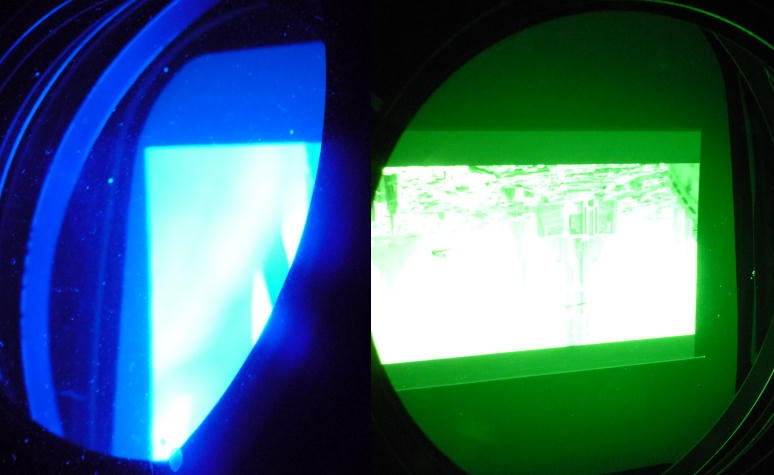
I'm still setting up my 1272Q and I can't shake the feeling it should be a little closer to the screen to optimize the 16:9 raster. However I already moved it a little closer than the factory spec and I'm not sure how little tube margin I can safely leave. Here are shots of the 4:3 raster (blue) and 16:9 raster showing a 2.35:1 image (green).
As it is the images fill my screen to the edge. Is the 4:3 raster too big? Is the 16:9 raster too small? This is the first time I've set up a CRT projector so I'm not sure. I wouldn't mind having a border around 4:3 on my screen if it means I can optimize the 16:9 raster a bit more.
| Description: |
|
| Filesize: |
45.56 KB |
| Viewed: |
4433 Time(s) |
|
|
|
| Back to top |
|
 |
Ile

Joined: 09 Mar 2006
Posts: 1491
Location: Jyväskylä, Finland
|
| Posted: Tue Aug 17, 2010 6:17 am Post subject: |
|
|
|
4:3 is about right and 16:9 is too small with same projection distance. It depend which aspect ratio you want to be main one and about your screen aspect ratio.
|
|
| Back to top |
|
|
CIR Engineering

Joined: 25 Aug 2008
Posts: 4269
Location: Chicago USA & Berlin Germany
|
| Posted: Tue Aug 17, 2010 2:42 pm Post subject: |
|
|
You can't optimize both 4x3 and 16x9, you have to optimize one or the other. Either 4x3 can fill the tube face and 16x9 will have a large boarder, or 16x9 can fill the tube face (side to side) and 4x3 will not fill the screen. Geometry dictates that you can't have your cake and eat it to.
craigr
_________________
JETI 1501-HiRes 2nm Spectroradiometer
JETI 1211 Spectroradiometer
Photo Research PR-650 Spectroradiometer
Klein K10-A Colorimeter
Murideo Fresco SIX-G HDMI 2.x Multimedia Generator
Murideo Fresco SIX-A HDMI 2.x Analyzer
Light Illusion ColourSpace XPT Color Calibration Software
Light Illusion LightSpace XPT Pro Version 10.x Color Calibration Software
OMARDRIS JVC Software Patch to use K10-A and Jeti with JVC OEM AutoCal Software!
Sencore CR7000 CRT Tube Analyzer / Rejuvenater
Authorized Dealer for Lumagen & just about everything worth buying 
www.CIR-Engineering.com - craigr@cir-engineering.com
Phone: 865-405-6892
|
|
| Back to top |
|
|
ecrabb
Forum Moderator

Joined: 13 Mar 2006
Posts: 15909
Location: Utah
TV/Projector: JVC RS40, Epson 5010
|
| Posted: Tue Aug 17, 2010 2:59 pm Post subject: |
|
|
Just optimize for 16:9 on a 16:9 screen and pillarbox your 4:3 on the 16:9... Other than a few classic, there's so little high-res 4:3 material, there's really no reason to optimize for that format.
SC
|
|
| Back to top |
|
|
dvh99

Joined: 25 Dec 2009
Posts: 2158
Location: nederland
|
| Posted: Tue Aug 17, 2010 3:17 pm Post subject: |
|
|
yep, when you have a screen with 16:9 ratio set it up for 16:9 and watch 4:3 in the 16:9 raster, thats how i do it.
your raster lits up at the inactive image, i looked in the tube and set g2 for each colour so that the nonactive image that vaguely shines just disappears.
run a 22:9 image into a 16:9 raster and its easily done.
_________________
1 answer always poses multiple questions.
marquee 9500ultra HD10L moome hdmi1.3 v3+ some mods.
|
|
| Back to top |
|
|
Cube
Joined: 06 Dec 2009
Posts: 77
Location: IL, USA
|
| Posted: Tue Aug 17, 2010 8:16 pm Post subject: |
|
|
|
Thanks for the suggestions... I know you have to pick one or the other to optimize, my real question was just how close I can get to the edge of the tube safely. Apparently I can get extremely close to the edge as long as it's not going over, right? I think I'll push the 16:9 raster to the limit now and let the 4:3 have a border. My screen's 4:3 btw, so I don't have to go so far as pillarboxing.
|
|
| Back to top |
|
|
akajester

Joined: 09 Jul 2008
Posts: 934
Location: Wisconsin
|
| Posted: Tue Aug 17, 2010 8:32 pm Post subject: |
|
|
My understanding is that you can't push an image over the tube edge without problems but you can make the raster as large as you want. Although the further to the edge you go with your image the tougher it'll be to get the outside edges focused. So, you need to find that balance between size and quality that you prefer. Someone correct me if I'm wrong here. Thanks.
I believe I'm running my 16x9 image about a 1/4" at it's closest point to the left/right edge of the tube face.
Dale
|
|
| Back to top |
|
|
ecrabb
Forum Moderator
Joined: 13 Mar 2006
Posts: 15909
Location: Utah
TV/Projector: JVC RS40, Epson 5010
|
| Posted: Tue Aug 17, 2010 8:37 pm Post subject: |
|
|
| Cube wrote: | | My screen's 4:3 btw, so I don't have to go so far as pillarboxing. |
Yeah, you can have your 4:3 image a lot bigger than your widescreen material, but the question is do you want to? Almost all your 4:3 source material will be older and lower-resolution than your widescreen material, so why have your crummiest source material displayed the largest just because that's how big your screen is? Think about a movie theater and how they display material... The wider aspects are larger, not smaller.
SC
|
|
| Back to top |
|
|
ecrabb
Forum Moderator
Joined: 13 Mar 2006
Posts: 15909
Location: Utah
TV/Projector: JVC RS40, Epson 5010
|
| Posted: Tue Aug 17, 2010 8:39 pm Post subject: |
|
|
| akajester wrote: | | I believe I'm running my 16x9 image about a 1/4" at it's closest point to the left/right edge of the tube face. |
That's fine. IMHO, people get too obsessed with maximizing the raster. Yes, you want your rasters as large as possible, but don't forget that the larger you make the raster, the more difficult it will be to get geometry and focus nailed down at the edges. It's a compromise.
SC
|
|
| Back to top |
|
|
akajester
Joined: 09 Jul 2008
Posts: 934
Location: Wisconsin
|
| Posted: Tue Aug 17, 2010 8:49 pm Post subject: |
|
|
| ecrabb wrote: | | akajester wrote: | | I believe I'm running my 16x9 image about a 1/4" at it's closest point to the left/right edge of the tube face. |
That's fine. IMHO, people get too obsessed with maximizing the raster. Yes, you want your rasters as large as possible, but don't forget that the larger you make the raster, the more difficult it will be to get geometry and focus nailed down at the edges. It's a compromise.
SC |
The corner focus isn't as tight as I'd like it. But having a larger gap between the raster edge and the left image edge has solved many issues for me. I've been told that it gives the image more time to initialize thus a more stable picture. Maybe this is specific to Barco though.
dale
|
|
| Back to top |
|
|
paw

Joined: 08 Mar 2006
Posts: 1176
Location: Arvada, CO
|
| Posted: Wed Aug 18, 2010 3:20 am Post subject: |
|
|
Does anyone REALLY miss Raster?
You old timers will know what I mean.
_________________
Aubrey
|
|
| Back to top |
|
|
ecrabb
Forum Moderator
Joined: 13 Mar 2006
Posts: 15909
Location: Utah
TV/Projector: JVC RS40, Epson 5010
|
| Posted: Wed Aug 18, 2010 6:05 am Post subject: |
|
|
| paw wrote: | | Does anyone REALLY miss Raster? |
Uhhh, let me think about that.... No.
SC
|
|
| Back to top |
|
|
Cube
Joined: 06 Dec 2009
Posts: 77
Location: IL, USA
|
| Posted: Wed Aug 18, 2010 3:09 pm Post subject: |
|
|
| ecrabb wrote: | | Yeah, you can have your 4:3 image a lot bigger than your widescreen material, but the question is do you want to? Almost all your 4:3 source material will be older and lower-resolution than your widescreen material, so why have your crummiest source material displayed the largest just because that's how big your screen is? Think about a movie theater and how they display material... The wider aspects are larger, not smaller. |
Well, I like to play older 4:3 video games with an upscaler and a lot of stuff on cable is still 4:3, so I don't want to burn a 4:3 patch over time in the middle of my 16:9 raster. Also, you know the theater uses CIH with digital projectors these days so the circumstances are different. I guess ideally I'd use a 4:3 or 1:1 raster with an anamorphic lens.
I'm going to experiment some more and see if the corner sharpness is that much worse with the 16:9 raster closer to the edge. If it is I may just go back to how I have it now.
|
|
| Back to top |
|
|
|
|




