| Author |
Message |
Cube
Joined: 06 Dec 2009
Posts: 77
Location: IL, USA
|
| Posted: Thu Aug 12, 2010 5:52 pm Post subject: Magical mystery scanline |
|
|
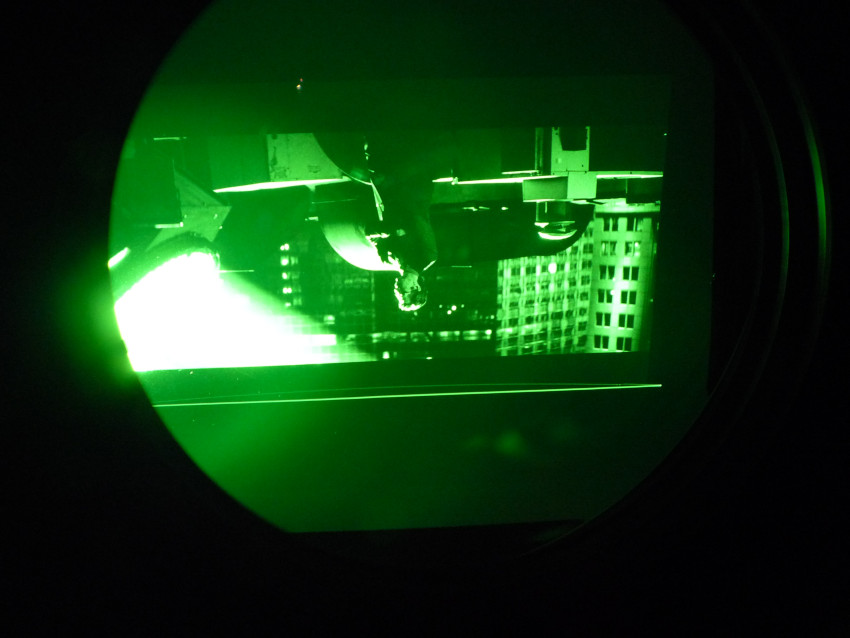
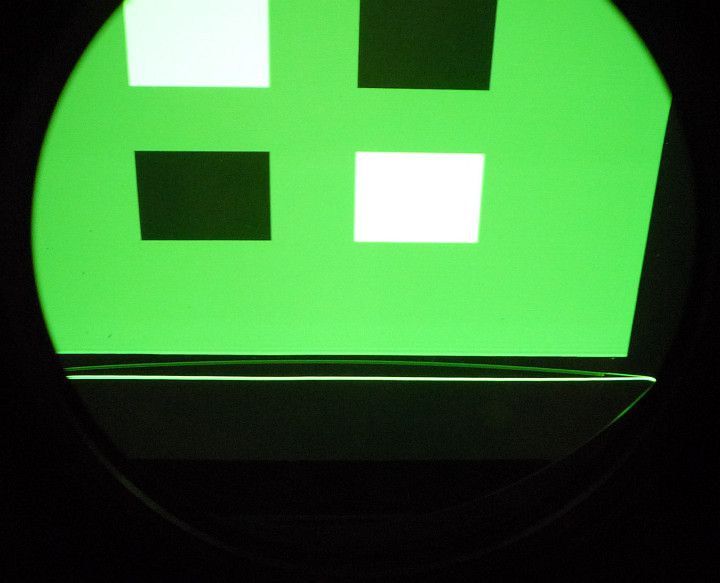
At the top of my 1272's projected raster there's a strange white scanline. It appears on everything, even the internal test patterns, and blanking won't get rid of it. I mean, I can try lowering the top blanking area but the line just stays there. It's just above the black AKB line (which thankfully doesn't show up), right at the very edge of the raster. What is this? Is there any way to get rid of it?
Here are photos looking into the green lens. For another example check out this guy's post.
| Description: |
| mystery scanline on 16:9 raster |
|
| Filesize: |
81.16 KB |
| Viewed: |
3779 Time(s) |
|
| Description: |
| mystery scanline on 4:3 raster |
|
| Filesize: |
61.7 KB |
| Viewed: |
3779 Time(s) |
|
|
|
| Back to top |
|
 |
Jeremy112

Joined: 28 Sep 2006
Posts: 2649
Location: Fond du Lac, WI
|
| Posted: Thu Aug 12, 2010 6:13 pm Post subject: |
|
|
My old 1272Q had the identical scan line, use the blanking to hide it once the projector is setup, you wont see it then.
_________________
When I'm asking for a Model number, that doesn't mean I'm asking for a nude photo with your number on it 
|
|
| Back to top |
|
|
Cube
Joined: 06 Dec 2009
Posts: 77
Location: IL, USA
|
| Posted: Thu Aug 12, 2010 6:22 pm Post subject: |
|
|
I tried that already... the blanking doesn't make it go away. If I advance the top blanking area down the screen it starts covering the video but the white scanline at the top is still there glaring at me.
I'm going to try messing with the V-Shift thing later and see if that does anything.
|
|
| Back to top |
|
|
ecrabb
Forum Moderator

Joined: 13 Mar 2006
Posts: 15909
Location: Utah
TV/Projector: JVC RS40, Epson 5010
|
| Posted: Thu Aug 12, 2010 9:43 pm Post subject: |
|
|
That's the AKB line (or ABG as some call it).
You have two options:
1. Turn off AKB and deal with the G2/brightness issues that result manually, or...
2. When you do geometry, set it up with the test pattern a fair bit larger than what you'll want for your actual image area, then use RGB SIZE to make the active image smaller (moving the active image away from the AKB line).
I went with 1 on my G70, but 2 on my 12xx. On my 16:9 screen, I could get the AKB line to fall on the black wall behind my screen where it was just barely visible, and then only during full fades to black.
Also, on a 12xx, once your happy with your physical setup, you can always just mask off the offending part of the CRT so the line doesn't show up on the screen/wall - call it "manual blanking".
SC
|
|
| Back to top |
|
|
Zebu Fellenz
Joined: 21 Dec 2006
Posts: 2567
|
| Posted: Fri Aug 13, 2010 12:38 am Post subject: |
|
|
It doesn't look like it's in the image area and the 1272 is an AC machine, I would take masking tape to the tubes and mask it off.
Erik
|
|
| Back to top |
|
|
Cube
Joined: 06 Dec 2009
Posts: 77
Location: IL, USA
|
| Posted: Fri Aug 13, 2010 2:55 am Post subject: |
|
|
Oh, so that's the AKB line. There's a dark line I can RGB Shift the image through and that's what I thought the AKB line was for some reason.
I would go with the masking tape option but I'm using a 4:3 screen with variable aspect ratios. I could just avoid using 4:3 content on the pj or let it be stretched out I guess, but I'd rather just live with the line if it comes to that. Or I could go with AKB off but it seems like more trouble than it's worth (since you have to get at those touchy knobs whenever the black level needs adjusting...).
Here's another idea. When I'm projecting 4:3 the line falls off the edge of the screen and you can't really see it on the wall, so that's no big deal. For widescreen projection I could add a moveable black curtain type of thing (like a window dressing) to the top of the screen for the line to fall on.
|
|
| Back to top |
|
|
ecrabb
Forum Moderator
Joined: 13 Mar 2006
Posts: 15909
Location: Utah
TV/Projector: JVC RS40, Epson 5010
|
| Posted: Fri Aug 13, 2010 5:42 am Post subject: |
|
|
| Cube wrote: | | Here's another idea. When I'm projecting 4:3 the line falls off the edge of the screen and you can't really see it on the wall, so that's no big deal. For widescreen projection I could add a moveable black curtain type of thing (like a window dressing) to the top of the screen for the line to fall on. |
That's an excellent idea... That's essentially horizontal masking... If you did it for both top and bottom on your 4:3 screen, it has the added benefit of increased perceived contrast, not to mention a really slick/clean appearance for widescreen images - especially for scope. Google "DIY horizontal masking" and look in the screen section at AVS you should find lots of resources on inexpensive masking solutions.
SC
|
|
| Back to top |
|
|
blange
Joined: 12 Aug 2010
Posts: 16
Location: Germany
|
| Posted: Fri Aug 27, 2010 11:11 am Post subject: |
|
|
I do have the same line(s) on my 1271. Mine were at the top and left of the image, before setting up the projector. Now, with a good setup and the help of blanking horizontally and vertically, the lines are gone. So i think, when you're setting up the projector properly, they should go, too. Do you have experimented with the move/shift button or changed the input signal?
As i already said, for me the lines have gone after the setup.
|
|
| Back to top |
|
|
Cube
Joined: 06 Dec 2009
Posts: 77
Location: IL, USA
|
| Posted: Fri Aug 27, 2010 10:51 pm Post subject: |
|
|
|
The AKB line can't be removed with blanking. However, it's not very noticeable after gamma adjustment and turning down the contrast. I'm happy with my setup now.
|
|
| Back to top |
|
|
CIR Engineering

Joined: 25 Aug 2008
Posts: 4269
Location: Chicago USA & Berlin Germany
|
| Posted: Fri Aug 27, 2010 11:01 pm Post subject: |
|
|
Masking 
https://www.curtpalme.com/forum_archived/viewtopic.php@t=21688.html
craigr
_________________
JETI 1501-HiRes 2nm Spectroradiometer
JETI 1211 Spectroradiometer
Photo Research PR-650 Spectroradiometer
Klein K10-A Colorimeter
Murideo Fresco SIX-G HDMI 2.x Multimedia Generator
Murideo Fresco SIX-A HDMI 2.x Analyzer
Light Illusion ColourSpace XPT Color Calibration Software
Light Illusion LightSpace XPT Pro Version 10.x Color Calibration Software
OMARDRIS JVC Software Patch to use K10-A and Jeti with JVC OEM AutoCal Software!
Sencore CR7000 CRT Tube Analyzer / Rejuvenater
Authorized Dealer for Lumagen & just about everything worth buying
www.CIR-Engineering.com - craigr@cir-engineering.com
Phone: 865-405-6892
|
|
| Back to top |
|
|
|
|




