| Author |
Message |
atomiccow
Joined: 11 Jul 2009
Posts: 89
|
| Posted: Mon Aug 02, 2010 7:57 am Post subject: My G70 black levels are getting increasingly crushed. |
|
|
A few days ago everything was fine then I turned the projector on and the blacks were noticably crushed but everything else looked quite good. I run it off a computer so I played with a number of software settings like Powerstrip and Catalyst which didn't help. What finally fixed it was turning off the computer and restarting. Yesterday it was perfect. But it happened again tonight. I think I've decided its not the G70 because when I check the internal Bias and Gain levels they look fine. I noticed as I left it on longer it got worse until after an hour greys up to about 30 percent were going to black. It was almost amusing watching the image fail.
I have now eliminated the video card. It is doing the same thing with another card.
Last edited by atomiccow on Mon Aug 02, 2010 5:14 pm; edited 2 times in total
|
|
| Back to top |
|
 |
atomiccow
Joined: 11 Jul 2009
Posts: 89
|
| Posted: Mon Aug 02, 2010 9:24 am Post subject: |
|
|
Deleted because problem was eliminated as a possibility.
Last edited by atomiccow on Mon Aug 02, 2010 5:09 pm; edited 1 time in total
|
|
| Back to top |
|
|
Mark_A_W
Joined: 15 Mar 2006
Posts: 3068
Location: Sunny Melbourne Australia
|
| Posted: Mon Aug 02, 2010 9:39 am Post subject: |
|
|
|
Check the PC with a CRT monitor.
|
|
| Back to top |
|
|
atomiccow
Joined: 11 Jul 2009
Posts: 89
|
| Posted: Mon Aug 02, 2010 2:28 pm Post subject: |
|
|
| Mark_A_W wrote: | | Check the PC with a CRT monitor. |
Thanks. I may just do that. It just is a bit of a pain in the butt here.
In this case I'll have to bring the computer to the monitor instead or the other way around.
|
|
| Back to top |
|
|
atomiccow
Joined: 11 Jul 2009
Posts: 89
|
| Posted: Mon Aug 02, 2010 3:16 pm Post subject: |
|
|
Post edited and content deleted.
Because potential problem was eliminated as a possibility.
Last edited by atomiccow on Mon Aug 02, 2010 4:10 pm; edited 1 time in total
|
|
| Back to top |
|
|
macgyver655
Joined: 22 Aug 2007
Posts: 8508
|
| Posted: Mon Aug 02, 2010 3:32 pm Post subject: |
|
|
| atomiccow wrote: | I brought the computer to my LCD monitor. I don't have a CRT monitor anymore.
It was disquieting at first because the boot screen came up nice and clear as ever
as did the Windows 7 logo. But when it did boot to Windows the LCD shut off with
a message saying out of range. I took that maybe it was a confirmation the card
crapped out.
But it occurs to me my resolution is set for 1920 x1280 and my
It could be my resolution is too high. This LCD resolves 1370 x 760 or something like
that but it usually downscales higher resolutions. I better test one more time. |
Downscales? I dont think so. The only flat panels that I've seen that supposedly downscale have a label on the front that says 1080HD ready. But I never tried it because to high a resolution will damage the device. I had a 768 plasma a while back that the guy was sending 1080p. Said it looked great for about 10 minutes then developed a 2 inch black strip up and down the screen. It took out the logic board. That was an expensive lesson to him.
Your message is telling you its out of range so DONT try it again. Hook the PC up to the projector again and lower the resolution to the LCD disply resolution.
If it gets darker on the LCD also then its possible your video card has failed caps much the same as other electronics from this era caused by counterfeit caps. I have also seen this many times already. But verify first.
|
|
| Back to top |
|
|
atomiccow
Joined: 11 Jul 2009
Posts: 89
|
| Posted: Mon Aug 02, 2010 4:06 pm Post subject: |
|
|
Okay it unfortunately is not the ATI video card. Unfortunately because that is probably under warranty.
I pulled and plugged in a different card an ATI 2400 on the G70 and the image is still dark.
So its most likely something dying/going wrong in the projector.' Or less likely my powered cigarette box
RGBHV adaptor. Its the only other variable. I don't have any means at the moment to eliminate that.
So the symptom is the image on my G70VR is getting increasingly darker
However G70 internal Bias and gain gray scales look perfectly normal.
Any suggestions for what card might be failing?
(I'm hoping its one I already have a back up for.)
|
|
| Back to top |
|
|
AnalogRocks
Forum Moderator

Joined: 08 Mar 2006
Posts: 26706
Location: Toronto, Ontario, Canada
TV/Projector: Sony 1252Q, AMPRO 4000G
|
| Posted: Mon Aug 02, 2010 4:23 pm Post subject: |
|
|
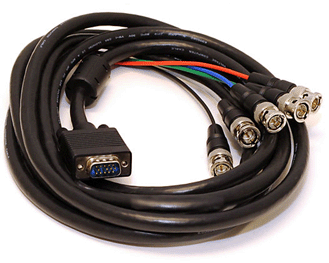
Try bypassing that little box and use a VGA to BNC cable directly from the computer.
_________________
Tech support for nothing
CRT.
HD done right!
|
|
| Back to top |
|
|
dvh99

Joined: 25 Dec 2009
Posts: 2158
Location: nederland
|
| Posted: Mon Aug 02, 2010 4:45 pm Post subject: |
|
|
yes do as anolog suggested and put colourspace on 16-235 when watching movies.
_________________
1 answer always poses multiple questions.
marquee 9500ultra HD10L moome hdmi1.3 v3+ some mods.
|
|
| Back to top |
|
|
atomiccow
Joined: 11 Jul 2009
Posts: 89
|
| Posted: Mon Aug 02, 2010 4:48 pm Post subject: |
|
|
| AnalogRocks wrote: | | Try bypassing that little box and use a VGA to BNC cable directly from the computer. |
That does sound like logical step. Its a very old so its a possibility.
It would certainly be the cheapest repair if it works.
I'll have to go buy one. I just contacted the local rescource and
have to wait for them to get back to me.
In the meantime I am open to other things to try.
Last edited by atomiccow on Mon Aug 02, 2010 5:08 pm; edited 2 times in total
|
|
| Back to top |
|
|
atomiccow
Joined: 11 Jul 2009
Posts: 89
|
| Posted: Mon Aug 02, 2010 4:53 pm Post subject: |
|
|
| dvh99 wrote: | | yes do as anolog suggested and put colourspace on 16-235 when watching movies. |
I've always wondered about adjusting to 16-235 but I don't really have that setting option any place I can find. I am dependent on software like Powerstrip, PowerDVD and ATI CCC but have never see the option anywhere. I get quite a satisfying movie experience as is and haven't detected any obvious crushing before.
|
|
| Back to top |
|
|
dvh99
Joined: 25 Dec 2009
Posts: 2158
Location: nederland
|
| Posted: Tue Aug 03, 2010 12:42 am Post subject: |
|
|
only seen this option in media player classic, i suppose powerdvd automatically selects the correct colourspace.
that box must be your problem.
if you have a moome card or box i would run hdmi out of the videocard.
videocards from a pc put quite a bit of noise in the signal when using vga out, at least thats the case with my videocard ati hd4890.
with dvi-hdmi to the moome there is almost no noise in the picture.
_________________
1 answer always poses multiple questions.
marquee 9500ultra HD10L moome hdmi1.3 v3+ some mods.
|
|
| Back to top |
|
|
atomiccow
Joined: 11 Jul 2009
Posts: 89
|
| Posted: Tue Aug 03, 2010 1:16 am Post subject: |
|
|
Good news sort of. I replaced the powered gray cigarette pack RGBHV adaptor.
I bought a breakout RGBHV cable and the display is no longer too dark.
But its being heavily overdriven instead. Its too bright, washed out with thin white lines along the top of the display.
I've tried a number of settings on the G70 menu and reset what I could find to standard levels. But I can't tame it.
Any ideas?
|
|
| Back to top |
|
|
atomiccow
Joined: 11 Jul 2009
Posts: 89
|
| Posted: Tue Aug 03, 2010 1:23 am Post subject: |
|
|
| dvh99 wrote: | only seen this option in media player classic, i suppose powerdvd automatically selects the correct colourspace.
that box must be your problem.
if you have a moome card or box i would run hdmi out of the videocard.
videocards from a pc put quite a bit of noise in the signal when using vga out, at least thats the case with my videocard ati hd4890.
with dvi-hdmi to the moome there is almost no noise in the picture. |
I don't have a moome. I connect to DVI off my video card which I guess is aproximately the same thing.
I haven't noticed much noise from my card but I am not much of a connoiseur. Moome box is too rich for my blood anyway.
I only paid 800 for the projy plus about 3-400 in some early repairs.
It may not help much but that's still interesting info and suggestions thanks.
As you may have read I replaced the box with a breakout cable but now the picture is overdriven.
So out of the frying pan into the fire.
|
|
| Back to top |
|
|
AnalogRocks
Forum Moderator
Joined: 08 Mar 2006
Posts: 26706
Location: Toronto, Ontario, Canada
TV/Projector: Sony 1252Q, AMPRO 4000G
|
| Posted: Tue Aug 03, 2010 1:37 am Post subject: |
|
|
Define overdriven
_________________
Tech support for nothing
CRT.
HD done right!
|
|
| Back to top |
|
|
dvh99
Joined: 25 Dec 2009
Posts: 2158
Location: nederland
|
| Posted: Tue Aug 03, 2010 1:48 am Post subject: |
|
|
lower the g2 settings and see what happens.
_________________
1 answer always poses multiple questions.
marquee 9500ultra HD10L moome hdmi1.3 v3+ some mods.
|
|
| Back to top |
|
|
atomiccow
Joined: 11 Jul 2009
Posts: 89
|
| Posted: Tue Aug 03, 2010 1:52 am Post subject: |
|
|
| dvh99 wrote: | | lower the g2 settings and see what happens. |
Ive read this term recently. G2. is this Gamma, Gain settings?
|
|
| Back to top |
|
|
Mark_A_W
Joined: 15 Mar 2006
Posts: 3068
Location: Sunny Melbourne Australia
|
| Posted: Tue Aug 03, 2010 5:15 am Post subject: |
|
|
| dvh99 wrote: | | yes do as anolog suggested and put colourspace on 16-235 when watching movies. |
If you are suggesting to expand the 16-235 to 0-255, I wouldn't do it.
Leave the levels unmolested and set the brightness correctly on the projector. If you expand you may (will) get banding.
|
|
| Back to top |
|
|
Mark_A_W
Joined: 15 Mar 2006
Posts: 3068
Location: Sunny Melbourne Australia
|
| Posted: Tue Aug 03, 2010 5:16 am Post subject: |
|
|
| atomiccow wrote: | | dvh99 wrote: | | lower the g2 settings and see what happens. |
Ive read this term recently. G2. is this Gamma, Gain settings? |
If you don't know what G2 is, leave it alone.
Are you running the G70 with AKB/ABL disabled? If so, turn it back on.
And you have set the brightness haven't you?
|
|
| Back to top |
|
|
atomiccow
Joined: 11 Jul 2009
Posts: 89
|
| Posted: Tue Aug 03, 2010 6:23 am Post subject: |
|
|
| Mark_A_W wrote: | | atomiccow wrote: | | dvh99 wrote: | | lower the g2 settings and see what happens. |
Ive read this term recently. G2. is this Gamma, Gain settings? |
If you don't know what G2 is, leave it alone.
Are you running the G70 with AKB/ABL disabled? If so, turn it back on.
And you have set the brightness haven't you? |
Thanks Mark,
I don't really know what G2 is but I have completely taken apart my G70 and put it back together, and retubed my former 1271 and fine tuned that to spec in all the sophisticated ways possible. So I could probably handle adjusting G2. The akb/abl was/is on.
Right now I have it looking good but its completely jerry rigged. Bias and Gain are way off factory settings. Contrast is maxed to restore dynamics and brightness dipped to hide a bad screen crawl. Its in a pretty watchable but undesirable state.
At least I know the problem was in my little adaptor. But I think I am going to need a better solution than this breakout cable
I appreciate the advice on not expanding that black level range deely. My picture is usually great. Reading papers on Gamma X and stuff makes me think my blacks are clogged up and I just don't know it.
|
|
| Back to top |
|
|
|
|




